
Ask ten people what Zoho One is and you will hear "Zoho's version of Microsoft 365", "a cheap CRM bundle" and "everything Zoho makes". None of those is quite right. Zoho One is a licensing and administration layer: one subscription that switches on most of Zoho's business apps for the people you choose, with one sign-in, one admin panel and one invoice. What you then do with those apps is up to you, and that is where most of the work and most of the value sit.
This guide is for owners, finance leads and operations managers in small and mid-sized businesses, mainly in Australia, New Zealand and the United Kingdom, who are weighing Zoho One against buying apps one at a time. It covers how Zoho One works, what is in it and what is not, the two licensing models, the usage limits that matter, local points for each country, and who it suits. Everything was checked on Zoho's own pages on 28 November 2026, and those pages are linked where they are used. We do not quote prices: Zoho shows them on its Zoho One pricing page in your local currency.
The short answer
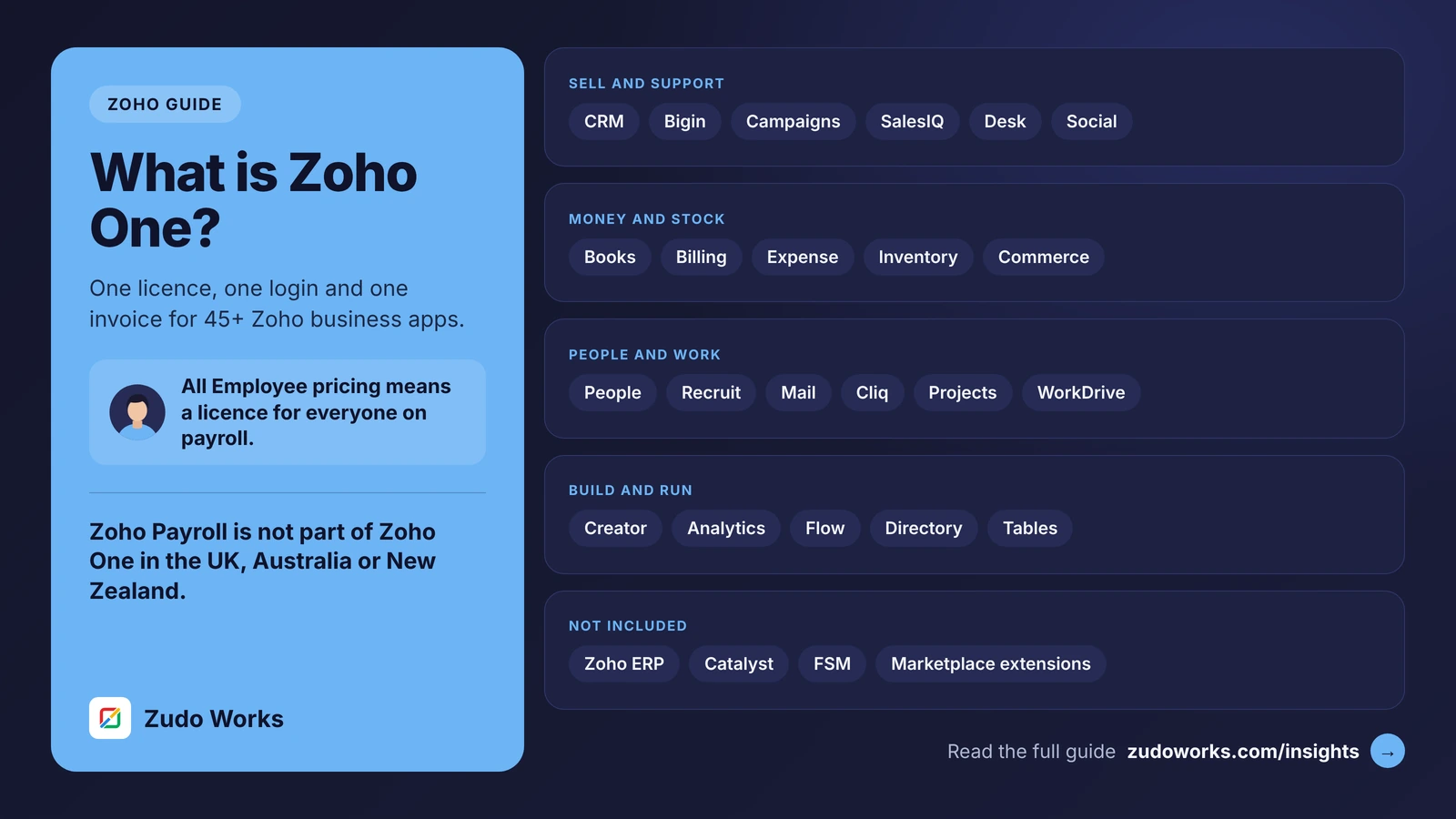
- Zoho One is one subscription for more than 45 Zoho business apps. Zoho's home page says 45+, its pricing page says 50+ for the Standard edition.
- It works through one admin panel, Zoho Directory. An administrator adds users, decides which apps each person gets, and sets sign-in and security rules in one place.
- There are two ways to pay. All Employee Pricing licenses everyone on payroll at a lower rate. Flexible User Pricing licenses only the people you choose, at a higher rate.
- Each app runs at enterprise-level features, with usage limits set per employee or per organisation.
- It is not everything Zoho makes. Zoho ERP, Catalyst, FSM, Shifts and paid Marketplace extensions are among the products outside it.
- In Australia, New Zealand and the UK, payroll is not included. Zoho Payroll is offered in Zoho One only in nine other countries, so plan a separate payroll product.
- It suits a business that will use four or more Zoho apps across several teams. For one or two apps, buying them on their own is usually simpler.
What is Zoho One?
Zoho calls Zoho One "The Operating System for Business". In practice it is a bundle of Zoho's web and mobile apps sold under one licence. The Zoho One FAQ describes three ways to buy Zoho software: individual apps, bundles (CRM Plus for sales and service, Finance Plus for accounting and inventory, Workplace for email and documents), or Zoho One, the all-in-one suite.
The apps inside Zoho One are the same apps Zoho sells separately, not cut-down versions. Zoho says the suite gives "enterprise level" features rather than mapping each app to a particular plan, and that all updates to the included apps are part of the subscription. There are exceptions at the top end: for example, the FAQ says Zoho CRM's Ultimate edition is not included and can be bought as an add-on.
It is also not a single program. Each app keeps its own interface and its own update schedule. What Zoho One adds is the layer around them: a shared user directory, single sign-on, central security settings, cross-app search and dashboards, and one bill.
How Zoho One works day to day
For the administrator
Everything starts in the Admin Panel, which is Zoho Directory. According to the plan details, it handles single sign-on, Active Directory sync, central user management, conditional app assignment, custom user fields, usage reports and domain management. An administrator adds a person once, puts them in a department or group, and assigns only the apps that person needs. A warehouse picker might get Inventory and Cliq. A salesperson might get CRM, Mail, SalesIQ and Bookings.
Zoho has added a fair amount here in the last year. Its what's new page lists, from November 2025, audit logs of identity and access changes, anomaly detection, smart groups that add and remove users by rule, routing policies for sign-in, bring-your-own-key encryption, and a delete-users step for offboarding. Directory can also provide sign-on and user provisioning for some non-Zoho services; the update log names Microsoft and GitHub among them. The FAQ is clear, though, that third-party apps themselves cannot be administered from the Zoho One Admin Panel.
For the people using it
Users sign in once at Zoho One and see the apps assigned to them. The address depends on where the account is held: one.zoho.com, one.zoho.eu, one.zoho.uk or one.zoho.com.au. Since November 2025 the home screen uses Spaces, which groups apps by business function, along with QuickNav to search and jump between apps and modules, and Dashboards that pull figures from several apps into one view. Mobile apps for Android and iOS are included.
Between the apps
Many Zoho apps are pre-connected: a deal in CRM can raise an invoice in Books, a ticket in Desk can show the customer's CRM record. Zoho's own FAQ is honest that not every pairing is on by default and a few apps are not integrated yet. For anything the built-in links do not cover, Zoho One includes Zoho Flow and Deluge for automation, and Zoho Creator for custom apps.
What apps are included in Zoho One?
The plan details page groups the Standard edition by department. This is a condensed view, taken from that page on 28 November 2026. Some apps appear only in certain countries.
| Business area | Main apps in Zoho One |
|---|---|
| Sales | CRM, Bigin, Sites, Bookings |
| Marketing | Campaigns, Marketing Automation, SalesIQ, Social, Forms, Survey, PageSense, Backstage, LandingPage, Thrive, Publish |
| Customer service | Desk, Assist, Lens |
| Finance | Books, Invoice, Billing, Expense, Inventory, Checkout, Commerce, Payroll (selected countries only) |
| HR | People, Recruit |
| Work and collaboration | Mail, Cliq, Meeting, Projects, Sprints, WorkDrive, Connect, TeamInbox, Learn, Notebook, Sign, Vault, Vani, Tables |
| Legal | Contracts |
| Build, data and automation | Creator, Analytics, DataPrep, Flow, RPA |
| Security and IT | Directory, device management, Log360 Cloud |
| Customer experience | CommandCenter, TouchPoint, Apptics |
Zia, Zoho's AI assistant, runs across these apps. Our guide to Zoho AI explains what Zia and the newer agent features do and where they sit.
What Zoho One does not include
This catches people out more than anything else. The Zoho One FAQ gives a partial list of what is not included:
- Zoho ERP, which is a separate product. Manufacturers often assume it is part of the suite. It is not. Our guide to Zoho for manufacturing covers what that means for a factory.
- Zoho Catalyst (the developer platform), Zoho FSM (field service), Zoho Shifts, RouteIQ, Zoho CPaaS, Zoho Classes, Zoho Workerly and CommunitySpaces.
- Apps from Zoho's other brands: ManageEngine, Site24x7, Qntrl and TrainerCentral.
- Paid extensions from Zoho Marketplace. They work with Zoho One apps but are bought and invoiced separately.
- Domain registration.
- Agency editions of apps such as Social and Recruit.
Zoho also says it plans to add more apps but does not promise that every future app will join the suite, and it advises buying on what is there today. We agree. Check the specific app you need against the plan details page before you sign.
All Employee vs Flexible User pricing
Zoho One is sold per person, monthly or annually, with the best rate on annual. The pricing FAQ sets out two models for the Standard edition:
| Question | All Employee Pricing | Flexible User Pricing |
|---|---|---|
| Who must be licensed | Every employee on payroll | Only the users you choose |
| Rate per person | Lower. The headline annual rate is for the first year; Zoho says annual renewals from the second year are billed at a different rate | Higher per user |
| Minimum users | None, a one-person business can use it | None |
| If not everyone is licensed | Zoho asks you to buy the rest or switch to Flexible User, and can take further action under the licence agreement | Not an issue |
| Mix with separate Zoho apps | No, everyone is already on Zoho One | Yes, other users can have individual Zoho apps |
| Suits | Most staff use at least one Zoho app | Franchises, single divisions, or only some staff need Zoho |
A few other points from the same FAQ are worth knowing before you talk to anyone:
- There are no long-term contracts, and licences can be added or removed during the term.
- The price is the same whether you buy from Zoho directly or through a local consultant.
- Zoho does not offer non-profit or education discounts on Zoho One.
- You pay in the currency of the country where the account was created. A business with staff in Australia and New Zealand cannot split the bill into two currencies.
- For employees who never use a computer or phone, such as some factory or field staff, Zoho asks you to contact its sales team about the licensing approach. Get the answer in writing before you choose All Employee Pricing.
- If you already pay for several Zoho apps, start a Zoho One trial, add the apps you use, then upgrade, and Zoho prorates the change onto one billing date.
Other editions
In some regions Zoho also sells Zoho One Essentials, a smaller edition of 15 or more apps for businesses starting out. The app list for Essentials differs by region, so check the pricing page from your own country. Zoho has also launched a Zoho One Free Plan for up to three users, but on 28 November 2026 it was available only in Latin America (excluding Brazil). Everyone can start with the 30-day free trial, which needs no card.
Usage limits that matter
Because Zoho One is priced per person, many app limits scale with the number of licences. These are the limits Zoho lists in its FAQ. They rarely bite a small business, but they matter if you plan heavy automation or a large customer database with few staff.
| App | Limit in Zoho One |
|---|---|
| Zoho CRM | Storage of 1 GB per organisation plus 1 GB per employee |
| Zoho Creator | 250,000 records and 5 GB storage per employee; 500 emails, 500 external calls and 1,000 developer API calls per employee per day |
| Zoho Flow | 50 flows per organisation; 3,000 tasks per organisation per month plus 1,000 per employee |
| Zoho Analytics | 5 million rows per organisation and 100,000 per employee |
| Zoho Campaigns | 5,000 contacts per employee |
| Zoho SalesIQ | 5,000 tracked visitors a month per employee, or 200,000, whichever is lower |
| Zoho Forms | 200,000 submissions a month |
| Zoho Social | One brand |
Two examples of how this plays out. A 12-person business with 80,000 marketing contacts would sit above the Campaigns allowance of 60,000. A business that runs a lot of integrations through Zoho Flow can reach 50 flows sooner than expected. Zoho asks customers in those positions to contact support. If you are building a custom app on Creator, our Zoho Creator pricing guide compares these figures with the standalone plans, and our Quickbase vs Zoho Creator comparison shows how another platform charges for the same kind of app.
Notes for Australia, New Zealand and the UK
- Payroll is not included. The FAQ lists Zoho Payroll in Zoho One only for India, Canada, Bahrain, Oman, Qatar, Kuwait, Saudi Arabia, the UAE and the USA, and Zoho added the Canada and Gulf editions in March 2026. Businesses in Australia, New Zealand and the UK need a separate payroll product, connected to Zoho People and Zoho Books.
- Where your data is held. Zoho's data centre page lists Sydney and Melbourne for Australia and London and Manchester for the UK, and says the data centre is chosen from the country you select at sign-up. Pick the country carefully when you start a trial; moving later is not a settings change.
- Accounting. Zoho Books is included, and Zoho's Australian and UK Books pages describe GST and VAT (including Making Tax Digital) support respectively. Many businesses here already run Xero, and Zoho One does not force a change. Our Zoho Books vs Xero comparison covers that choice.
- Email. Zoho Mail in Zoho One and a standalone Zoho Mail account cannot share the same domain. If you keep Microsoft 365 or Google for email, read our Zoho One vs Microsoft 365 guide on running both.
- Help. Zoho supports the product, but its FAQ says Zoho itself does not offer implementation services. That is done by consultants. Our guide on choosing a Zoho consultant in Australia and New Zealand covers local versus remote help.
Who Zoho One suits, and who it does not
A good fit
- You will use four or more Zoho apps across at least two teams, for example CRM, Books, Desk and Projects.
- Most of your staff will log in to at least one app, so All Employee Pricing is not paying for idle seats.
- You want one place to add and remove staff, enforce sign-in rules and see who uses what.
- Your processes cross departments: a sale becomes an invoice, a job, a support ticket.
- You expect to need a custom app or automation later, and want Creator and Flow already licensed.
- You are replacing several separate tools and want one bill and one vendor relationship.
Probably not the right buy
- You need one or two apps, such as CRM alone. Buy that app, or a bundle like CRM Plus.
- Only a few people in a large workforce need Zoho, and Flexible User Pricing works out dearer than separate apps.
- You are committed to another platform for your core system, such as an established ERP, and want Zoho only at the edges.
- The app you need most is on the not-included list, such as Zoho ERP or FSM.
Manufacturers are a special case. Zoho One covers sales, finance, inventory and the back office well, but it has no shop floor module: no routings, work orders or job costing. Some manufacturers build that on Zoho Creator, others add a dedicated system. Our own ZMOS is built for shops of 10 to 50 people, and our Zoho or manufacturing ERP guide sets out the options.
How to start without wasting the trial
- List the processes, not the apps. Write down the five things that cause the most re-keying or chasing today. Map each to the Zoho apps involved.
- Choose the sign-up country deliberately, because it sets the data centre and the billing currency.
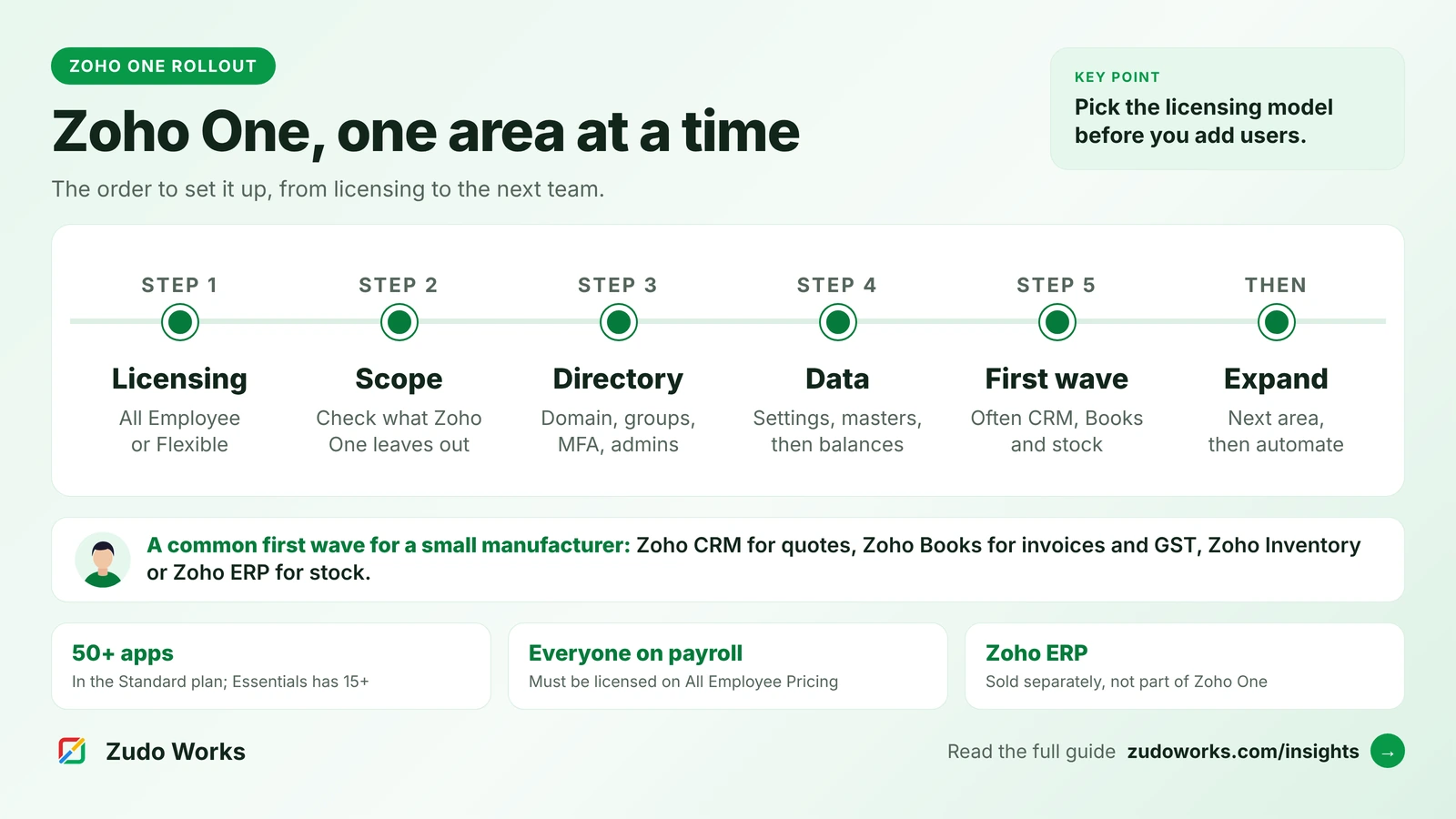
- Decide the licensing model early. Count everyone on payroll, including part-time and floor staff, and ask Zoho in writing about anyone who never uses a device.
- Enable apps in phases. Zoho's own advice is not to deploy everything at once. Start with the two or three apps behind your biggest problem.
- Set up Directory first: domain, departments, groups and sign-in rules, before anyone starts entering data.
- Test one process end to end during the 30 days, for example enquiry to quote to invoice, with real people.
Our Zoho One implementation checklist goes step by step through the rollout, and our Zoho CRM implementation cost guide covers what outside help tends to involve.
What to take from this
Zoho One is one licence for most of Zoho's business apps, held together by Zoho Directory, single sign-on and one invoice. It is good value when several teams will use several apps, and poor value when you need only one or two. Before you buy, check three things: that the apps you need most are included, which licensing model fits your headcount, and, in Australia, New Zealand or the UK, how you will handle payroll. We build on Zoho, connecting and extending these apps for businesses that have outgrown the standard setup; see our Zoho development and Zoho integrations services.
Frequently asked questions
Frequently asked questions
What is Zoho One and how does it work?
Zoho One is a single subscription for more than 45 Zoho business apps, such as CRM, Books, Desk, People, Inventory, Mail, Projects, Creator and Analytics. An administrator adds users in one admin panel, Zoho Directory, and assigns the apps each person needs. Users sign in once, and the business pays one invoice for everything.
What apps are included in Zoho One?
The Standard edition includes CRM, Bigin, Campaigns, SalesIQ, Social, Forms, Desk, Books, Billing, Expense, Inventory, Commerce, People, Recruit, Mail, Cliq, Projects, WorkDrive, Sign, Creator, Analytics, Flow, Tables and Directory, among others. Zoho's plan details page has the full list. Zoho ERP, Catalyst, FSM and paid Marketplace extensions are not included.
Do I have to buy Zoho One for every employee?
Only on All Employee Pricing, which needs a licence for everyone on payroll in return for a lower rate. Flexible User Pricing lets you license only the people you choose, at a higher rate per user. There is no minimum number of users on either model.
Is Zoho Payroll included in Zoho One in Australia or the UK?
No. Zoho lists Zoho Payroll in Zoho One only for India, Canada, Bahrain, Oman, Qatar, Kuwait, Saudi Arabia, the UAE and the USA. Businesses in Australia, New Zealand and the UK need a separate payroll product connected to Zoho.
Is Zoho One worth it for a small business?
Usually yes if several teams will use four or more Zoho apps and most staff will log in to at least one. If you need only one or two apps, such as CRM on its own, buying those apps or a smaller bundle like CRM Plus is normally simpler.
Is there a free version of Zoho One?
Everyone can try Zoho One free for 30 days without a card. Zoho has also launched a Free Plan for up to three users, but on 28 November 2026 it was available only in Latin America, excluding Brazil.