In short
Run quality as three linked records. An inspection is a planned check. A failed check raises a nonconformance report, which holds the stock and needs a disposition: rework, scrap, use as is or return. An NCR that could recur raises a corrective action with an owner, a due date and a later check that it worked. Track first-pass yield and time to close.
Walk into the quality office of most small factories and you will find a filing cabinet of nonconformance forms. Each was filled in carefully. Almost none can answer the question that matters: is this the fourth time this has happened?
Moving quality records out of the cabinet is one of the most contained and most useful first projects. It touches few people, needs little integration and changes what managers can see within weeks.
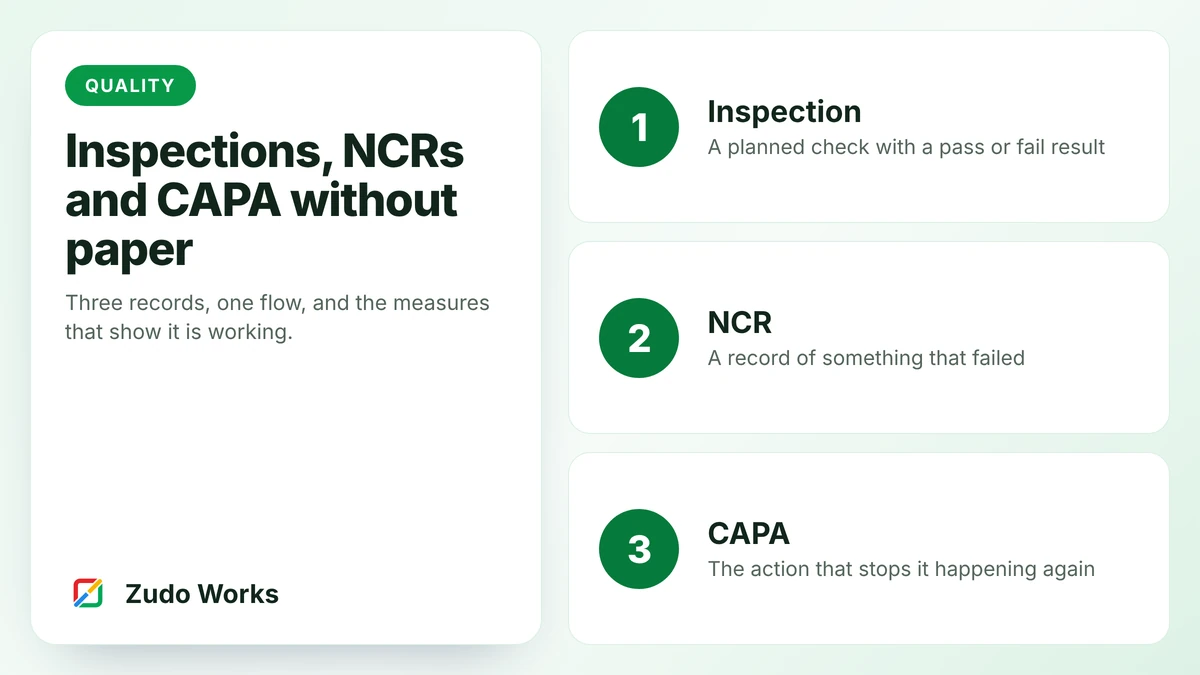
Three records, and how they connect
- Inspection. A planned check against a specification: incoming goods, in-process, or final. The result is pass or fail, with measurements where they matter.
- Nonconformance report (NCR). Raised when something fails, whether an inspection found it or a customer did. It describes the problem and records what was done with the affected product.
- Corrective and preventive action (CAPA). Raised when the cause needs removing, not just the product fixing. It has an owner, a due date and a check that it worked.
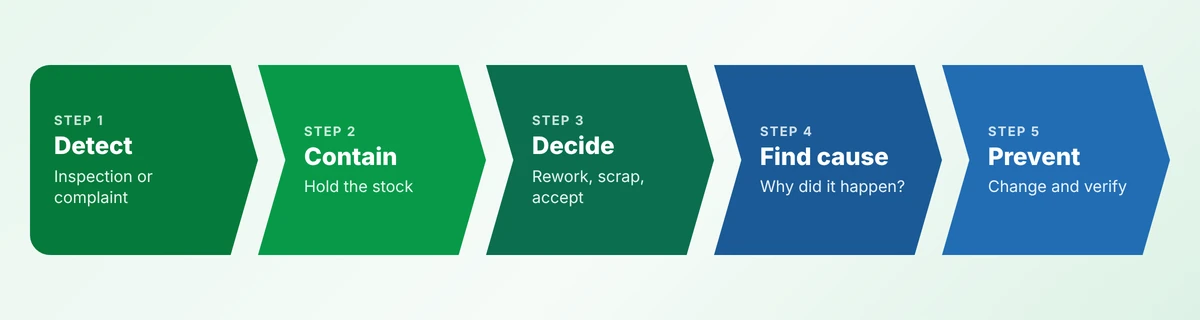
The first three stages deal with the product. The last two deal with the process. A filing cabinet handles the first three. The value is in the last two.
Inspections: check less, record better
Start by listing where checks already happen. There are usually more than anyone realises, most of them unrecorded. For each, decide:
- What is checked, against which specification or drawing revision.
- How many. Every unit, first-off and last-off, or a sample per batch.
- What is recorded. A tick for visual checks; the actual measurement for critical dimensions.
- What a fail does. It should raise an NCR and hold the stock automatically.
Recording the measurement, not just pass or fail, is what lets you see a process drifting before it produces rejects.
The NCR: contain first, then decide
An NCR has two jobs in its first hour. It tells people there is a problem, and it stops the affected product moving. On paper the second job depends on someone walking to the store with a red tag. In a system, raising the NCR changes the stock status.
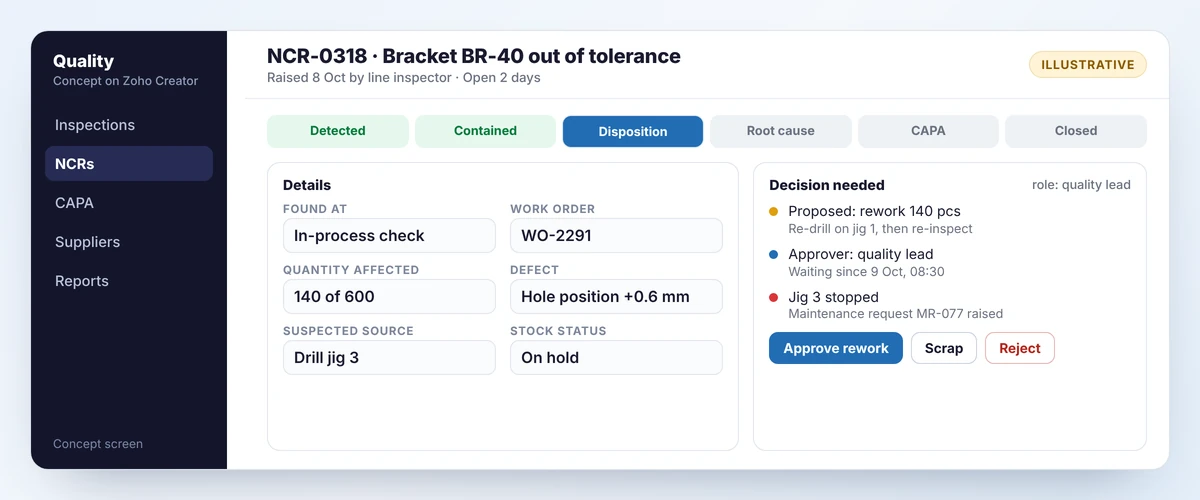
Fields worth having, and no more:
- where it was found, and by whom;
- the work order, batch or supplier delivery it relates to;
- quantity affected, and quantity checked;
- the defect, chosen from a list, with a photo;
- the suspected source, also from a list.
Then comes the disposition: what happens to the product.
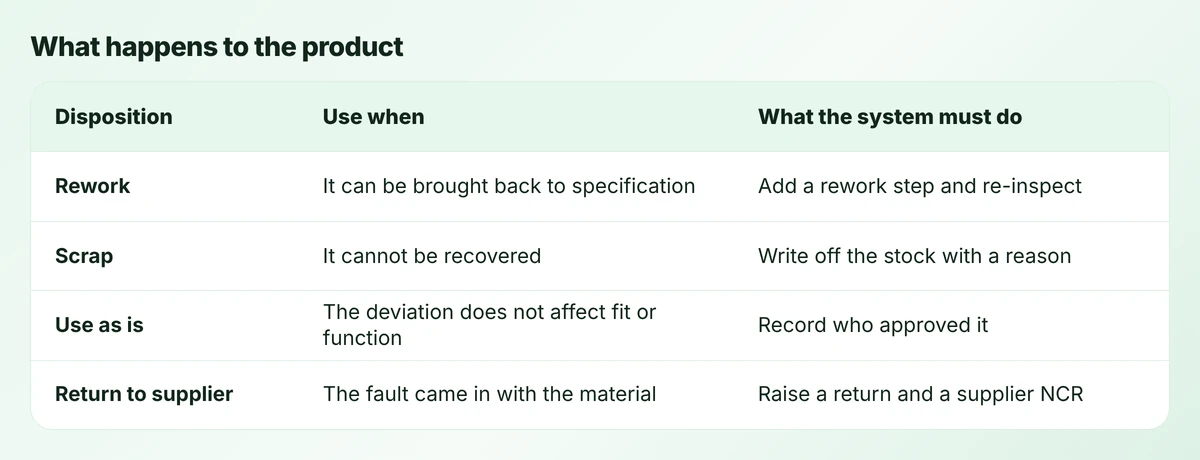
“Use as is” deserves care. It is a legitimate decision, and it must be made by a named person with the authority to make it, sometimes with the customer’s agreement. An approval step with a role attached handles that.
CAPA: the part that pays
Not every NCR needs a corrective action. A one-off handling knock does not. A third NCR against the same jig does. Set a rule you can apply without debate, such as: any NCR above a set cost, any customer complaint, and any cause that appears three times in a quarter.
A corrective action needs four things:
- A root cause, reached by asking why until the answer is something you can change. “Operator error” is rarely a root cause. Why was the error possible?
- An action that removes the cause: a fixture, a changed drawing, a supplier specification, a check added earlier.
- An owner and a date.
- An effectiveness check, scheduled for some weeks later. Did the problem come back?
The check most systems skip
Schedule the effectiveness check when the action is created, not when it is completed. A corrective action is closed when it has been shown to work, not when the task was ticked off.
What to measure
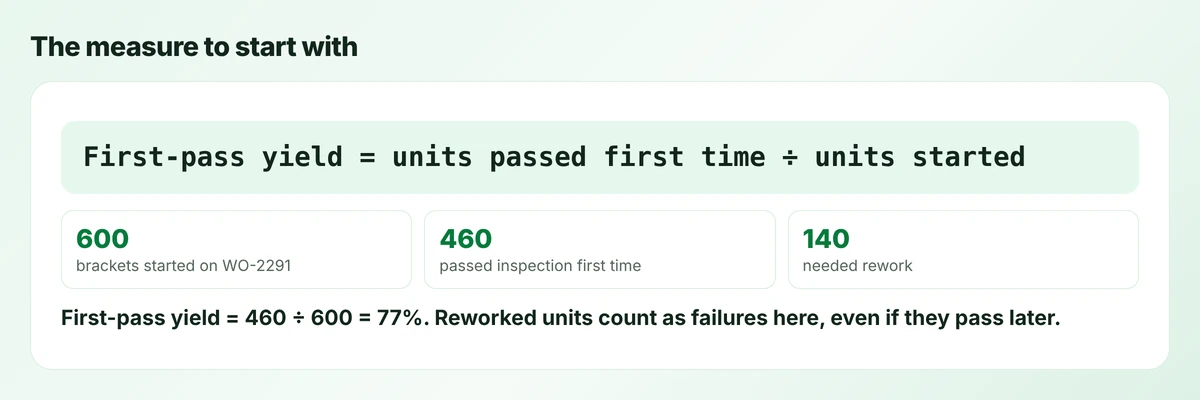
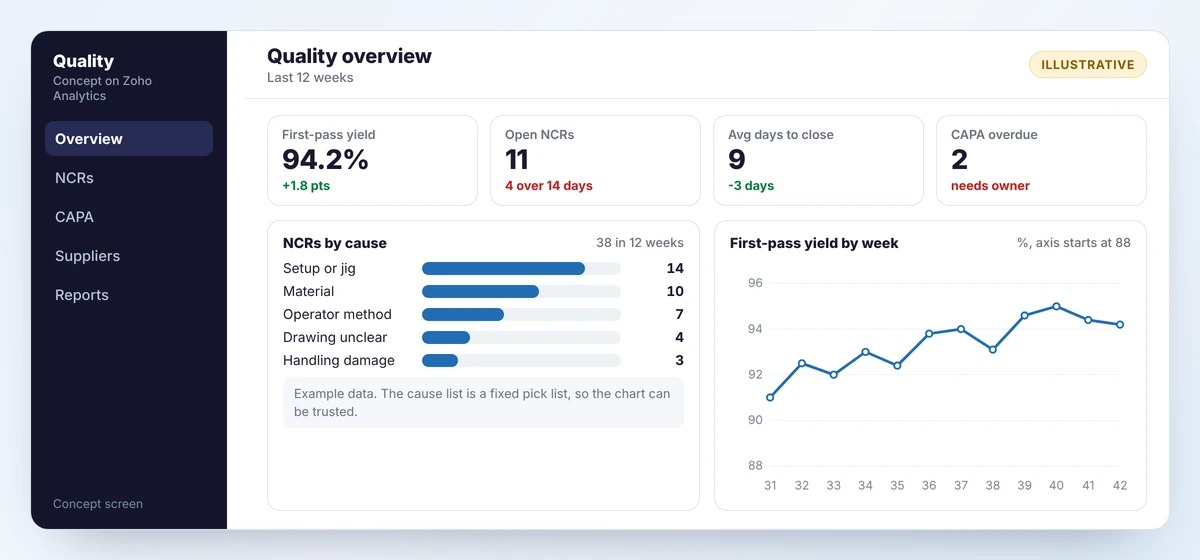
Begin with one number, first-pass yield, and add others when it has become routine.
- NCRs by cause. Shows where to spend effort. Only meaningful if the cause comes from a fixed list.
- Days to close. Long-open NCRs usually mean held stock nobody has decided about.
- Supplier NCRs. Rejections per supplier, against deliveries received.
- Overdue corrective actions. The plainest sign of whether the system is alive.
More on choosing measures is in our guide to manufacturing dashboards and KPIs.
A worked example: one NCR, start to finish
Follow NCR-0318 from the screen above. The business is an example, a small metal fabricator making brackets.
- Detect. An in-process check finds hole positions 0.6 mm out on brackets from work order WO-2291. The inspector raises the NCR on a tablet and attaches a photo of the gauge.
- Contain. The system marks 140 brackets as on hold. The inspector checks the other 460 made that shift, which pass. Drill jig 3 is stopped and a maintenance request is raised.
- Decide. The quality lead approves rework: re-drill on jig 1 and inspect every piece. A rework step is added to the work order, so the planner sees the delay.
- Find the cause. Asking why three times gets there. The holes were out because the jig bush was worn. The bush was worn because it had no replacement interval. It had no interval because jigs were never on the maintenance schedule.
- Prevent. The corrective action adds all drill jigs to planned maintenance, with a bush check every month. An effectiveness check is booked for six weeks later: any hole-position NCRs since?
On paper, this NCR would have ended at step three with “reworked, OK”, and jig 4 would have produced the same fault in the spring.
Building it
This is a natural fit for a low-code platform. On Zoho Creator the three records are three forms linked to each other. Its approvals and Blueprint features enforce who can disposition and who can close. The mobile apps let an inspector raise an NCR with a photo from the line, and role-based access and audit trails cover who changed what.
Two connections make it much more useful:
- To stock, so that raising an NCR holds the affected quantity and scrapping it writes it off.
- To production, so that a rework disposition adds a rework step to the work order. Our production tracking guide covers that side.
If you run Zoho ERP in India, it includes quality templates, rules and inspections of its own. Elsewhere, and for NCR and CAPA in particular, a custom app is the usual route. If you hold or want a quality certification, these records are what an auditor will ask to see, so agree the fields with whoever manages your certification.
Mistakes to avoid
- Free-text causes. You cannot count them. Use a list, with “other” reviewed monthly.
- Raising a CAPA for everything. The list becomes unmanageable and people stop believing in it.
- Blaming the operator. It ends the investigation one step early.
- A form with 40 fields. The inspector on the line will not fill it in.
- No link to stock. The NCR says “on hold” while the product ships.
Getting started
- Pull the last three months of paper NCRs and sort them by cause. That exercise alone usually finds a repeat problem.
- Agree the defect list, the cause list and the four dispositions.
- Build the NCR first. Add inspections and CAPA once it is in daily use.
- Review open NCRs and overdue actions in a fixed weekly slot.
Frequently asked questions
An NCR records a specific failure and what was done with the affected product. A CAPA addresses the cause so the failure does not recur. Every CAPA starts from one or more NCRs, but most NCRs do not need a CAPA.
No. Set a rule, for example any customer complaint, any NCR above a cost threshold, and any cause that repeats. Raising a corrective action for everything overloads the system.
Yes. Inspections, NCRs and corrective actions are linked forms with approvals, photos from the mobile app, role-based access and an audit trail. Linking it to your stock system makes holds and scrap automatic.
Divide the units that passed inspection the first time by the units started. Units that passed after rework count as failures for this measure.
Sources
Product capabilities change. We checked these pages in October 2026; confirm anything you plan around.
Related services: Zoho Creator development · Business process automation · Manufacturing workflows