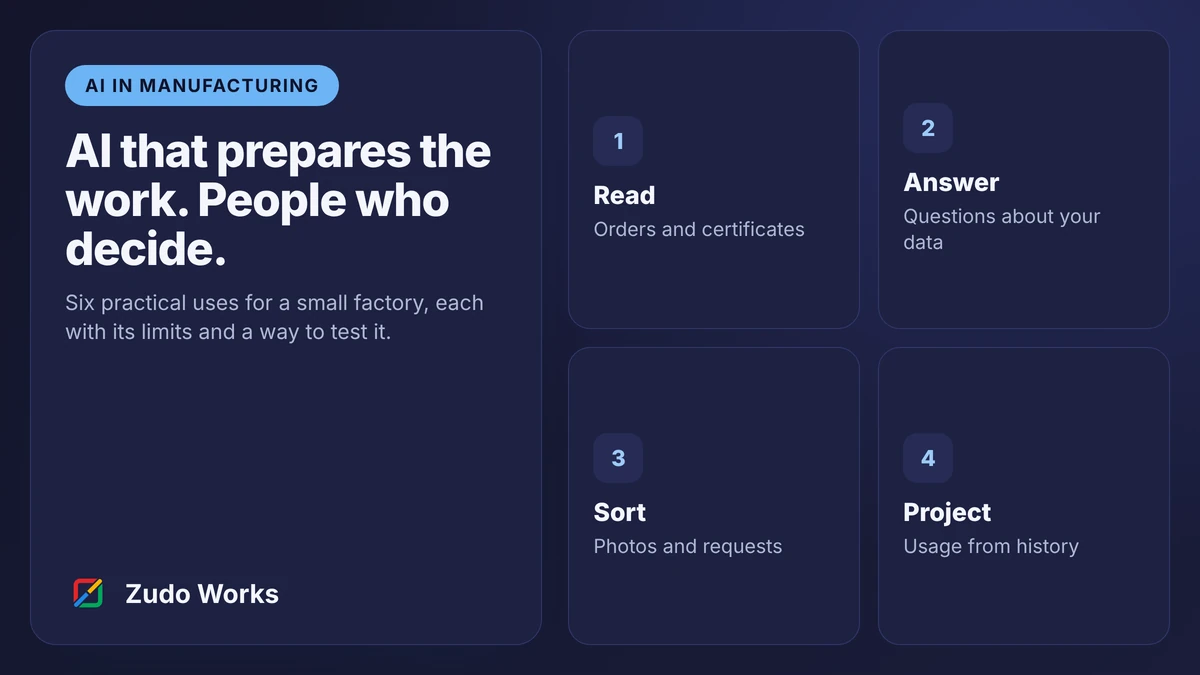
AI that prepares the work, with people who decide

Reading purchase orders, checking supplier documents, answering questions about your own data. Useful, narrow and testable. We design every AI workflow with a review step, and we start with a proof of concept that is allowed to fail.

Pattern
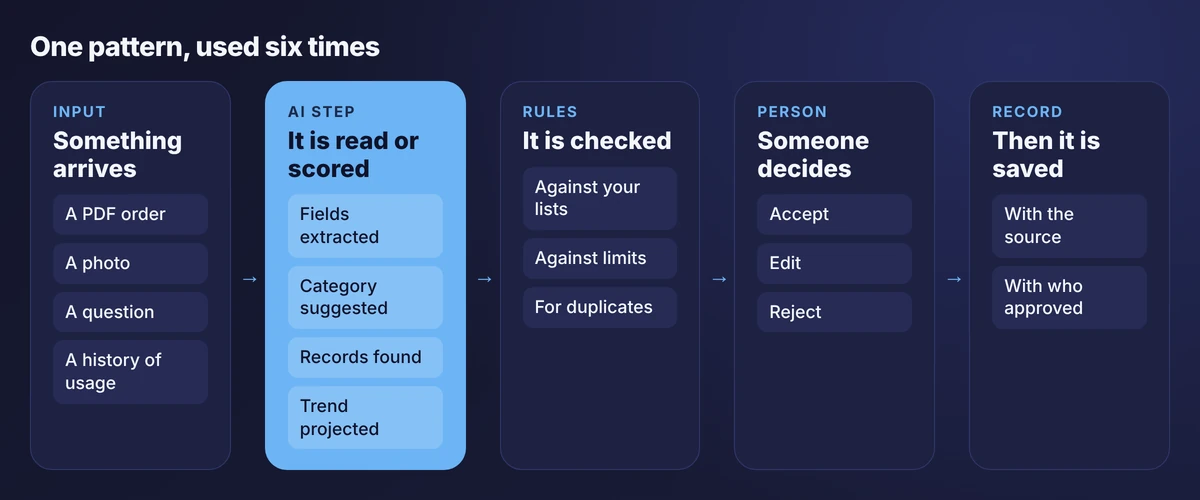
AI prepares, rules check, a person decides
First step
A five-week proof of concept
AI can change
Nothing without confirmation
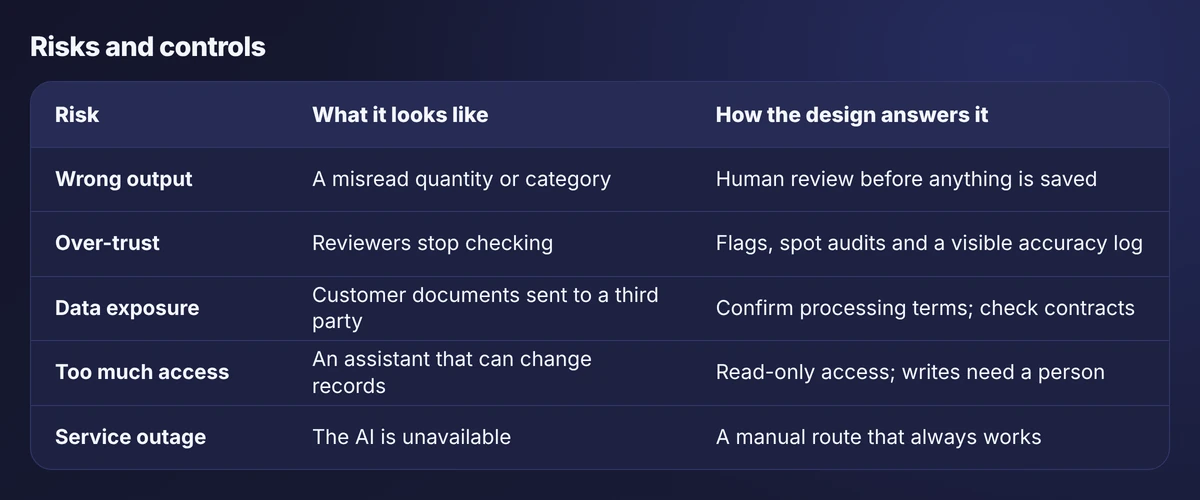
Cover: four things AI does in a small factory

Where AI helps a factory, and where it does not

AI is good at reading, sorting, searching and projecting. It is poor at judgement, and it cannot tell which of its own answers are wrong. That makes it a useful assistant and a bad decision-maker.

Every use case below is designed the same way: the AI prepares something, rules check it, and a named person decides. We do not build systems that place orders, release product or change schedules by themselves.

This page describes what we would build and how we would test it. It does not claim results. A proof of concept on your own documents is the only honest source of numbers.

  • Document extraction
  • Prediction
  • Language models
  • Image classification
  • Human review
  • Read-only access
  • Accuracy logs

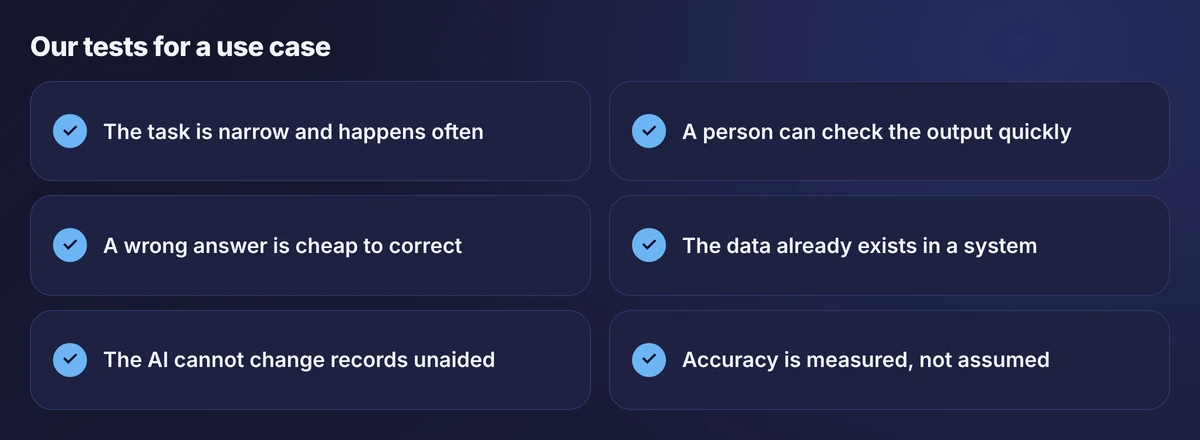
Six tests for a use case

Six conditions for a good AI use case: narrow, checkable, cheap to correct, data exists, no unaided changes and measured accuracy
Six tests we apply before recommending an AI use case. Failing two is usually enough to say no.
Five-column pattern for AI workflows: input, AI step, rules, person and record
The same five-part pattern sits behind every use case on this page.

Our guide to AI for small manufacturers explains the reasoning, including a risk and readiness grid for placing your own ideas.

Six use cases, each with its limits

Each card covers the same eight points, so you can compare them: the problem, how it works, the data needed, where Zoho or custom software fits, benefits, limitations, oversight and a small test.

Reading customer purchase orders

Document extraction
The problem
Customers send orders as PDFs in their own layouts, and someone retypes each one. It takes hours and produces occasional keying errors.
How it works
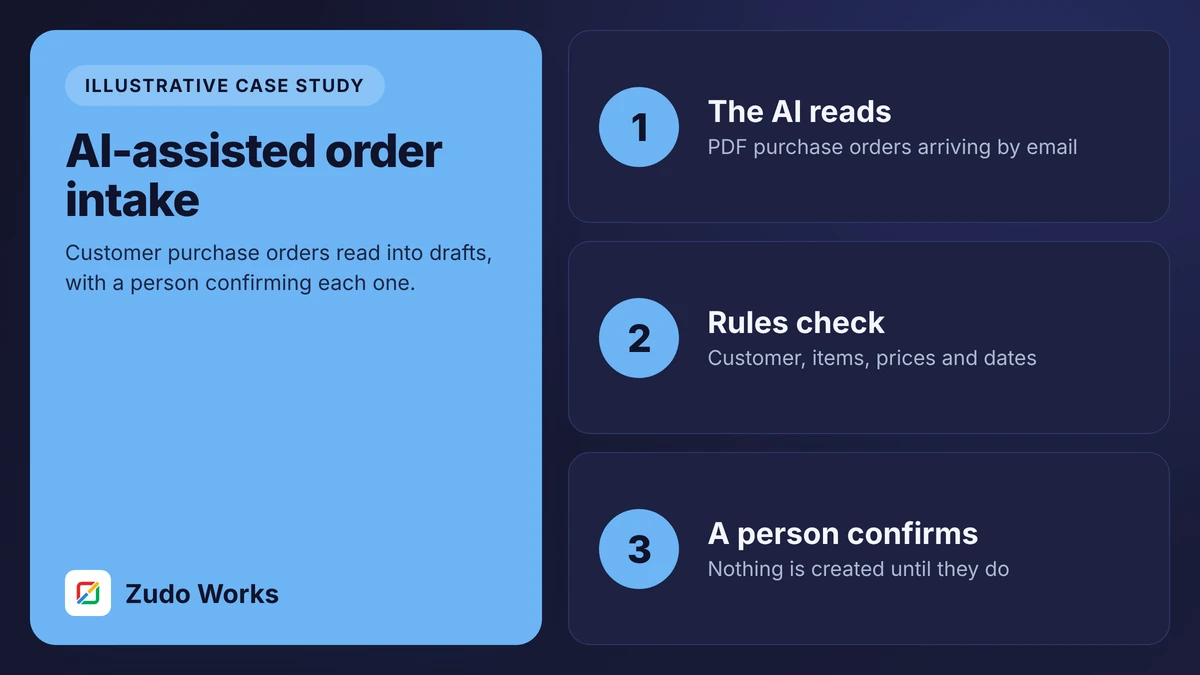
A document model reads each PDF and fills in a draft sales order. Fixed rules check customer, items, prices, dates and duplicates. A person reviews the draft beside the original and confirms.
Data and integrations
Needs your customer list, item list with any customer part numbers, price lists and standard lead times. Reads from the orders inbox; writes to the order system only after confirmation.
Where Zoho or custom software fits
The review app is built on Zoho Creator, which includes OCR and custom models in its AI Modeler. An outside model can be connected where it reads your documents better.
Expected benefits
Less typing, same-day order entry, and price and date checks on every order instead of when time allows.
Limitations
Accuracy depends on document quality. Handwritten or photographed orders read poorly. New layouts need closer checking at first.
Security and human oversight
The extraction service can read a document and nothing else. No order is created without a named person confirming. Every correction is logged.
A small proof of concept
Take 100 past orders with the entries that were actually made. Measure field-level accuracy against a pass mark agreed in advance.

Read the reference implementation →

Reading supplier documents at goods in

Document extraction
The problem
Delivery notes and certificates carry lot numbers, dates and test values. Typing a 14-character lot number at a cold loading dock invites mistakes that break traceability.
How it works
Stores photograph or scan the document. Lot number, quantity, dates and listed test values are extracted into the receipt, and the receiver confirms them against the label.
Data and integrations
Needs open purchase orders and the item list. Writes a goods receipt and lot record to the stock system after confirmation, with the document attached.
Where Zoho or custom software fits
A Creator form on a phone or tablet captures the image and shows the extracted fields. Zoho Inventory holds the lot, quantity and expiry date.
Expected benefits
Faster receiving, fewer mistyped lot numbers and certificates stored with the lot they belong to.
Limitations
Supplier layouts vary widely. Poor photographs and multi-lot delivery notes need manual correction. It reads what is printed; it cannot verify that the goods match.
Security and human oversight
The receiver confirms every lot against the physical label. Typed overrides are flagged for a second check.
A small proof of concept
Collect 50 delivery notes and certificates from your five main suppliers and measure how often lot number and date are read correctly.

Read the traceability guide →

Answering questions about operations

Language model with data access
The problem
Simple questions, such as which jobs are at risk or whether there is enough material for next week, require someone to open three systems and a spreadsheet.
How it works
A language model is given read-only access to defined records. It turns a question into queries, totals the results and answers in a sentence, naming the records it used.
Data and integrations
Needs reliable work orders, holds, stock and purchase orders. If job status is not recorded as it happens, the answers will be wrong with great confidence.
Where Zoho or custom software fits
Zoho publishes an MCP server that lets an assistant read Zoho data with permission, and Zoho Analytics includes a plain-language assistant. A custom layer limits which records are exposed.
Expected benefits
Quicker answers for sales and managers, and fewer interruptions for the planner.
Limitations
It answers from data, so it inherits every error in the data. It can misread an ambiguous question. It is no use for anything not recorded.
Security and human oversight
Read-only access, scoped to named modules. Every answer cites its source. No ability to create or change records.
A small proof of concept
List the twenty questions asked most often. Test each against known answers and count how many are right.

Read about connecting an assistant to Zoho →

Sorting defect photos

Image classification
The problem
Inspectors describe defects in their own words, so the same fault is recorded five ways and cause analysis becomes guesswork.
How it works
When an inspector photographs a defect, a classifier suggests a category from your fixed list. The inspector accepts or corrects it and makes the pass or fail decision.
Data and integrations
Needs a few hundred labelled photos per category, taken in consistent lighting. Writes the category to the nonconformance record.
Where Zoho or custom software fits
Creator’s AI Modeler supports object detection and custom models. The NCR workflow around it is a standard Creator app.
Expected benefits
More consistent categories, faster recording and cause charts that can be trusted.
Limitations
Sensitive to lighting, angle and camera. Rare defects have too few examples. It is not suitable as the sole judge of acceptance.
Security and human oversight
The model suggests; the inspector decides. Low-confidence suggestions are marked. Corrections are tracked by category.
A small proof of concept
Label 300 existing photos across four common defect types, hold back a quarter and measure how often the suggestion matches the inspector.

Read the quality workflow guide →

Projecting material usage

Prediction
The problem
Reorder points are set once and never revisited, so they drift away from real usage and cause stock-outs or excess.
How it works
A model projects usage per item from history. Where the projection suggests a different reorder point, the buyer is shown the suggestion with the reason.
Data and integrations
Needs at least a year of reliable issue transactions per item. Reads stock movements; proposes changes to reorder points.
Where Zoho or custom software fits
Zoho Analytics includes forecasting over your stock data. Zoho Inventory holds the reorder points. A small report presents suggestions to the buyer.
Expected benefits
Reorder points that follow real usage, and a regular prompt to review them.
Limitations
Useless for new items and job-specific materials. It knows nothing about an order you are about to win or a product you are about to drop.
Security and human oversight
Suggestions only. The buyer accepts or declines each change, and purchase orders are never sent automatically.
A small proof of concept
Pick 30 steady items, project the last quarter from the year before it and compare with what was actually used.

Read the purchasing guide →

Triage of maintenance and support requests

Language model
The problem
Operators report machine problems in free text. Someone has to read each, work out the machine, the urgency and who should deal with it.
How it works
A language model reads the request and proposes the machine, a category and a priority, and drafts a summary. The maintenance lead confirms before the job is assigned.
Data and integrations
Needs the machine list, categories and priority rules. Writes to a maintenance request app after confirmation.
Where Zoho or custom software fits
A Creator app holds requests, assignments and history. The model is called from a workflow; Zoho’s agent tools allow connecting your own account with a model provider.
Expected benefits
Faster routing, more consistent priorities and a searchable history per machine.
Limitations
It can misjudge urgency from a short message. It does not replace a safety procedure: anything safety-related follows your existing rules first.
Security and human oversight
A person confirms priority and assignment. Requests containing safety keywords bypass the model and go straight to a named person.
A small proof of concept
Run the last 200 requests through the model and compare its category and priority with what the maintenance lead chose.

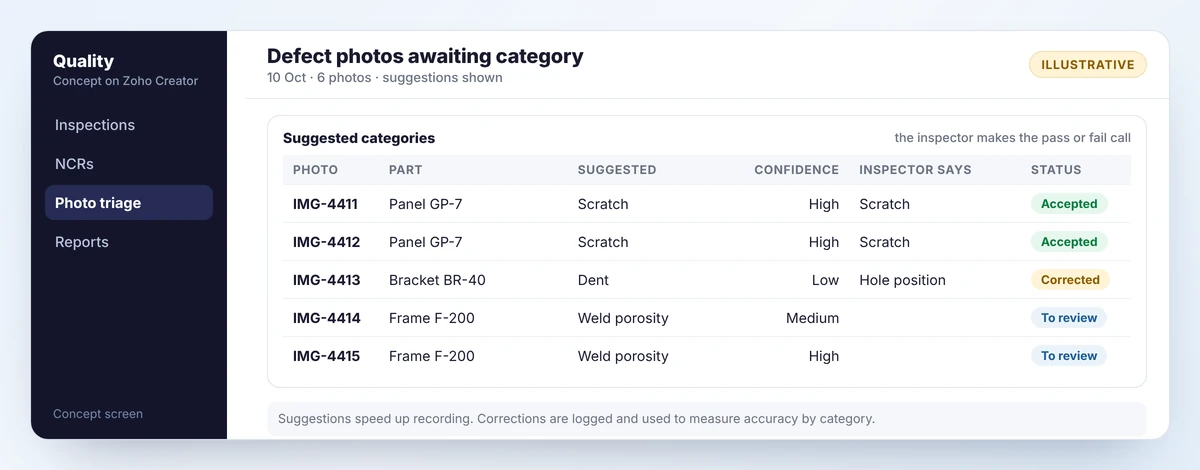
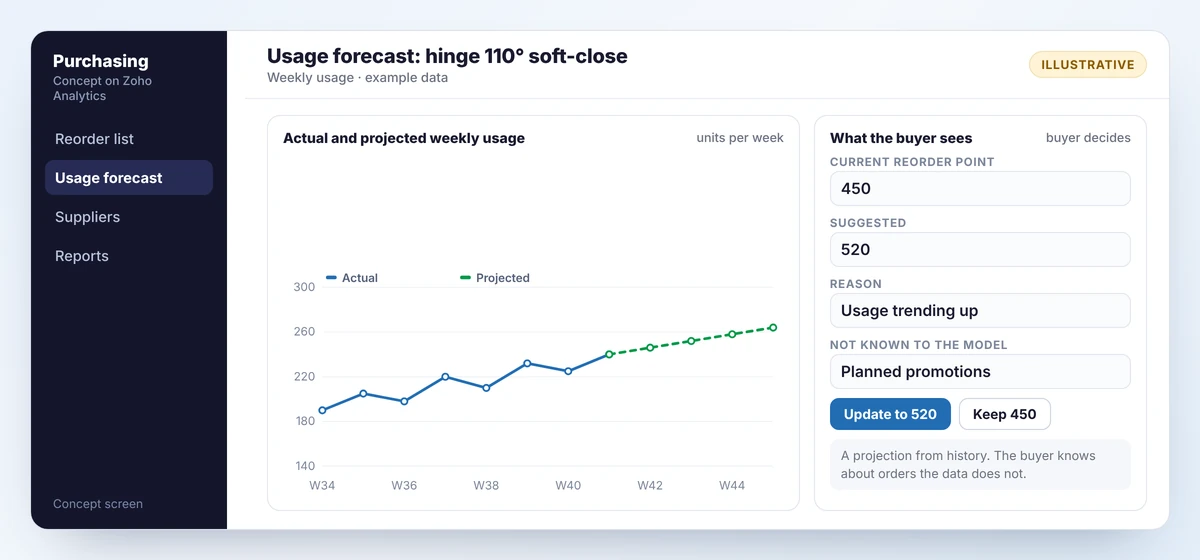
Two concept screens

Concept defect photo triage screen listing photos with a suggested category, confidence level, the inspector’s own category and status
Concept screen A concept triage screen. The model suggests a category; the inspector confirms or corrects it and decides pass or fail.
Concept usage forecast screen with a chart of actual and projected weekly usage and a suggested change to the reorder point for the buyer to accept or decline
Concept screen A concept forecast screen with example data. The projection is advice; the buyer changes the reorder point or leaves it.

Both screens are concept mockups with example data. In each, the AI output is a suggestion beside a decision that belongs to a person.

Risks, and how the design answers them

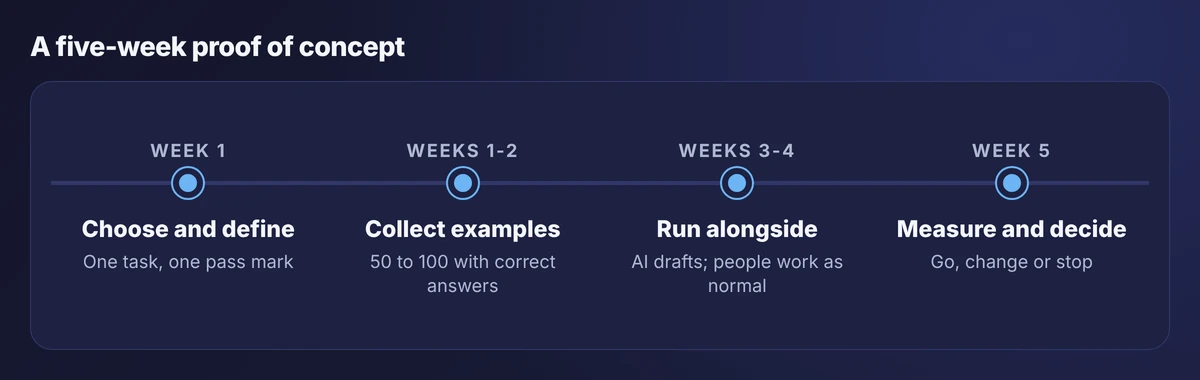
Table of five risks in AI workflows with what each looks like and how the design answers it
Five risks and the design answer to each. None of them is removed; all of them are managed.

Before any AI feature handles your documents, ask the provider where data is processed, whether it is retained, whether it is used for training and what the service can change. Answers differ by product, plan and region, so we confirm them for the specific service at the start of a project.

Start with a proof of concept

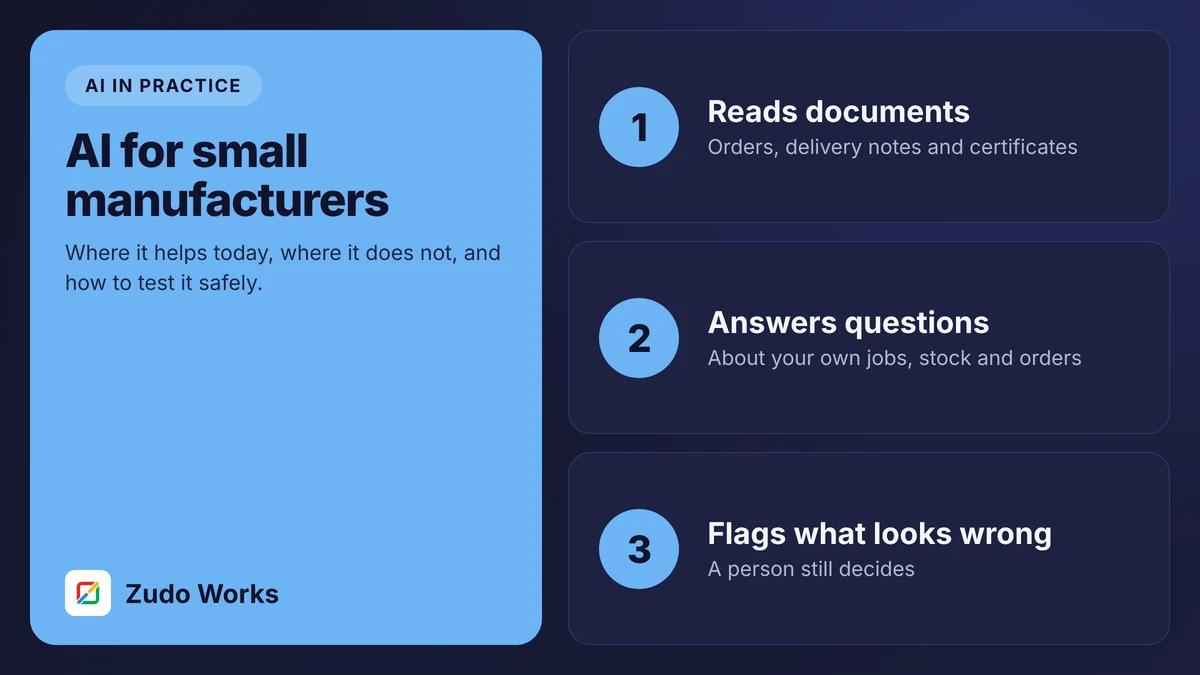
Five-week proof of concept timeline: choose and define, collect examples, run alongside, then measure and decide
Every use case starts with a proof of concept that is allowed to fail.
  1. Choose one task

    Narrow, frequent and easy to check. Agree the pass mark before testing.

  2. Collect real examples

    Fifty to a hundred, with the correct answers taken from what your people actually did.

  3. Run alongside

    The AI drafts while people work as normal. Nothing depends on it yet.

  4. Decide on evidence

    Go live, change the approach or stop. All three are acceptable outcomes.

Related reading

Frequently asked questions

Read documents such as purchase orders and certificates, answer questions about data you already hold, suggest categories for defect photos and requests, and project usage from history. In each case it prepares work for a person to check.

Not in any design we build. It removes typing, searching and sorting. Decisions about orders, quality, purchasing and scheduling stay with the people responsible for them.

It depends on the service and plan. Some providers do not train on business data by default and others need a setting or contract term. We confirm this for the specific service before any documents are processed.

No, but it helps if your data is already there. Zoho Creator and Zoho Analytics include AI features, and Zoho publishes an MCP server for assistants. The same patterns work with other systems through their APIs.

A proof of concept is small and fixed in scope. The full build depends on the use case and integrations, and running costs depend on volume and the service chosen. We estimate both after the proof of concept, when the numbers are real.

Then you have spent a few weeks and learned that the task is not ready, usually because of document quality or missing data. That is a useful result and far cheaper than finding out after go-live.

Have a task you think AI could take on?

Describe it and send a few sample documents. We will tell you whether it passes our six tests and what a proof of concept would involve.