Solution blueprint. A design for a typical business of this kind, showing how we would solve the problem. Screens are concept designs with example data, and expected benefits are stated as directions.
01Executive summary
This reference implementation shows how our team would apply AI to one narrow task in a manufacturing business: turning customer purchase orders, which arrive as PDFs in many layouts, into sales orders.
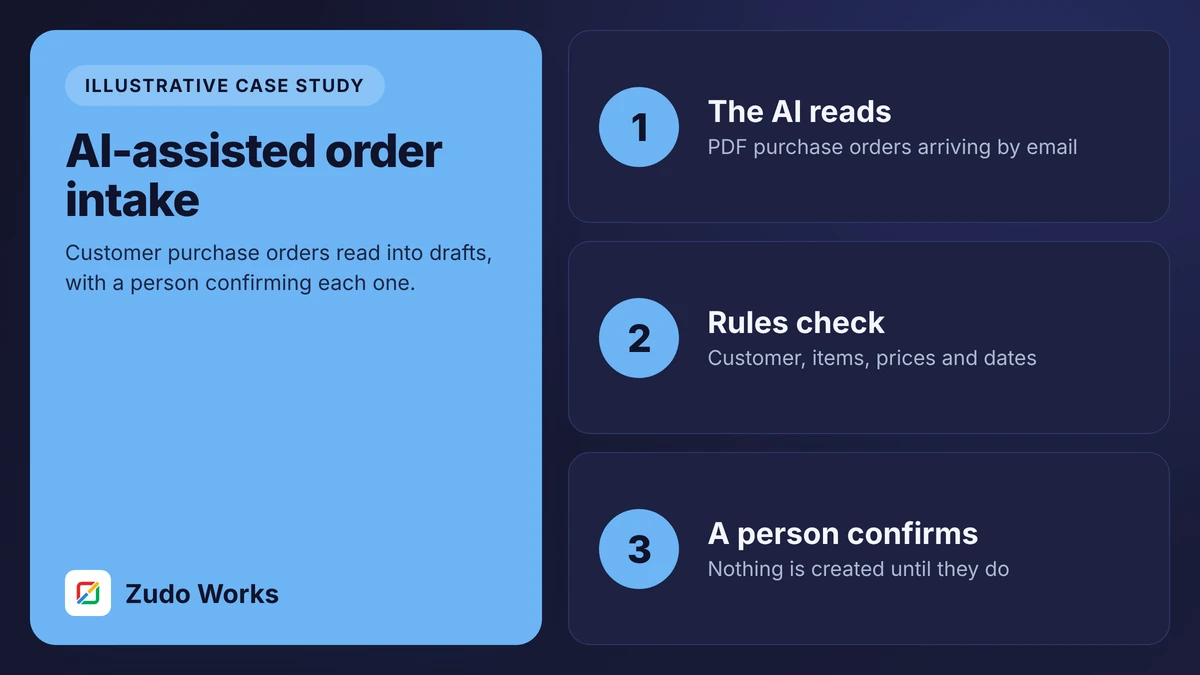
The AI reads each document and fills in a draft. Ordinary rules then check the customer, items, prices, dates and duplicates. A person reviews the draft beside the original and confirms it. Nothing is created in the order system until they do, and every correction is logged so accuracy can be measured.
We chose this task because it is frequent, easy to check and low in risk. That combination is what makes an AI project worth doing.
02Business context
The business in this blueprint is a manufacturer of shop fittings and shelving with about 35 staff. It sells to builders, fit-out firms and retail chains, and receives around 40 purchase orders a day by email. Each customer uses its own layout and often its own part numbers.
One sales administrator enters the orders, with help from a colleague at busy times. Customers, items and prices are already held in the CRM and stock system. The volumes are typical examples.
03Operational challenges
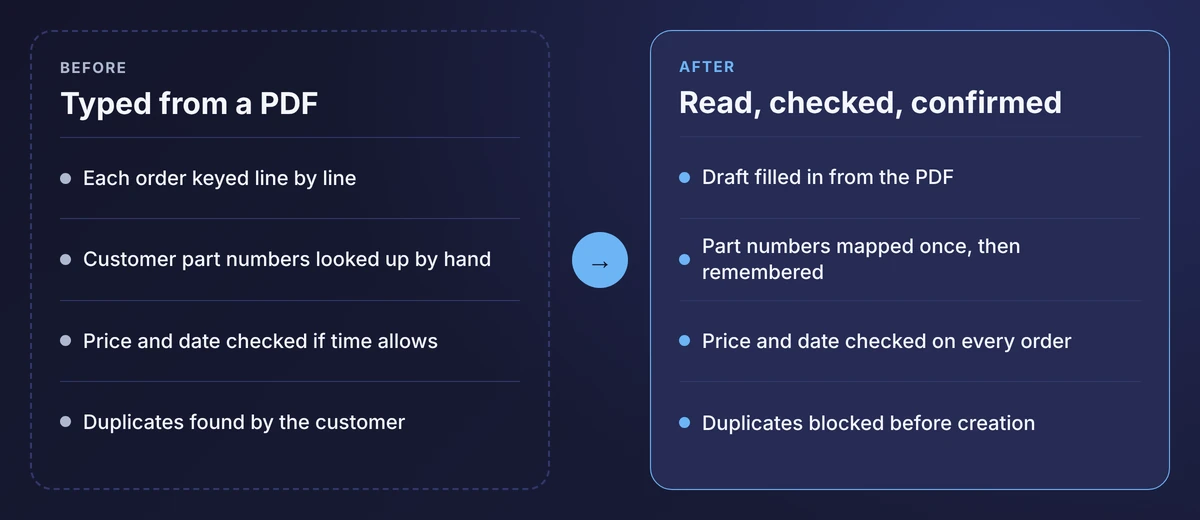
- Hours of retyping. Order entry fills most of the morning, and orders received after lunch wait until the next day.
- Keying errors. A 12 becomes a 21. The customer finds it on delivery.
- Customer part numbers. Each must be translated to an internal code, from memory or a spreadsheet.
- Unchecked prices and dates. There is rarely time to compare each line with the price list or the lead time.
- Duplicates. A customer resends a purchase order, and it is entered twice.
04The existing process
An email arrives with a PDF. The administrator opens it, opens the order screen beside it and types: customer, purchase order number, delivery address, then each line. Unfamiliar part numbers are looked up. The order is saved and the email is filed.
Nothing about this is badly run. It is careful work done by a capable person, and it is exactly the kind of work that produces occasional errors however careful the person is.
05Root-cause analysis
The root cause is not the administrator and not the customers. It is that information arrives in a form a person can read and a system cannot, so a person has to act as the translator.
- Unstructured input. Every customer’s layout is different, which ruled out simple templates.
- Knowledge held in one head. Which customer part number means which item was never written down.
- Checks compete with speed. When the queue is long, verification is the first thing dropped.
The first cause is what document extraction addresses. The second and third are addressed by ordinary software: a mapping table and validation rules.
06The proposed solution
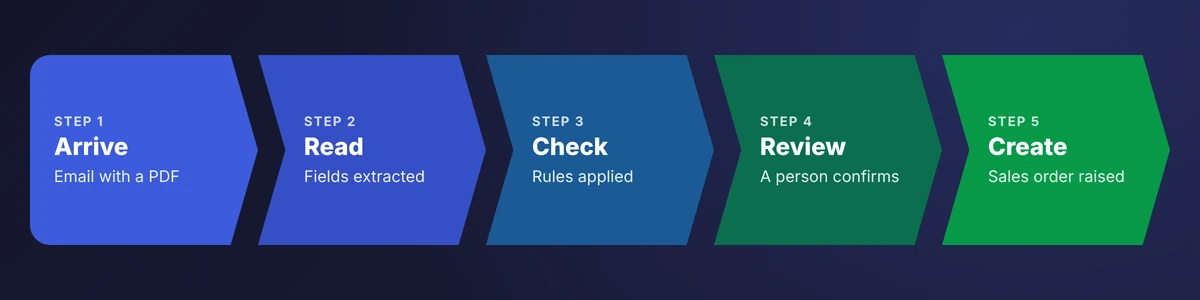
The solution has three layers, and only the first involves AI.
- Extraction. A document model reads the PDF and returns fields: customer, purchase order number, dates, and each line’s part number, description, quantity and price.
- Validation. Fixed rules compare those fields with what the business already knows.
- Review. A person sees the draft beside the source, deals with any flags and confirms.
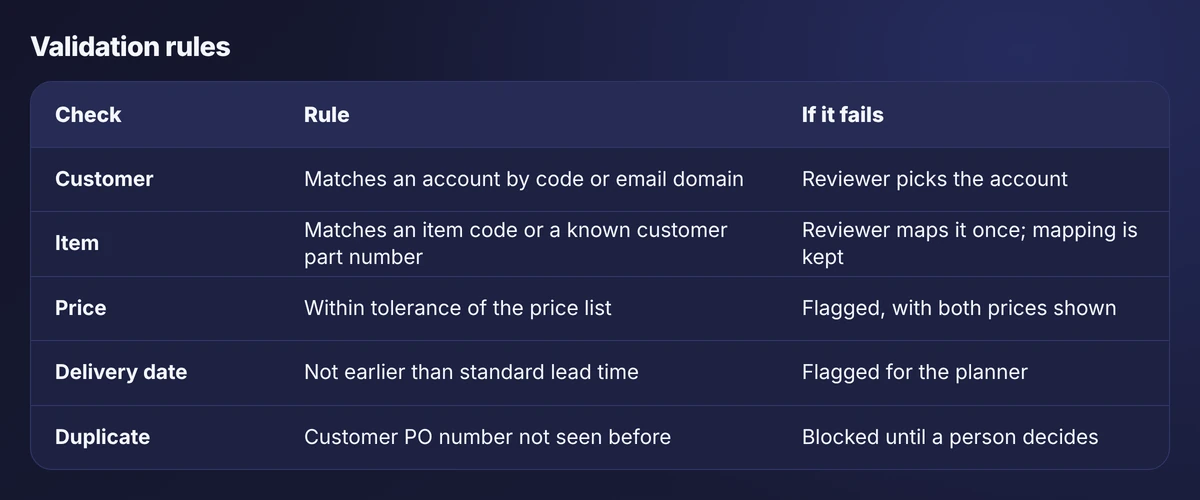
Keeping the checks as plain rules is deliberate. A rule that says “flag any price more than a set tolerance from the price list” behaves identically every day and can be explained to an auditor.
07Solution architecture
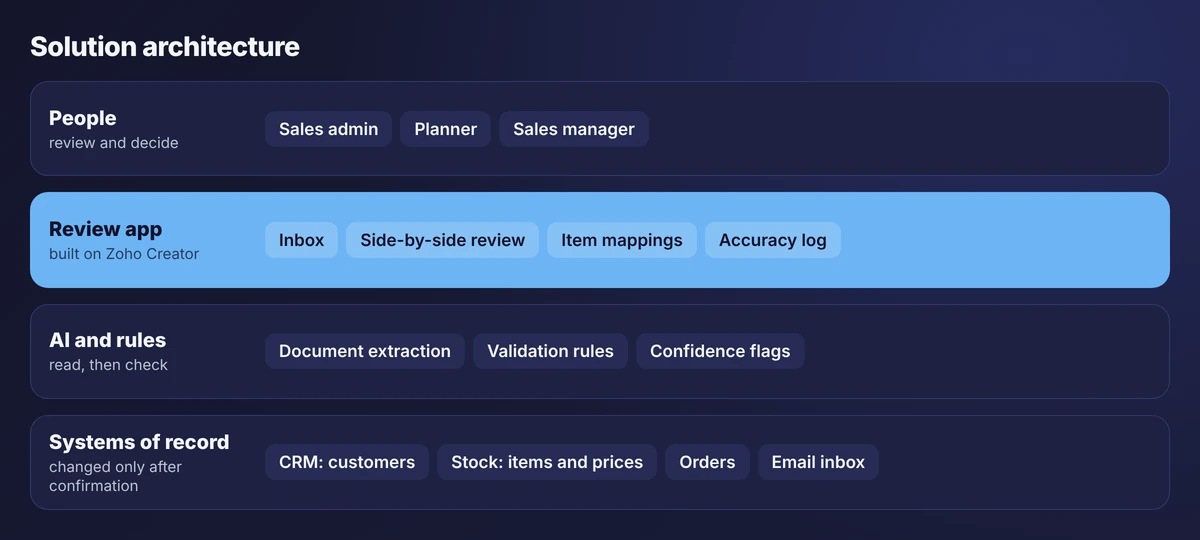
The review app is the centre of the design. It is the only component allowed to create sales orders, and it does so only when a named user confirms. The extraction service reads documents and returns data; it holds no credentials for the order system.
On Zoho, the review app would be built on Creator. Its AI Modeler includes OCR and supports custom models, and Zoho’s agent tools allow a business to connect its own account with an outside model provider. Which option fits depends on plan, region and document quality, so the design treats the extraction service as replaceable.
08The workflow, step by step
- Arrive. An email reaches the orders inbox. The attachment is saved to a new intake record.
- Read. The extraction service returns the fields, each with a confidence score.
- Check. The five rules run. Each failure becomes a flag in plain words.
- Queue. The order appears in the inbox as ready, needing attention or blocked.
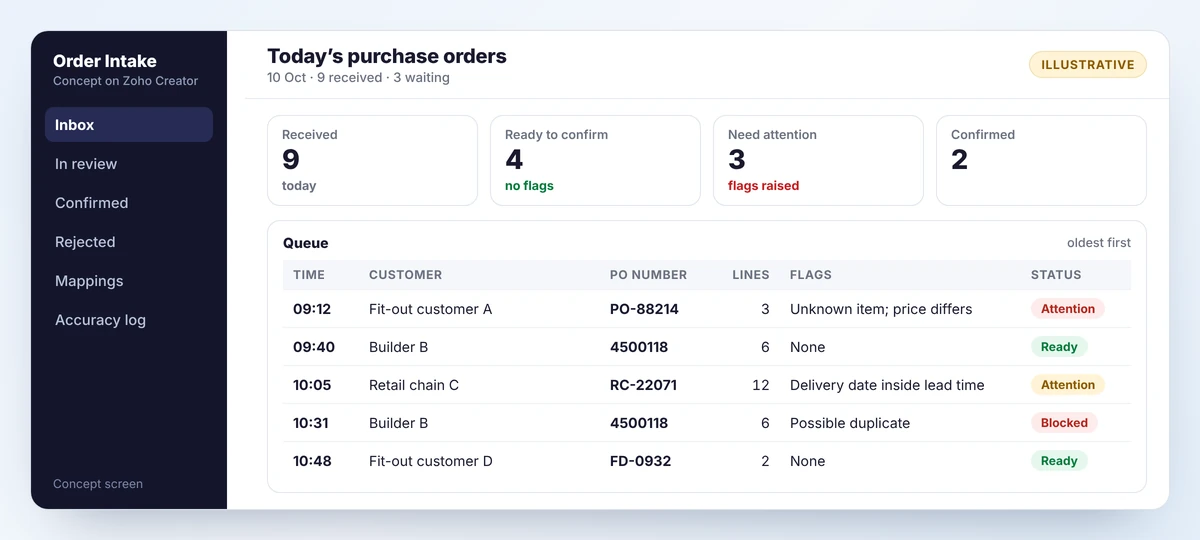
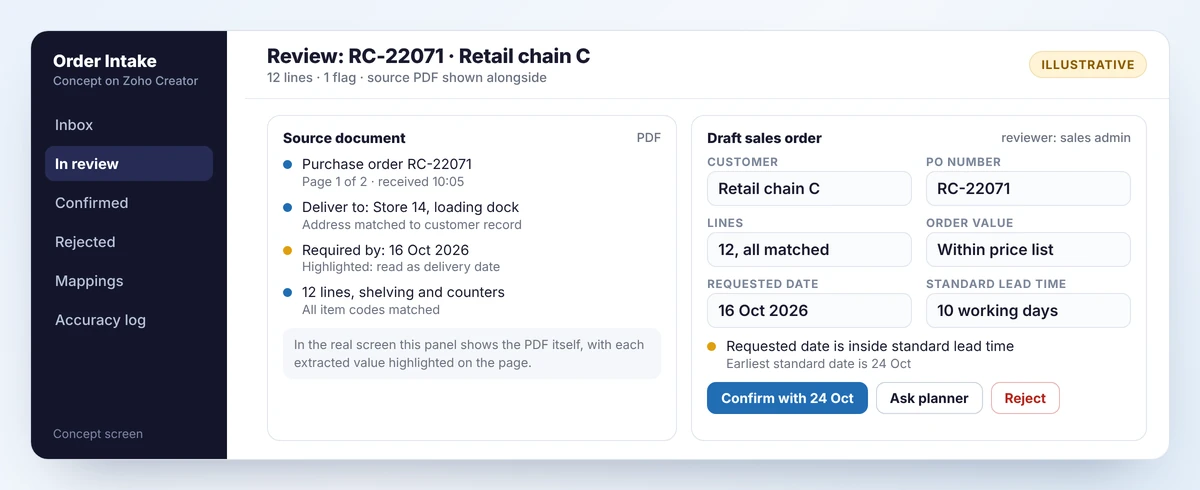
- Review. The administrator opens it. The PDF is on the left with extracted values highlighted, the draft on the right.
- Resolve. An unknown part number is mapped to an item once; the mapping is kept for next time. A date inside lead time is confirmed with the standard date or sent to the planner.
- Confirm. The sales order is created, linked to the original email and PDF.
- Log. Any field the reviewer changed is recorded in the accuracy log.
09Before and after
The administrator’s role moves from typing to checking. Orders with no flags take seconds. Attention goes to the few that need judgement: an unfamiliar item, a price that does not match, a date that cannot be met.
The checks that used to be skipped under pressure now run on every order, because a rule does not get tired at 11 a.m.
We have not attached savings to this. The proof of concept exists to measure them on real documents before anyone commits.
10Implementation stages
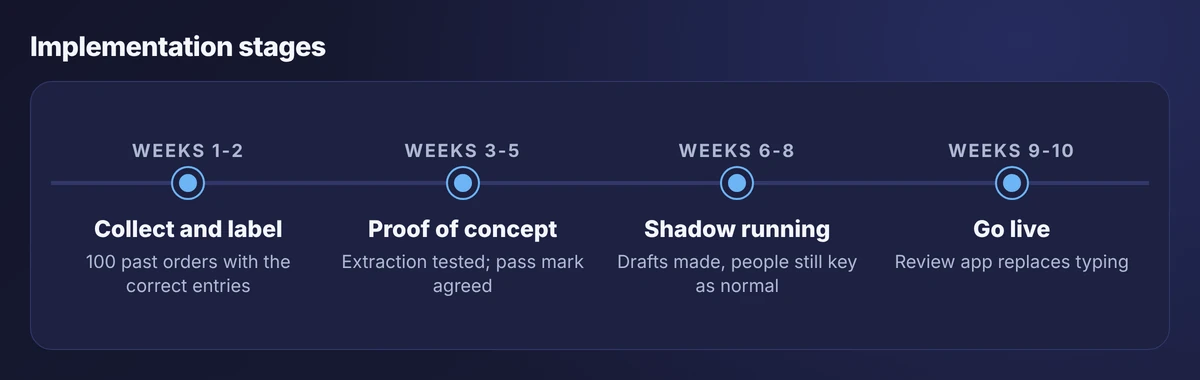
- Weeks 1 to 2. Collect 100 past purchase orders across the main customers, with the sales orders that were actually entered. These are the answer key.
- Weeks 3 to 5. Run extraction on them and measure field-level accuracy. Agree a pass mark first. If the test falls short, stop or change the approach.
- Weeks 6 to 8. Shadow running. The system drafts every incoming order while the administrator keeps typing as normal. Drafts are compared with what was entered.
- Weeks 9 to 10. Go live for two or three customers, then the rest.
The decision point after week five is real. A proof of concept that cannot fail is a demonstration, not a test.
11Integrations and data flow
- Email to review app: new messages and attachments from the orders inbox.
- Review app to extraction service: the document goes out, fields come back.
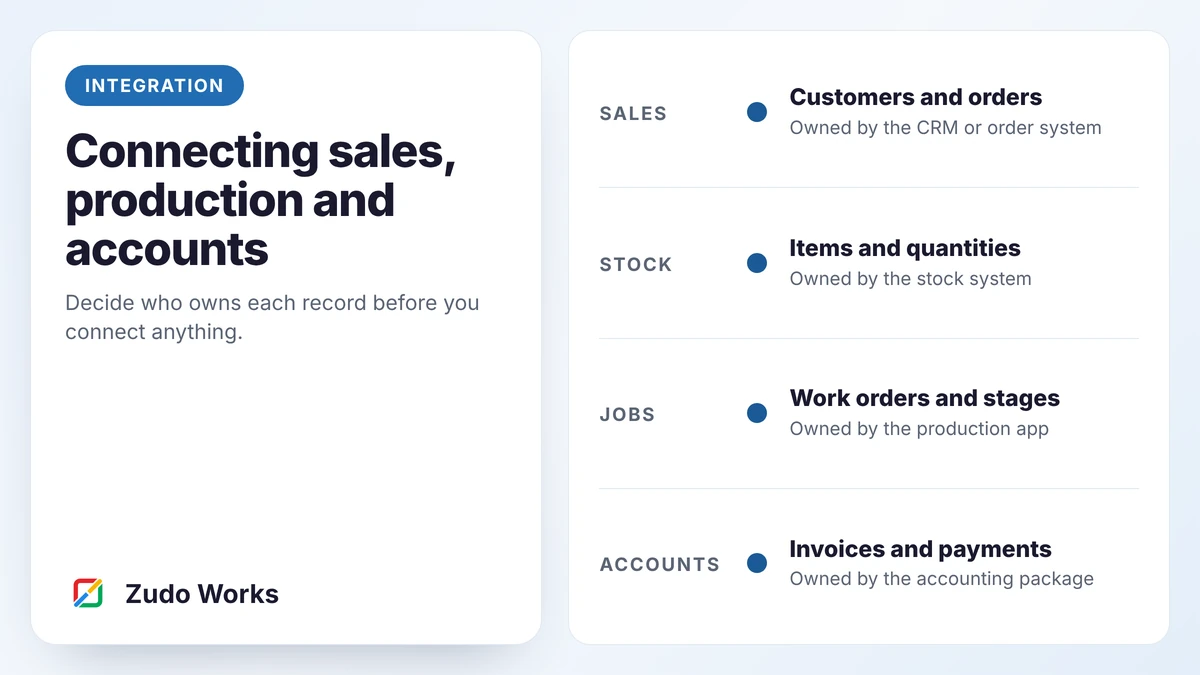
- CRM and stock system to review app: customers, items, price lists and lead times, read only.
- Review app to order system: the confirmed sales order, with a link to the source document.
From there the order follows the normal route into production and accounts, as described in our integration guide.
12Security, validation and exceptions
- Least access. The extraction service can read a document and nothing else. It cannot see the customer list or create records.
- Human confirmation. No order is created without a named user confirming it. There is no auto-approve setting.
- Duplicates blocked. A repeated customer purchase order number cannot be confirmed without a deliberate override.
- Data handling. Before go-live, confirm where documents are processed, whether they are retained and whether they are used for training. Check customer contracts for restrictions on sharing their documents.
- Audit trail. Each order keeps the source PDF, the extracted values, the changes made and who confirmed it.
- Fallback. If extraction is unavailable, the review app opens a blank draft beside the PDF and the order is keyed as before.
- Unreadable documents. Handwritten or badly scanned orders are routed straight to manual entry.
13Expected benefits and limitations
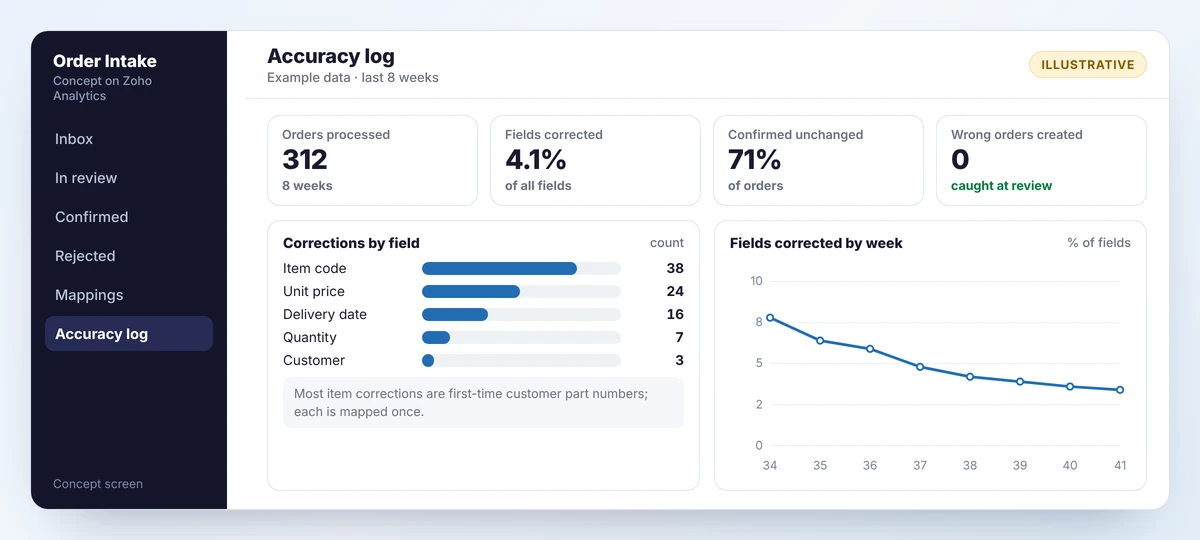
Expected benefits, as directions: less time spent typing, orders entered on the day they arrive, price and date checks on every order, fewer keying errors reaching customers, and part-number knowledge held in the system.
Limitations:
- Extraction will make mistakes. The design assumes it and relies on review to catch them.
- Accuracy depends on document quality. Clean PDFs read well; photographs of printed orders read poorly.
- New customers and new layouts need a period of closer checking.
- It does not negotiate, decide whether to accept an order or judge credit. People do.
- Running costs depend on the service and volume and should be estimated during the proof of concept.
14Where it could go next
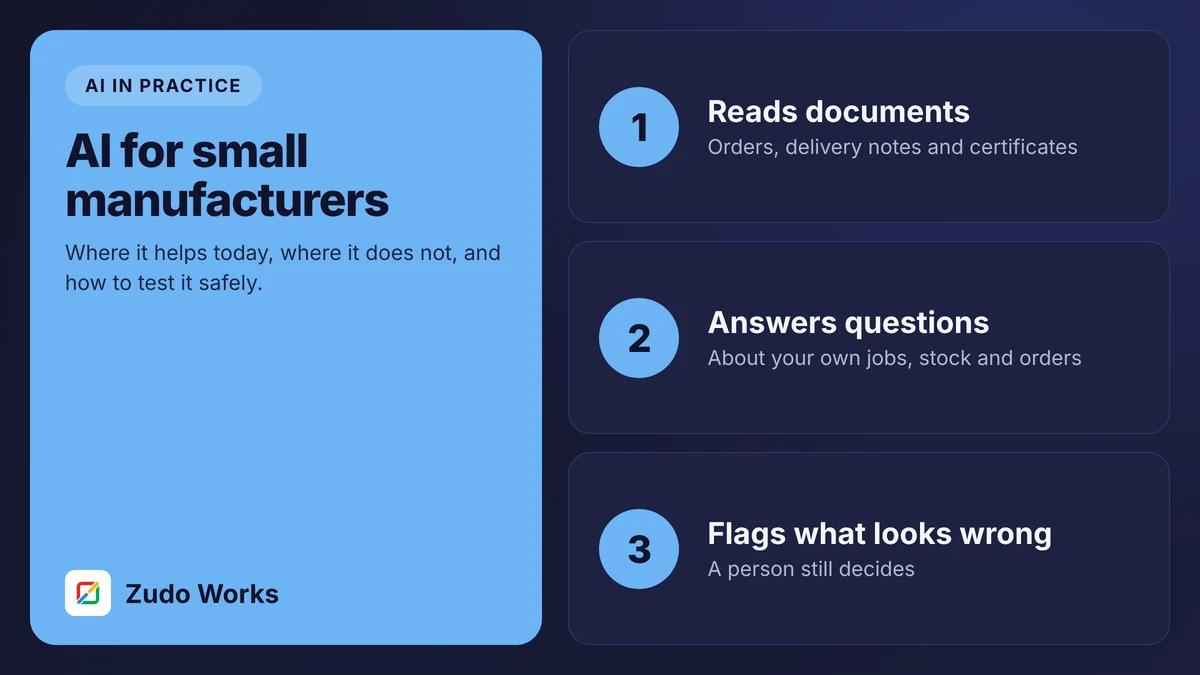
- Supplier documents. The same pattern reads delivery notes and certificates at goods in.
- Order acknowledgements drafted for the customer, for a person to send.
- Questions about orders, answered from the order data by a read-only assistant.
- Confidence-based routing, where clean, repeat orders from long-standing customers need only a one-click confirmation. We would consider this only after months of measured accuracy.
Our guide to AI for small manufacturers explains how we judge which of these is worth doing.
15Thinking about something similar?
If order entry, or any other document-heavy task, takes hours a day in your business, the first step is small. Gather twenty recent examples and note how long each took to process and what went wrong.
Send us those and we will tell you whether it is a good candidate, and what a proof of concept would involve. The AI in manufacturing page lists other use cases we would and would not recommend.
QQuestions about this blueprint
Because extraction is not perfect and cannot tell which of its answers are wrong. A short review catches errors before they become wrong orders, and the corrections provide a running measure of accuracy.
The design keeps the extraction service replaceable. Options include the OCR and custom model features in Zoho Creator or an outside provider connected with your own account. The proof of concept decides which reads your documents best.
That depends on the service chosen. Before go-live you should confirm where documents are processed, how long they are kept and whether they are used for training, and check your customer contracts.
It varies with document quality and layout, which is why the plan starts with a test on 100 of your own past orders against a pass mark agreed in advance.
Sources
Product capabilities change. We checked these pages in October 2026; confirm anything you plan around.