In short
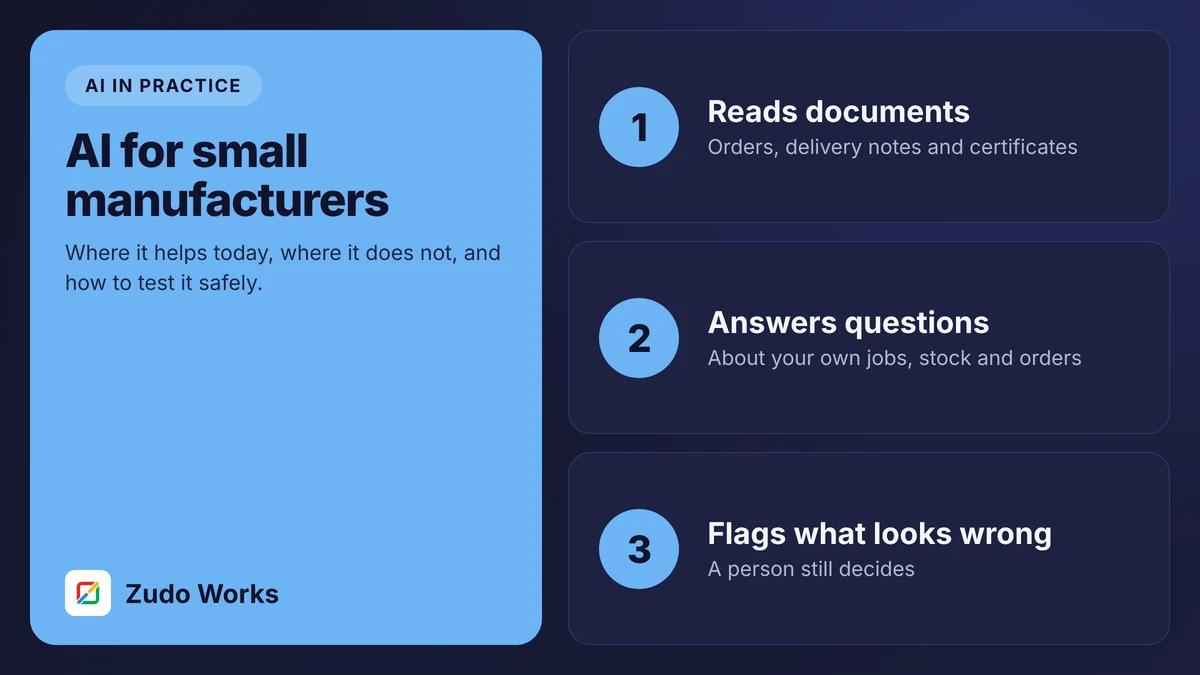
AI is useful in a small factory for narrow, frequent, checkable tasks: reading purchase orders and supplier documents, answering questions about your own data, sorting defect photos and projecting usage. It should prepare work for a person, not act alone. Start with one task, test it on 50 to 100 real examples, and measure accuracy before going live.
There are two ways to get AI wrong in a factory. One is to ignore it because the claims are inflated. The other is to believe the claims and hand it decisions it has no business making. This guide is my attempt at the ground between.
I build these systems, so I have an interest. I have also seen enough of them to know which ones are still in use six months on. They share three features: the task is narrow, the output is easy to check, and a named person approves it.
What “AI” means here
Four different technologies are sold under one word. They behave differently, so it helps to separate them.
- Document extraction. Reading text and fields from PDFs, scans and photos. Mature and dependable on clear documents.
- Prediction. Estimating a number or a category from past records, such as next month’s usage of a material. As good as the history it learns from.
- Language models. Reading and writing text: summarising, answering questions, drafting. Fluent, and capable of being confidently wrong.
- Image classification. Sorting photos into categories. Works when lighting and camera position are controlled.
None of them understands your factory. Each one maps an input to an output, well or badly.
Where to start
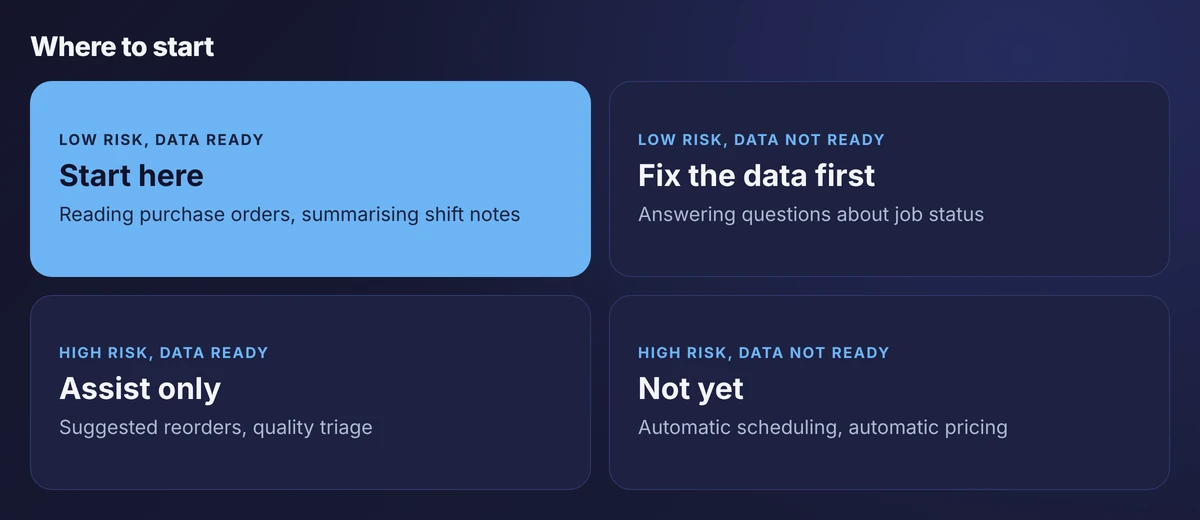
Two questions place any idea on this grid. What happens if the answer is wrong? And does the data it needs already exist in a system?
A misread quantity on a draft order costs a correction if someone reviews it. A wrong production schedule costs a week. Start where mistakes are cheap and visible.
Five uses that work today
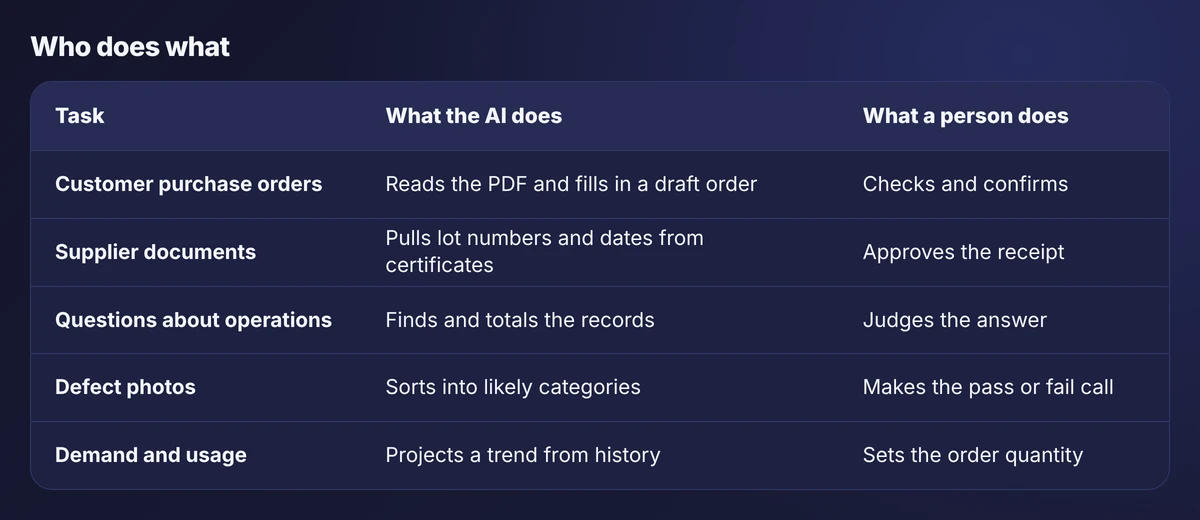
1. Reading customer purchase orders
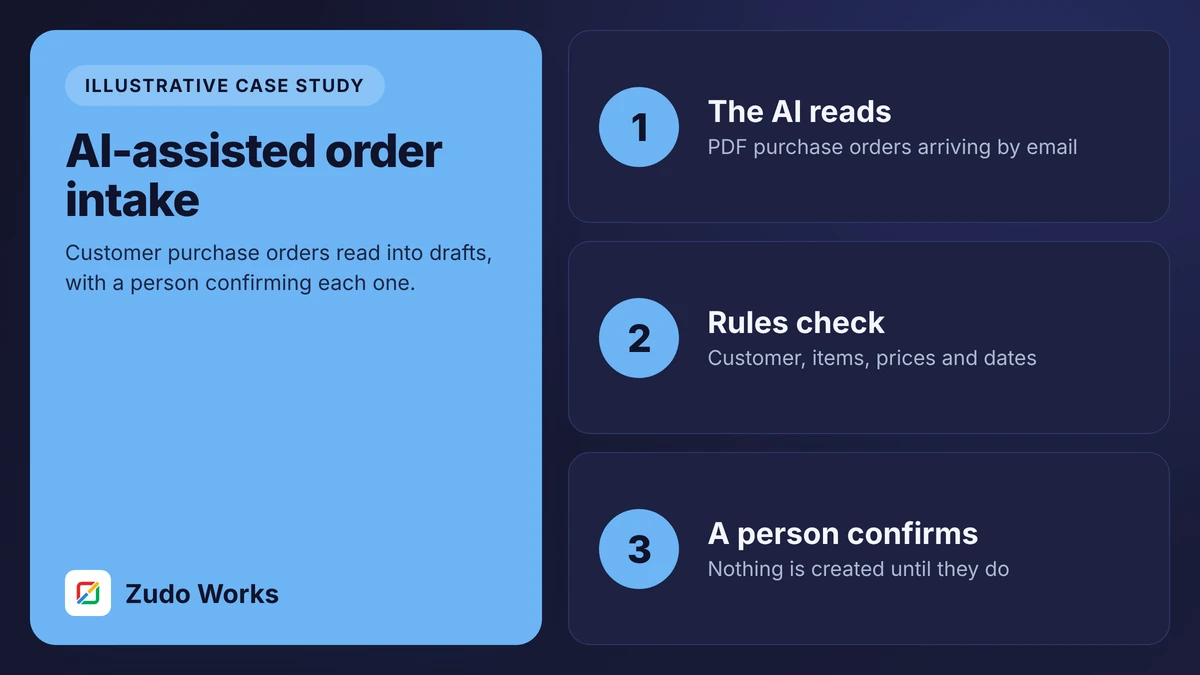
Customers send orders as PDFs in their own layouts. Someone retypes each into your system. Extraction reads the document, matches the customer and items against your lists and fills in a draft. The reviewer sees the draft beside the original and fixes what is flagged.
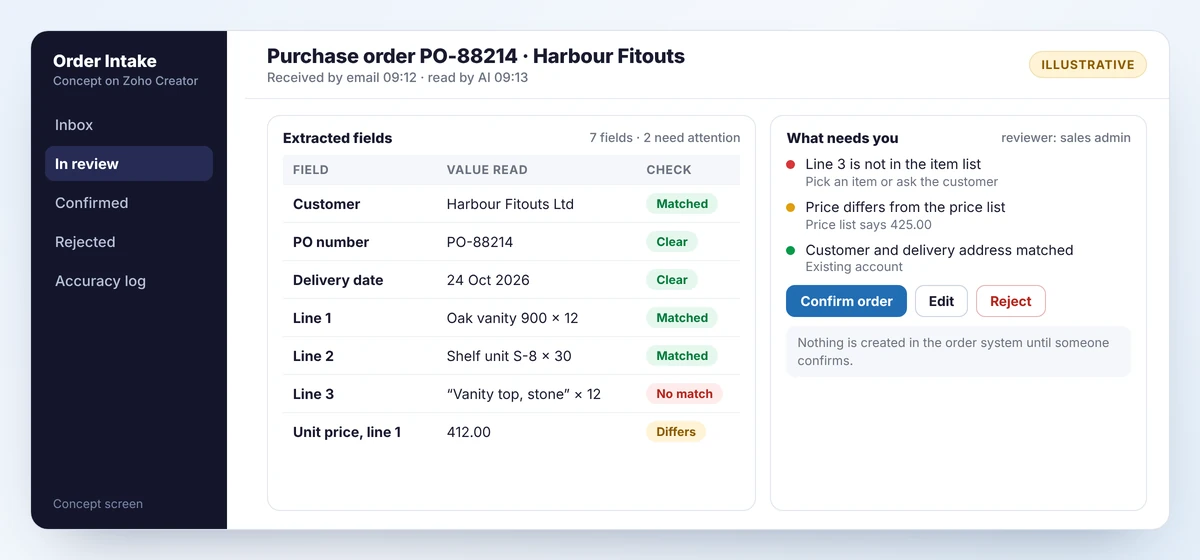
This is the use I recommend first. The task is frequent, the result is easy to check against the page, and the time saved is obvious. Our order intake reference implementation describes the full design.
2. Reading supplier documents
Delivery notes and certificates of conformity carry lot numbers, dates and test values that belong in your traceability records. Extraction pulls them out at receiving so nobody types a 14-character lot number.
3. Answering questions about your own data
“Which jobs due this week are at risk?” is a query across work orders, holds and due dates. A language model connected to those records can answer it in a sentence.
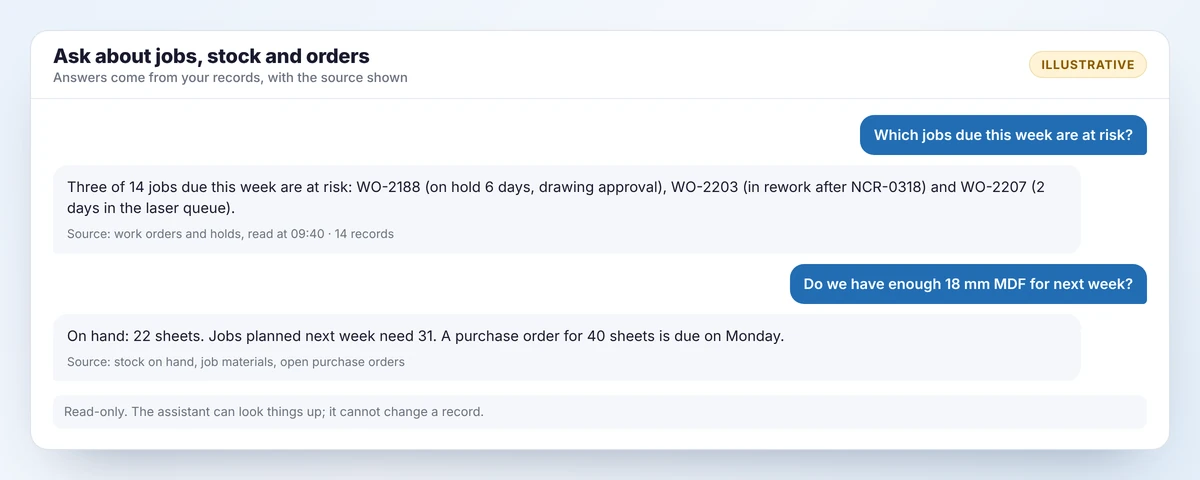
Two rules apply. The assistant should be read-only, and every answer should name the records it used so a person can check. This also depends entirely on the data being right, which is why it sits in the “fix the data first” quadrant for most businesses.
4. Sorting defect photos
If inspectors photograph defects, a classifier can suggest a category: scratch, dent, misalignment. That speeds up recording and makes cause analysis more consistent. I would not let it make the pass or fail call without a long, measured trial.
5. Projecting usage
A prediction model can project material usage from history, which helps set reorder points. Treat the projection as one input to the buyer’s decision. It knows nothing about the large order you are about to win.
The review step
Every design I am willing to put my name to has the same shape.
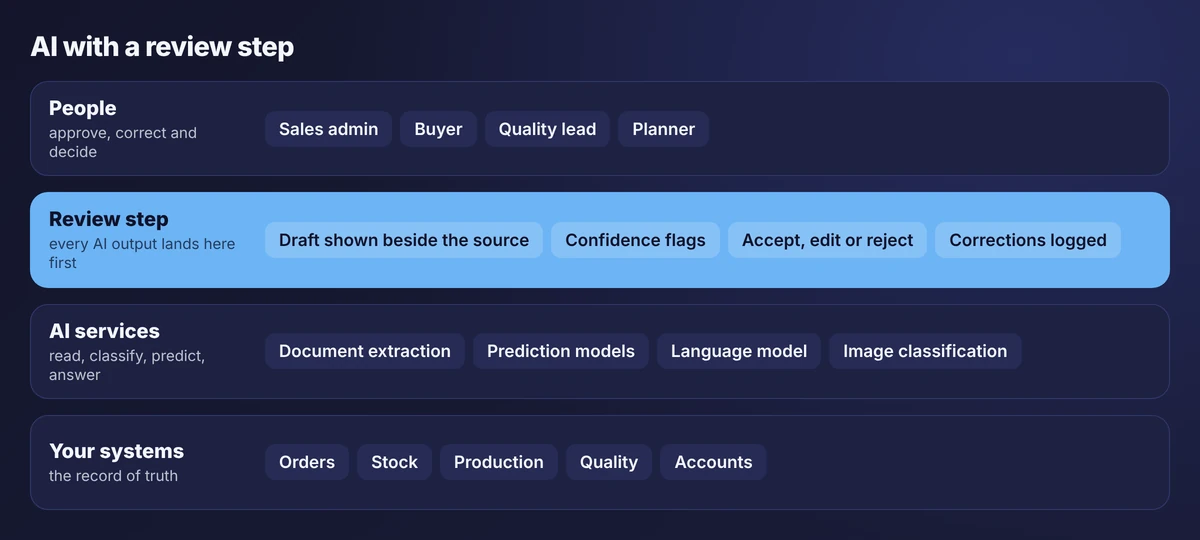
The AI never writes directly to the system of record. Its output goes to a review screen where a person accepts, edits or rejects it. Four details matter:
- Show the source. The reviewer sees the original document or the records behind an answer.
- Flag doubt. Fields the model was unsure of, or that failed a check, are marked.
- Log corrections. Each edit is recorded. That log is your accuracy measure.
- Have a manual route. When the AI service is unavailable, people can still do the job.
Why not just let it run?
Because a system that is right 97 times in 100 is wrong three times, and it does not know which three. On 40 orders a day that is more than one wrong order every day. A review that takes thirty seconds is cheap insurance.
What I would not use it for yet
- Automatic scheduling. Schedules depend on things no system holds: a customer who will accept a delay, an operator who is slow on one machine.
- Automatic purchasing. Draft the order, yes. Send it without a buyer, no.
- Final quality decisions on anything safety-related or customer-critical.
- Pricing and quoting without review. A fluent, wrong quote is still a commitment.
- Anything with no data behind it. AI will not rescue a process that is not recorded.
Data and security questions to ask
Before any AI feature goes near your documents, get plain answers to these:
- Where is the data processed, and is it kept afterwards?
- Is it used to train models other customers use?
- What can the AI read, and what can it change? The safest answer to the second is “nothing”.
- Is every AI action logged with the user who approved it?
- What do customer contracts say about sharing their drawings or orders with a third party?
Answers differ by product and plan, so check the current terms for whichever service you use.
What exists in the Zoho platform
If you run on Zoho, several of these pieces are already there. Zoho Creator includes an AI Modeler with prediction, OCR, object detection and keyword extraction, and supports custom models. Zoho Analytics has forecasting and a plain-language assistant. Zoho’s agent tools allow a business to connect its own account with an outside model provider, and Zoho publishes an MCP server so that an assistant can read Zoho data with permission. Our article on connecting an AI assistant to Zoho covers that last part.
Which of these you can use depends on your plan and region. Confirm before designing around one.
Test it with a small proof of concept
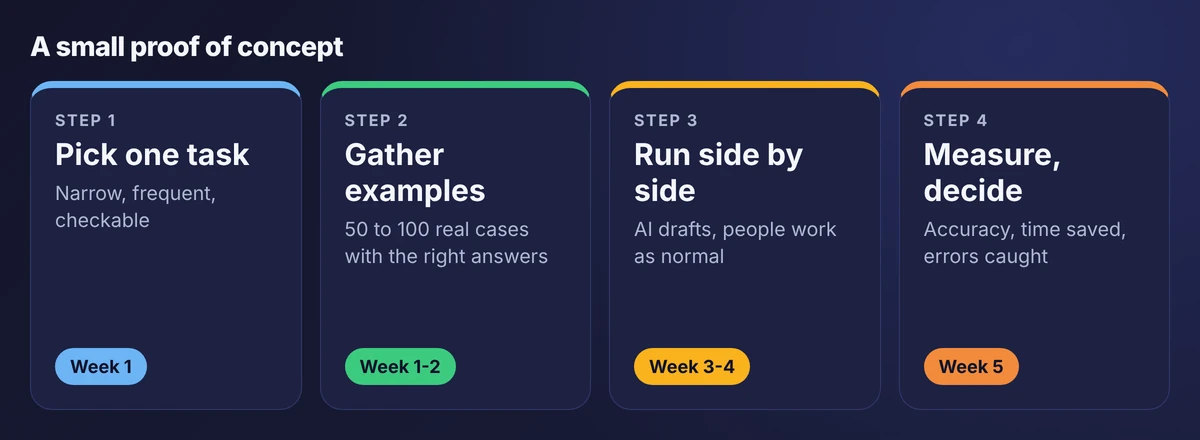
A proof of concept exists to produce one number: how often was the AI right, on your documents, compared with your people? Collect 50 to 100 real examples with known correct answers. Run the AI alongside normal work for two weeks. Count field-level accuracy, the time a review takes, and the errors the review caught.
Set the pass mark before you start. If the test falls short, you have spent a few weeks, not a budget.
What to do next
- List the tasks where someone retypes, searches or sorts for more than an hour a day.
- Place each on the risk and readiness grid.
- Pick one from the top-left quadrant and collect examples.
- Run a five-week test with a pass mark agreed in advance.
Our AI in manufacturing page describes more use cases in the same format, each with its limits.
Frequently asked questions
For narrow tasks, yes. Reading purchase orders and supplier documents, and answering questions about your own data, save real time and are easy to check. Broad promises about AI running production are not realistic today.
Reading incoming purchase orders into draft sales orders, with a person confirming each one. It is frequent, easy to verify against the document and low risk.
No. It prepares drafts, projections and summaries. The planner and buyer still decide, because they know things that are not in any system.
Test it on 50 to 100 real examples with known answers, run it beside normal work for two weeks and measure field-level accuracy. Set the pass mark before you start.
It depends on the service and plan. Ask where data is processed, whether it is retained or used for training, what the AI can change and whether actions are logged. Check customer contracts before sending their documents to any third party.
Sources
Product capabilities change. We checked these pages in October 2026; confirm anything you plan around.
Related services: AI in manufacturing · Business process automation · Zoho Creator development