

Low-code forms and workflow rules, without a developer
Every ZMOS screen has a switch at the top: Normal, Edit, Design and Workflow. Normal runs the shop. Edit adds fields and rules to the section you are on. Design rearranges layouts and colours. Workflow writes the rule that fires when a status changes or stock is posted. The owner does this, not a developer.
- 18 field types, including lookups and subforms
- Custom fields on the built-in forms too
- Field access per role: editable, read-only or hidden
- Rules on status changes, stock postings and low stock
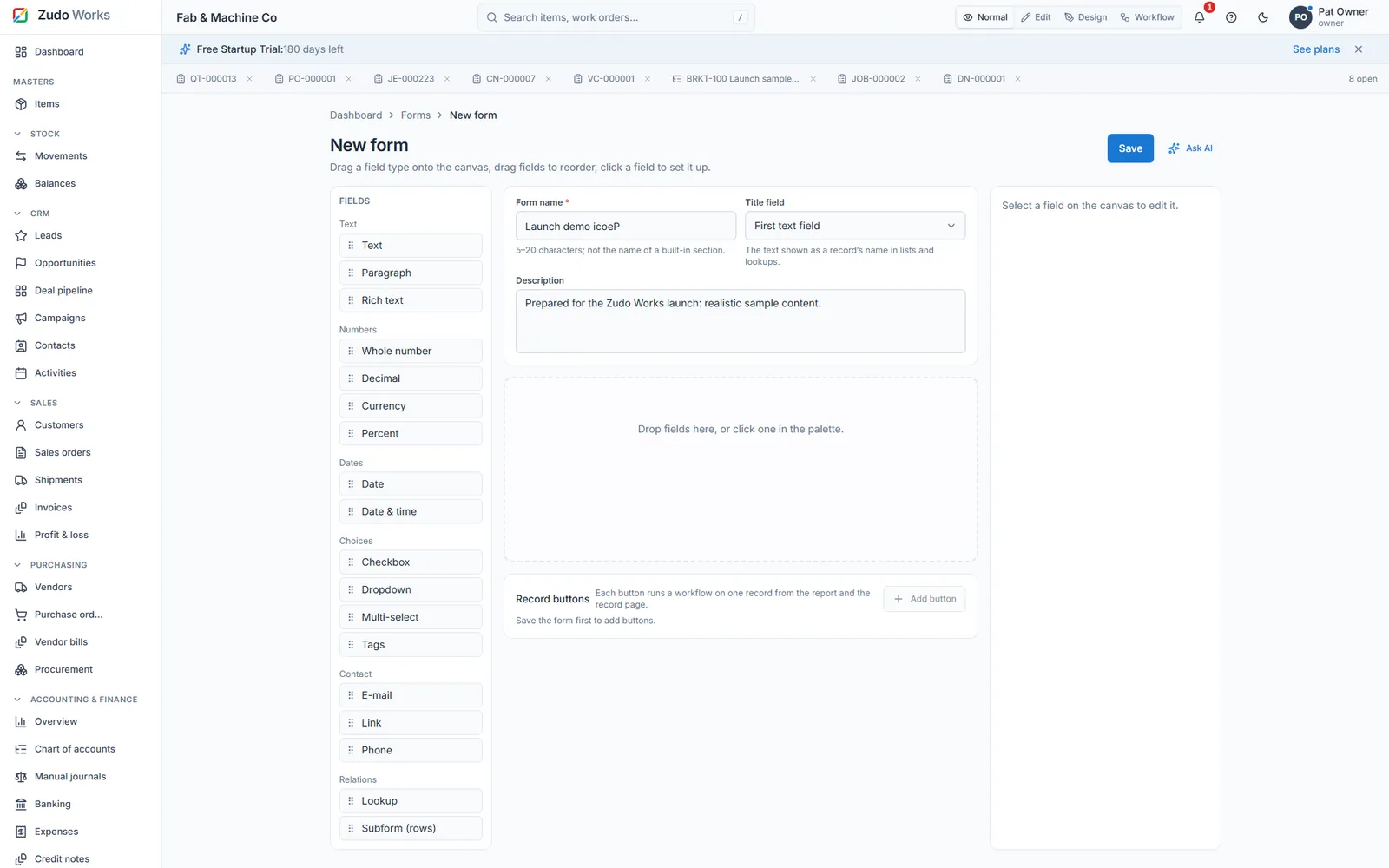
Forms and fields
- 18 field types
Text, paragraph, rich text, whole number, decimal, currency, percent, date, date and time, checkbox, dropdown, multi-select, e-mail, link, phone, tags, lookup and subform rows.
- Lookups that relate records
A lookup points at items, customers, vendors, warehouses or another of your forms, single or multiple. Lookup filters limit what a picker offers, so a storekeeper only sees the warehouses they work in.
- Custom fields on built-in forms
Items, customers, vendors, sales and purchase orders, work orders, warehouses and work centres take your own fields, placed between the built-in ones. Reports and Zudo AI read them like any other field.
- Validation rules
Block a save when a value is out of range, a combination is wrong or a reference is missing, with the message you wrote.
- Field access per role
Each field is editable, read-only or hidden per role. Hidden fields are stripped from responses and cannot be written, filtered or charted, so a wage column stays with the people who may see it.
- Forms stay editable
Add fields, subforms or options after a form holds records; existing records keep their data and new fields start empty. Deleting a form is refused while another form's lookup still points at it.
Workflow rules
A rule is a trigger, an optional condition and a list of steps. Rules run on your forms and on every built-in section.
- Triggers
Record created, updated, saved or deleted; status changed; movement posted, cancelled or reversed; stock balance changed; stock fell below the reorder point; and a button on a record or a report.
- Conditions
Written on the section's fields, custom fields included, with a safe set of operators. The rule also sees the record before the change, the person who made it and the record's link.
- Steps
Send an e-mail with templates, create a record, update this record or another, call a URL, set a variable, branch and loop. Functions are reusable step lists with parameters that rules can call.
- Safe by design
A rule that fails is logged in its run log and never stops the save that triggered it. URLs are checked against a server-side request forgery guard. Zudo AI can draft a rule when asked; a person approves it.
The four modes on every screen
The switch sits in the top bar of every section.
- Normal
Run the shop: post, issue, close, print.
- Edit
Fields, pickers and rules of this section become editable. Add a custom field to Items here.
- Design
Drag sections and dashboard boxes, change layouts and colours, rearrange the sidebar.
- Workflow
Write the rule for this section: new workflow for Stock movements, for example.
In numbers
- field types
- 18
- child fields in a subform, up to 200 rows
- 30
- record buttons per form
- 8
- built-in section can carry rules and custom fields
- Every
- field access levels per role
- 3
Watch it work
See this part of ZMOS on video
Recorded in the product itself, narrated in English, start to finish.
20:315. Your own forms, workflows and Blueprints
Building your own form, a workflow rule and a Blueprint without a developer. The clip starts at this chapter of the full two-hour build; every step is on sample data and the current version.
Can I customise ZMOS without a developer?
Yes. Custom fields, lookup filters, validation rules, layouts and workflow rules are built in the browser by the owner or a supervisor with the right permission. Code is never required; a developer is only needed for integrations you want written for you.
Can I add fields to the built-in forms such as Items?
Yes. Items, customers, vendors, sales and purchase orders, work orders, warehouses and work centres take custom fields, placed after a chosen built-in field, and reports, rules and Zudo AI read them.
What can a workflow rule do?
Send an e-mail, create or update a record, call a URL, set variables and branch, on triggers such as a status change, a stock posting, a balance falling below the reorder point or a button on a record.
Who can design forms?
People whose role holds the form design permission; by default the owner. Supervisors can read and write records; storekeepers read and write where their role allows. Owners set this in Settings, Roles.
Does Zudo AI help with forms and rules?
Yes. It can draft a new form with its fields, add a dropdown to a built-in form, move a sidebar entry or write a workflow rule, each as a proposal with a preview that a person approves.
Add your first custom field this afternoon
Six months free, no card. Switch to Edit on the Items page and the field is live for everyone.