
Nobody knows where a job is
Status lives on a whiteboard, and the office walks to the floor to find out.
Manufacturing software on Zoho
Replace the whiteboard, the spreadsheets and the retyping with one connected system. Every job, stock move and quality check is recorded once, by the person doing the work, and everyone sees the same live picture.
Reply within 6 hours, guaranteed
What you make and what slows you down. We reply within 6 hours with questions or times for a call.
We read every enquiry ourselves and reply within 6 hours, usually with a few questions or times for a call.
See it working
Each example starts with the tangle most factories live with: apps and spreadsheets wired together by hand. Then the integration and AI layer takes over, and the job runs from order to invoice, with status syncing back to sales as it goes.
See it workingAll 90 workflows
Sound familiar?
Status lives on a whiteboard, and the office walks to the floor to find out.
The system says 40, the shelf says 12, and buyers keep a private spreadsheet.
Quote, job sheet, dispatch note and invoice, each a chance for a different number.
Every nonconformance is written down. Nobody can say whether it is the fourth time.
Sales promises a date without knowing what the floor is already committed to.
The quote said one thing. Materials, scrap and hours said another, and nobody compared them.
What we build
Start with the process that hurts most. Each module is useful on its own and connects to the next when you are ready.
Job cards for every stage of your routing. Operators tap or scan each step done, and the office sees it live.
Production tracking guide Zoho InventoryStock moves posted as they happen, against the job, with cycle counts that keep the figures right.
Inventory accuracy guide Zoho Inventory · BooksReorder levels worked out from real usage and lead times, with purchase orders raised for approval.
Reorder points guide Zoho CreatorDefects recorded at the station with photos, each with an owner, a cause and a corrective action.
Quality workflow guide Zoho Creator · InventoryScan materials in and products out, so a recall question is answered in minutes, not days.
Traceability guide Zoho CRM · Xero · QuickBooksA won quote creates the work order, and the shipment creates the invoice in your accounting package.
Integration guide Zoho AnalyticsOn-time delivery, work in progress, scrap and quoted against actual cost, built from real records.
Dashboards guide Zia · Claude · ChatGPTCustomer purchase orders and supplier documents read into draft records, with a person approving each one.
AI in manufacturing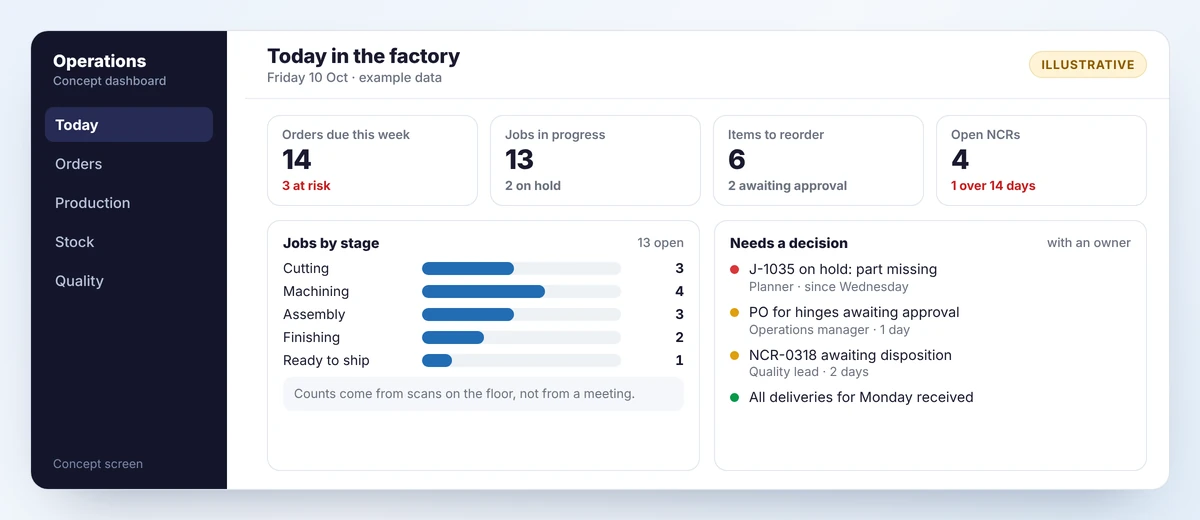
What you end up with
Because every record is made at the point of work, the daily view needs no one to update it. It lists what needs a decision, not a wall of charts.
Your options
There is no single right answer. This is how the three routes usually compare for a small manufacturer.
| Question | Spreadsheets and paper | Off-the-shelf manufacturing ERP | Zoho, built around your process |
|---|---|---|---|
| Fits how your factory works | Yes, but nothing is connected | You adapt to the software | Built around your routing and forms |
| Live job status | Someone walks to the floor | Yes | Yes, operators tap or scan each stage |
| First process in daily use | Already in use | Often months | Weeks, one process at a time |
| Material requirements planning (MRP) | By hand | Built in | Not built in; we say so up front |
| Your accounting package | Stays, retyped into | Often replaced | Stays, and is integrated |
| Changing it later | Easy, and easy to break | Through the vendor or a consultant | Your team or ours, fully documented |
Need full MRP? Read Zoho apps or a manufacturing ERP: how to choose. We would rather tell you before a project than during it.
How a project runs
We follow two or three real jobs from order to invoice and note every retyping and every question.
One process, a written scope, timeline and cost, with a fixed price where the scope allows.
A working version on one line or bench within weeks, changed in response to the people using it.
Integrations, reports, training and documentation, plus one month of free support after launch.
Our 90-day roadmap from spreadsheets to a connected system sets out a typical sequence week by week.
Company brochure
Our services, how the integration and AI layer works, example workflows, the manufacturing modules, how a project runs and who you will work with. Read it here, or download the PDF or PowerPoint to share with your team.
Who builds it
No account managers in between. Your project is designed and built by our Zoho developers and led by our CTO, who works on Zoho Creator, CRM, Deluge and integrations every day.
 Arunkumar V, CTO
“Master of Creator” award, Zoho Creator Partner Hackathon 2025
Arunkumar V, CTO
“Master of Creator” award, Zoho Creator Partner Hackathon 2025
Figures cover our team’s project experience. See our work for the kinds of systems we have built.
Straight answers
Questions
A connected set of Zoho apps shaped around your factory: a production app on Zoho Creator that follows your own routing, Zoho Inventory for stock and purchasing, Zoho CRM for quotes and orders, Zoho Analytics for dashboards, and your accounting package. Each record is entered once, by the person doing the work, and flows to the others.
It is quoted per project. After a discovery call we send a written proposal with scope, timeline and cost before any work starts, and agree a fixed price where the scope allows. Zoho licences are billed by Zoho, in your name. Our project estimator shows typical hours and timelines.
We start with the one process that causes the most daily pain, usually job tracking or quality records, and aim to have a working version on one line or bench within weeks. Other processes and integrations follow one at a time.
Not in the standard apps. Zoho Inventory has no manufacturing module and nothing calculates material requirements from a forecast. Zoho ERP includes manufacturing but is published for India only at the time of writing. If you need full MRP, a manufacturing ERP is the better core, and we will say so before any project starts. Our Zoho implementation for manufacturers page explains what each app covers.
No. If your accountant works in Xero, QuickBooks or Zoho Books, we keep it and integrate with it, so invoices and purchase orders arrive there without retyping.
Yes. Zoho Creator apps run in a browser and in the Creator mobile apps on phones and tablets, so operators can tap a stage done or scan a job card barcode at their station. We design those screens with the people who will use them.
You do. Zoho licences are held in your name, the data stays in your Zoho account, and you receive documentation your own team can maintain.
Yes. We work remotely with businesses in the US, UK, Australia, New Zealand and the Middle East, with working hours that overlap with yours, and reply to every enquiry within 6 hours.
Every build includes one month of free support and onboarding after launch. After that you can continue with ongoing support and maintenance or run the system yourselves.
In narrow, checkable ways: reading customer purchase orders and supplier documents into draft records, flagging unusual figures, and answering questions about your own data. We use Zoho Zia, or Claude and ChatGPT through Zoho MCP, and a person always approves the result. See our AI purchase order intake blueprint.
Go deeper
Get started
Tell us what you make and where the day goes wrong. We will tell you what we would build first, what we would leave alone, and how long it would take.
Prefer to talk first? Book a discovery call or email admin@zudoworks.com.
Project enquiry
We read every enquiry ourselves and reply within 6 hours, usually with a few questions or times for a call.
Want a copy? Enter your name and email in the project form to download the PDF or PowerPoint.
Get the brochure