Manufacturing
Does Zoho Have Manufacturing Software? Zoho ERP, Inventory and Creator Compared
Manufacturers ask one question about Zoho more than any other: can it run production? The answer depends on which Zoho product you mean, and the three options are very different. This guide separates them, using Zoho’s own documentation.

Quick answer
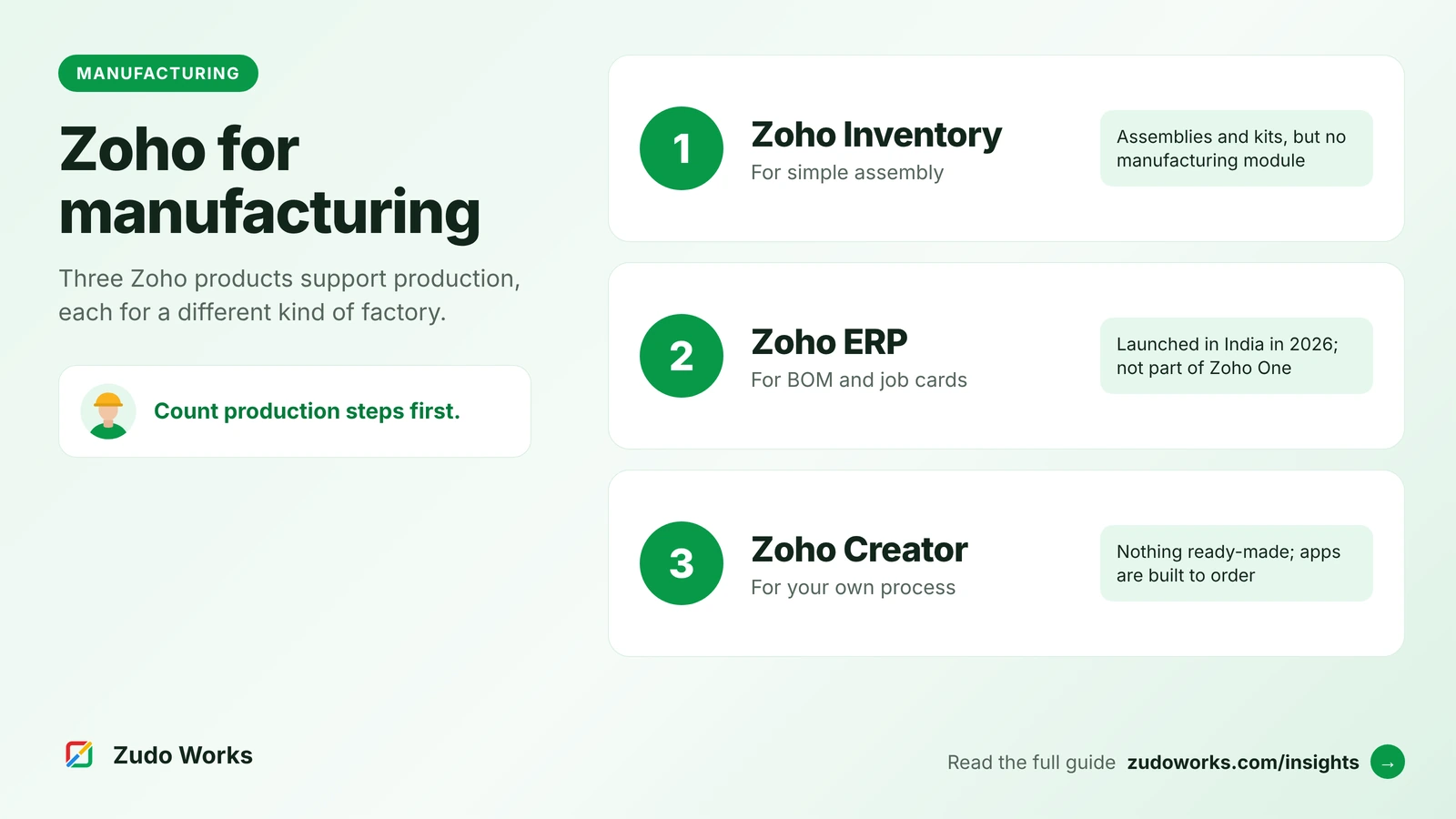
Zoho offers a manufacturer three routes. Zoho Inventory handles simple assembly but has no manufacturing module. Zoho ERP, launched in India in January 2026 and sold separately from Zoho One, has bills of materials, manufacturing orders, job cards, work centers, subcontracting and quality checks. Zoho Creator is for custom production apps built around your own process.
Search for “Zoho for manufacturing” and you will find confident answers that contradict each other. Some say Zoho has no production features at all. Others describe a full manufacturing ERP. Both are describing a real product, just not the same one.
Zoho has three separate ways to support production. Everything below was checked against Zoho’s product pages and help documentation in October 2026. Where Zoho does not state something, we say so.
The short answer
- Zoho Inventory handles simple assembly: it turns components into a finished item and adjusts stock. Zoho’s own knowledge base says it does not yet have a manufacturing module.
- Zoho ERP is a separate product with a real manufacturing module: bills of materials, manufacturing orders, job cards, a shop floor view, work centers, subcontracting and quality inspections. Zoho launched it in India in January 2026 and it is not part of Zoho One.
- Zoho Creator is a low-code platform. You can build production tracking, quality or maintenance apps around your own process, or a planning system of your own. Nothing is ready-made; it is built for you.
The three routes at a glance
| Area | Zoho Inventory | Zoho ERP | Zoho Creator |
|---|---|---|---|
| What it is | Stock and order management | A full ERP with finance, supply chain, payroll and manufacturing | A low-code platform for custom apps |
| Bill of materials | A component list on an assembly item | A Bill of Materials module, including subcontract BOMs | Whatever you design |
| Production orders | An assembly record that consumes components | Manufacturing orders with job cards and operations | Whatever you design |
| Shop floor and work centers | No | Yes: shop floor, work centers and work center timings | Built to order, for example shift logs or job tracking |
| Quality checks | No | Quality templates, rules and inspections | Built to order, for example NCR and CAPA |
| Where it is sold | Globally; plans vary by country | Published for India at the time of writing | Globally |
| In Zoho One? | Yes | No, it is a separate product | Yes |
| Effort to start | Low | An ERP implementation | A custom build |
Plans and limits change, so confirm them on the official pricing pages for Zoho Inventory, Zoho ERP and Zoho Creator.
Route 1: Zoho Inventory, for simple assembly
Zoho Inventory has composite items in two types. An assembly (formerly called a bundle) is for physically building one item from components: when you create the assembly, component stock goes down and the finished item gets its own stock. A kit groups existing items for sale without any assembly work. A composite item can contain another composite item, and a service such as labour can be one of the components, though not the only one.
That is enough for a business that packs sets, assembles a product from a fixed list of parts or does light finishing. It is not production management. Zoho says so directly: its knowledge base article on the subject states that Zoho Inventory does not yet support manufacturing modules, and suggests composite items as a workaround for basic assemblies that do not need a bill of materials.
This route has no work orders that move through stages, no routing, no capacity planning and no material requirements planning. Serial and batch tracking and bin locations depend on the plan.
Choose it when your “production” is one step, takes minutes or hours, and you mainly need accurate stock and costs.
Route 2: Zoho ERP, a real manufacturing module
Zoho ERP is the product many older articles do not know about. Zoho launched it in India in January 2026 as a single system for finance, supply chain, billing, payroll and spending, with purpose-built versions for manufacturing, distribution, retail and non-profits.
Its help documentation has full sections for the things Zoho Inventory lacks:
- Bill of Materials, including creating a manufacturing order straight from a BOM.
- Manufacturing orders with job cards, operations and a manufacturing dashboard.
- Shop floor screens and shop floor staff, with work centers, work center types and timings.
- Subcontract manufacturing: subcontract BOMs, subcontract orders, purchase orders and material transfers.
- Quality: templates, rules, inspections and inspection worklists.
The product is moving quickly. Zoho’s 2026 update notes list a work center calendar, manufacturing orders created from sales orders and quality inspections on purchase receipts. Some newer features are in early access or limited to higher plans.
Three limits matter before you plan around it:
- Availability. At the time of writing, Zoho’s ERP site, its rupee pricing and its tax and payroll features are published for India. We could not find an announced date for other countries. If you are outside India, ask Zoho first.
- It is not in Zoho One. Zoho’s pricing page states this plainly. Zoho ERP is licensed separately, per user, and each plan has a yearly cap on transactions.
- It is an ERP project. Moving finance, stock and production into one system needs data migration, opening balances, process design and training.
Choose it when you are in India, you want finance and production in one Zoho system, and your process fits a standard BOM, job card and work center model.
Route 3: Zoho Creator, built around your process
Zoho Creator is a low-code platform: forms, a database, workflows, Deluge scripts, mobile apps and portals. It contains no manufacturing logic until someone builds it.
Zoho’s own manufacturing page for Creator is careful about this. It describes Creator as a digital extension layer that sits beside a core system such as SAP, Oracle, Infor or NetSuite, with that system remaining the source of records. The examples it gives are the processes ERPs handle poorly: safety and near-miss reports, purchase requisitions, shift handover logs, permits and gate passes, engineering change requests, vendor onboarding, quality NCR and CAPA, and maintenance breakdowns. Zoho also has a page about building a material requirements planning solution on Creator, and that too is something you design, not a product you switch on.
So Creator fits two situations well:
- Beside an ERP or an accounting system, to digitize the paper, spreadsheet and WhatsApp processes around production.
- As the production system for a specific process that standard software models badly, for example job work with customer-supplied material, made-to-measure products or a multi-stage process with its own approvals.
The cost is the build and its upkeep. An app that tracks jobs through stages is a contained project. A full planning engine with scheduling and capacity is a serious software project, and should be compared honestly with buying one. Our Zoho Creator development page explains how we scope this kind of build, and Zoho Creator vs Power Apps compares it with Microsoft’s platform.
Choose it when your process is the unusual part, or when you already have a system of record and need the workflows around it.
What Zoho covers well around production
Most of a manufacturer’s software is not production software, and this is where Zoho is strongest:
- Zoho CRM for enquiries, quotes, dealers and distributors, samples and repeat orders, with custom modules where a standard pipeline does not fit.
- Zoho Books for invoicing, purchases and tax, linked to Zoho Inventory for stock.
- Zoho Analytics for dashboards that combine sales, stock, purchase and production data. The same rules apply as in our guide to building a data foundation in Zoho Analytics.
- Zoho IoT, a separate low-code platform that Zoho positions for machine monitoring, predictive maintenance and energy tracking.
Connecting these to a non-Zoho production system is an integration job; our guide to Zoho Flow, Deluge and custom middleware explains which tool suits which integration.
When dedicated manufacturing software is the better choice
If scheduling and planning are the hard part of your business, look at software built for exactly that. These are fair descriptions taken from each vendor’s own site:
- MRPeasy describes itself as MRP software for small manufacturers and says it is ideal for companies with 10 to 200 employees. It covers production planning, inventory, sales, procurement and finances.
- Odoo Manufacturing offers an MRP scheduler that plans work at each work center by capacity, tablets on the shop floor, automatic quality checks, maintenance requests and product lifecycle management.
- ERPNext is open-source ERP with multi-level BOMs, work orders, job cards, production planning, subcontracting and capacity planning.
- Katana offers bills of materials with subassemblies, a shop floor app and tracking of outsourced production, aimed at small and mid-sized product businesses.
- TranZact is built for Indian MSME manufacturers and says it works alongside systems such as Tally.
Choosing one of these does not rule Zoho out. A common and sensible design is a dedicated MRP for production, with Zoho CRM in front for sales and Zoho Analytics on top for reporting.
How to decide: five questions
- How many steps does production have? One step points to Zoho Inventory. Several operations across machines or people points to Zoho ERP or dedicated MRP.
- Do you need scheduling and capacity planning, or only tracking of what was made and what it consumed?
- Where are you? Zoho ERP is an option today in India. Elsewhere, plan around Zoho Inventory, Creator or a dedicated product.
- Which system holds the accounts? If Tally, SAP or another system stays, you need integration, not replacement.
- How standard is your process? The more unusual it is, the stronger the case for a Creator app built around it.
A sensible first project
Whatever you choose for production, start with the part that is safe to change. For most manufacturers that is the front office: enquiries, quotes and order follow-up in Zoho CRM, with stock and invoicing connected. It shows quickly whether your team will use the system, and it does not touch the shop floor.
Then map production on paper before choosing software for it: every stage, who records what, and which numbers you need at the end of the day. That page usually makes the choice between the three routes clear. To size the work, estimate your project.
Frequently asked questions
Zoho ERP has a manufacturing module with bills of materials, manufacturing orders, job cards, shop floor screens, work centers, subcontract manufacturing and quality inspections. Zoho launched it in India in January 2026. Zoho Inventory does not have a manufacturing module; it offers assemblies and kits through composite items.
Not as a separate module. An assembly in Zoho Inventory has a list of components that are consumed when the finished item is built, which works for simple, single-step assembly. Zoho's knowledge base says manufacturing modules are not yet supported in Zoho Inventory.
No. Zoho's ERP pricing page states that Zoho ERP is not included in Zoho One. It is a separate product with its own per-user plans.
At the time of writing, Zoho's ERP website, pricing and tax features are published for India, and we could not find an announced date for other countries. Check with Zoho for your country before planning around it.
It can be built into one, but nothing is ready-made. Zoho positions Creator for manufacturers as an extension layer beside a core system, for processes such as quality NCR and CAPA, maintenance, shift handover and engineering changes. A full planning and scheduling engine on Creator is a substantial custom build.
Related services: Zoho Creator development · Zoho integrations · Custom software · Zoho development