
Most teams that search for Zoho Expense vs Expensify are leaving spreadsheets or a shoebox of receipts, or are unhappy with the tool they have. Both products scan receipts, apply a policy, route reports for approval and push the result into the accounts. The real differences are in packaging: which plan a feature starts on, which cards and accounting systems connect, and how travel is handled.
Every plan name, limit and feature below was read on Zoho’s and Expensify’s own pages on 25 November 2026, using Zoho’s United States edition. We do not quote prices, because both vendors change them and show them by region; see the official Zoho Expense pricing and Expensify pricing pages. We build on Zoho, so read this with that in mind. The sections below say where Expensify is the better fit.
The short answer
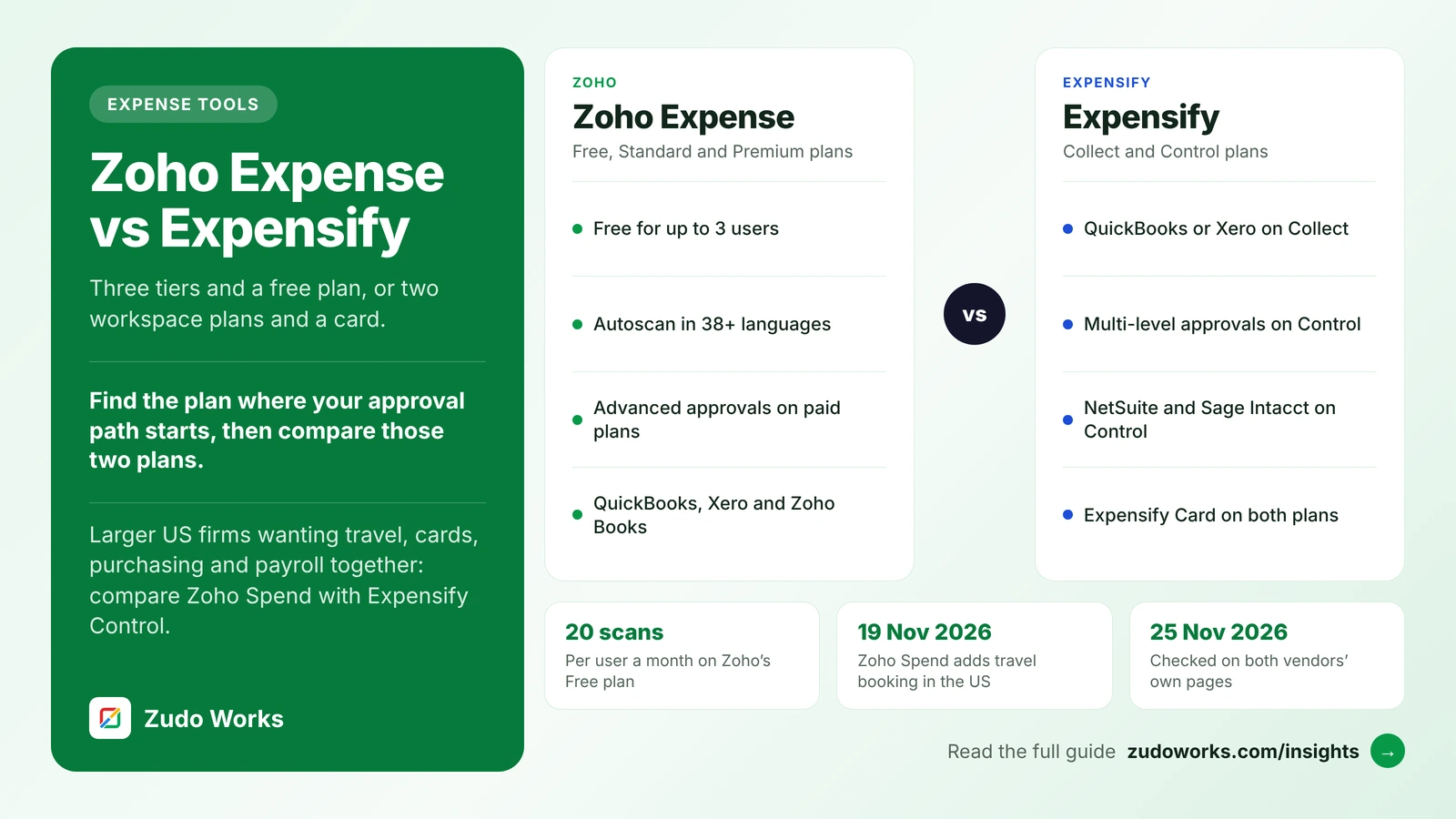
- Zoho Expense has three tiers and a free plan for 3 users. Its US plan comparison lists Free, Standard and Premium, with a Custom plan for large companies. Limits rise by tier: receipt scans, policies, workflow rules and custom functions.
- Expensify has two workspace plans. Collect covers receipt scanning, reimbursement, a simple approval workflow and a QuickBooks or Xero connection. Control adds multi-level approvals, ERP and HR integrations, several corporate card connections, custom expense rules and SAML single sign-on.
- Expensify leans on its own card. Its help centre says the Expensify Card works with both plans and that some pricing benefits apply only to eligible Control workspaces. Zoho Expense connects to existing Visa, Mastercard and commercial card feeds instead.
- Zoho Expense goes further on rules. Even its paid entry plan lists 25 policies, advanced approvals and workflow rules. If your policy has many exceptions, that depth matters.
- For larger US companies, Zoho now points to Zoho Spend. On 19 November 2026 Zoho added built-in travel booking to Zoho Spend, its wider spend platform, in the United States.
Zoho Expense and Expensify at a glance
| Area | Zoho Expense | Expensify |
|---|---|---|
| Plans | Free, Standard, Premium; Custom for large firms | Collect and Control; a free Submit workspace for individuals |
| Free option for a company | Free plan for up to 3 users | No free company plan on the help page we read |
| How it is billed | Per user per month, monthly or yearly | See the Expensify pricing page; Card use can change the price on Control |
| Receipt scanning | Autoscan in 38+ languages: 20, 200 or 1,000 scans per user per month by plan | SmartScan from the app, by email or by text message |
| Approvals | Simple on Free; advanced (hierarchical, parallel, delegation) on paid plans | Simple on Collect; multi-level on Control |
| Accounting | Zoho Books, QuickBooks Online, QuickBooks Desktop, Xero; Oracle, SAP, NetSuite and Dynamics as add-ons | QuickBooks or Xero on Collect; NetSuite and Sage Intacct on Control |
| Cards | Real-time Visa and Mastercard feeds; commercial feeds including American Express, AirPlus and HSBC | Expensify Card on both plans; several card connections on Control |
| Mileage | Odometer, map, GPS and automatic tracking | GPS (mobile), map, manual and odometer |
| Travel | Travel requests, self-booking tool, itineraries and travel policy | Expensify Travel, booked inside the app when enabled |
| Single sign-on | SSO with Active Directory, Okta and JumpCloud; SCIM provisioning | SAML SSO on Control |
How the plans are packaged
Zoho Expense. Zoho’s help article on plans describes Free as being “for small businesses and freelancers to track expenses and mileage claims”, Standard for growing businesses that manage corporate cards, Premium for businesses “with a high volume of expenses, in need of powerful controls and robust workflows”, and Custom for companies that need a customised, integrated set-up. Paid plans are billed per user, monthly or yearly. The US plan comparison shows the limits that separate them:
- Receipt scans: 20 Autoscans per user per month on Free, 200 on Standard and 1,000 on Premium, with line-item capture on the two paid plans.
- Policies: 1 on Free, 25 on Standard and 100 on Premium.
- Automation: 10 workflow rules on Standard and 25 on Premium. Premium also lists 25 custom functions, 5 custom modules and 10 custom schedulers.
- Audit trail: basic on Free, advanced on the paid plans.
Expensify. Expensify’s help centre describes two workspace plans. Collect is “for organizations that need straightforward expense management and reimbursements”. Control is “for organizations that need advanced spend management, automation, integrations, and administrative controls”. The comparison table on the same page marks six things as Control only: multi-level approvals, ERP integrations, HR and payroll integrations, multiple corporate card connections, custom expense rules and SAML/SSO. There is also a free Submit workspace, meant for an employee whose company has not adopted Expensify and who wants to code expenses and send them to an approver.
The practical reading: a team of three can run Zoho Expense free, within its scan and policy limits. A team that needs two approval steps needs a paid Zoho plan or Expensify Control. A team that only needs one approver and a QuickBooks or Xero link fits Expensify Collect or Zoho Expense Standard, and the choice comes down to the app people prefer and the price on the day.
Receipt capture and expense entry
Both tools read receipts so people do not type them in.
Zoho Expense calls this Autoscan and lists it in 38+ languages. The monthly scan allowance is per user and depends on the plan, as above, so a heavy traveller on the Free plan can run out. Paid plans capture line items as well as totals, which helps when a hotel bill mixes room, meals and parking that sit in different categories.
Expensify calls it SmartScan. Its help centre lists several ways in: the mobile camera (including a rapid-fire mode for a stack of receipts), dragging files onto the desktop app, emailing receipts to receipts@expensify.com, or texting a photo to 47777 from a phone number added to the account. The page we read did not state a monthly scan limit.
Zoho’s own Expensify comparison page says Expensify reads receipts in 10+ languages against Zoho’s 38+. That page is vendor-written and dated March 2025, so treat its claims about Expensify as questions to check, not settled fact. If your team files receipts in several languages, test a real batch in both trials.
Policies, approvals and audit
This is where the two differ most for a growing company.
Zoho Expense lists hierarchical approval, parallel approval, approval delegation and custom approval workflows, with “Advanced approval” on Standard and Premium. Policy checks include duplicate detection, fraud detection and an audit violations report. Budgets can be set and compared with actual spend, with alerts at thresholds. Cash advances run through their own approval flow, in several currencies.
Expensify keeps the entry plan simple on purpose: Collect has a single approval step. Multi-level approvals and custom expense rules start on Control. For many small firms one approver is enough, and fewer settings means less to maintain. Once a company has department heads and a finance check, Control is the plan to compare against Zoho’s paid plans.
If your rules go beyond what any settings screen offers, Zoho Expense Premium lists custom functions, which are written in Deluge, Zoho’s scripting language. Our Deluge script examples show what that code looks like, and our Zoho Flow vs Deluge guide explains when you need code and when a no-code flow will do.
Corporate cards
The two vendors take opposite approaches here.
Expensify issues its own card. The help centre says the Expensify Card works with both Collect and Control, and that “certain subscription pricing benefits are only available with eligible Control workspaces”. In other words, using the card can affect what you pay; the details are on Expensify’s pricing page. Control also allows several corporate card connections, so you can keep an existing bank card alongside it.
Zoho Expense does not issue a card in the plan comparison we read. It connects the cards you already have: the page lists real-time feeds for Visa and Mastercard, commercial card feeds, a reconciliation dashboard and auto-matching of card lines to receipts, with American Express, AirPlus and HSBC named among the card integrations. If the company already has a bank card programme it is happy with, that avoids a change. If you would rather move to a card built into the expense tool, Expensify has the tighter link.
Mileage and per diem
Both handle mileage. Zoho Expense lists odometer entry, mileage “via Maps with screenshot”, GPS tracking and automatic tracking. Expensify’s help centre lists four ways to record a distance expense: GPS tracking on iOS and Android, a map route from start to end, manual entry, and odometer readings. Rates are set by the workspace admin, and Control workspaces can update the government rate automatically.
Both handle per diem too. Zoho Expense lists per diem rates and per diem automation. Expensify’s help centre describes per diem as a fixed daily allowance that a workspace admin must switch on.
One correction worth making. Zoho’s Expensify comparison page says Expensify lacks built-in mileage tracking and per diem rules. Expensify’s own help pages, read the same day, describe GPS distance tracking and per diem. The Zoho page is dated March 2025, and both products have changed since. Do not choose on that point.
Travel booking, and where Zoho Spend fits
Expensify Travel is built into the app. Its help page says that when travel is enabled on a workspace, people choose Book travel from the create menu, search and book a flight, and see a red “Out of policy” alert when a choice breaks the rules. The company’s travel policy can require approval before the booking is confirmed. The booking receipt is SmartScanned into an expense report automatically. Authorised arrangers can book for others, and guest booking can be switched on.
Zoho Expense lists travel requests, an online self-booking tool, itinerary management, travel policy and trip automation in its plan comparison. Check on the pricing page which plan each of these needs before relying on them.
Zoho Spend is Zoho’s wider spend platform. Its pricing page lists Travel, Expense Management, Cards, Procurement, AP Automation and Payroll, priced per person per month with no minimum number of licences. On 19 November 2026 Zoho announced built-in travel in Zoho Spend in the United States. The release says the launch is “built for mid-market and enterprise” and lists:
- Access to 500+ airlines, 1.6M+ hotel properties and 40,000+ car rental locations through GDS, NDC and direct connections.
- Negotiated company fares shown at booking, out-of-policy options highlighted, and exceptions sent for approval before confirmation.
- Travel arrangers who can book for employees and guests.
- 24/7 support for disruptions, tracking of unused airline credits, and carbon emissions per trip.
- Every booking captured in the expense report automatically.
The release and the Spend pricing page both describe travel booking as an add-on charged per trip. So, for a US company of a few hundred people that wants travel, cards, purchasing and payroll on one policy engine, the fair comparison is now Zoho Spend against Expensify Control, not Zoho Expense on its own. For a 20-person team that books the odd trip, Zoho Expense or Expensify is still the right scale.
Accounting and other integrations
QuickBooks and Xero. Both connect. Expensify offers QuickBooks or Xero from Collect. Zoho Expense lists QuickBooks Online, QuickBooks Desktop and Xero. If you are also choosing the ledger, see our Zoho Books vs QuickBooks Online and Zoho Books vs Xero comparisons.
ERP. Expensify lists NetSuite and Sage Intacct on Control. Zoho Expense lists Oracle, SAP, NetSuite and Microsoft Dynamics as add-ons on Standard and Premium. Sage was not named on the Zoho page we read, so a Sage Intacct company should ask Zoho directly or plan a custom connection.
HR. Expensify Control lists Workday and BambooHR. Zoho Expense lists Zoho People and Zoho Payroll, and HRMS add-ons on Premium.
The Zoho ecosystem. This is Zoho Expense’s strongest card. It lists Zoho Books (including card reconciliation in Books), Zoho CRM, Zoho Projects, Zoho Analytics and Zoho Cliq, as well as Google Workspace, Microsoft 365 and Slack. If you are deciding between Zoho and Microsoft for the wider suite, see our Zoho One vs Microsoft 365 comparison. If you already run on Zoho, or plan to, that link saves real work. Our Zoho and QuickBooks integration guide explains the options if your accounts stay in QuickBooks while the rest moves to Zoho.
AI and automation
Both vendors now add AI to expenses. We did not test Expensify’s AI features for this guide, so ask Expensify for a demonstration on your own receipts. In the Zoho Spend travel release, Zoho says its Zia AI flags unusual spending and policy deviations, that “Ask Zia” answers policy questions for employees, and that Zoho MCP connects AI assistants to travel and expense workflows. Our guide to Zoho AI explains Zia and how Zoho charges for it. With either vendor, ask which AI features are included in your plan and which are charged by use.
Which one fits your team
| Your situation | Likely fit | Why |
|---|---|---|
| Up to 3 people, light expenses | Zoho Expense Free | Free for 3 users, 20 scans per user per month, one policy |
| Small team, one approver, QuickBooks or Xero | Either | Expensify Collect or Zoho Expense Standard; test both apps with real receipts |
| Wants a company card built into the expense tool | Expensify | Expensify Card on both plans, with pricing benefits on eligible Control workspaces |
| Many policies, department approvals, budgets | Zoho Expense Standard or Premium | 25 or 100 policies, advanced approvals, budgets and workflow rules |
| Already on Zoho Books, CRM or Projects | Zoho Expense | Native links, including card reconciliation in Zoho Books |
| On NetSuite or Sage Intacct with Workday or BambooHR | Expensify Control | Those ERP and HR integrations are listed on Control |
| US mid-market firm wanting travel, cards, purchasing and payroll together | Zoho Spend, compared with Expensify Control | Spend added built-in travel booking in the US on 19 November 2026 |
A checklist before you choose
- Count receipts per person per month, and check them against each plan’s scan allowance.
- Write down your approval path, step by step, and find the plan where it starts.
- List the cards you use today and decide whether you would change them.
- Confirm the exact accounting connection: QuickBooks Online or Desktop, Xero, NetSuite or Sage Intacct.
- Check mileage and per diem rates for each country you claim in.
- Ask which travel features are included and which are charged per trip.
- Run one real trip end to end in each trial: booking, receipts, approval, reimbursement and the accounting entry.
- Check how expense data and receipt images come out, as files, if you leave.
The tool is half the job. The categories, policies and approval paths you set up decide whether people use it. Our Zoho One implementation checklist shows the order we work in when expenses sit alongside other Zoho apps.
What to take from this
Expensify keeps things simple: two plans, one app, and its own card. Zoho Expense gives more rules and limits to work with, a free plan for very small teams, and the closest fit with Zoho Books and the other Zoho apps. For larger US companies, Zoho Spend now adds travel booking, procurement and payroll on top. Start from your approval path and your accounting system, find the plan where each need is met, and compare those plans on the vendors’ own pricing pages.
If you choose Zoho and need expenses joined to your accounts, CRM or a custom app, our Zoho integrations page explains how we scope that work.
Frequently asked questions
Frequently asked questions
Is Zoho Expense better than Expensify?
It depends on the team. Zoho Expense suits companies that want a free plan for up to 3 users, many policies and advanced approvals, and a close link to Zoho Books and other Zoho apps. Expensify suits teams that want a simple app, its own Expensify Card, and two clear plans: Collect and Control.
Is Zoho Expense free?
Yes, for small teams. On 25 November 2026 the Zoho Expense US plan comparison listed a Free plan for up to 3 users, with 20 Autoscans per user per month, one policy and simple approval. Standard and Premium are paid per user, billed monthly or yearly.
What is the difference between Expensify Collect and Control?
Collect covers receipt scanning, reimbursement, a simple approval workflow and a QuickBooks or Xero connection. Control adds multi-level approvals, ERP integrations such as NetSuite and Sage Intacct, HR integrations such as Workday and BambooHR, several corporate card connections, custom expense rules and SAML single sign-on.
Does Zoho Expense integrate with QuickBooks and Xero?
Yes. The Zoho Expense plan comparison lists QuickBooks Online, QuickBooks Desktop and Xero, as well as Zoho Books. Oracle, SAP, NetSuite and Microsoft Dynamics are listed as add-ons on the Standard and Premium plans.
Does Expensify track mileage and per diem?
Yes. Expensify's help centre describes four ways to record distance: GPS tracking on iOS and Android, a map route, manual entry and odometer readings. It also describes per diem as a fixed daily allowance that a workspace admin switches on.
What is the difference between Zoho Expense and Zoho Spend?
Zoho Expense is Zoho's expense reporting app. Zoho Spend is its wider spend platform, listing travel, expense management, cards, procurement, AP automation and payroll. On 19 November 2026 Zoho added built-in travel booking to Zoho Spend in the United States, as an add-on charged per trip.