

A common set-up in Australia, New Zealand, the UK and the US looks like this: the sales team works in Zoho CRM, the warehouse may use Zoho Inventory, and the bookkeeper or accountant keeps the books in QuickBooks Online and has no wish to move. The question is then how to stop people typing the same customer, item and invoice into two systems.
There is no single “Zoho to QuickBooks” switch. Zoho has built a separate connection for each of its apps, and they behave differently. The details below come from Zoho’s help pages and Intuit’s developer documentation, opened on 20 November 2026 and linked in each section. We build on Zoho, including integrations of this kind, so we have tried to be exact about what the standard connections do before suggesting any custom work.
The short answer
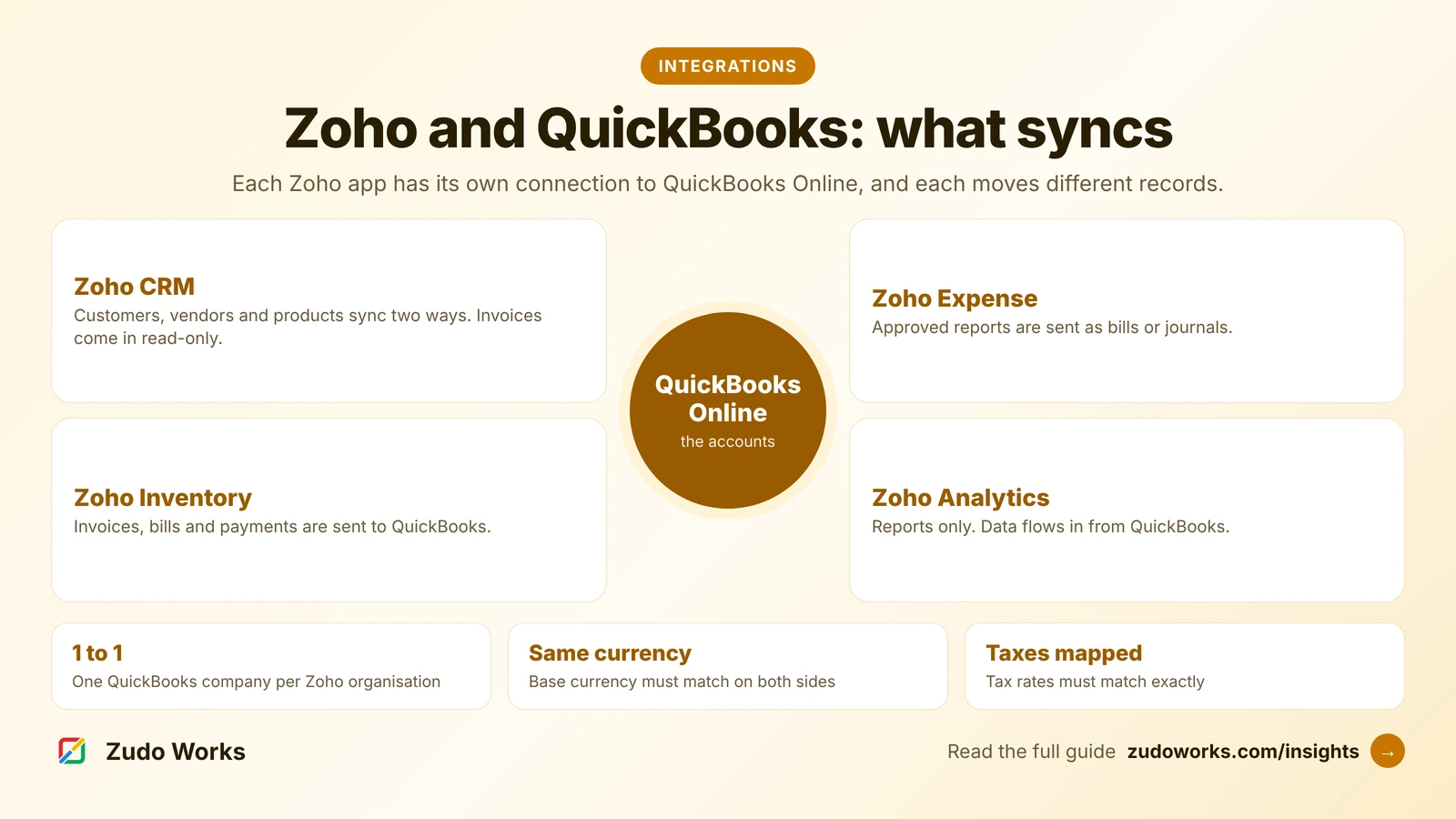
- Zoho CRM has a native QuickBooks Online integration. Customers, vendors and products sync both ways. Estimates, invoices and purchase orders come from QuickBooks into CRM as read-only records.
- Zoho Inventory and Zoho Billing send invoices, credit notes and payments to QuickBooks Online. Zoho Inventory also sends bills. The chart of accounts and customers come the other way.
- Zoho Expense sends approved expense reports to QuickBooks Online as bills or journals.
- Zoho Analytics only reads. It copies QuickBooks data in on a schedule for reports and dashboards, and it is the one connection we found that also covers QuickBooks Desktop.
- Zoho Flow and Deluge fill the gaps, such as creating a QuickBooks invoice when a CRM deal is won.
- The rules that catch people out: one QuickBooks company per Zoho organisation, the same country and base currency on both sides, and tax rates that match exactly.
Every Zoho and QuickBooks connection at a glance
The table lists what each standard connection moves. “QuickBooks” here means QuickBooks Online unless Desktop is named.
| Zoho app | Into Zoho from QuickBooks | From Zoho into QuickBooks |
|---|---|---|
| CRM | Customers, vendors, products; estimates, invoices and purchase orders (read-only) | Contacts or accounts, vendors, products |
| Inventory | Chart of accounts, customers, vendors | Invoices, credit notes, bills, payments, the items on them |
| Billing | Chart of accounts, customers | Invoices, credit notes, payments, refunds, new customers, items |
| Expense | Expense accounts, employees, customers, classes | Expense reports as bills, journals or expenses |
| Analytics | Accounts, customers, invoices, payments, items and more, for reporting | Nothing |
| Flow | Whatever you build from 7 triggers | Whatever you build from 17 actions |
Zoho CRM and QuickBooks: the native integration
Zoho CRM now has its own QuickBooks Online integration, built by Zoho. It is installed inside CRM from Marketplace, under Integration, and Zoho’s help article sets out how it behaves.
What syncs both ways. Contacts, Accounts, Vendors and Products. You choose whether QuickBooks customers map to CRM Contacts or to CRM Accounts. It cannot be both, and the help article says the choice cannot be edited afterwards, so decide this before you connect. Products sync only when they are “Inventory” type items in QuickBooks.
What comes one way, from QuickBooks. Estimates (Quotes in CRM), Invoices and Purchase Orders. These arrive in CRM locked, with a link back to the QuickBooks record. Once the integration is configured, the Create Estimate, Create Invoice and Create Purchase Order buttons in CRM open QuickBooks, and the finished document then syncs back. Zoho’s launch post puts it plainly: changes to these records must be made in QuickBooks.
That design suits most teams. Sales staff see what has been quoted, invoiced and ordered against each customer without a QuickBooks login, and the accounts stay under the control of whoever keeps the books.
The rules.
- Only a Super Admin can enable and configure it.
- Each Zoho CRM account links to one QuickBooks company at a time.
- The home currency must be the same on both sides. Currencies the integration creates in CRM start with an exchange rate of one, which you must correct by hand.
- For duplicates you choose Skip, Overwrite or Clone, and for Overwrite you choose which side wins.
- Records that fail to sync go to an error list. Sync can be paused for contacts, accounts, vendors and products.
- If delete sync is on, deleting an inventory record in QuickBooks removes it from CRM for good.
Edition and region: check your own account. Zoho’s two pages disagree. The help article lists Professional edition and above and says the integration is available in all data centres. The launch post, updated on 7 July 2026, says Enterprise and above, with a phased rollout that named the US, Australia, China, Japan and Canada data centres. The launch post also says the integration comes at no additional cost and that pricing may be introduced later. The quickest test is to open Marketplace in your own CRM and look for QuickBooks under Integration.
Third-party extensions. Zoho Marketplace also lists QuickBooks extensions for CRM made by other developers. One we looked at is a paid extension that lists payments and tax data among the records it syncs, which the native integration does not. Support for these comes from the developer, not from Zoho.
Zoho Inventory and QuickBooks Online
This connection suits a business that sells and ships from Zoho Inventory and wants the accounting entries to land in QuickBooks. It is set up in Zoho Inventory under Settings, Accounting. The help page gives these rules:
- QuickBooks to Zoho Inventory: the chart of accounts is imported by default, and you can choose to import customers and vendors. Changes made in QuickBooks are picked up by an auto-sync that runs once a day, and there is a Sync Manually button.
- Zoho Inventory to QuickBooks: invoices, credit notes, bills and payments, from a start date you choose. This direction is one-way.
- Items: the items on a synced transaction are created in QuickBooks as Items and Services. Items that already exist in QuickBooks are not imported into Zoho Inventory automatically.
- Discounts: QuickBooks Online does not support discounts on a single line, so line discounts arrive as one discount on the invoice total.
- Stock value: journal entries update the Inventory Asset and Cost of Goods Sold accounts in QuickBooks, but only when the sync of invoices with payments and bills with payments is switched on.
The help page names QuickBooks Online only. If your team has not chosen an inventory app yet, our comparisons of Zoho Inventory and Katana and Fishbowl and Zoho Inventory cover the alternatives, including ones built around QuickBooks.
Zoho Billing and Zoho Expense
Zoho Billing handles subscriptions and recurring invoices. Its QuickBooks Online integration is listed for the Standard, Premium and Enterprise plans. Accounts come in from QuickBooks by default and customers if you choose. Invoices, including drafts, go out as QuickBooks invoices, credit notes as credit memos and items as products and services. Transactions are exported as they are created, updated or deleted, while customers and accounts sync once a day.
Zoho Expense handles staff expense claims. Its integration lists the QuickBooks Online Simple Start, Essentials, Plus and Advanced plans. Expense accounts in QuickBooks become categories in Zoho Expense, employees with an email address become submitters, customers come across, and classes become tag options. Approved reports are then exported in one of three forms:
- As a bill: one bill per report, with each expense as a line and the employee as the vendor.
- As a journal: each expense as a debit line. On Simple Start this is the only choice for reimbursable expenses.
- As expenses: for non-reimbursable spending such as company card purchases.
Export can happen on approval or when an admin triggers it. The page notes that the reimbursement itself usually has to be recorded in QuickBooks by hand.
Reports in Zoho Analytics, and QuickBooks Desktop
Zoho Analytics does not change anything in QuickBooks. Its QuickBooks Online connector copies data in on a schedule, including accounts, customers, vendors, invoices, payments, items, expenses and journal entries, and Zoho says it comes with over 50 prebuilt reports and dashboards. It is useful when you want QuickBooks figures beside CRM or production data on one dashboard.
- How often: every hour on the Zoho Analytics Enterprise plan; every 3, 6 or 12 hours on Standard and above; once a day on Basic and above. A manual sync can be run up to five times a day.
- Who sets it up: a QuickBooks Online user who is an administrator of the company, and only one setup is allowed per company.
- If it fails: the schedule is suspended after five failures in a row.
QuickBooks Desktop. Every operational integration above names QuickBooks Online. The one Zoho connection we found for Desktop is the Zoho Analytics Desktop connector, which works through Intuit’s QuickBooks Web Connector and a .QWC file installed on the Desktop machine. It is for reporting only. If you run Desktop and want CRM or inventory records to sync, plan for third-party middleware or a custom build, and ask the supplier to show it working on your Desktop version.
Filling the gaps with Zoho Flow and Deluge
The most common request the native CRM integration does not cover is this: when a deal is won in Zoho CRM, create the invoice in QuickBooks automatically. The native integration only brings invoices in. Two Zoho tools can push records out.
Zoho Flow. Flow’s QuickBooks app lists 7 triggers (new account, customer, estimate, invoice, sales receipt or vendor, and payment received) and 17 actions, among them create customer, create estimate, create invoice, create sales receipt, create vendor, create bill and send invoice. A flow that starts from a CRM deal, finds or creates the QuickBooks customer and then creates the invoice needs no code. Flow can also sit between QuickBooks and a Zoho Creator app.
Deluge. Zoho CRM has a built-in Deluge task, intuit.quickbooks, that can create, fetch, search and update QuickBooks records from a custom function once the QuickBooks connector from Zoho Marketplace is installed. For anything it does not reach, a function can call the QuickBooks Online API directly with invokeUrl. Our guide to Zoho Flow versus Deluge explains how to choose between the two.
Intuit’s limits. Custom code has to respect the QuickBooks Online API limits: 500 requests a minute for each company, 10 requests a second for each company and app, up to 30 payloads in one batch request and 40 batch requests a minute. A query returns at most 1,000 records, and a request that runs past 120 seconds times out. When the limit is hit, QuickBooks answers with HTTP 429 and Intuit says to wait 60 seconds before retrying. A first load of several thousand customers therefore needs batching and a retry routine; see error handling in Deluge. Zoho has limits of its own, covered in our guide to Zoho CRM API limits.
Five rules that catch people out
- One company to one organisation. Zoho CRM, Zoho Inventory, Zoho Billing and Zoho Expense each link one Zoho organisation to one QuickBooks company. A group with three QuickBooks companies cannot point them all at one Zoho Inventory organisation.
- Same country and base currency. Zoho Inventory and Zoho Billing require the QuickBooks company to be in the same country as the Zoho organisation, with the same base currency. An Australian QuickBooks Online company needs a Zoho organisation set to Australia with Australian dollars as the base currency. Zoho CRM and Zoho Expense require the same home currency.
- Taxes are mapped, and the rates must match. Each tax in Zoho is mapped to a tax in QuickBooks with the same rate. Set up GST, VAT or sales tax codes on both sides first. For documents that mix taxable and non-taxable lines, Zoho’s pages say to map the non-taxable lines to a zero per cent tax.
- Existing records do not merge by themselves. Items already in QuickBooks are not pulled into Zoho Inventory, and in CRM you must choose a duplicate rule. Clean the customer and item lists on both sides before the first sync, or you will create doubles.
- Timing differs by app. Some data moves when a record is saved and some once a day. Tell the team which is which, so nobody chases a customer that will appear tomorrow morning.
Checklist before you connect
- Confirm you are on QuickBooks Online, and note the plan and country edition.
- Check the country and base currency of each Zoho organisation against QuickBooks.
- Decide which system owns each record: customers, items, prices, invoices, payments.
- For Zoho CRM, decide whether QuickBooks customers map to Contacts or to Accounts.
- Remove duplicate customers and items on both sides, and mark unused QuickBooks items inactive.
- Create matching tax codes on both sides, including a zero per cent code.
- Pick the start date for exported transactions and agree it with your accountant.
- Take a backup or export from both systems, then test with a handful of records first.
- Name the person who checks the sync error list each week.
Keep QuickBooks, or move the books to Zoho
An integration is the right answer when the accountant is settled in QuickBooks, payroll or bank feeds depend on it, or the business simply has no reason to change. Moving to Zoho Books is worth a look when most of the business already runs on Zoho, because Zoho Books shares customers, items and invoices with Zoho CRM and Zoho Inventory inside one organisation, with no sync to look after.
The move takes real work. Zoho’s migration guide describes a file-based process: export reports from QuickBooks Online, then import the chart of accounts, contacts, items, opening balances and open transactions into Zoho Books in a set order. Its limitations page lists what does not carry over cleanly. Inactive customers and items arrive as active with “(Deleted)” in the name, for example, and item units are not imported. Our comparison of Zoho Books and QuickBooks covers the choice itself. In Australia and New Zealand, where many firms use Xero, see Zoho Books versus Xero.
When a custom integration is worth it
Start with the standard connections. They are maintained by Zoho, and for many businesses they are enough. A custom build earns its cost in cases like these:
- Invoices or estimates must be created in QuickBooks from Zoho CRM or a Zoho Creator app without anyone retyping them.
- You run more than one QuickBooks company, or the country and currency rules above do not fit your structure.
- You need custom fields, classes, locations or project codes carried across.
- Payments recorded in QuickBooks must update a deal, a job or a customer portal in Zoho.
- You are on QuickBooks Desktop.
This is work we do. We build on Zoho for businesses in Australia, New Zealand, the UK and the US, and our Zoho integrations page describes how we scope it. We work remotely from India, a fixed price is agreed in writing before work starts, and the Zoho and QuickBooks accounts stay in your name. See pricing. We are an independent Zoho development team; our Zoho partner application is in progress.
Watch and share
The same guide as a short video, on the channels where we post it. Share the one that suits the person you are sending it to.
- YouTube: the 50-second video
- YouTube Shorts: the vertical version
- Instagram: the Reel
- Facebook: the Reel
- LinkedIn: Zudo Works page
- LinkedIn: Arunkumar V
- Instagram: the four-slide guide
- Facebook: the four-slide guide
- LinkedIn: Zudo Works page, four slides
- LinkedIn: Arunkumar V, four slides
- Threads: the short version
- Mastodon: the short version
Frequently asked questions
Frequently asked questions
Does Zoho integrate with QuickBooks?
Yes. Zoho CRM, Zoho Inventory, Zoho Billing, Zoho Expense, Zoho Analytics and Zoho Flow each have their own connection to QuickBooks Online. They sync different records in different directions, so check the one for the app you use. There is no single switch that links every Zoho app to QuickBooks at once.
Can Zoho CRM create invoices in QuickBooks?
Not through the native integration on its own. It brings QuickBooks estimates, invoices and purchase orders into Zoho CRM as read-only records, and the create buttons in CRM open QuickBooks. To create a QuickBooks invoice automatically from a CRM deal, use Zoho Flow's create invoice action or a Deluge custom function.
Is the Zoho CRM and QuickBooks integration free?
Zoho's launch post says the native integration is available at no additional cost and that pricing may be introduced in the future. You still need a Zoho CRM edition that includes it and a QuickBooks Online subscription. Third-party QuickBooks extensions on Zoho Marketplace are priced separately by their developers.
Does Zoho work with QuickBooks Desktop?
Only for reporting, as far as Zoho documents it. Zoho Analytics has a QuickBooks Desktop connector that uses the QuickBooks Web Connector. The Zoho CRM, Zoho Inventory, Zoho Billing and Zoho Expense integrations name QuickBooks Online. Syncing records with Desktop needs third-party middleware or a custom build.
Can I connect more than one QuickBooks company to Zoho?
Not to the same Zoho organisation. Zoho CRM links one QuickBooks company at a time, and Zoho Inventory, Zoho Billing and Zoho Expense each allow one QuickBooks organisation per Zoho organisation. Groups with several companies usually need separate Zoho organisations or a custom integration.
How often does Zoho sync with QuickBooks?
It depends on the app. Zoho Billing exports transactions as they are created or changed. Zoho Inventory picks up QuickBooks changes once a day and has a manual sync button. Zoho Expense can export a report on approval. Zoho Analytics syncs every 1 to 24 hours depending on the plan.