
On a feature list the two products look alike: an online database, forms and reports, rules that run when data changes, and sign-in for your users. The differences that decide a project are plainer: who pays for what, where the app appears, how it behaves on a phone, and how the logic is written.
Every plan, limit and feature below was checked on Caspio’s and Zoho’s own pricing, product and help pages on 15 November 2026. We do not quote prices, because they change and differ by country and billing period; see the official Caspio pricing and Zoho Creator pricing pages. We build on Zoho, so read this with that in mind. We have tried to say plainly where Caspio is the better choice, and there are several such places.
The short answer
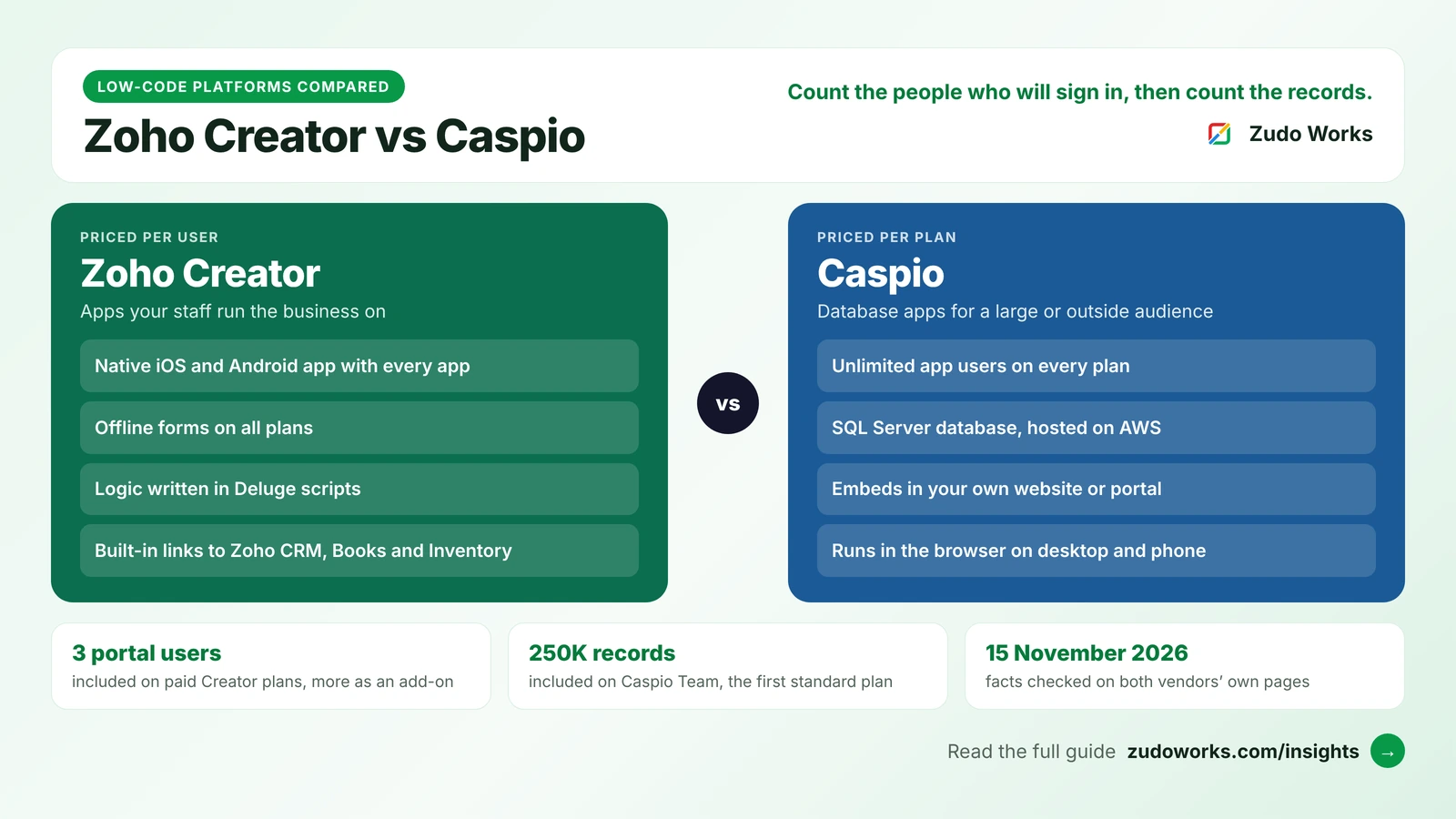
- Many people signing in, or people outside the company? Caspio fits better. Every plan includes unlimited app users, so a customer portal or a public directory does not cost more as it grows in head count.
- A known team of staff, working partly on phones? Zoho Creator fits better. Every app has a native iOS and Android app, forms work offline, and the cost is easy to predict for a fixed group.
- The limits sit in different places. Caspio limits records, pages and storage for the whole account. Creator limits records and storage per user, and sells access for outside users in blocks.
- The logic is written differently. Caspio uses visual blocks, with SQL and JavaScript available when needed. Creator uses Deluge, Zoho’s own scripting language.
How the two products are built
Caspio describes every application as running on a SQL Server data core, hosted on Amazon Web Services. Its help pages describe an app as a set of connected objects: tables that hold the data, views that filter or join those tables, and user interfaces built one screen or component at a time. There are two frameworks in the same account. Flex is the newer one: a visual builder that shows the app as you build it, with user management built in and hosting by Caspio. Each interface in Flex is called a DataPart and does one job, such as a form, a chart or a report. Bridge is the established one, aimed at authors who are comfortable with some light coding. Its interfaces are called DataPages, and Caspio says most Bridge apps are deployed on the customer’s own website or portal. The two share the same data and can be combined in one app.
Zoho Creator is also database-first. You define forms, and each form stores records. Reports show those records as lists, calendars, Kanban boards and more, and pages combine them into dashboards. Logic is written in Deluge, which runs when a form loads, a record is saved, a schedule fires or a button is pressed. Zoho’s page says developers can also work with Deluge in VS Code. Our Deluge script examples show what that code looks like.
So both start from the data. The difference is where the app ends up: Caspio is at home inside a website you already have, and Creator gives staff a complete app, on the web and on a phone, inside a Zoho account.
Side-by-side comparison
| Area | Zoho Creator | Caspio |
|---|---|---|
| Best suited to | Internal apps for a known team, with portals for a limited number of outside users | Database apps with many users, including customers, members or the public |
| How you pay | Per user, per month or year | Per plan, with unlimited app users |
| Plans | Free, Standard, Professional, Enterprise, Flex | Team, Business, Enterprise, plus a HIPAA Edition and a Compliance Edition |
| Main limits | Records and file storage per user; one app on Standard | Records, DataPages or DataParts, and file storage for the account; 5 app authors on Team |
| Data | Zoho’s own data store behind forms and reports | SQL Server |
| Logic | Deluge scripts and workflows | Triggered actions and tasks built from visual blocks; SQL and JavaScript optional |
| Phones | A native iOS and Android app with every app; offline forms on all plans | Responsive web apps in a phone browser; no native app or offline use on the pages we read |
| Outside users | 3 portal users included on paid plans, more as an add-on | Included in unlimited app users |
| Where the app appears | In Zoho Creator on the web and in its mobile app; a portal for outside users | Hosted by Caspio, or embedded in your own website, portal or intranet |
| Integrations | Over 1,000 prebuilt connectors listed; other Zoho apps; Deluge API calls | REST API, webhooks, and Zapier, Make and n8n |
| Free tier | One user, one app, 5,000 records, 250 MB | A free trial; no free plan on the pricing page |
Pricing: per user or per plan
How Caspio charges
Caspio’s pricing page lists three standard plans, Team, Business and Enterprise, and states that all plans include unlimited users. What a plan limits is the size of what you build. On the day we checked, the page listed 100 DataPages or DataParts on Team, 200 on Business and unlimited on Enterprise. It listed 250K data records on Team, 1M on Business and 2M or more on Enterprise, and file storage of 50 GB, 100 GB and 200 GB or more. More records, pages, storage and emails are sold as add-ons, up to a stated maximum for each plan.
Two details are easy to miss. The people who build the apps are counted separately: Team allows 5 app authors, while Business and Enterprise allow unlimited authors. And the page notes one exception to unlimited users: if you use Caspio Directories to sign users in to external apps, user limits apply.
Caspio is open that a flat price is not always the lower one. A post on its own blog dated 18 August 2026 says that at three seats plenty of per-seat tools cost less.
How Zoho Creator charges
Creator charges for each user, meaning each person with access to your Creator workspace. The limits grow with the number of users. Standard allows one app and 25,000 records per user. Professional allows unlimited apps and 100,000 records per user. Enterprise allows unlimited apps and 250,000 records per user. File storage is 1 GB, 3 GB and 5 GB per user on the same three plans. The Free plan covers one user and one app, with 5,000 records and 250 MB.
People outside the company are handled separately. Paid plans include 3 portal users, and more are bought as an add-on in tiers that run from 250 to 100,000 portal users. A custom domain, rebranded mobile apps and SAML single sign-on are add-ons on Standard and Professional and included in Enterprise. Our Zoho Creator pricing guide explains each limit and how to size a plan.
What that means in practice
| Your project | On Zoho Creator | On Caspio |
|---|---|---|
| 8 staff, three internal apps | 8 users on a plan with unlimited apps; the record allowance is 8 times the per-user figure | One plan; the plan price is the same for 8 people as for 800 |
| 60 staff, most of them occasional users | 60 users, whether they sign in daily or monthly | One plan; head count does not change the cost |
| A portal for 2,000 customers | A portal add-on tier large enough for 2,000 people | Covered by unlimited app users |
| A few users, millions of records | Records are limited per user, so a small team has a small allowance | Records are limited per plan; more are sold as an add-on |
| Many separate small apps | Unlimited apps on Professional and Enterprise | Each screen counts towards the DataPage or DataPart limit, except on Enterprise |
Neither model is cheaper in general. Work out your own case with real numbers: how many people will sign in a year from now, how many of them are outside the company, and how many records you will hold. Then price both on the vendors’ pages.
Mobile and offline use
Zoho’s Creator page states that every app you build comes with a native iOS and Android app. Users install the Zoho Creator app, sign in and see the apps they have access to. Zoho’s help page says offline access is available on all Creator plans: forms can be filled in without a connection and are submitted when the device is back online, and reports can be viewed as they stood at the last sync. There are limits. Formula fields that depend on other fields, integration fields, and actions that run as the user types do not work offline, and offline reports cannot be edited.
Caspio apps are web apps. Its system requirements page lists browsers for phones, namely Safari, Chrome and Firefox on iOS and Chrome and Firefox on Android, and its help pages say responsive mode is switched on by default for new DataPages, so screens adjust to a small display. None of the Caspio pages we read describes a native app for the app stores or a way to enter data without a connection. If either matters to you, ask Caspio directly before you decide.
For a team entering data on a factory floor or a building site with a poor signal, Creator is the safer choice. For customers who open a link in a browser, a web app is all that is needed.
Logic, code and integrations
In Caspio, automation is built from triggered actions and tasks. Its help page describes triggered actions as actions that run when data in a table is inserted, updated or deleted. They are assembled from visual blocks grouped as Data, Logic, Loops, Text, Number, Date and Variables, and they can change records in other tables and send email or SMS. The same page notes two limits: triggered actions do not run during data imports, and only one can be active for each event type in a table. Tasks run the same kind of logic on a schedule. When the blocks are not enough, Caspio says an app can be extended with SQL and JavaScript, though neither is required.
In Creator, the equivalent logic is Deluge script. It is a real language with variables, loops and error handling, so it can express almost any rule, but someone has to learn it or you have to hire someone who knows it. Our guides to error handling in Deluge and Deluge loops give a fair idea of the work.
For connections to other systems, Caspio lists a documented REST API, webhooks, and integrations through Zapier, Make and n8n. Zoho Creator lists over 1,000 prebuilt connectors, and Deluge can call any REST API directly. Paid Creator plans carry daily limits on external calls: 100 per user on Standard, 250 on Professional and 500 on Enterprise. Creator’s particular strength is the rest of Zoho: an app can read and write Zoho CRM, Books, Inventory and Desk records with built-in tasks. If your business does not run on Zoho, this advantage counts for little.
One practical point in Caspio’s favour: its data sits in SQL Server, a database that most analysts and developers already know.
AI features
Both vendors now put AI in the builder and in the finished app. Caspio names four capabilities and says they are available on every plan: Caspi, which builds an application from a plain-language description, including the data model, interface and roles; a Chat AI Agent, which gives your end users a chat inside the app under their own permissions; AI Connector Extensions, which bring AI models into workflows to summarise, classify and enrich data; and a Caspio MCP Server, which lets outside AI tools work with your data. The AI features are metered in credits. The pricing page says plans include 100 credits a month for testing, with more sold as an add-on.
Zoho’s Creator page describes Zia building from a prompt and names Plan, Build and Test agents. It says you can use Zoho’s own generative AI or bring your own key from OpenAI, Google or Anthropic. Our guide to Zoho MCP with Claude and ChatGPT covers how an outside AI tool works with Zoho data.
Treat both as ways to reach a first version faster. You still have to check the data model and the access rules yourself.
Hosting, security and compliance
Where it runs. Caspio is hosted on AWS and lists data residency in the United States, Canada, the EU, the UK, Australia and South America. One Caspio page we read listed fewer regions in its questions section, so confirm the region you need in writing. Zoho hosts Creator accounts in its own regional data centres, and its Creator page also lists deployment on AWS, Azure, GCP, on-premise or hybrid. If the app must run on your own servers, Creator is the one that lists that option.
Security standards. Caspio states that it is SOC 2 Type II certified and that every paid plan supports GDPR, PCI DSS Level 1, WCAG, ADA and Section 508. Zoho’s Creator page says the product is independently audited and certified against SOC 2, GDPR, HIPAA and HDS, and that Zoho holds ISO 27001, 27017 and 27018 certification.
Health and education records. This is an area Caspio has built a product around. Its HIPAA Edition includes a signed business associate agreement, a separate hosting environment, encryption at rest and in transit, and system-wide audit logs. A separate Compliance Edition adds safeguards aimed at FERPA, the United States law on student records. Zoho lists HIPAA among Creator’s certifications too. If you will store patient or student records, ask each vendor what it will sign and which plan that requires before you build anything.
Lock-in. An app built on either platform runs only on that platform. The data can be exported from both. The screens and rules have to be rebuilt if you leave.
When Zoho Creator is the better choice
- The users are your own staff, and you know roughly how many there are.
- People will use the app on phones, sometimes without a signal.
- You already use Zoho CRM, Books or Inventory and want the app to share their data.
- You need many separate apps and do not want to count screens against a limit.
- The rules are complicated enough to need a real scripting language.
- You want a free plan to try a single app with no time limit.
- You must run the app on your own servers.
When Caspio is the better choice
- Hundreds or thousands of people will sign in, and many of them are customers, members, students or the public.
- The app has to sit inside a website or portal you already run.
- Most users sign in only now and then, so paying for each of them makes little sense.
- Your team knows SQL and would rather not learn a vendor’s own language.
- You handle health records in the United States and want a dedicated HIPAA edition with a signed agreement.
- You do not use Zoho and have no reason to start.
Portal pricing is the plain reason Creator is a weaker fit for a large outside audience: a membership app with 5,000 registered people needs a portal tier sized for 5,000, whether or not they are active.
A six-question decision checklist
- How many people will sign in a year from now? A small, steady team points to Creator. A large or growing audience points to Caspio.
- How many of them are outside the company? More than a handful, and Caspio’s unlimited users start to count.
- Does it have to work offline, or as an app from the app stores? If yes, Creator.
- Where should the app appear? Inside your own website points to Caspio. Inside a Zoho account, beside your CRM and accounts, points to Creator.
- How many records and screens will there be? Check Caspio’s record and DataPage limits, and Creator’s per-user record limits, against your own figures.
- Who will maintain it in three years? Find out who is available to hire: Deluge developers for Creator, people who know Caspio and SQL for Caspio.
If neither fits
If flat pricing with unlimited logins is what draws you to Caspio, compare Zoho Creator vs Knack as well, since Knack is priced in a similar way for smaller apps. For larger operations teams, see Zoho Creator vs Quickbase. For a business that runs on Microsoft 365, see Zoho Creator vs Power Apps. For a public product where the design matters most, see Zoho Creator vs Bubble. And if what you have in mind will outgrow any app builder, our custom software page explains when writing it in code makes more sense.
If you settle on Creator and want it built for you, our Zoho Creator development page sets out how we scope and price the work, and our guide to choosing a Zoho Creator developer lists the questions to ask anyone you hire, including us.
Frequently asked questions
Frequently asked questions
Is Caspio better than Zoho Creator?
Neither is better in general. Caspio is the stronger choice when many people will sign in, especially customers or the public, because every plan includes unlimited app users and apps can be embedded in your own website. Zoho Creator is the stronger choice for a known team of staff, because it includes a native iOS and Android app, offline forms, Deluge scripting and built-in links to other Zoho products.
How is Caspio priced compared with Zoho Creator?
Caspio charges per plan and includes unlimited app users; its plans limit records, DataPages or DataParts, file storage and, on the Team plan, the number of app authors. Zoho Creator charges per user, with record and storage limits that grow with each user, and sells access for outside users as a portal add-on. We do not quote prices; both vendors publish them on their pricing pages.
Does Caspio really include unlimited users?
Caspio's pricing page states that all plans include unlimited users. It notes one exception: user limits apply if you use Caspio Directories to sign users in to external apps. The people who build apps are counted separately, with 5 app authors on the Team plan and unlimited authors on Business and Enterprise, as listed on 15 November 2026.
Does Caspio have a mobile app?
Caspio apps are responsive web apps that run in a phone browser. Its system requirements page lists Safari, Chrome and Firefox on iOS and Chrome and Firefox on Android. The Caspio pages we read on 15 November 2026 do not describe a native app for the app stores or offline data entry. Zoho Creator provides a native iOS and Android app with every app and offline access on all plans.
Do I need to write code in Caspio or Zoho Creator?
Simple apps need no code in either. For business rules, Caspio uses triggered actions and tasks built from visual blocks, and says SQL and JavaScript are available but not required. Zoho Creator uses Deluge, Zoho's own scripting language, for anything beyond basic workflows, so more complex Creator apps involve writing script.
Which is better for HIPAA: Caspio or Zoho Creator?
Caspio sells a dedicated HIPAA Edition that includes a signed business associate agreement, a separate hosting environment, encryption and system-wide audit logs. Zoho lists HIPAA among the standards Zoho Creator is audited against. Before storing health records on either, ask the vendor in writing what agreement it will sign and which plan or edition that requires.