
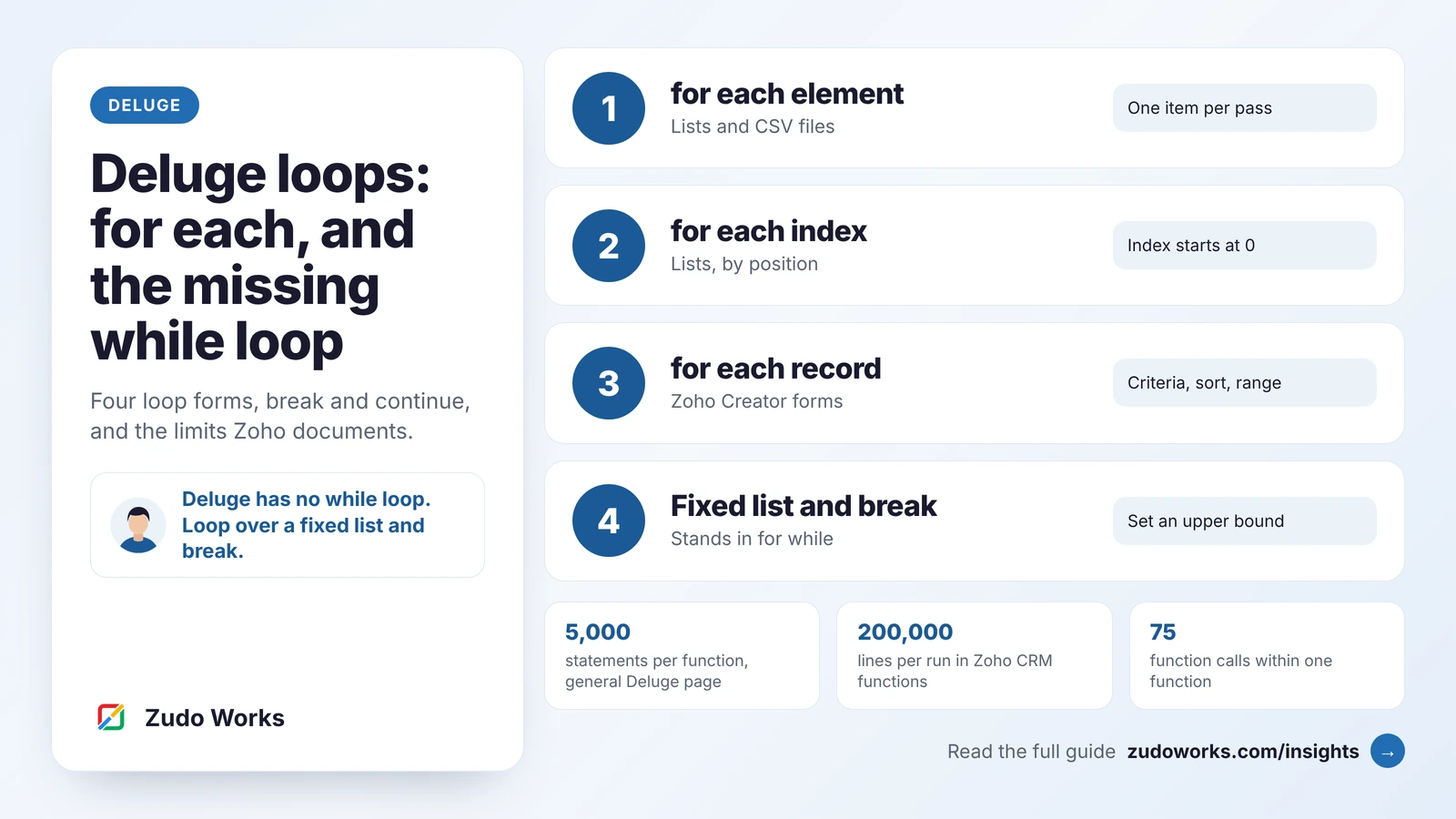
Developers who come to Deluge from JavaScript, Python or PHP look for two things early on: a loop with a counter, and a while loop. Deluge has neither. It has one loop statement, for each, and everything else is built from it.
That sounds limiting, and now and then it is. Most of the time it is enough, as long as you know the three forms of for each, the two statements that control it, and the pattern that stands in for a while loop. The syntax and limits described here were checked on Zoho’s Deluge and Zoho Creator help pages, the Zoho CRM developer documentation and Zoho’s community tips on 14 November 2026. We build on Zoho, so read this with that in mind. If you are new to the language, our Deluge script examples are a gentler start.
The short answer
- Deluge loops with
for each. It goes through the elements of a list, the index positions of a list, or the records of a Zoho Creator form. - There is no counter loop and no while loop. We found no entry for either in the 2025 and 2026 Deluge release notes, the latest dated 16 September 2026.
breakends a loop early andcontinueskips one pass. Both are documented for thefor eachloop.- To repeat code a set number of times, loop over a list of that length. To loop until a condition is met, loop over a list as long as your upper bound and
breakwhen the condition is true. - Every pass counts against a statement limit. Zoho’s general Deluge page lists 5,000 executed statements per function, and each Zoho service sets its own figure.
For each element: looping through a list
This is the form you will use most. The loop variable takes one element of the list on each pass. You do not declare it first.
parts = {"bolt", "nut", "washer"};
for each part in parts
{
    info part;
}
Zoho’s help page lists two things this form can go through: a list, and a CSV file, which must be 2 MB or smaller. Three details are worth knowing:
- The variable outlives the loop. Zoho documents that after the loop it holds the last element. Do not reuse the name for something else further down without assigning it again.
- A list of maps works the same way. Most API replies are a list of records, each one a map, so
for each deal in dealsgives you one record per pass anddeal.get("Amount")reads a field. - Text needs converting first. A comma-separated string becomes a list with
toList(), and a JSON array held as text becomes one withtoJSONList().
Looping through a map
A map is not a list, so loop through its keys. The keys() function returns them as a list.
stock = {"bolt" : 1200, "nut" : 950, "washer" : 40};
for each item in stock.keys()
{
    info item + ": " + stock.get(item);
}
For each index: when you need the position
Add the word index and the loop variable holds the position of the element, not the element itself. Zoho’s example shows the positions starting at 0.
colours = {"red", "green", "blue"};
for each index i in colours
{
    info "(" + i + ") " + colours.get(i);
}
// (0) red
// (1) green
// (2) blue
Use it when you need a row number, when you are reading two lists side by side, or when you want to compare an element with the one before it. This is the closest thing Deluge has to the counter loop of other languages.
For each record: Zoho Creator forms
Inside Zoho Creator, for each can go straight through the records of a form. Zoho’s help page says this form applies to Zoho Creator only. The criteria in square brackets are optional, and you can sort and limit the records in the same line.
for each job in Jobs [Status == "Open"] sort by Due_Date range from 1 to 100
{
    info job.Job_Number;
}
The rules Zoho documents for this form:
- Sort comes before range when you use both. Sorting is ascending unless you add
desc. - The range start can be 0 or 1. Both mean the first record. A negative index is a runtime error.
- The order is not guaranteed without
sort by. Records may appear in the order they were added, but Zoho says this can change. If the order matters, sort. [ID != 0]fetches every record. Zoho advises using it only when you must, because fetching everything can slow the app.
The single most useful habit here is to put the test in the criteria and not inside the loop. A loop over all jobs with if (job.Status == "Open") inside it runs once for every record in the form. The same loop with [Status == "Open"] in the header runs only for the open ones. Zoho’s own troubleshooting tip for the execution limit gives this as its first fix.
Break and continue
Two statements control a loop from the inside.
continue;skips the rest of the current pass and moves to the next element.break;ends the loop. The script carries on with the first statement after it.
technicians = {{"name" : "Bruno", "status" : "busy"}, {"name" : "Asha", "status" : "available"}, {"name" : "Lee", "status" : "available"}};
chosen = "";
for each technician in technicians
{
    if (technician.get("status") != "available")
    {
        continue;
    }
    chosen = technician.get("name");
    break;
}
info chosen;   // Asha
Both go inside an if block, as in Zoho’s examples. Zoho’s page says break ends “the current loop”, and does not discuss nested loops. If you put a loop inside a loop, expect break to leave the inner one only, and test that before you rely on it. A simple flag variable that the outer loop checks is the clear way to leave both.
break matters for more than tidiness. Every pass you do not run is a set of statements that does not count against the limit described below.
How to loop a set number of times
With no counter loop, the question is how to say “do this five times”. The answer is to make a list with five things in it.
A small, known count
Write the list out. It is plain and nobody will misread it.
for each attempt in {1, 2, 3, 4, 5}
{
    info "Attempt " + attempt;
}
A count that comes from a field or a variable
Zoho has published the pattern for this twice in its Zoho Creator community tips. Both pad a piece of text with spaces, turn each space into a list separator, and convert the result to a list. This is the line from the more recent tip, where a subform gets one row per participant:
slots = "t".leftpad(count).replaceAll(" ", "t,").toList();It works, and it is Zoho’s own answer. One caution from reading the sources side by side: Zoho’s help page for leftpad describes the number as the white spaces to pad, while the example on the same page shows it acting as a total length, and Zoho’s two tips use it in slightly different ways. So do not let the exact length of the generated list decide how many times your code runs. Count inside the loop and stop when you reach the number you want.
count = input.No_Of_Participants;
done = 0;
if (count != null && count > 0)
{
    slots = "t".leftpad(count).replaceAll(" ", "t,").toList();
    for each slot in slots
    {
        if (done >= count)
        {
            break;
        }
        done = done + 1;
        info "Row " + done;
    }
}
The check on count also covers an empty field and a zero, which the bare one-liner does not. If you need this in several workflows of a Creator app, put the list building in one custom function that returns the list, as Zoho’s earlier tip does, and call it wherever you need it.
How to write a while loop in Deluge
A while loop says “keep going until this is true”, without knowing in advance how many passes that takes. Deluge cannot express that directly. What it can express is “try up to N times, and stop as soon as this is true”, which is safer in any case, because it can never run for ever.
The shape is always the same: a list as long as your upper bound, a test, and a break.
Example: read every page of a Zoho CRM module
The zoho.crm.getRecords task returns records a page at a time. Zoho’s help page gives 1 as the default page and 200 as the default number of records per page. To read them all, ask for page after page until one comes back short.
all_deals = List();
for each page in {1, 2, 3, 4, 5, 6, 7, 8, 9, 10}
{
    batch = zoho.crm.getRecords("Deals", page, 200);
    if (batch.size() == 0)
    {
        break;
    }
    all_deals.addAll(batch);
    if (batch.size() < 200)
    {
        break;
    }
}
info all_deals.size();
The list of ten page numbers is the upper bound: this script reads at most 2,000 records. That is a decision, not a weakness. Choose the bound on purpose, and if the loop ends without hitting a break, treat it as a sign there is more data than the script was built for and log it. For the limits on reading Zoho CRM data from outside Zoho, see our guide to Zoho CRM API limits.
Example: retry a call until it works
The same shape gives you a retry with a limit. Use invokeurl with detailed: true so the reply carries the status code.
reply = Map();
for each attempt in {1, 2, 3}
{
    reply = invokeurl
    [
        url : "https://api.example.com/orders"
        type : GET
        detailed : true
    ];
    if (reply.get("responseCode") == 200)
    {
        break;
    }
}
Three attempts, then the script moves on and can report the failure. Our guides to invokeurl and to try, catch and throw cover what to check in the reply and how to raise an error when the last attempt fails.
What about a function that calls itself?
Recursion is the other answer you will find, and one of Zoho’s older Zoho Creator tips shows it: a function does its work, then calls itself with the count reduced by one until the count runs out. It is valid, but keep it for small counts. Zoho’s general Deluge page lists a maximum of 75 function calls within one function, and every statement in every call still counts against the statement limit. For most jobs the bounded for each is easier to read and harder to get wrong.
Which loop to use
| You want to | Use | Good to know |
|---|---|---|
| Go through a list or an API reply | for each x in list | Works on lists and on CSV files up to 2 MB |
| Know the position of each element | for each index i in list | Positions start at 0; read the element with get(i) |
| Go through a map | for each k in map.keys() | Read each value with get(k) |
| Go through Zoho Creator records | for each r in Form [criteria] | Zoho Creator only; add sort by and range |
| Repeat a small, fixed number of times | for each n in {1, 2, 3} | Write the list out |
| Repeat a number of times held in a variable | A generated list, a counter and break | Check the number is above zero first |
| Loop until a condition is met | A list as long as your upper bound, and break | Log it when the bound is reached |
| Stop early or skip one element | break or continue | Place them inside an if block |
The limits that stop a long loop
A Deluge loop rarely fails because of its syntax. It fails because it ran too many statements or took too long. The figures differ by Zoho service, so check the one your script runs in.
| Where | What Zoho documents |
|---|---|
| Deluge in general | 5,000 executed statements in one function, and 75 function calls within one function. The page notes that its figures may be revised. |
| Zoho Creator | “Approximately 5000 to 50000” statements, depending on the pricing plan. Fetching with a range, and deleting, are limited to 5,000 records. |
| Zoho CRM functions | 200,000 lines of execution per invocation. A time limit of 10 seconds for buttons, related lists, validation rules and REST API calls, 30 seconds for workflow rules, Blueprint and approvals, and 15 minutes for schedules. |
What catches people is how the count works. The limit is on statements executed, not statements written. Zoho’s example: a for each with two statements inside it, run over a list of five elements, counts as 15, because the loop line counts on every pass too. A multi-line task such as sendmail or invokeurl counts as one statement.
So the arithmetic for any loop is simple: statements per pass, times the number of passes. A loop with 10 statements inside it reaches the general figure of 5,000 before its 500th element. In Zoho CRM the statement allowance is far larger, and the clock is the tighter limit: a function behind a button has 10 seconds, however few lines it runs. Our Zoho CRM custom functions guide covers how functions are triggered and timed.
Ways to keep a loop inside the limit
- Filter before you loop. Put the condition in the Creator criteria or in the API search, not in an
ifinside the loop. - Do not loop to count or add up. In Zoho Creator,
Jobs[Status == "Open"].count(ID)returns the number in one statement. Zoho’s troubleshooting tip recommends the built-in aggregate functions over a counting loop. - Keep fetches out of the loop. A record fetch or an API call on every pass is the slowest thing a loop can do. Fetch once before the loop and read from the result, or collect the IDs and make one call afterwards.
- Leave with
breakas soon as you have what you came for. - Split the work. Zoho’s Creator limits page points to batch workflows for jobs larger than the per-function statement limit. In Zoho CRM, a scheduled function has the longest time allowance.
- Move very large jobs out of Deluge. A nightly sync of tens of thousands of rows belongs in middleware or a bulk API. Our Zoho Flow vs Deluge comparison explains where that line sits.
Common mistakes
- Looking for
whileorfor (i = 0; ...). They do not exist in Deluge. Use the patterns above. - A loop with no upper bound in mind. Every stand-in for a while loop has a maximum. Choose it deliberately and log when it is reached.
- Testing on ten records and going live on ten thousand. The statement count grows with the data. Work out statements per pass times passes before release.
- Sending an email or an API call on every pass. Zoho’s general Deluge page lists 500 emails and 2,000 webhook calls per user per day. Collect the results in a list and send one summary after the loop.
- Relying on record order without
sort by. Zoho says the default order in Creator is not guaranteed. - Reusing the loop variable after the loop. It still holds the last element.
- Nesting loops over two large lists. A hundred by a hundred is ten thousand passes. Build a map from one list first and look values up by key.
Checklist before a loop goes live
- The list is filtered before the loop, not inside it.
- Statements per pass times the largest realistic number of passes is under the limit of the service the script runs in.
- No record fetch sits inside the loop unless there is no other way.
- Any stand-in for a while loop has a chosen upper bound and a
break. - The script logs or alerts when the upper bound is reached.
- A count taken from a field is checked for empty, zero and negative values.
- Emails and alerts are sent once after the loop, not once per pass.
- Zoho Creator record loops that depend on order use
sort by. - The loop has been tested with a realistic volume of data, not a handful of records.
If you have scripts that stop part-way through a loop, or a process that has outgrown its statement limit, our Deluge development service covers reviews and rewrites as well as new functions, and Zoho Creator development covers the app around them.
Frequently asked questions
Frequently asked questions
Does Deluge have a for loop?
Deluge has a for each loop, not a counter loop. for each goes through the elements of a list, and for each index gives you the position of each element, starting at 0. In Zoho Creator, for each can also go through the records of a form. A loop written as for (i = 0; i < n; i++) is not valid Deluge.
Does Deluge have a while loop?
No. Deluge has no while loop, and Zoho's Deluge release notes list none up to September 2026. The usual stand-in is a for each loop over a list as long as the most passes you will allow, with a break statement that ends the loop as soon as your condition is met.
How do I loop a fixed number of times in Deluge?
Loop over a list with that many elements. For a small count, write the list out: for each n in {1, 2, 3}. For a count held in a variable, Zoho's community tips build a list with leftpad, replaceAll and toList. Keep a counter inside the loop and break when it reaches the number you want.
How do I break out of a for each loop in Deluge?
Use the break statement inside an if block. When the condition is true the loop ends and the script continues with the first statement after it. To skip one element and carry on with the next, use continue in the same way.
How do I loop through a map in Deluge?
Loop through its keys. The keys() function returns the keys of a map as a list, so write for each k in myMap.keys() and read each value inside the loop with myMap.get(k).
How many times can a Deluge loop run?
There is no fixed number of passes. The limit is on executed statements, and each pass counts every statement inside the loop. Zoho's general Deluge page lists 5,000 statements per function, Zoho Creator documents roughly 5,000 to 50,000 depending on the plan, and Zoho CRM lists 200,000 lines per function run plus a time limit.