
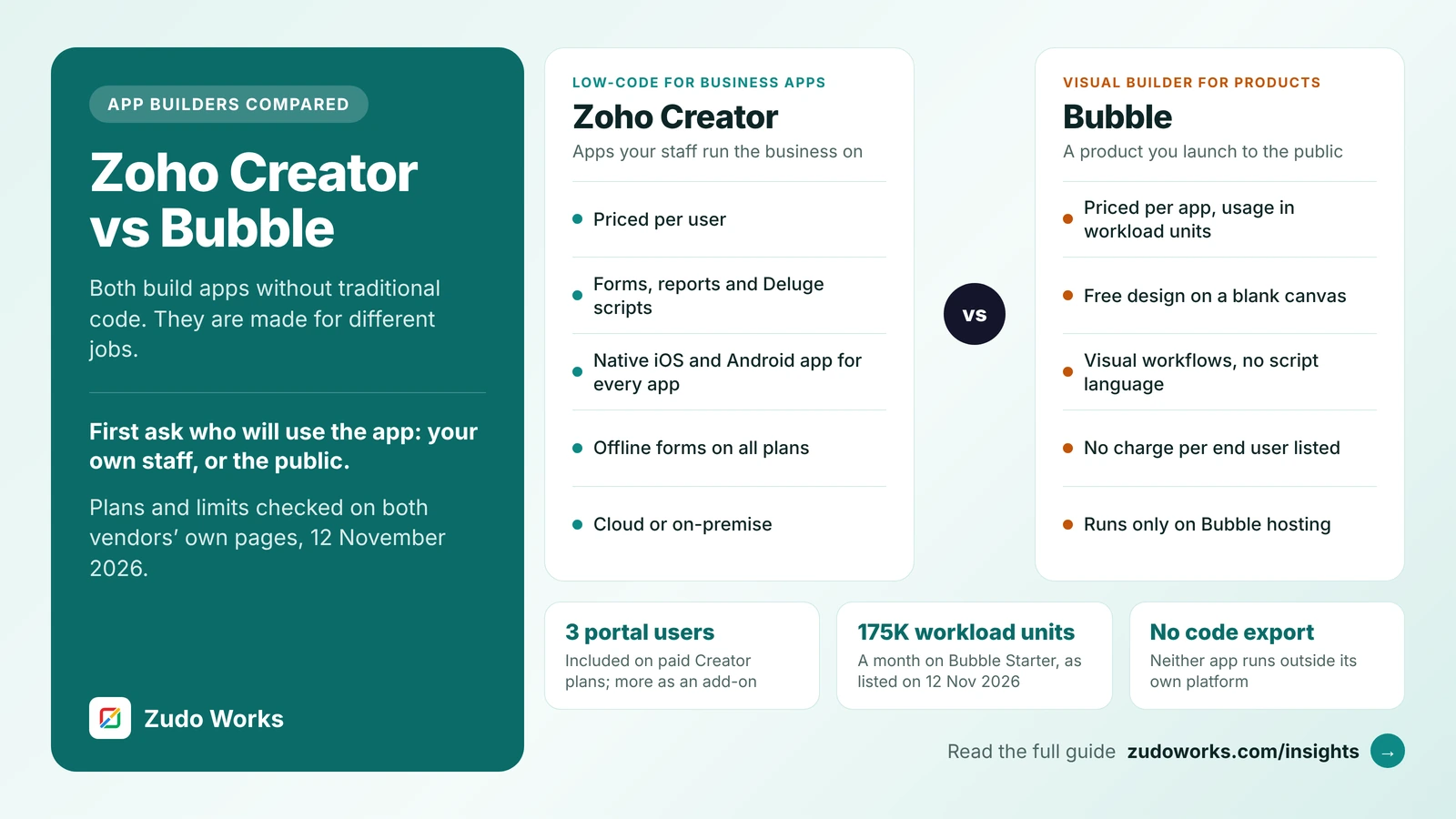
Both products let you build a working application without writing it in a traditional programming language, and both host it for you. That is where the likeness ends. Bubble starts from a blank page and lets you design any screen you can imagine, then charges for the server work your app does. Zoho Creator starts from your data, gives you forms and reports to work with it, and charges for each person who uses it.
Every plan, limit and feature below was checked on Bubble’s and Zoho’s own pricing, manual and help pages on 12 November 2026. We do not quote prices, because they change and differ by country and billing period; see the official Bubble pricing and Zoho Creator pricing pages. We build on Zoho, so read this with that in mind. We have tried to say plainly where Bubble is the better choice, and there are several such places.
The short answer
- Building a product for the public? A marketplace, a booking site, a software service you will sell: Bubble fits better. It gives full control of the design and does not charge per person who signs up.
- Building an app your staff run the business on? Orders, inspections, approvals, stock, field work: Zoho Creator fits better. It is quicker to build on a data model, every app has a native phone app, and the logic is written in Deluge.
- The pricing models are opposite. Bubble charges per app and meters usage in workload units. Creator charges per user and limits records and storage per user.
- Lock-in is real on both. Bubble states that its apps run only on Bubble. Creator apps run only on Zoho Creator, though Zoho also lists on-premise deployment.
How the two products are built
Bubble describes itself as a no-code platform and a complete hosting solution. You work in one editor. You place elements on a page, and the responsive engine changes the layout by screen size. Logic lives in workflows, which Bubble’s manual defines as sequences of actions that run in response to an event such as a button click or a page load. Values on the page come from dynamic expressions, which update as the data changes. The database is built in, and privacy rules decide on the server which users can see which data. There is no script language to learn; the work is done by pointing, choosing and configuring.
Zoho Creator is database-first. You define forms, and each form stores records. Reports show those records as lists, calendars, Kanban boards and more, and pages combine them into dashboards. Logic is written in Deluge, Zoho’s scripting language, which runs when a form is loaded, a record is saved, a schedule fires or a button is pressed. Zoho’s page says developers can also work with Deluge in VS Code. Our Deluge script examples show what that code looks like.
The result is a different feel. In Bubble, the screen is the starting point, and you can make it look like any consumer product. In Creator, the record is the starting point, and a usable form, list and phone screen exist as soon as the fields do. Creator screens can be styled, but it is not a free-form design tool.
Side-by-side comparison
| Area | Zoho Creator | Bubble |
|---|---|---|
| Best suited to | Internal business apps for known users, plus portals for customers and suppliers | Public web products: marketplaces, software services, customer-facing apps |
| How you pay | Per user, per month or year | Per app (project), by plan, with usage metered in workload units |
| Plans | Free, Standard, Professional, Enterprise, Flex | Free, Starter, Growth, Team, Enterprise; each as web, mobile, or web and mobile |
| Main limit | Records and file storage per user | Workload units per month |
| Design freedom | Forms, reports and pages with themes | Blank canvas with a responsive engine |
| Logic | Deluge scripts and workflows | Visual workflows and dynamic expressions |
| Mobile | A native iOS and Android app with every app; offline forms | Responsive web apps; a native mobile editor that Bubble’s manual describes as in beta |
| Outside users | Customer portal: 3 users included on paid plans, more as an add-on | No charge per end user listed; their activity uses workload units |
| Integrations | Over 1,000 prebuilt connectors listed; other Zoho apps; Deluge API calls | API Connector for any JSON-based API; a plugin store with thousands of plugins |
| Hosting | Zoho’s regional data centres; Zoho also lists AWS, Azure, GCP, on-premise and hybrid | AWS, shared environment in the US; choice of hosting location on Enterprise |
| Free tier | One app, 5,000 records, 250 MB | Development version only; a paid plan is needed to go live |
Pricing: per user or per app
This is the difference that decides most cases, so it is worth understanding before you compare features.
How Bubble charges
A Bubble plan applies to a single project, not to your whole account. Each plan includes a monthly allowance of workload units, which Bubble defines as a measure of the server resources needed to host, run and scale an app. Database reads and writes, workflows and page loads all use them; work done in the visitor’s browser does not. On the day we checked, Bubble’s pricing page listed 50K workload units a month on Free, 175K on Starter, 250K on Growth and 500K on Team, with a custom figure on Enterprise.
What happens when the allowance runs out matters. On paid plans, overages are on by default: the app keeps running and you pay for the extra units. You can switch overages off to cap the bill, but Bubble states that the app then goes offline once the included units and any add-ons are used up. Bubble sends an email at 75% of the allowance and again at 100%, and sells workload tiers, which are blocks of extra units at a discount.
Two more points. The Free plan gives a development version only, so a live app with its own domain starts at Starter. And the number of people who can edit the app is set by plan: Bubble lists 2 app editors on Growth and 5 on Team.
How Zoho Creator charges
Creator charges for each user, meaning each person with access to your Creator workspace. The limits grow with the number of users. Standard allows one app and 25,000 records per user. Professional allows unlimited apps and 100,000 records per user. Enterprise allows unlimited apps and 250,000 records per user. File storage is 1 GB, 3 GB and 5 GB per user on the same three plans. The Free plan covers one app with 5,000 records and 250 MB.
People outside the company are handled separately. Paid plans include 3 portal users, and more are bought as an add-on in tiers that run from 250 to 100,000 portal users. A custom domain, rebranded mobile apps and SAML single sign-on are add-ons on Standard and Professional and included in Enterprise. Our Zoho Creator pricing guide explains each limit and how to size a plan.
What that means in practice
| Your project | On Zoho Creator | On Bubble |
|---|---|---|
| 15 staff, five internal apps | 15 users on a plan with unlimited apps; cost is fixed and known | Each app is its own project and plan, unless you build them as one app |
| One public app, thousands of sign-ups | Every sign-up is a portal user; you buy a portal tier large enough | One plan; cost follows activity, not head count |
| Busy month, heavy use | No usage bill, but daily limits on API and external calls apply per user | Overage charges, or an offline app if overages are off |
| Team grows from 15 to 40 | Cost rises with each user | No change unless workload rises or you need more app editors |
Neither model is cheaper in general. Per-user pricing suits a known group of staff. Usage pricing suits a public audience whose size you cannot predict, as long as someone watches the workload figures.
Mobile apps
Zoho’s Creator page states that every app you build comes with a native iOS and Android app. Users install the Zoho Creator app, sign in and see the apps they have access to. Offline access is available on all Creator plans: forms can be filled in without a connection and are submitted when the device is back online, and reports can be viewed offline as they stood at the last sync. There are limits. Forms that rely on formula fields that depend on other fields, integration fields, or actions that run as the user types do not work offline, and offline reports are view-only. If you want the app under your own name in the app stores, that is the rebranded mobile app option described above.
Bubble apps are responsive web apps first, and they work in a phone browser. Bubble also has a native mobile editor that builds iOS and Android apps sharing one backend and database with the web app. On the day we checked, Bubble’s manual still described that editor as in beta, said features may change, and noted that Android support covers version 12 and later. Publishing to the App Store or Google Play needs a mobile plan. Each plan has a monthly build allowance, which Bubble lists as 5 on Starter, 10 on Growth and 20 on Team after the first three months, and a number of live versions, 3, 5 and 8. The manual page we read does not describe offline use.
For a field team entering data on a factory floor or a building site with a poor signal, Creator is the safer choice today. For a consumer app where the look of each screen matters most, Bubble’s editor gives more control.
Integrations and AI
Bubble connects to other systems through its API Connector, which supports any service that exposes a JSON-based API and handles sign-in methods including OAuth2, JSON Web Tokens and keys in a header. Its plugin store offers thousands of plugins made by Bubble and its community, many of which wrap a well-known service so that you do not have to set up the calls yourself.
Zoho Creator lists over 1,000 prebuilt connectors, and Deluge can call any REST API directly. Its particular strength is the rest of Zoho: an app can read and write Zoho CRM, Books, Inventory and Desk records with built-in tasks. If your business already runs on Zoho, that removes most of the integration work. If it does not, this advantage counts for little. Paid plans carry daily limits on external calls: 100 per user on Standard, 250 on Professional and 500 on Enterprise.
Both vendors now put AI inside the builder. Bubble’s AI Agent, which a Bubble post dated 4 August 2026 describes as still in beta and free to use during the beta, can build and edit pages, workflows and data, set up API connections and work on native mobile apps, and everything it makes stays editable in the visual editor. Bubble’s pricing page lists monthly AI credits by plan. Zoho’s Creator page describes Zia building from a description, and names Plan, Build and Test agents. Treat both as ways to get a first version faster. Neither removes the need to check the data model and the access rules yourself. Our guide to Zoho MCP with Claude and ChatGPT covers the other direction, where an outside AI tool works with your Zoho data.
Hosting, security and lock-in
Where it runs. Bubble’s servers are hosted on Amazon Web Services. Its shared environment is in the United States, and Bubble’s manual says that location cannot currently be changed. The Enterprise plan lists a choice of hosting location and a customisable server. Zoho hosts Creator accounts in regional data centres, and its Creator page also lists deployment on AWS, Azure, GCP, on-premise or hybrid. For a business in the UK, Australia or New Zealand that must keep data in a particular region, check this point with each vendor before anything else.
Security. Bubble states that it complies with the SOC 2 Type II standard and has measures designed to meet the EU and UK GDPR. Its pricing page lists single sign-on and the SOC 2 report under Enterprise. Zoho’s Creator page lists SOC 2, GDPR, HIPAA and HDS, and ISO 27001, 27017 and 27018 certification. The Bubble security page we read does not mention HIPAA. If you will store health records, ask each vendor in writing what it will sign before you build.
Lock-in. Be clear-eyed about this on both sides. Bubble’s manual states that Bubble apps can only be run on the Bubble platform and that moving an app away from Bubble’s hosting is not possible. You own your design and your data, and the data can be exported as CSV files or read through the API, but leaving means rebuilding the logic elsewhere. Bubble does commit to releasing its source code under an open-source licence if it ever shuts down. A Zoho Creator app is tied to Creator in the same way: the data exports, the Deluge scripts can be read and copied out, but the app itself does not run anywhere else. The practical difference is that a Creator app holds conventional records and scripts, which a developer can read and re-implement, while Bubble logic exists only as configuration in its editor.
When Zoho Creator is the better choice
- The users are your own staff, and you know roughly how many there are.
- The app is mostly records, approvals, schedules and reports, not a designed customer experience.
- People will use it on phones in the field, sometimes without a signal.
- You already use Zoho CRM, Books or Inventory and want the app to share their data.
- You need several apps and do not want a separate plan for each one.
- You want the logic as readable script, kept in development and live environments with an audit trail, which paid Creator plans include.
- You must host on your own servers or in a specific country.
When Bubble is the better choice
- You are launching a product to the public, and the number of sign-ups is unknown or large.
- The design has to be your own, screen by screen, and match a brand closely.
- The business model is the app itself: a marketplace, a directory, a subscription service.
- You want to build without learning a script language.
- You are a founder testing an idea and want a working product in front of customers before hiring developers.
- You do not use Zoho and have no reason to start.
Portal pricing is the plain reason Creator is a poor fit for a consumer product. A public app with 20,000 registered members needs a portal tier sized for 20,000 people, whether or not they are active. Bubble’s usage pricing was designed for that case.
A six-question decision checklist
- Who signs in? Named staff points to Creator. The public points to Bubble.
- How many apps? Several internal tools favour Creator’s unlimited apps on Professional and above. One product favours Bubble.
- Does it have to work offline on a phone? If yes, Creator.
- Does the design have to be yours, pixel by pixel? If yes, Bubble.
- Where must the data live? If outside the United States and you are not buying an Enterprise plan, check Bubble’s hosting terms first.
- Who will maintain it in three years? Find out who is available to hire: Deluge developers for Creator, Bubble developers for Bubble.
Using both, and the alternatives
Some businesses use both, and it can be the right design. The public product runs on Bubble, where sign-ups are free of per-user charges. The back office runs on Zoho: orders, support tickets and invoices sit in Zoho CRM, Books or a Creator app, and the two exchange data through Bubble’s API Connector and Zoho’s APIs. The cost is two platforms to maintain and an integration that someone must own.
If neither feels right, the question may be a different one. For a shared database with light apps on top, see Zoho Creator vs Airtable. For a simple data app with flat pricing and unlimited logins, see Zoho Creator vs Knack. For a SQL Server database with unlimited users on every plan, see Zoho Creator vs Caspio. For a business that runs on Microsoft 365, see Zoho Creator vs Power Apps, and for larger operations teams, Zoho Creator vs Quickbase. And if the product you have in mind will outgrow any app builder, our custom software page explains when writing it in code makes more sense.
If you settle on Creator and want it built for you, our Zoho Creator development page sets out how we scope and price the work, and our guide to choosing a Zoho Creator developer lists the questions to ask anyone you hire, including us.
Frequently asked questions
Frequently asked questions
Is Zoho Creator better than Bubble?
Neither is better in general. Zoho Creator is the stronger choice for internal business apps used by known staff, because it charges per user and includes a native mobile app, offline forms and Deluge scripting. Bubble is the stronger choice for a public product such as a marketplace or software service, because it gives free visual design and does not charge per end user.
How is Bubble priced compared with Zoho Creator?
Bubble charges per app, by plan, and meters usage in workload units, which measure the server resources the app uses each month. Zoho Creator charges per user, with limits on records and file storage that grow with each user. We do not quote prices; both vendors publish them on their pricing pages.
What happens when a Bubble app uses all its workload units?
On paid plans overages are on by default, so the app keeps running and the extra units are charged. If you switch overages off to cap the bill, Bubble states that the app goes offline once its included units and any add-ons are used up. Bubble emails the owner at 75% and 100% of the allowance.
Can Bubble build native mobile apps?
Bubble has a native mobile editor for iOS and Android apps that share a backend and database with the web app, and a mobile plan is needed to publish to the App Store or Google Play. When we checked on 12 November 2026, Bubble's manual still described the editor as in beta. Zoho Creator provides a native iOS and Android app with every app.
Can I export my app from Bubble or Zoho Creator?
You can export your data from both. You cannot take the app itself elsewhere from either. Bubble's manual states that Bubble apps can only be run on the Bubble platform, and a Zoho Creator app runs only on Zoho Creator. Moving away means rebuilding the screens and logic on the new platform.
Can I use Bubble and Zoho together?
Yes. Bubble's API Connector works with any service that exposes a JSON-based API, and Zoho's products have REST APIs. A common design keeps the public product on Bubble and the back office, such as customers, orders and invoices, in Zoho CRM, Zoho Books or a Zoho Creator app, with the two exchanging data through those APIs.