Comparisons
Zoho Creator vs Airtable (and Zoho Tables): Which One Fits Your Business?
Most “Zoho Creator vs Airtable” pages compare two products that are not quite the same kind of thing. Airtable’s closest Zoho match is Zoho Tables. Zoho Creator is what you move to when a shared database has to become a business app. This guide compares all three, fairly.

Quick answer
Choose Airtable or its Zoho equivalent, Zoho Tables, when one team needs a flexible shared database. Choose Zoho Creator when the data drives a process with stages and owners, people outside the office or the company must use it, or it has to work directly with Zoho CRM, Books or Inventory. Airtable bills only people who edit; Creator bills every user and adds portals for outsiders.
Airtable made the spreadsheet-database popular: a grid that looks familiar, with linked records, views and automations behind it. Zoho offers two answers to it. Zoho Tables is the like-for-like product. Zoho Creator is a low-code platform for building complete business applications, with its own scripting language, mobile apps and portals.
Every plan, limit and feature below was checked on Airtable’s and Zoho’s own pricing pages and help articles on 14 October 2026. We do not quote prices, because they change and vary by country; follow the links to the official pricing pages for those.
What each product is built for
- Airtable organises data in bases made of linked tables, with views, automations, Interface Designer for simple app screens, and AI features such as Omni, a conversational builder that creates tables, interfaces and automations from a description. Its strength is speed: a team can model its data in an afternoon.
- Zoho Tables is Zoho’s collaborative database. It offers Grid, Kanban, Gallery, Calendar and Form views, linked records, automations, mobile apps for Android and iOS, and AI field types such as sentiment analysis and keyword extraction. It sits in the same category as Airtable.
- Zoho Creator is an application platform. You build forms, reports and pages on its database, add logic in Deluge, run processes with workflows and Blueprints, and publish native iOS and Android apps and customer or supplier portals. Zoho now describes it as an AI app builder, with agents that turn a description into requirements and then into an app.
So the real question is usually not “Airtable or Creator?” but “do we need a shared database, or an application?”
The three at a glance
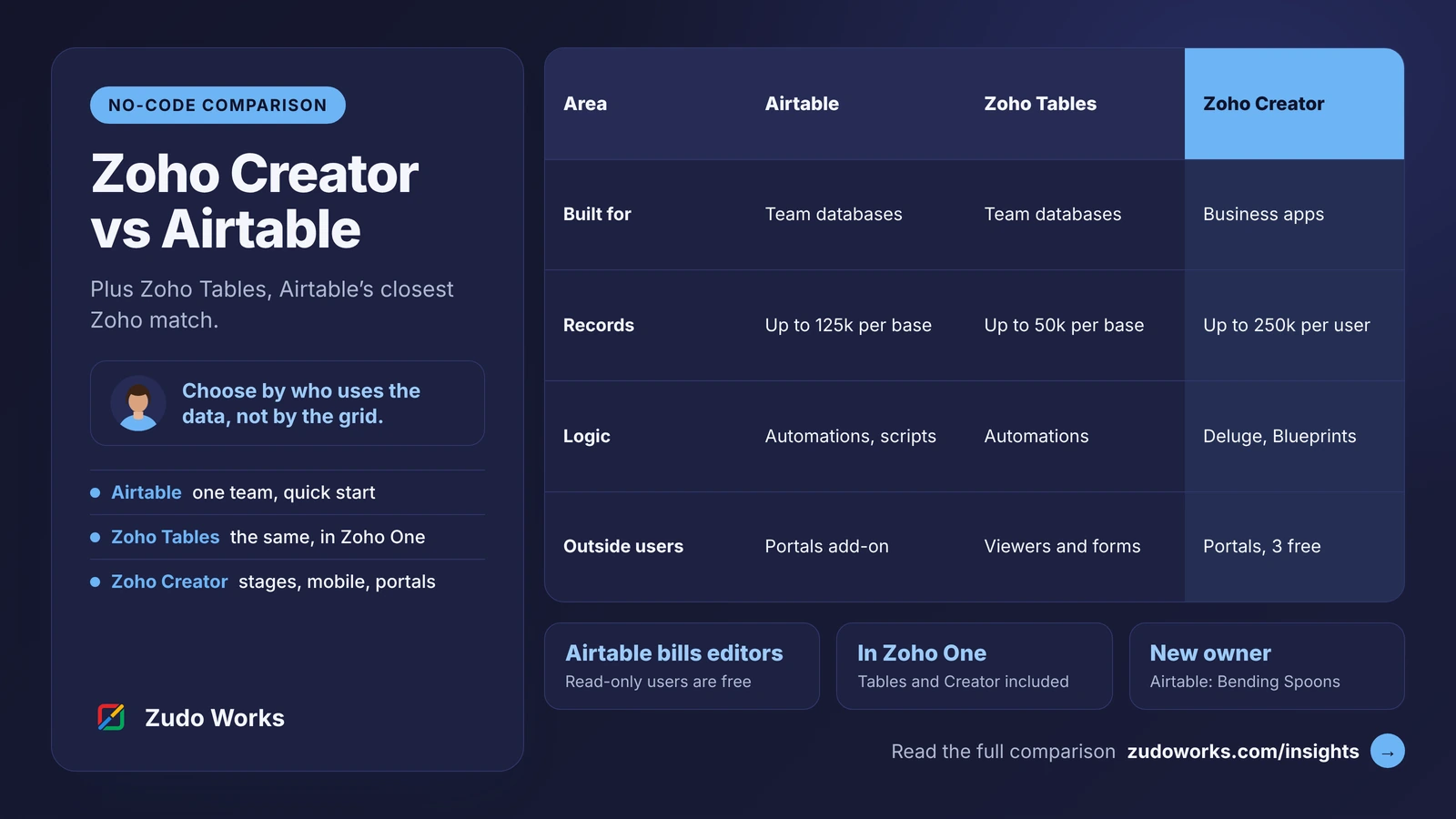
| Area | Airtable | Zoho Tables | Zoho Creator |
|---|---|---|---|
| Built for | Team databases and light apps | Team databases | Business applications |
| Plans | Free, Team, Business, Enterprise Scale | Free, Professional | Free, Standard, Professional, Enterprise, Flex |
| Who you pay for | Collaborators who can edit (commenters too on Team); read-only users are free | Users; Professional starts from 3 licences, with unlimited viewers | Users |
| Record limit | Per base: 1,000 Free, 50,000 Team, 125,000 Business | Per base: 5,000 Free, 50,000 Professional | 5,000 Free; then 25,000, 100,000 or 250,000 per user |
| Logic | Automations and scripts | Automations and scheduled automations | Deluge scripts, workflows, Blueprints |
| Outside users | Portals add-on, sold in seat packs | View-only users (unlimited on Professional) and forms | Portals: 3 users free, more as an add-on |
| Mobile | iOS and Android apps | iOS and Android apps | Native iOS and Android apps for each app you build |
| In Zoho One? | No | Yes, Professional | Yes |
Confirm current limits on the official pages: Airtable pricing, Zoho Tables pricing and the Zoho Creator plan comparison.
Who you pay for: the difference most comparisons miss
The three products count users differently, and that often decides the total cost more than the price per seat.
- Airtable charges per seat for people who change data. On Team, anyone with commenter access or higher is billable; on Business, Airtable lists owners, creators and editors as billable. Read-only collaborators, form submissions and share links are not charged on paid plans. A base that ten people edit and fifty people only read costs ten seats.
- Zoho Tables charges per user, and its Professional plan includes unlimited view-only users. If your company already pays for Zoho One, Tables Professional is included.
- Zoho Creator charges per user, and its record and storage allowances grow with the number of users. External users such as customers or suppliers are portal users instead: three are free, and more are bought as an add-on.
Model the cost on your real user list: who edits, who only reads, and who sits outside the company.
Limits that shape the design
Airtable and Zoho Tables set limits per base. On Airtable that is 50,000 records on Team and 125,000 on Business; on Zoho Tables it is 50,000 on Professional. That is plenty for a project tracker or a content calendar. It becomes a design constraint for transaction data such as orders, production logs or inspection results, which grow every day and never shrink.
Zoho Creator sets limits per user across the account: 25,000 records per user on Standard, 100,000 on Professional and 250,000 on Enterprise. Note that Standard allows one app, while Professional and Enterprise allow unlimited apps.
Other limits worth checking before you build: Airtable allows 75, 100 or 150 unique automations per base on Free, Team and Business, and 1,000 API calls a month per workspace on Free and 100,000 on Team. Zoho Tables allows 3 active automations per base on Free and 25 on Professional. Creator publishes its limits for Deluge statements, external calls and API calls per user per day on its comparison page.
Logic, processes and integrations
For simple rules, all three work: when a record changes, notify someone or update a field. The difference shows when the process has stages, owners and rules about who may do what.
Creator was built for that. Deluge runs at exact points, such as when a form is submitted or a field changes; Blueprints enforce the stages of a process; and calls to other systems are part of the language. If Zoho CRM, Zoho Books or Zoho Inventory already hold your customers and orders, a Creator app works with the same records instead of syncing a copy. Our Deluge script examples show the kind of logic involved.
Airtable’s automations and scripting go a long way, and it has a large catalogue of integrations. It is at its best when the data and the people working on it sit in one team.
Customers, suppliers and the shop floor
Letting people outside the company in is where the products differ most.
- Airtable Portals is an add-on for Team, Business and Enterprise Scale. Seats come in packs starting at 15; a guest with editor access counts as a portal seat, while read-only guests do not. There can be one portal per base, sharing any number of its interfaces.
- Zoho Creator includes portals in its plans, with three portal users free and more as an add-on, and per-app permission sets for what each type of user can see and do.
On phones, Airtable’s iOS and Android apps run its interfaces, though Airtable notes that interface pages cannot be opened in mobile browsers and that the apps may slow down with tens of thousands of records. Creator publishes each app you build as a native mobile app, which suits people who record work away from a desk.
AI and MCP
Both vendors are moving fast here. Airtable offers Omni and Field Agents, which act as researchers or content creators across records, with AI credits included in each plan. Zoho Creator offers Zia, agents that plan, build and test an app from a description, a choice of Zoho’s own models or your own key for OpenAI, Google or Anthropic models, and access from AI assistants through MCP.
Zoho MCP lists both Creator and Tables among the Zoho services an assistant such as Claude or ChatGPT can use; our Zoho MCP guide explains the setup and which actions to allow.
Airtable’s change of ownership
Airtable was acquired by Bending Spoons, and its newsroom says the deal closed in early September 2026. In a post on 12 October 2026, Airtable said that plans, prices and service offerings are unchanged, and announced an upgraded Omni assistant, Airtable Canvas for custom apps, a more powerful MCP and options to bring your own agents and keys.
For a current customer this is a reason to watch the roadmap, not to move. For a new project it is one more question to ask any vendor: what happens to your data and pricing if the company changes hands.
An example: replacing a production tracker spreadsheet
Take a small manufacturer whose production planner keeps jobs in a shared spreadsheet. This is an illustration, not a client project.
- If only the office uses it, Airtable or Zoho Tables is enough. Jobs, customers and materials become linked tables, the planner gets a Kanban view by stage and a calendar of due dates, and an automation reminds the owner of a late job. Choose Zoho Tables if the company already uses Zoho One, Airtable if the team already knows it.
- If operators must record work on the floor, customers want to see order status, and finished jobs should create invoices in Zoho Books, it has become an application. A Creator app gives operators a phone screen that shows only their jobs, gives customers a portal limited to their own orders, and passes completed jobs to accounts. Our guide to production tracking in Zoho Creator covers that build in detail.
How to choose
- Choose Airtable if a team needs a flexible database quickly, most viewers only read, and your other systems are not Zoho.
- Choose Zoho Tables if you want the same kind of tool and already pay for Zoho One, or want your data in the same account as your other Zoho apps.
- Choose Zoho Creator if the data drives a process with stages and owners, people outside the office or the company must use it, or it has to work with Zoho CRM, Books or Inventory records directly.
If you are also weighing Microsoft’s platform, read our Zoho Creator vs Power Apps comparison. When an app is clearly needed, our Zoho Creator development page explains how we scope it.
Frequently asked questions
Partly. Zoho Creator can do what Airtable does, but it is a full low-code application platform with scripting, native mobile apps and portals. Zoho's like-for-like alternative to Airtable is Zoho Tables, a collaborative database with grid, Kanban, gallery, calendar and form views.
Yes. Zoho's pricing page for Zoho Tables states that Zoho One includes the Professional plan at no extra cost. Zoho Creator is also part of Zoho One.
Airtable's plans overview lists 1,000 records per base on Free, 50,000 on Team and 125,000 on the self-serve Business plan. Enterprise Scale limits are agreed with Airtable sales.
Airtable does not charge for read-only collaborators, form submissions or share links on its paid plans. Zoho Creator is priced per user, with external customers or suppliers handled as portal users: three are free and more are bought as an add-on.
Not so far. In a post on 12 October 2026, Airtable said its plans, prices and service offerings are unchanged after the acquisition closed in early September 2026. Check Airtable's pricing page for current terms.
Related services: Zoho Creator development · Custom software · Pricing · Zoho development