
Search for a machine shop ERP comparison and most of what you find is a ranking written by one of the companies being ranked. The vendor comes first, the rivals have “gaps”, and nothing is linked to a source.
This comparison is written for owners and managers of CNC machining and precision shops of roughly 10 to 75 people, mainly in the United States. One disclosure first: we make ZMOS, one of the six systems covered. So the rules here are strict: every statement about another product is taken from that vendor’s own website, checked on 13 November 2026 and linked. We do not rank the systems, we do not quote other vendors’ prices, and the section on ZMOS lists what it does not do.
The short answer
- Three questions sort the shortlist: is your work regulated, how do you schedule, and how many people will use the system.
- Regulated work first. If you machine parts for aerospace, defence or medical customers, quality records and data hosting decide more than any other feature. ProShop is built around that case.
- Scheduling second. If the daily problem is which job runs on which machine, JobBOSS², Fulcrum and Global Shop Solutions all centre on scheduling and job control.
- Size third. A shop of 10 to 30 people that mainly wants to know what each job cost can start with a lighter system such as MRPeasy or ZMOS.
- ZMOS is not for everyone. It has no finite scheduling and no lot or heat-number tracking today, and we make no ITAR or CMMC claim for it.
What a machine shop needs from an ERP
A machining job is mostly time. The bar or billet is a known cost. The margin is decided by how long setup took, how long the cycle ran and how many parts failed inspection. That changes what to look for.
- Routings with setup and run time. Each part has an ordered list of operations at named machines or work centres.
- Labour capture at the machine. If operators cannot log time easily, it is guessed at the end of the shift. See how to track labour on jobs.
- Job cost on the day the job closes. Material at its real cost, hours at a rate per work centre, and the difference from the quote. See how to calculate job cost.
- Scheduling. Anything from a list of due dates to a finite-capacity schedule that loads each machine.
- Quality records. First-article and in-process inspections, non-conformance reports and corrective actions, held against the job. Our answer on NCR and CAPA covers the terms.
- Traceability. Heat numbers and material certificates that travel with the part, as described in what lot traceability is.
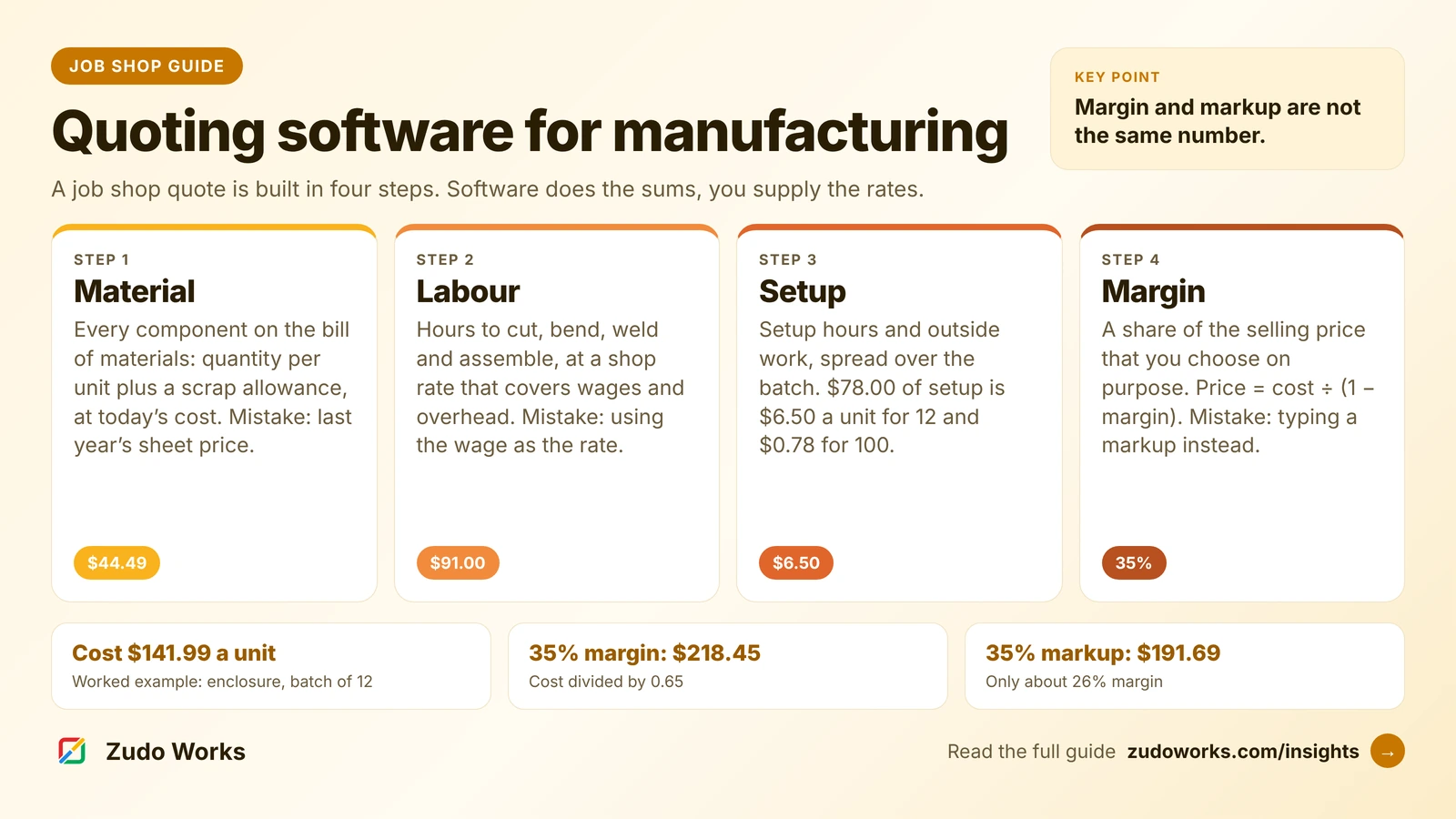
- Quoting. An estimate built from material, setup, run time and outside work. We covered this in quoting software for manufacturing.
Most of these systems do not read the machine controller on their own. Operators report time through a terminal, a tablet or a scanned job card, and automatic machine data comes from a monitoring product connected to the ERP. See ERP vs MES.
If you do United States defence work, start here
For shops in the defence supply chain, one date has just passed. The Department of Defense rule that puts Cybersecurity Maturity Model Certification (CMMC) requirements into contracts took effect on 10 November 2025 and is being phased in over three years. The second phase, which brings in the requirement for Level 2 certification by an outside assessor where a contract calls for it, began on 10 November 2026. Subcontractors that handle federal contract information or controlled unclassified information are covered as well as prime contractors, according to a summary of the rule by the law firm Mayer Brown.
An ERP holds drawings, purchase orders and inspection records, so it can fall inside the scope of that assessment. If your contracts carry controlled information, ask every vendor where the data is hosted, who can access it, and what written evidence it gives customers. Two of the vendors below publish something on this. ECI says JobBOSS² complies with ITAR standards and offers a private hosted cloud and an on-premise installation as well as its shared cloud. ProShop describes a hosting option kept exclusively in the AWS GovCloud region in the United States with access limited to US persons. Treat both as starting points for your own checks. This is general information, not compliance advice.
Six systems at a glance
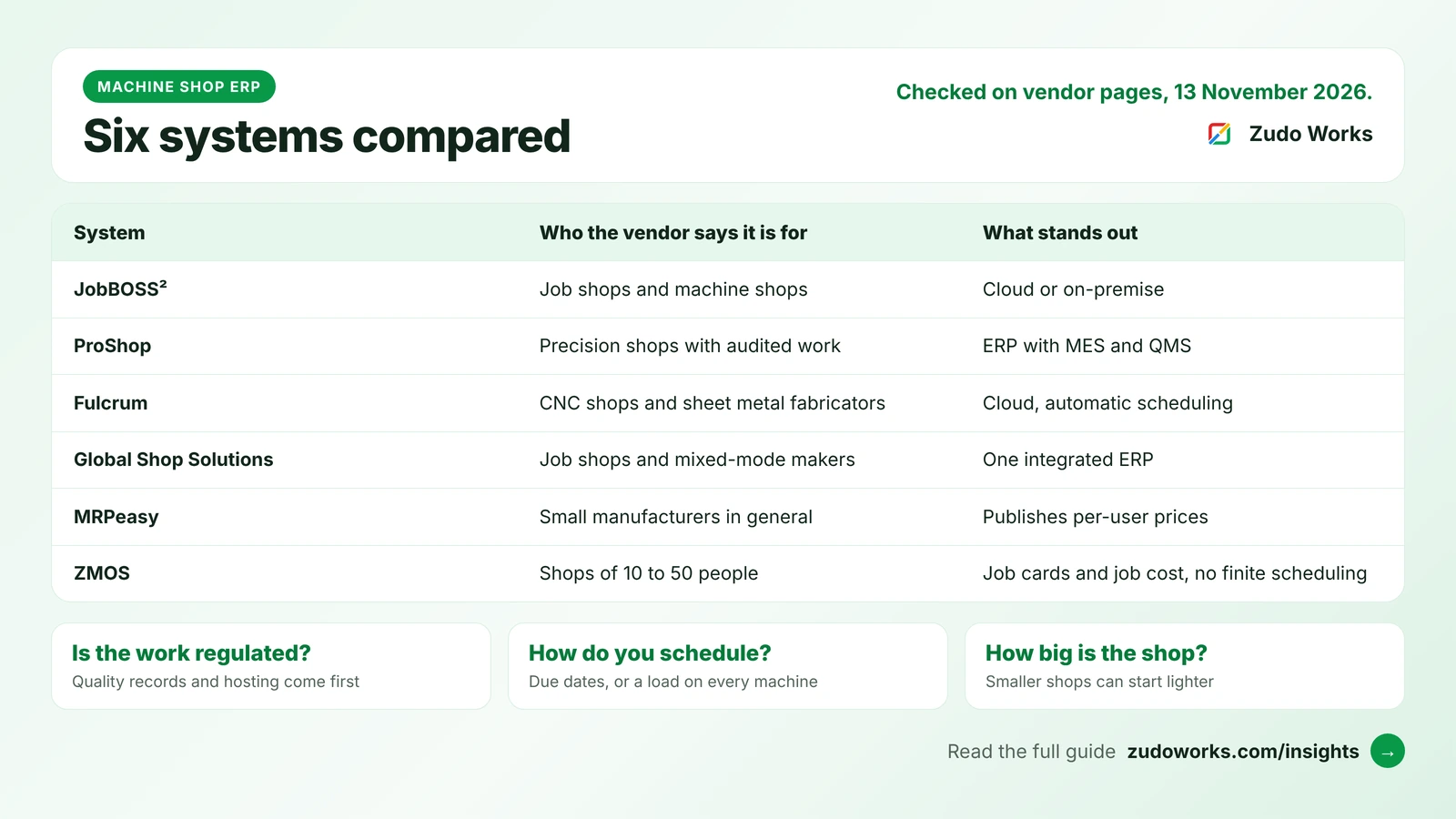
Four of these are specialists in job shops and machining. MRPeasy and ZMOS are general small-manufacturer systems that machine shops also use. The descriptions are the vendors’ own.
| System | Who the vendor says it is for | How it is delivered | Prices on the website |
|---|---|---|---|
| JobBOSS² (ECI) | Small and mid-sized make-to-order shops: job, machine, fabrication, tool and die | Shared cloud, private hosted cloud or on-premise | No. Quote on request |
| ProShop | Precision machine shops in aerospace, defence, medical and space | Web-based, with a US government cloud hosting option | No. Priced by users, on request |
| Fulcrum | Precision CNC shops and sheet metal fabricators | Cloud | No. Its site says pricing does not depend on user count |
| Global Shop Solutions | Machine shops, custom fabricators, job shops and mixed-mode manufacturers | Cloud or on-premise | No. Demonstration first |
| MRPeasy | Small manufacturers in general | Cloud | Yes. Per user, four plans |
| ZMOS (ours) | Sheet-metal, machining and fabrication shops of 10 to 50 people | Cloud, in the browser | Yes. Per bundle of three seats |
The six systems, one by one
JobBOSS²
ECI describes JobBOSS² as a purpose-built job shop ERP for make-to-order and custom metal manufacturers, and says it was formerly called E2 Shop (ECI, JobBOSS²). Its features page lists estimating and quoting, order management, material and inventory, scheduling, shop data collection, a quality module with non-conformances, corrective actions and document control, a CRM, and accounting that is either built in or synchronised with QuickBooks. The scheduling page describes a choice of finite or infinite scheduling, a drag-and-drop planning board and what-if scenarios.
Fits: a shop that wants an established job shop system with a choice of where it is hosted. Check: which features are in the package you are quoted, because the pricing page describes scalable packages without listing what is in each.
ProShop
ProShop calls itself an all-in-one platform that includes ERP, MES and QMS, built for shops where documentation is as critical as the part (ProShop). Beyond estimating, work orders and job costing, its module list has things most general ERPs leave out: visual work instructions, calibration, inspection, and tool and fixture management. Its integrations page shows invoices and purchase orders being pushed to QuickBooks or Sage 50, and links to Paperless Parts for quoting, Mastercam for programming and Datanomix for machine monitoring. In its own blog the company describes its best fit as shops of 20 to 75 employees.
Fits: a precision shop whose customers audit it, and which wants quality management in the same system as the jobs. Check: the effort to set it up. Holding work instructions, tooling and inspection plans for every part takes more preparation than holding only the routing.
Fulcrum
Fulcrum describes itself as cloud manufacturing software built for precision CNC shops and sheet metal fabricators (Fulcrum). Its site lists quoting and sales orders, automatic scheduling, live job tracking of labour and materials, purchase planning, shipping, quality control and finance reporting, with an AI assistant built in. The integrations page names QuickBooks Online and Desktop, Xero, Paperless Parts, several nesting packages and three machine-monitoring products, and says there is an open API.
Fits: a shop that wants a newer cloud system with automatic scheduling and many ready-made connections. Check: the price for your shop, since none is published, and how the general ledger is handled between Fulcrum and your accounting package.
Global Shop Solutions
Global Shop Solutions sells one fully integrated ERP for machine shops, custom fabricators, job shops and mixed-mode manufacturers. Its own FAQ describes advanced planning and scheduling with capacity planning, shop floor data collection, quoting, preventative maintenance, quality and CRM. It runs in the cloud, billed monthly by number of users, or on your own servers. The same page gives an average implementation time of three to six months and says there is no free trial.
Fits: a shop that has outgrown separate tools and wants one supplier for everything, with on-premise as an option. Check: that you have someone who can give the project those three to six months.
MRPeasy
MRPeasy is a cloud system for small manufacturers of all kinds, not only machine shops. It is the only one of the five other vendors that publishes its prices, on a per-user pricing page with four plans. That page lists production planning, bills of materials, drag-and-drop rescheduling, lot traceability and standard accounting on every plan, with quality control and serial numbers on the higher ones. Our longer piece on MRPeasy vs Zoho goes through the plans.
Fits: a small shop that wants planning and traceability quickly and likes to see the price before talking to anyone. Check: which plan holds the features you need, because several that machine shops rely on sit above the entry plan.
ZMOS
ZMOS is our own system, new in 2026, for shops of 10 to 50 people, and the lightest of the six. The full account, with screenshots and limits, is in the ZMOS section below.
Feature comparison
The two tables show what each vendor states on the pages we checked. “Not stated” means we did not find it on those pages. It does not mean the product lacks it, so ask.
| Area | JobBOSS² | ProShop | Fulcrum |
|---|---|---|---|
| Schedule | Finite or infinite, planning board, what-if | Shop floor management module | Automatic scheduling |
| Shop floor | Shop data collection, mobile apps | Paperless shop floor with work instructions | Live job tracking of labour and materials |
| Quality | Non-conformances, corrective actions, document control | Quality system, inspection, calibration | Quality control, described as ready for AS9100D and ISO 9001 |
| Lot or heat | Not stated | Traceability described for medical work | Not stated |
| Accounts | Built in, or QuickBooks sync | Sends invoices and purchase orders to QuickBooks or Sage 50 | Finance reporting, links to QuickBooks and Xero |
| Tooling | Calibration tracking in the quality module | Tool and fixture management, calibration | Not stated |
| Free trial | Not mentioned | Not mentioned | Self-guided tour on its site |
And the other three:
| Area | Global Shop | MRPeasy | ZMOS |
|---|---|---|---|
| Schedule | Advanced planning with capacity planning | Production planning with drag-and-drop rescheduling | Due dates and routing steps. No finite scheduling |
| Shop floor | Shop floor data collection | Kiosk reporting | Scanned job cards on a phone or scanner |
| Quality | Quality module | Quality control on higher plans | Inspections, NCR, CAPA. Not a certified QMS |
| Lot or heat | Not stated | Lot traceability on every plan | Not in the current release |
| Accounts | Part of the integrated system | Standard accounting, links to QuickBooks Online and Xero | Built in: journals, banking, reports |
| Tooling | Preventative maintenance built in | Maintenance on a higher plan | No module. A custom form can hold a gauge register |
| Free trial | No | Yes | Six months for startups and registered partners |
Sources are the vendor pages linked above, read on 13 November 2026. Confirm anything that matters to you with the vendor in writing.
Where ZMOS fits, and where it does not
ZMOS suits a machining or fabrication shop of 10 to 50 people that is moving off spreadsheets and paper travellers and wants to know where every job is and what it cost.
Each job carries its routing. A work order takes the part, quantity, revision and due date, and lists the steps the job goes through at named work centres. Steps are started and completed in order. The job card prints as a PDF with a QR code and a Code 128 barcode, and a phone camera or an ordinary scanner opens the job from the card. See barcode job cards.
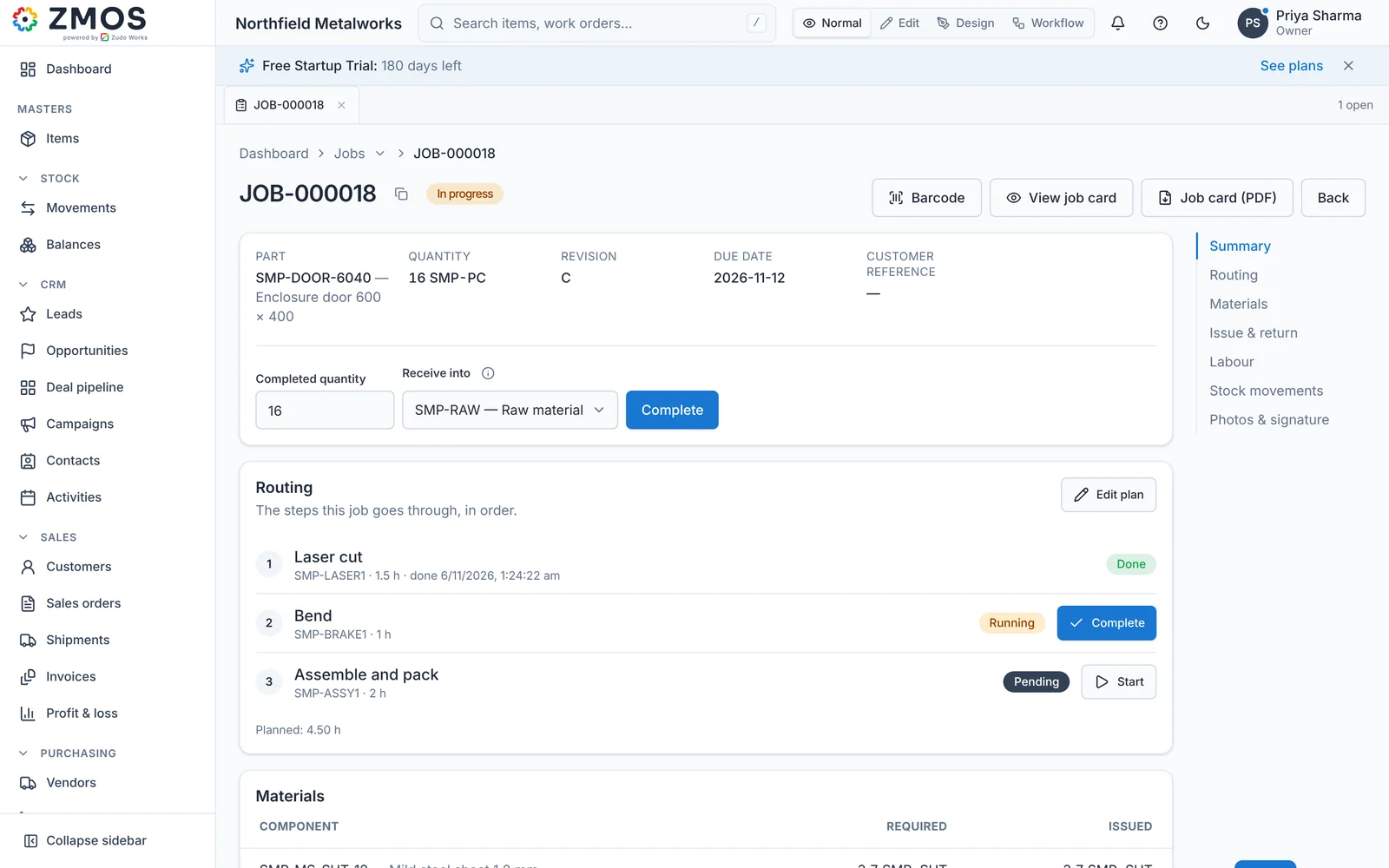
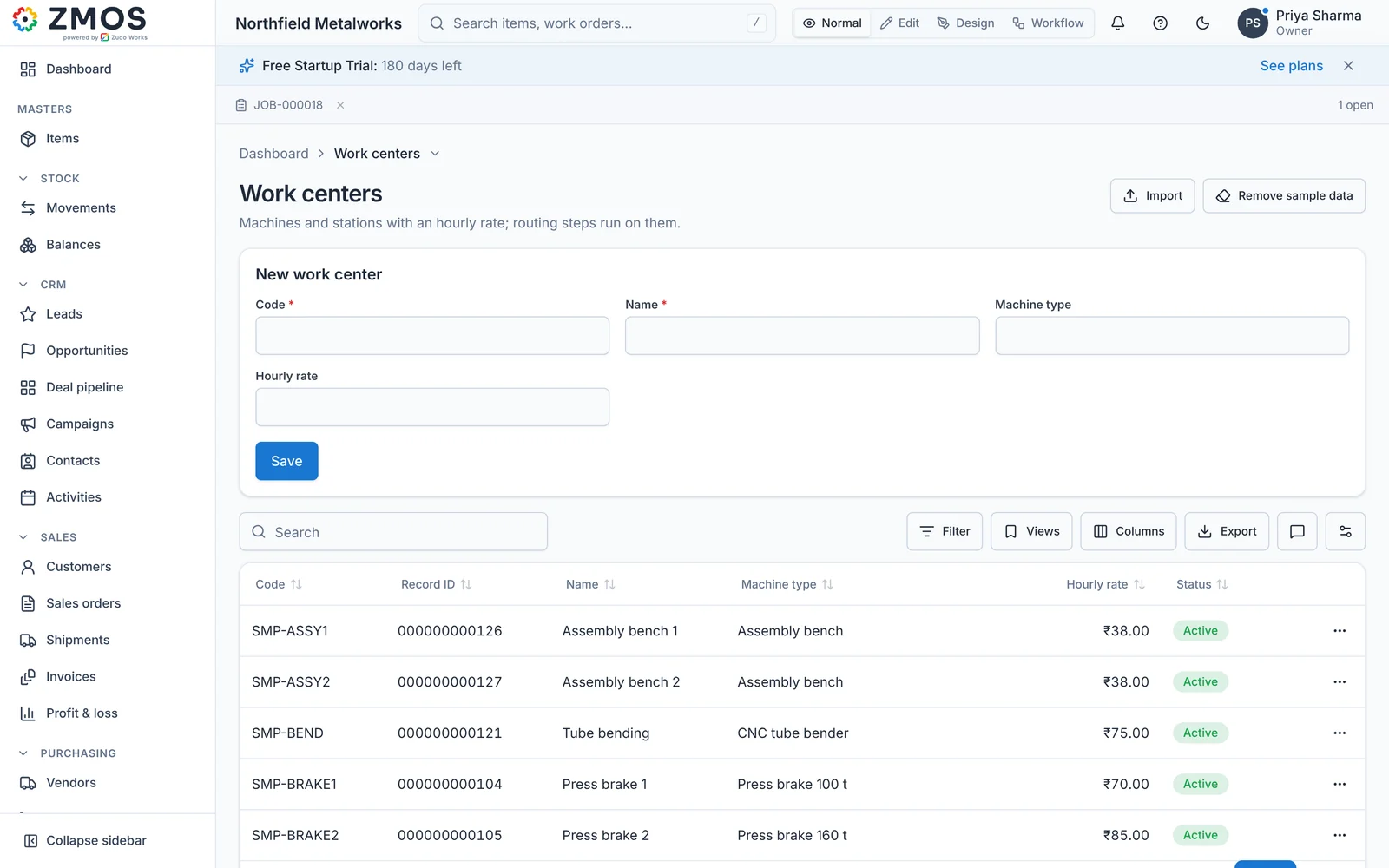
Each work centre has an hourly rate. Labour logged against a step is costed at the rate of the work centre it ran on, and material issued to the job is costed at the item’s current cost. When the job closes, the card shows material, labour and total cost, per job and per unit. This is actual costing, with no standard costing or automatic overhead allocation. See job work and costing.
Quality records stay with the job. Inspections with photos and signatures, non-conformance reports and corrective actions are linked to the item and the job. Extra forms, such as a gauge register or a calibration log, can be built in the form designer without a developer. As the quality page says, this is record keeping and not a certified quality management system.
What ZMOS does not do, and a machine shop should weigh carefully:
- No finite scheduling. ZMOS shows jobs by status, due date and current step. It does not load machines to capacity.
- No lot or heat-number tracking in the current release. If your customers require certificates traced to the heat, ZMOS is not ready for that work today.
- No machine data. It records what people scan and enter. It does not read CNC controllers.
- Single-level bills of materials. A sub-assembly is its own part with its own job.
- No ITAR or CMMC claim. We do not offer government cloud hosting and we do not put ZMOS forward for contracts that carry controlled information.
- No track record yet. ZMOS is new in 2026 and has no listing on review sites. The other five have years of customers behind them.
What it offers in return is a short start and a low entry cost: plans are sold per bundle of three seats, the figures are on the ZMOS pricing page, and startups and registered partners get six months free. If a shop needs something the product lacks, the same engineers build it as custom software. We also build on Zoho, as set out in Zoho for manufacturing. A wider comparison with other small manufacturing systems is on ZMOS and other manufacturing ERPs.
How to choose: a checklist for the demonstration
Take one real job to every demonstration: a part you make often, with its routing and what it cost last time. Ask each vendor to show these on screen with your job, not theirs.
- Enter the routing with setup and run time as separate figures for each operation.
- Have an operator start and stop an operation the way it will be done on your floor.
- Close the job and show its cost per piece beside the quote, without a custom report.
- Show next week’s load on one machine and move a job to another.
- Record a failed inspection and follow it to a corrective action.
- Trace a finished part back to the material certificate it was cut from.
- Say where the data is hosted, who can reach it and how you get it out if you leave.
- Put the full first-year cost in writing: licences, implementation, training and support. Ask for the go-live date in writing too; our guide to how long an ERP implementation takes shows what vendors publish about their own timelines.
The first three points apply to every shop. The fifth and sixth matter if your customers audit you. More questions are in what to look for in an ERP demo and questions to ask an ERP vendor.
What to take from this
There is no best machine shop ERP, only a best fit for your work. If auditors and certificates shape your week, look first at the systems built around quality records and controlled hosting. If the schedule is the daily fight, look at the job shop systems with finite scheduling. If you mostly need to see jobs and their real cost, a lighter system will get you there sooner, and you can try ZMOS free to see whether it is enough. A shorter version of this advice is in our answer on the best ERP for machine shops.
Frequently asked questions
Frequently asked questions
What is the best ERP for a small machine shop?
It depends on the work. Shops with aerospace, defence or medical customers usually need quality records and controlled hosting first, which points to a system such as ProShop. Shops whose main problem is scheduling look at JobBOSS², Fulcrum or Global Shop Solutions. Shops of 10 to 30 people that mainly need job cost can start with a lighter system such as MRPeasy or ZMOS.
How do I compare machine shop ERP systems fairly?
Take one real job to every demonstration and ask each vendor to enter its routing, record time against an operation, close the job and show cost per piece against the quote. Then compare scheduling, quality records, traceability, hosting and the full first-year cost in writing. Vendor rankings are a poor substitute for your own job on screen.
Does a machine shop ERP connect to CNC machines?
Usually not on its own. Most machine shop ERP systems collect time from operators through terminals, tablets or scanned job cards. Automatic data from the controller comes from a machine-monitoring product linked to the ERP. ProShop and Fulcrum both list integrations with monitoring products on their websites.
Do machine shops need a CMMC-ready ERP?
Only if their contracts involve United States defence information. The CMMC contract rule took effect on 10 November 2025, and its second phase, covering Level 2 certification by an outside assessor, began on 10 November 2026. Subcontractors that handle the information are covered. Ask each vendor where data is hosted and what evidence it provides.
Is JobBOSS2 the same as E2 Shop System?
ECI, the company that sells it, says on its product page that JobBOSS² was formerly E2 Shop. It is offered as a shared cloud service, a private hosted cloud or an on-premise installation for customers in the United States. ECI does not publish prices and quotes each shop individually.
Can ZMOS run a machine shop?
ZMOS can run jobs, routings, barcode job cards, labour by work centre, job cost, inspections, purchasing, sales and accounting for a shop of 10 to 50 people. It has no finite scheduling, no lot or heat-number tracking in the current release and no machine data capture, and we make no ITAR or CMMC claim for it.