
A vendor says you can be live in days. A consultant’s report says the typical project runs most of a year. A shop owner down the road says theirs took eighteen months and nearly sank the business. None of them is lying. They are counting different things: a 12-person shop loading a clean item list into a cloud system, a 400-person group replacing its finance and production systems across three sites, and a project that started without an owner.
We went looking for figures with a name and a date attached, and read them on 15 November 2026. Every figure about another company below comes from that company’s own page or report, linked where it is used. We do not quote other vendors’ prices. One disclosure: we make ZMOS, a system for small shops, and we build on Zoho for manufacturers, so we have an interest in short projects. The estimates that are ours are marked as ours.
The short answer
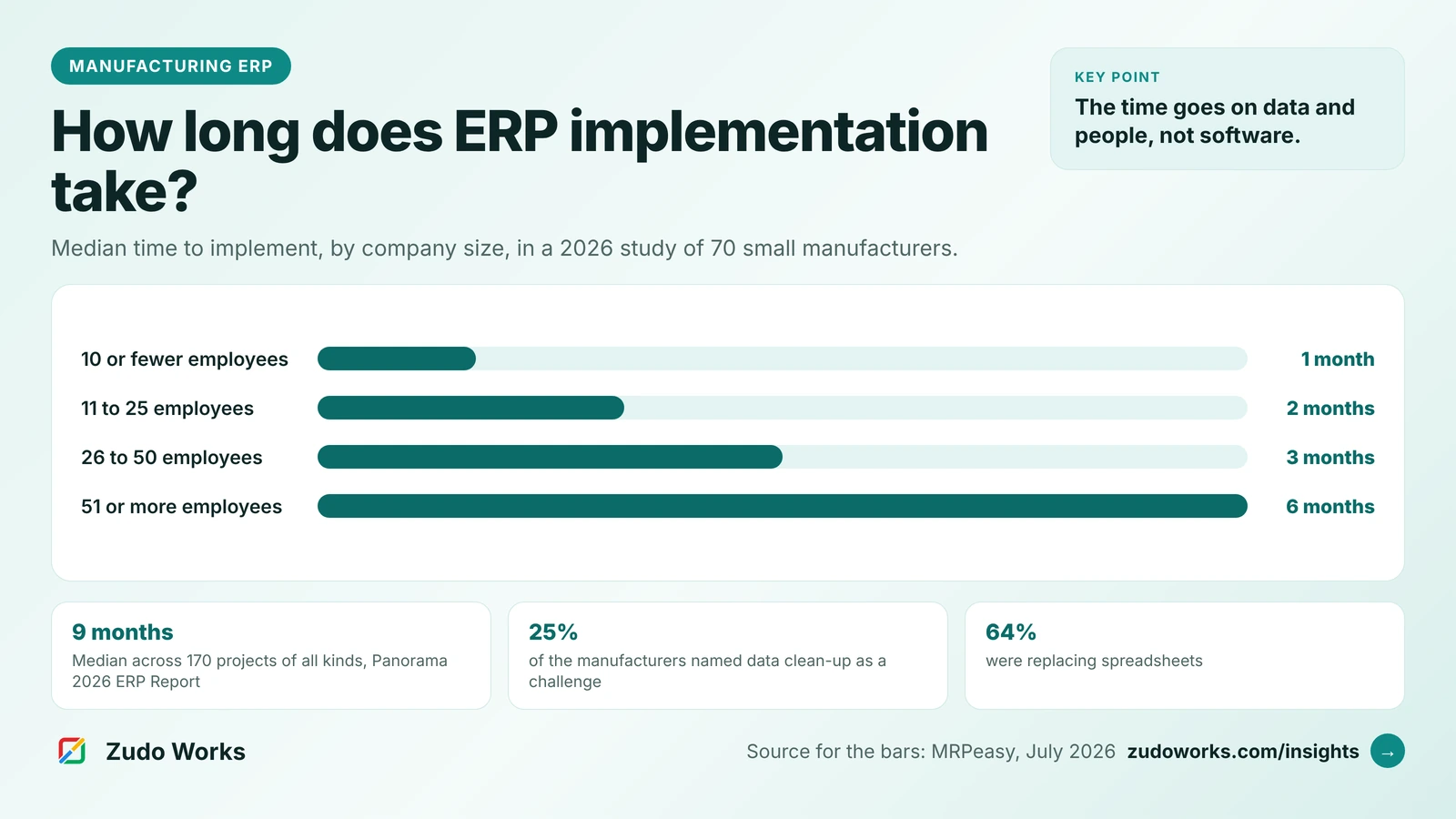
- A shop of 10 to 50 people on a cloud system: one to three months. In MRPeasy’s 2026 study of 70 small manufacturers, the median time to implement was two months.
- Above 50 people: about six months in the same study, and vendors of larger systems state four to twelve months for their own products.
- Projects of every size and industry: a median of nine months in Panorama Consulting Group’s 2026 ERP Report, with almost a quarter running over schedule.
- The software is rarely what takes the time. Data clean-up, people’s time and agreement between teams are the challenges manufacturers report most.
- Check where the clock starts. Some timelines start at the first sales call, some at signing, and some at the day the data is ready.
ERP implementation time by company size
The most useful published figures for a small manufacturer come from MRPeasy, which makes manufacturing software for small companies. In July 2026 it published an analysis of 70 case studies based on interviews with its own customers. The companies had a median of 15 employees and ranged from 1 to 200. Forty-six of them said how long implementation took.
| Company size | Median time to implement |
|---|---|
| 10 or fewer employees | 1 month |
| 11 to 25 employees | 2 months |
| 26 to 50 employees | 3 months |
| 51 or more employees | 6 months |
| All 46 companies | Median 2 months, average 14 weeks, range 2 days to 12 months |
Read these with two cautions, both of which MRPeasy states itself. The companies are its customers, so the figures describe one cloud product aimed at small manufacturers. And they are companies that agreed to be interviewed, so the sample, in MRPeasy’s words, “may overrepresent successful ERP implementations”. A project that was abandoned does not become a case study.
Even so, the pattern is the one we see: time grows with headcount, because more people means more items, more bills of materials, more roles to train and more opinions to settle. The study puts it this way: larger companies need more time for “process customization, data migration, and team alignment”.
What vendors say about their own timelines
These are the statements six vendors publish about their own products or projects. They are not a ranking, and they do not measure the same thing, which is the point of putting them side by side.
| Vendor | What it states | What the figure covers |
|---|---|---|
| Katana | “Most clients are live in under six weeks, with some needing just a few days” | Its onboarding programme, from a scoping call to go-live |
| Global Shop Solutions | Fast Track customers “will Go Live in 90 to 120 days” | A simplified route with “no customization, no advanced functionality”; the standard route takes longer |
| Genius ERP | Recommends “a four- to six-month target for your initial go-live” | The first go-live, with other features left for later phases |
| ECI, maker of JobBOSS² | A 17-week schedule for a small manufacturer or job shop | The whole journey, starting before a system is chosen |
| NetSuite | “The lifecycle usually takes six to 12 months” | Six phases from discovery to support, for businesses in general |
| Priority Software | “Anywhere from 6 months to 2 years” | Manufacturing ERP projects in general, shorter for small companies on standard cloud systems |
The sources, in order: Katana’s implementation page; Global Shop Solutions’ Fast Track announcement of May 2022; Genius ERP’s article on implementation time, updated on 13 November 2026; ECI’s guide to building an ERP project plan; NetSuite’s article on implementation phases of September 2025; and Priority Software’s manufacturing implementation page.
Three things stand out. First, the short figures belong to products sold to small companies with a standard set-up, and the long ones to systems that are configured for each customer. Second, the fast routes are fast because they leave things out: Global Shop Solutions says so in plain words, and Genius ERP’s advice is to go live with what the business needs most and add the rest later. Third, ECI’s schedule is the only one that counts the weeks before you buy. In its plan the purchase happens in week 14, and training, testing and go-live take weeks 16 and 17. If your own count starts at the first demo, add those months.
The nine-month figure, and what it measures
The number quoted most often comes from Panorama Consulting Group, an independent ERP consultancy that surveys organisations each year. Its 2026 ERP Report covers 170 respondents, with data collected from January 2025 to January 2026, and gives a median project timeline of nine months. It also reports that almost a quarter of organisations ran over schedule and more than a quarter ran over budget.
That survey spans several industries and is not limited to small companies, so nine months is not a forecast for a 20-person machine shop. Its most useful finding for a small shop is the reason projects ran late. The most common one was not software. It was what the report calls organisational issues: who decides, resistance to change, and redesigning how work is done.
Where the time actually goes
The MRPeasy study asked its manufacturers what was hard. The answers line up with the Panorama finding.
| Challenge reported | Share of the 70 manufacturers |
|---|---|
| Data clean-up and migration | 25% |
| Employee resistance | 19% |
| Limited time and internal resources | 17% |
| Internal alignment across teams | 17% |
| Rebuilding bills of materials | 10% |
| Learning curve | 10% |
| Integration problems | 4.3% |
Integration, the item most buyers worry about before they sign, is at the bottom. Data is at the top. In the same study 64% of the companies were replacing spreadsheets, 50% accounting software used for jobs it was not built for, and 18% paper. None of those sources holds a clean item list. Somebody has to decide whether a bracket and its painted version are one item or two, which revision of a bill of materials is the real one, and what is physically on the shelf. A vendor can import a clean file in a day. It cannot make those decisions for you. Our short answers on data migration for small shops and managing BOM revisions cover that work.
The second cost is people’s hours. Fulcrum, which sells to machine shops and fabricators, publishes the time it expects from a customer’s team in its implementation guide: about two hours a month from the executive sponsor, four to six hours a week from the project lead, two or more hours a week from the person responsible for data, and one to two hours a week from each functional lead when needed. It also tells customers to plan for reduced shop capacity in the first week of live production and for one to two weeks of intensive support afterwards. Whatever system you choose, hours of that order have to come from somewhere, and a project lead who is also running the floor full time will not find them.
A week-by-week plan for a shop of 10 to 50 people
This is our own working plan for a small shop on a cloud system, not a survey result. It assumes one site, standard processes and one person who owns the project. The phases overlap, and the data phase is the one that slips.
| Phase | Typical time | Done when |
|---|---|---|
| Scope, owner and go-live date | 1 week | The first three processes to go live are written down |
| Clean items, BOMs, customers, vendors and opening stock | 2 to 4 weeks | Active items have one name, one unit and one current BOM |
| Configure and import | 1 to 2 weeks | Numbering, units, warehouses, tax rates and roles are set and the files are in |
| Test with real orders | 1 to 2 weeks | Three real orders have run from quote or order to invoice |
| Train each role and go live | 1 week | Stock is counted and opening balances are loaded |
| Settle after go-live | 2 to 4 weeks | Stock and open orders reconcile and the old spreadsheets are switched off |
That adds up to eight to fourteen weeks, which sits inside the one to three months the MRPeasy study found for companies of this size. A shop with a clean item list and current BOMs can be at the short end. A shop that has to decide what its parts are called first will be at the long end, and the software is not the reason. The step-by-step version is in our ERP implementation checklist for a small manufacturer.
Choosing the go-live date
Go live at the start of a month, outside your busiest season, and bring accounting across at a period end so the opening balances are clean. Many shops choose the start of their financial year. The standard income year runs from 1 July to 30 June in Australia and from 1 April to 31 March in New Zealand, so working back twelve weeks puts the start of the project in early April for an Australian shop and early January for a New Zealand one. In the United Kingdom and the United States the year end is the company’s own choice, so use whichever month end follows your quiet period.
A full stock count just before go-live is not optional. Opening stock that is wrong on day one is the fastest way to lose the floor’s trust in the new system.
What stretches a timeline, and what shortens it
Projects slip for the same few reasons, and they match the survey findings above.
- No single owner inside the shop with hours set aside each week and the authority to decide.
- Every module on the same day. Stock, work orders, purchasing and accounting all going live together.
- Custom development first. Changing the system before the standard version has been run for a month.
- Waiting for a quiet period that never arrives.
- Data cleaning handed to someone who does not know the parts.
What shortens it is the reverse. Go live with stock and work orders first, then purchasing, then accounting. Use the vendor’s file import instead of keying records by hand. Keep changes to custom fields and simple rules for the first month. Hold a 30-minute check-in every week with the owner, the planner and the stores person, and close open questions in that meeting. Run the old spreadsheet in parallel for one month at most. Our answer on why ERP implementations fail goes through each of these.
Questions to ask a vendor about the timeline
- Where does your stated timeline start: the first call, the signature, or the day our data is ready?
- What does “live” mean in that figure: first login, first real order, or the old system switched off?
- What is left out of the fast route, and what would adding it cost in weeks?
- How many hours a week do you need from our project lead and from the person who knows our parts?
- Who cleans and loads the data, and in what file format do you need it?
- Can we go live with stock and jobs first and add accounting at a period end?
- What support do we get in the first two weeks after go-live, and from whom?
- Can we speak to a customer of our size about how long theirs took?
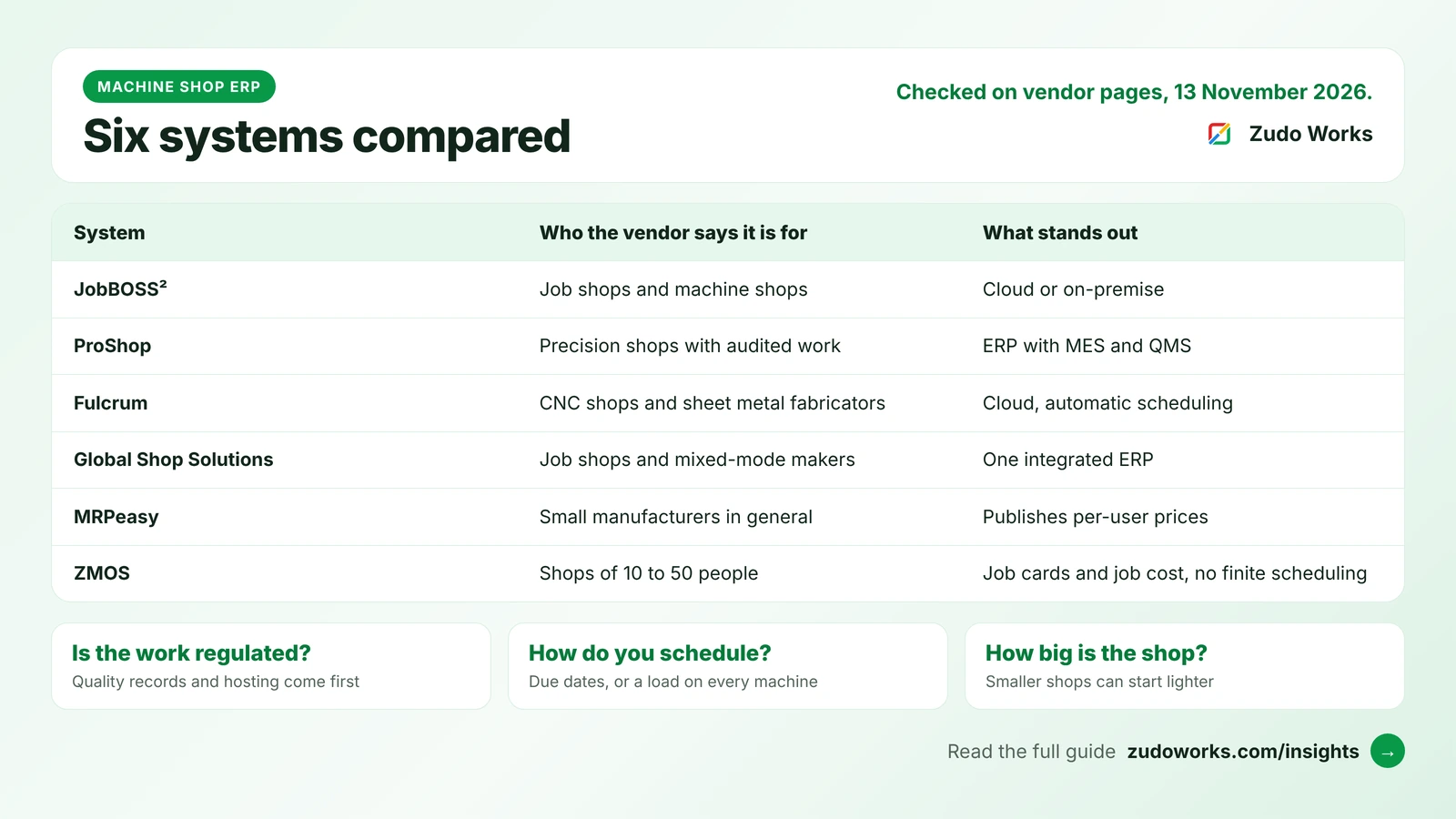
Ask for the answers in writing, alongside the costs. Our list of questions to ask an ERP vendor covers the rest of the conversation, and the machine shop ERP comparison shows how six systems describe their own fit.
Where Zoho and ZMOS fit
Two of our own figures, so you can hold us to them. When we build on Zoho for a manufacturer, a first phase covering stock, one production workflow and the main integrations typically takes about twelve weeks; the sequence is on our Zoho implementation for manufacturers page. That is a configured build, not a product you sign up for, and it sits between the small-shop figures and the larger-system figures above for that reason. The Zoho One implementation checklist gives the rollout order.
ZMOS is the other route: a ready system for sheet-metal, machining and fabrication shops of 10 to 50 people. A new workspace opens with seven guided set-up steps. Items, customers and vendors can be imported from CSV files, up to 200 rows at once, with bigger files run in batches. A sample workspace can be loaded so the team can try a job from start to finish before any real data goes in.
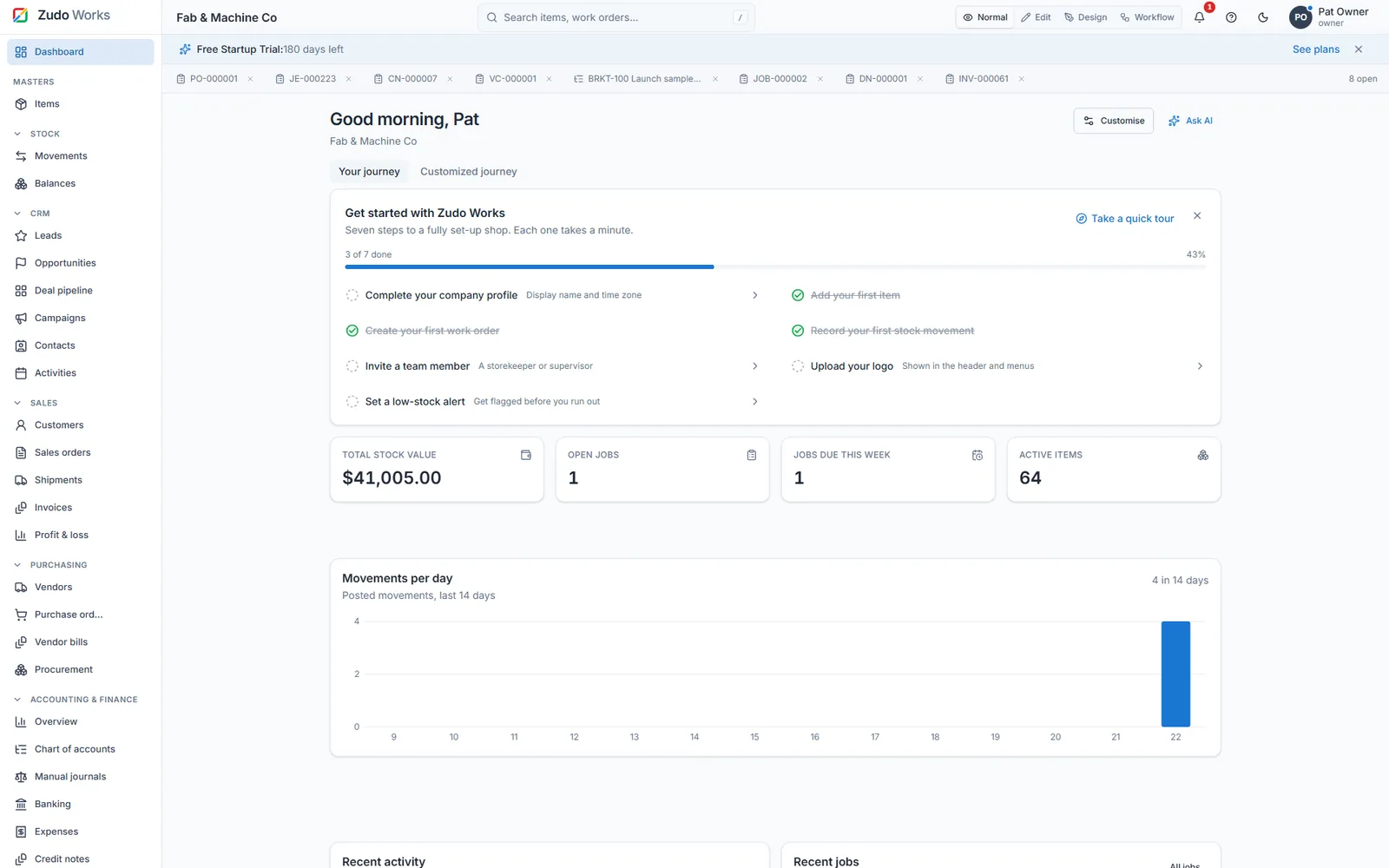
Those steps set the workspace up. They do not clean your data, and we will not tell you a shop is “live in minutes”. The plan in the table above applies to ZMOS as much as to any other system. ZMOS is also not sized for a multi-plant group or for a plant that needs its machines connected directly; a larger system is the better fit there, and a longer project comes with it. Startups and registered partners can use the whole product free for 180 days, which is long enough to run the plan above before paying; the details are on the free trial and pricing pages.
What to take from this
For a shop of 10 to 50 people on a cloud system, plan for one to three months and treat anything quoted in days as the time to switch the software on, not the time to run the business on it. For a larger company or a configured system, four to twelve months is what the vendors themselves state. In every case the calendar is set by your data and your people’s hours. Start the item list clean-up before you sign anything; it is useful whichever system you choose. If you would like a second opinion on a plan or a quote, get in touch, or read the short version in how long does an ERP implementation take?
Frequently asked questions
Frequently asked questions
How long does it take to implement an ERP system?
It depends mostly on company size and how much the system is configured. In a 2026 MRPeasy study of 70 small manufacturers the median was two months, with a range from two days to twelve months. Panorama Consulting Group's 2026 ERP Report, which covers 170 projects of all sizes and industries, gives a median of nine months.
How long does ERP implementation take for a small manufacturer?
For a manufacturer of 10 to 50 people on a cloud system, one to three months is typical. The MRPeasy study found a median of one month for companies with 10 or fewer employees, two months for 11 to 25 and three months for 26 to 50. Clean item and bill of materials data puts a shop at the short end.
What takes the longest in an ERP implementation?
Preparing data. In the MRPeasy study, data clean-up and migration was the challenge manufacturers named most often, at 25%, followed by employee resistance at 19% and limited time and internal resources at 17%. Integration problems were named by 4.3%.
Why do ERP implementations run late?
Mostly for reasons inside the company, not because of the software. Panorama Consulting Group's 2026 ERP Report found that almost a quarter of projects ran over schedule and that organisational issues, such as governance, resistance to change and process redesign, were the most common reason.
Can an ERP be implemented in a few weeks?
Yes, for a small company with a standard set-up and clean data. Katana states that most of its clients are live in under six weeks, and the fastest company in the MRPeasy study took two days. Fast routes work by leaving customisation and advanced features for later, so check what is left out.
When is the best time to go live with a new ERP?
At the start of a month, outside your busiest season, with a full stock count just before. Bring accounting across at a period end so opening balances are clean. Many shops choose the start of their financial year, which is 1 July in Australia and 1 April in New Zealand.