

Most small fabrication and machining shops lose money on quotes in one of two ways. Either the quote takes three days and the customer has already placed the order elsewhere, or it goes out in an hour with a price nobody can explain a month later. Quoting software is sold as the cure for both. It cures neither unless the numbers behind it are your own: your material costs, your hours, your shop rate.
This guide is written for owners and estimators in shops of 10 to 50 people, with Australian and New Zealand readers in mind. The tax rules and the descriptions of other companies’ products were checked on their own pages on 13 November 2026 and are linked where they are used. One disclosure first: we make ZMOS, a system for small manufacturers, and the last part of this guide shows how quotes work in it. The screenshots are real captures from the product on sample data. We say plainly what its quote form does not do.
The short answer
- A manufacturing quote has four parts: material, labour, setup and outside work, and margin. Software only does the arithmetic. You supply the rates.
- Margin and markup are different numbers. A 35 per cent markup gives a margin of about 26 per cent. Mixing them up is the most common pricing mistake.
- There are three kinds of quoting software: a spreadsheet, a quoting tool that reads drawings, and quoting inside the system that runs the shop.
- A small job shop usually gets the most from the third kind, because the quote, the job and the actual cost sit in the same place and can be compared.
- Shops that quote hundreds of new parts a month from CAD files are better served by a tool built for that, and we say so below.
What quoting software does for a manufacturer
Quoting software for manufacturing turns a request for quotation into a price and a delivery date. For a made-to-order part it does this by adding up what the part will cost to make and then adding a margin. That is different from quoting in a shop that resells finished goods, where the cost is simply what the supplier charges.
The attraction is speed and consistency. Writing in a trade magazine in August 2021, a product owner at a fabrication software company said a quoting system can turn a drawing into a quote in as little as five minutes, against an hour or more by hand (The Fabricator, 10 features of a good quoting system). The same article lists consistency as a feature in its own right: two estimators should produce the same price for the same part. Neither benefit depends on a particular product. Both depend on the shop writing its rates down once and using them every time.
The four parts of a quote
Every quote for a made part can be laid out in the same four lines. If your current quotes cannot be split this way, that is the first thing to fix, before any software.
| Part | Where the number comes from | Common mistake |
|---|---|---|
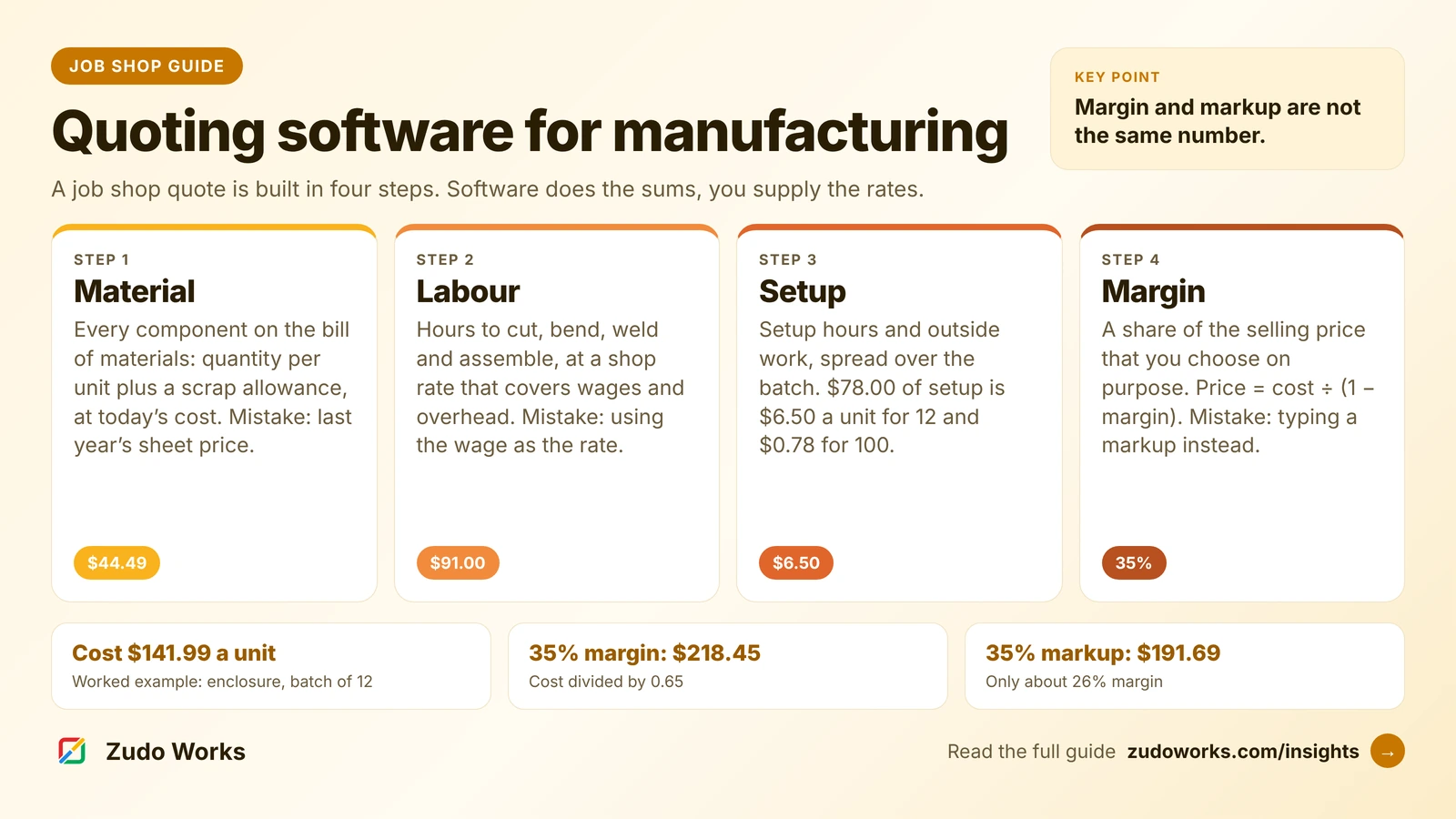
| 1. Material | The bill of materials: each component, quantity per unit, a scrap allowance, at the current cost | Using last year’s sheet price, or leaving out scrap and offcuts |
| 2. Labour | Hours per operation (cut, bend, weld, assemble) multiplied by the shop rate | Using the wage as the rate, so overhead is never recovered |
| 3. Setup and outside work | Setup hours spread over the batch, plus subcontracted steps such as galvanising or heat treatment, plus freight | Charging the setup of a batch of 100 to a batch of 10 |
| 4. Margin | A percentage of the selling price that you decide by customer, risk and how busy the shop is | Entering a markup when you meant a margin |
Material is the easiest part to get right if you keep bills of materials. Our short answer on what a bill of materials is covers the basics, and how to handle scrap in production explains why the scrap allowance belongs on the BOM line and not in someone’s head.
How to build a shop rate
The shop rate is the hourly figure you multiply labour hours by. It has to recover wages and the cost of the building, the machines and the consumables, which is why it is always higher than the wage.
A widely used method, set out by Don Clutter in The Fabricator in August 2023, builds the rate for each department from three figures (Estimating basics and quoting jobs in custom metal fabrication):
- Direct labour per hour: the average hourly wage in the department, rounded up.
- Fixed overhead per hour: the last 12 months of rent, leases, utilities and depreciation, shared between departments, divided by the productive hours you expect this year.
- Variable overhead per hour: the last 12 months of gases, wire, safety gear and indirect labour, adjusted for expected price rises, divided by the same hours.
The shop rate is the sum of the three. The article’s arithmetic for productive hours is worth copying: one 8-hour shift, five days a week, is 2,080 hours a year, and at 80 per cent utilisation that is 1,664 hours a machine. Use your own working week and your own utilisation. The article also advises reviewing overhead rates every quarter, which matters when power and gas prices move.
Sales, administration and accounts are recovered the same way, as a figure per productive hour across the whole shop, or left to be covered by the margin. Either is fine. What matters is that you choose one and do not count it twice.
Margin and markup: a worked example
Markup is profit as a percentage of cost. Margin is profit as a percentage of price. The same job has both, and they are never the same number.
- Price from a markup: cost × (1 + markup).
- Price from a margin: cost ÷ (1 − margin).
Here is one unit of a sheet-metal electrical enclosure, quoted in a batch of 12. The material figure is the one shown on the bill of materials in the screenshot further down. The hours and the $65 shop rate are example figures chosen to make the arithmetic easy to follow. They are not a market rate.
| Line | Working | Per unit |
|---|---|---|
| Material | BOM components including 5 per cent scrap on the sheet | $44.49 |
| Labour | Laser 0.25 h + press brake 0.30 h + welding 0.50 h + assembly 0.35 h = 1.40 h at $65 | $91.00 |
| Setup | 1.2 h at $65 = $78.00, spread over 12 units | $6.50 |
| Cost | Sum of the three lines | $141.99 |
| Price at a 35 per cent margin | $141.99 ÷ 0.65 | $218.45 |
| Price at a 35 per cent markup | $141.99 × 1.35 | $191.69 |
The difference is $26.76 a unit, or $321.12 on the batch of 12. A shop that means to make a 35 per cent margin and types 35 into a markup box makes about 26 per cent: $49.70 of profit on a price of $191.69. Whatever software you use, find out which of the two its percentage field means, and write it on the quoting procedure.
Setup deserves the same care. The $78.00 of setup is $6.50 a unit in a batch of 12 and $0.78 a unit in a batch of 100. A quote copied from the larger batch under-recovers $5.72 on every unit of the smaller one.
GST on quotes in Australia and New Zealand
GST is 10 per cent in Australia and 15 per cent in New Zealand, according to the Australian Taxation Office and Inland Revenue. In Australia a business must register once its GST turnover reaches $75,000 (ATO, Registering for GST).
Most manufacturing quotes go to other businesses. The ACCC’s guidance on price displays says a business displaying prices only to other businesses does not need to include GST in the total price (ACCC, Price displays). The safe habit in both countries is to show three figures on every quote: the price before GST, the GST, and the total, each labelled. A buyer comparing two quotes should never have to guess which one includes tax. This is general information and not tax advice. Check your own position with your accountant.
Three kinds of quoting software
| Kind | How it prices a part | Fits | Watch for |
|---|---|---|---|
| Spreadsheet | Your own formulas for material, hours and margin | A few quotes a week, one estimator | Rates and material prices go stale. Nothing links the quote to what the job really cost |
| Quoting tool that reads drawings | Works out cutting, bending or machining time from the part file, then applies your pricing rules | High volumes of new parts quoted from CAD files | It is a second system. Check how won quotes reach your job and stock records |
| Quoting inside the shop system | Starts from the item, its bill of materials and its cost in the same system that runs jobs and stock | Shops that make repeat and similar parts and want quote, job and actual cost in one place | Check how much of the estimate it works out for you and how much you enter |
Two examples of established products, described from their own pages. Paperless Parts says its costing automation uses part geometry to estimate costs and applies customisable pricing logic, and its page lists security measures aimed at United States defence work (Paperless Parts, job shop software). That is the second kind. JobBOSS² from ECI is a job shop system whose Australian page describes estimates built from preset burden rates, labour rates, quantity breaks, setup time, run time and outside services, with visibility of shop capacity when you quote (ECI, JobBOSS² quotes). That is the third kind, with a deep estimating module. We do not quote other vendors’ prices. Ask each one directly.
If you receive dozens of new drawings a day and no two parts are alike, a tool that reads the drawing will save more estimator time than anything else on this list. If most of your work is repeat parts, variations on known parts and small batches, the third kind usually pays back sooner, because the cost of a part you have made before is already in the system.
What to check before you choose
- Does the percentage field mean margin or markup, and does the screen say so?
- Does the material cost come from a bill of materials with a scrap allowance, at today’s cost?
- Can you set a different rate for each work centre or department?
- Is setup entered once for the batch and spread over the quantity?
- Does a won quote become an order without retyping, and does it reserve stock?
- Can you see the estimate beside the actual cost when the job closes?
- Are quotes numbered, with a record of who changed and sent each one?
- Does it show the price before tax, the tax and the total separately?
The sixth point is the one that improves a shop over time. A quote is a forecast. Comparing it with the job’s actual cost is how the next forecast gets better. Our answers on how to calculate job cost and how to track labour on jobs cover the actual side.
How quotes work in ZMOS
ZMOS is our system for sheet-metal, machining and fabrication shops of 10 to 50 people. It is the third kind in the table above, with a simple quote form. Here is exactly what it does, checked in the product on 13 November 2026.
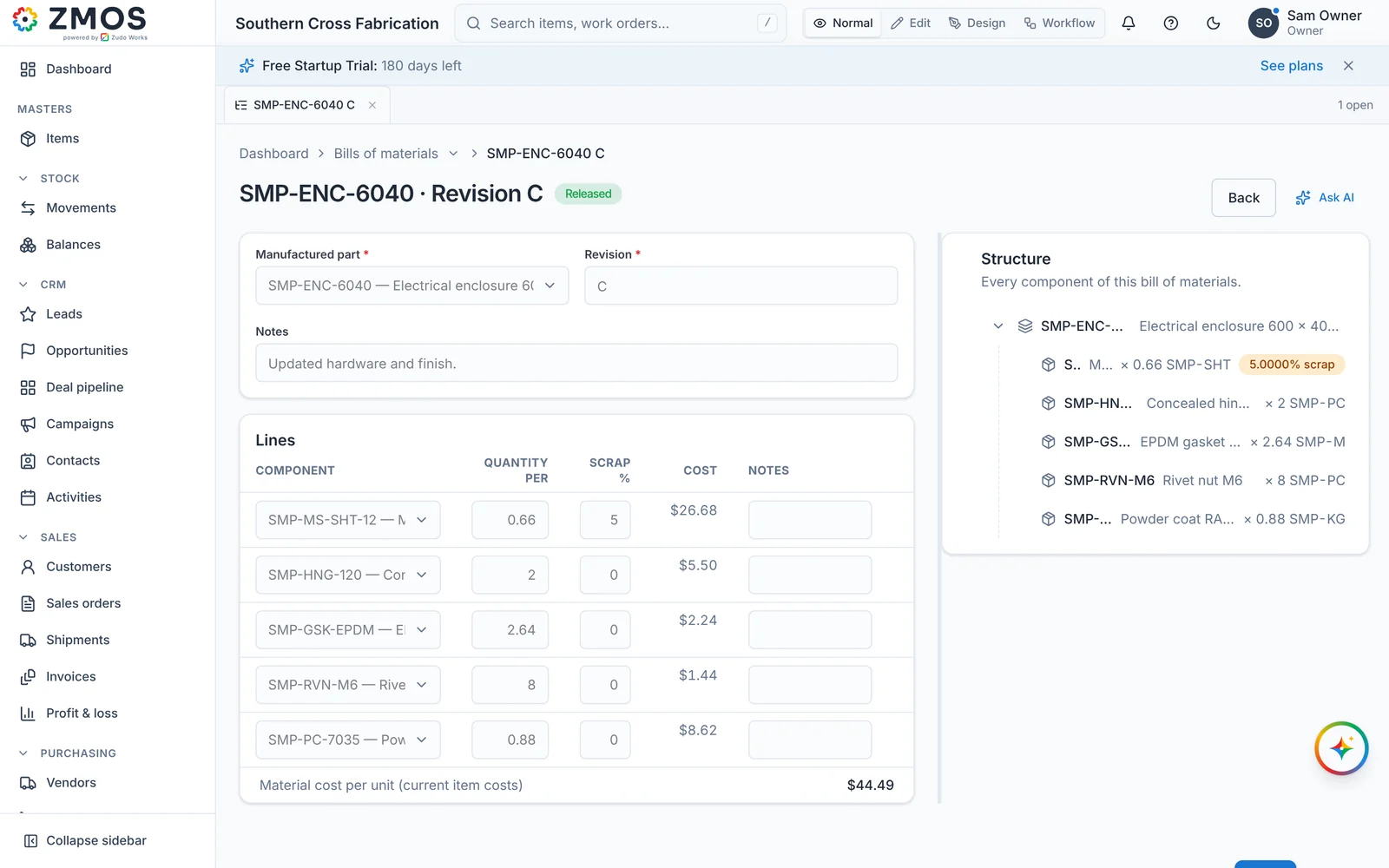
The material cost starts on the bill of materials. Each manufactured part has a BOM with a quantity per unit and a scrap percentage on every line. The editor shows the cost of each line and the material cost per unit at current item costs. A released revision cannot be edited, so the figure you quoted from stays on record. A change means a new revision, as described in how to manage BOM revisions.
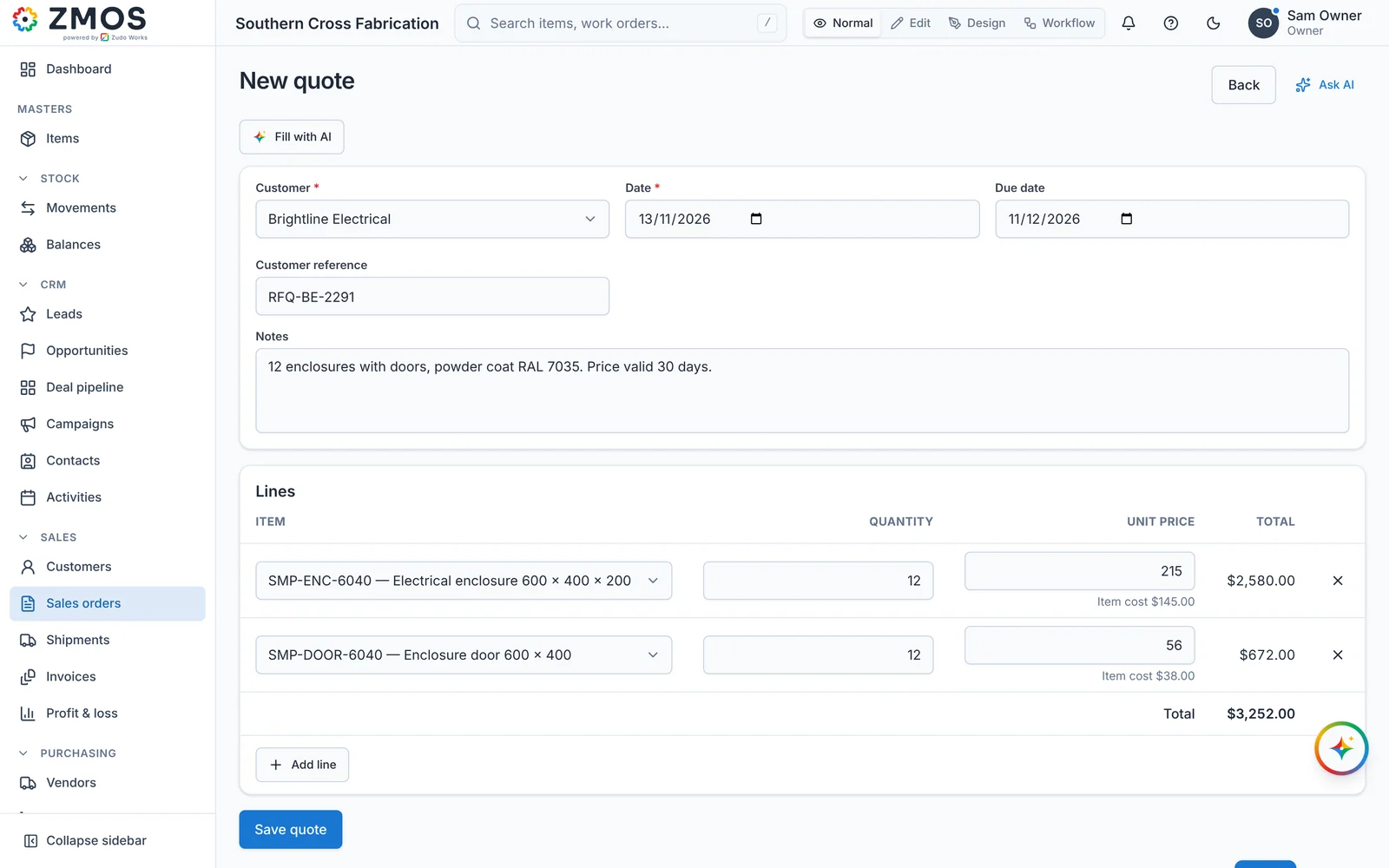
The quote shows the item’s cost beside your price. A quote has a customer, a date, a due date, the customer’s reference and lines of item, quantity and unit price. When you pick an item, the unit price is filled in with the cost held on the item, and that cost stays visible under the price box after you type your own figure. In the screenshot the enclosure is priced at $215.00 against an item cost of $145.00. That is a margin of 32.6 per cent, or a markup of 48.3 per cent.
A won quote becomes the order. A saved quote gets a number starting QT. Send quote marks it as sent. Confirm order turns it into a sales order with its own number and reserves the stock that is on hand. If the quote was raised from an opportunity in the built-in CRM, confirming it marks the deal as won. Every step is written to the audit log with the person who did it.
The actual cost comes back from the job. When the job runs, material is issued at the item’s cost and labour is logged at the work-centre rate, so the job shows its real cost per unit when it closes. That is the figure to compare with the quote. The detail is on the job costing page, and the BOM and work order side is on production and bills of materials.
Zudo AI can fill in the form. The Fill with AI button lets you describe the quote in a sentence, and Zudo AI fills in the fields. It does not save the quote. You check it and save it yourself.
What the ZMOS quote form does not do:
- It does not read drawings. There is no cutting or machining time worked out from a CAD file. You estimate the hours.
- It does not have a margin or markup field. You see the item cost and type the price. The percentage is your own arithmetic, as in the example above.
- It does not build the labour estimate for you. The BOM gives the material cost. The cost held on the item is the figure you maintain, so include labour and setup in it if you want the hint to show full cost.
- It does not add tax to the quote. The quote total is a before-tax figure. Tax rates are applied on the invoice in ZMOS accounting.
- It does not hold quantity-break price tables. A different batch size is a new line or a new quote.
The workspace currency is a setting, and the screenshots use Australian dollars. ZMOS plans themselves are billed in Indian rupees or US dollars, and the figures are on the ZMOS pricing page, including the six-month free trial. If you are weighing ZMOS against other small manufacturing systems, see ZMOS and other manufacturing ERPs, our machine shop ERP comparison and our guide to what a manufacturing operating system is.
What to take from this
Write the four parts of your quote down before you look at software: material from a bill of materials, hours at a shop rate you have worked out, setup spread over the batch, and a margin you have chosen on purpose. Then pick the kind of software that matches how your requests arrive. Drawings by the dozen point to a tool that reads them. Repeat and similar parts point to quoting inside the system that runs your jobs. If your quoting follows rules no product covers, such as pricing by weight, by cut length or by a customer’s own schedule of rates, that is a job for custom software, and you are welcome to talk to us about it.
Watch and share
The same guide as a short video, on the channels where we post it. Share the one that suits the person you are sending it to.
- YouTube: the 49-second video
- YouTube Shorts: the vertical version
- Facebook: the Reel
- LinkedIn: Zudo Works page
- LinkedIn: Arunkumar V
- Instagram: the four-slide guide
- Facebook: the four-slide guide
- LinkedIn: Zudo Works page, four slides
- LinkedIn: Arunkumar V, four slides
- Threads: the short version
- Mastodon: the short version
Frequently asked questions
Frequently asked questions
What is quoting software for manufacturing?
Quoting software for manufacturing works out a selling price for a made-to-order part. It adds the material from the bill of materials, labour hours at a shop rate, setup and outside work, then applies a margin. It also keeps numbered quotes, records who sent them, and in most products turns a won quote into an order.
What is the difference between margin and markup on a quote?
Markup is profit as a percentage of cost. Margin is profit as a percentage of the selling price. On a cost of $141.99, a 35 per cent markup gives a price of $191.69, which is a margin of about 26 per cent. A 35 per cent margin needs a price of $218.45.
How do I work out a shop rate for quoting?
Add three hourly figures for each department: the average direct wage, fixed overhead such as rent and depreciation, and variable overhead such as gases and consumables. Each overhead figure is the last 12 months of cost divided by the productive hours you expect this year. Review the rate every quarter.
Should a manufacturing quote include GST?
Show the price before GST, the GST and the total as three labelled figures. GST is 10 per cent in Australia and 15 per cent in New Zealand. The ACCC says prices shown only to other businesses do not need to include GST in the total, but a clear split avoids disputes.
Do small job shops need CAD-based quoting software?
Only if they quote many new parts from drawings every day. A tool that reads part files saves estimator time on parts never made before. A shop that mostly makes repeat or similar parts gets more from quoting inside the system that holds its bills of materials, jobs and actual costs.
Can ZMOS create quotes for manufactured parts?
Yes. A ZMOS quote has a customer, dates, a reference and lines of item, quantity and unit price, with the item cost shown under each price. Confirming a quote creates the sales order and reserves stock on hand. It has no margin field and does not read CAD files, so you estimate hours yourself.