

An if statement looks like the easy part of any language, and in Deluge the syntax is easy. What goes wrong is everything around it: a field that is empty when the script expected a value, a test that mixes && and || without brackets, or a comparison that fails because one side is "open" and the other is "Open".
This guide goes through the conditional forms Deluge offers, then the parts that cause most of the trouble: null values, empty values, operator order and text comparison. The syntax and behaviour described here were checked on Zoho’s Deluge and Zoho Creator help pages on 19 November 2026. We build on Zoho, so read this with that in mind. If you are new to the language, start with our Deluge script examples.
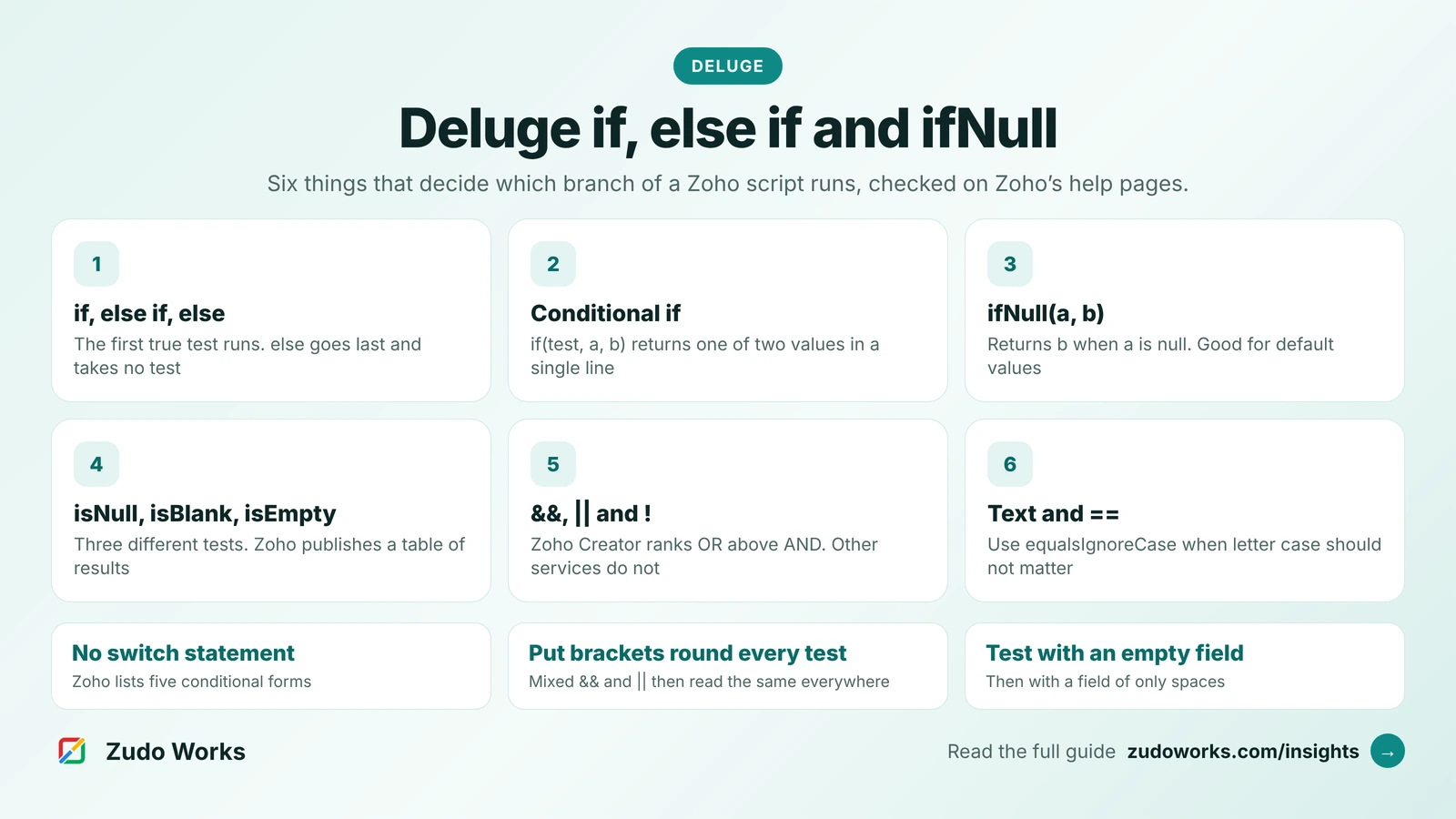
The short answer
- Deluge has
if,else ifandelse. The test goes in round brackets, the actions in curly brackets. The first test that is true runs, and the rest are skipped. - There are two one-line forms.
if(test, a, b)returns one of two values.ifNull(a, b)returnsbwhenais null. - There is no switch statement. Zoho’s conditional statements page lists five forms and none of them is a switch or a case. Use an
else ifladder or a map lookup. isNull,isBlankandisEmptyare not the same test. Zoho publishes a table of what each one returns, and the answers differ between Zoho Creator and other services.- Zoho Creator ranks
||above&&. Every other Zoho service ranks&&first. Put brackets round each part of a mixed test and the difference stops mattering.
The syntax of if, else if and else
The full shape is one if, any number of else if blocks, and one optional else at the end.
amount = ifNull(deal.get("Amount"), 0);
if (amount >= 50000)
{
    tier = "Key account";
}
else if (amount >= 10000)
{
    tier = "Standard";
}
else
{
    tier = "Small";
}
The rules Zoho documents for it:
ifandelse ifneed a test. Zoho calls it the criteria. It must work out to true or false.else ifalways follows anif. It is checked only when the tests before it failed.elsetakes no test and must come last. It runs when nothing above it matched. It is optional.- With no
elseand no match, nothing runs. The script simply moves on to the next statement. That is often what you want, and sometimes a silent bug.
Because only the first true test runs, the order of the ladder matters. In the example above a deal of 80,000 passes both tests, and it is the first one that decides. Put the narrowest test first and the widest last.
Any Deluge statement can go inside the curly brackets, including another if. In Zoho Creator, a form workflow can stop a record being saved from inside one, as in this example from Zoho’s own help page:
if (!(input.Accept_Agreement))
{
    alert "Please Accept the agreement and press submit";
    cancel submit;
}
The operators you can use in a test
A test is one or more comparisons joined by logical operators. These are the ones Zoho’s operator and criteria pages list.
| Operator | Meaning | Works with |
|---|---|---|
== | Equals | Text, numbers, decimals, dates and times |
!= | Not equal | Text, numbers, decimals, dates and times |
< > <= >= | Less than, greater than, and the same with “or equal” | Numbers, decimals, dates and times. Not text |
in not in | The value is, or is not, one of a list | A list of text, numbers or dates, as listed on Zoho’s criteria page |
&& | AND: both sides must be true | Two tests |
|| | OR: at least one side must be true | Two tests |
! | NOT: turns true into false and false into true | One test |
A function that returns true or false can stand in for a comparison, so if (name.contains("Ltd")) and if (parts.isEmpty()) are both valid tests. A single = assigns a value. A double == compares. Even one of Zoho’s older help pages mixes the two up in an example, so it is an easy slip to make.
&& and ||: the rule that differs in Zoho Creator
When a test mixes AND and OR, the language has to decide which to work out first. Zoho’s logical operators page gives two different answers:
- All Zoho services except Zoho Creator: NOT first, then AND, then OR.
- Zoho Creator: NOT first, then OR, then AND.
The page carries a note that Zoho is working on unifying the two. Until it does, the same line of code can mean different things in different products. Take a test meant to pick up urgent jobs, plus any open job that is late:
if (priority == "Urgent" || status == "Open" && isLate)
{
    // escalate
}
In a Zoho CRM function, AND is worked out first, so this reads as “urgent, or open and late”. In Zoho Creator, by the documented order, OR is worked out first, so it reads as “urgent or open, and also late”. An urgent job that is not late is escalated in one product and skipped in the other.
The fix costs four characters. Zoho documents that the innermost brackets are always processed first, in every service:
if (priority == "Urgent" || (status == "Open" && isLate))
{
    // escalate
}
Make it a habit: whenever && and || appear in the same test, bracket each group. This matters most when you copy a function from Zoho CRM into a Zoho Creator app, or the other way round.
The one-line conditional if
Other languages have a ternary operator for choosing between two values. Deluge has a function for it, and Zoho calls it the conditional if. It takes a test and two values, and returns the first when the test is true and the second when it is not.
label = if(stock > 0, "In stock", "Out of stock");That one line replaces an eight-line if and else. Zoho documents that each value can be a plain value, an expression, or a statement that returns a value, which includes another conditional if. So nesting is allowed:
band = if(score >= 80, "Hot", if(score >= 50, "Warm", "Cold"));One level of nesting is readable. Beyond that, write the ladder out in full. The person who has to change the bands next year will thank you.
ifNull: a default value in one line
ifNull takes two expressions. If the first is null it returns the second. Otherwise it returns the first. Zoho’s example reads an element from a list and falls back to a message:
name = ifNull(nameList.get(10), "Not found");Its everyday use is giving a missing field a safe default before you do arithmetic or build a message with it.
lead = zoho.crm.getRecordById("Leads", leadId);
phone = ifNull(lead.get("Mobile"), lead.get("Phone"));
revenue = ifNull(lead.get("Annual_Revenue"), 0);
discount = revenue * 0.05;
Without the default, a lead with no revenue makes the last line fail or produce nothing useful. With it, the script carries on with zero.
One limit to keep in mind: Zoho’s page defines ifNull by null only. It does not say what happens when the first value is an empty piece of text or a text of spaces. If your default has to cover those as well, write the test out with the functions in the next section.
isNull, isBlank and isEmpty are three different tests
“Is this field empty?” sounds like one question. In Deluge it is at least three, because a value can be null (nothing there at all), an empty piece of text (""), a text of spaces (" "), or an empty list. Zoho has a help page with a table of what each function returns for each case. This is that table, as published when we checked.
| Value tested | In Zoho Creator | In other Zoho services |
|---|---|---|
| null | isNull: true isBlank: true isEmpty: true | isNull: true isBlank: false isEmpty: not given as true or false |
Empty text "" | isNull: true isBlank: true isEmpty: true | isNull: true isBlank: true isEmpty: not given as true or false |
Text of spaces " " | isNull: false isBlank: true isEmpty: false | isNull: false isBlank: true isEmpty: true |
Empty list {} | isNull: false isBlank: true isEmpty: true | isNull: false isBlank: true isEmpty: true |
A list holding "" or " " | isNull: false isBlank: false isEmpty: false | isNull: false isBlank: false isEmpty: false |
Four things stand out.
isNullis true for empty text as well as for null. Zoho’sisNullpage showsisNull("")returning true. It is false for a text of spaces.isBlankis the widest test for text. It is true for empty text and for spaces in every service. For null, the table shows true in Zoho Creator and false elsewhere.isEmptyis for things that hold other things. Zoho lists it for text, lists, maps and collections. For null or empty text outside Zoho Creator, the table shows neither true nor false, so do not rely on it there.- Zoho’s own pages disagree on one cell. The table says
isEmptyis true for a text of spaces outside Zoho Creator. The example on theisEmptypage shows" ".isEmpty()returning false. Treat that case as untested until you have run it in your own service.
The syntax differs too. isNull(value) works in every service, while Zoho documents the form value.isNull() for all services except Zoho Creator, and notes that isNull is not supported for form objects. isBlank has both forms. isEmpty is documented only as value.isEmpty().
A test for “no usable text” that reads the same everywhere
Going by Zoho’s table, this pair covers null, empty text and a text of spaces in Zoho Creator and in the other services:
if (isNull(email) || isBlank(email))
{
    info "No email address on this record";
}
For a list that came back from a fetch or an API call, test for null first and then for size:
if (isNull(rows) || rows.isEmpty())
{
    info "Nothing to process";
}
Zoho’s criteria page also lists is not null as an operator, and in the same line advises using the isNull function instead. We follow that advice.
Comparing text: case, spaces and contains
Zoho’s operator pages do not say whether == on two pieces of text ignores letter case. The function pages are clear, so use them when case matters:
equalsIgnoreCasecompares two pieces of text without regard to case.status.equalsIgnoreCase("open")is true for “Open”, “OPEN” and “open”.containson text is case-sensitive. Zoho’s page says so in those words.containsIgnoreCaseis the version that is not.containson a list is strict about case and type. Zoho’s examples show a list holding"Zoho"does not contain"zoho", and a list holding the text"2"does not contain the number2.
Spaces count as characters. Zoho’s example for equalsIgnoreCase shows “ZohoCreator” and “Zoho Creator” as not equal. Text typed by people, or imported from a spreadsheet, often carries a space at the end, which is one more reason to test with isBlank and not with == "".
The list form of contains gives a tidy way to test one value against several:
closedStates = {"Closed Won", "Closed Lost", "Cancelled"};
if (closedStates.contains(stage))
{
    info "No follow-up needed";
}
No switch statement: what to use instead
Zoho’s conditional statements page lists five forms: if, else if, else, the conditional if and ifNull. There is no switch or case among them. Two patterns do the same job.
An else if ladder is right when each branch does different work, as in the tier example at the top.
A map lookup is right when each branch only picks a value. Put the choices in a map and read the one you need, with ifNull as the default. Zoho documents that get returns null when the key is not in the map:
leadTimes = {"Laser" : 3, "Machining" : 7, "Casting" : 21};
days = ifNull(leadTimes.get(process), 10);
Ten branches become two lines, and adding an eleventh is a change to data, not to logic.
Which form to use
| You want to | Use | Good to know |
|---|---|---|
| Run some statements only when a test is true | if (test) { } | With no else, nothing runs when it is false |
| Choose between several sets of statements | if, else if, else | First true test wins, so order them narrowest first |
| Choose between two values | if(test, a, b) | Can be nested; keep it to one level |
| Give a missing value a default | ifNull(a, b) | Documented for null only |
| Pick one value out of many | A map and ifNull | Stands in for a switch |
| Check a text field has something in it | isNull(x) || isBlank(x) | Covers null, empty text and spaces |
| Check a list has something in it | isNull(x) || x.isEmpty() | Test for null first |
| Test one value against several | list.contains(x) | Strict about case and data type |
Common mistakes
- Mixing
&&and||without brackets. The result depends on which Zoho service runs the script. - Testing only for null. A field cleared by a user may hold empty text or a space, not null.
- Calling a function on a value that may be null. Check with
isNull(value)before you callvalue.isEmpty(),value.size()orvalue.get(). - Putting the widest test first in a ladder. Every record matches it and the later branches never run.
- Leaving out the
else. If a value outside your expected set arrives, nothing happens and nobody is told. Add anelsethat logs it or raises an error with throw. - Comparing a number with text. A value read from an API reply may be the text
"5", not the number 5. Zoho’s list examples show the two are not treated as equal. Convert the text to a number before you compare. - Testing inside a loop what could be filtered before it. In Zoho Creator, put the condition in the fetch criteria. Our guide to Deluge loops explains why this also saves statements.
- Trusting an API reply without a test. Check the status code before you read the body. See our guide to invokeurl.
Checklist before a condition goes live
- Every test that mixes
&&and||has brackets round each group. - Every field that can be empty is checked, or given a default with
ifNull, before it is used. - Text fields are checked for empty text and spaces as well as null.
- The
else ifladder runs from the narrowest test to the widest. - There is an
elsethat handles, or at least logs, the case nobody planned for. - Text comparisons that should ignore case use
equalsIgnoreCaseorcontainsIgnoreCase. - Numbers that arrive as text are converted before they are compared.
- The script has been run with an empty field, a field of spaces and a value outside the expected set.
- A function moved between Zoho Creator and another Zoho service has had its mixed tests read again.
Conditions are where business rules live, in Zoho CRM custom functions as much as in Zoho Creator workflows, and where a rule can be met with settings alone our Zoho Flow vs Deluge comparison shows when a script is not needed at all. If you have functions that take the wrong branch on some records, our Deluge development service covers reviews and rewrites, Zoho Creator development covers the app around them, and Zoho CRM implementation covers the CRM side.
Watch and share
The same guide as a short video, on the channels where we post it. Share the one that suits the person you are sending it to.
- YouTube: the 50-second video
- YouTube Shorts: the vertical version
- Instagram: the Reel
- Facebook: the Reel
- LinkedIn: Zudo Works page
- LinkedIn: Arunkumar V
- Instagram: the four-slide guide
- Facebook: the four-slide guide
- LinkedIn: Zudo Works page, four slides
- LinkedIn: Arunkumar V, four slides
- Threads: the short version
- Mastodon: the short version
Frequently asked questions
Frequently asked questions
How do you write an if else statement in Deluge?
Write if, then the test in round brackets, then the actions in curly brackets. Add else if with another test for each further case, and finish with an optional else, which takes no test. Only the first branch whose test is true runs. If there is no else and no test is true, the script moves on without running any of them.
Does Deluge have a switch statement?
No switch or case statement appears on Zoho's conditional statements page, which lists if, else if, else, the conditional if and ifNull. Use an else if ladder when each case does different work. When each case only picks a value, put the values in a map and read the one you need, with ifNull supplying the default.
Does Deluge have a ternary operator?
Deluge has a function that does the same job, which Zoho calls the conditional if. Write result = if(test, valueWhenTrue, valueWhenFalse). Each value can be a plain value, an expression or another conditional if, so it can be nested, though more than one level becomes hard to read.
What does ifNull do in Deluge?
ifNull takes two expressions. If the first is null it returns the second, and otherwise it returns the first. It is used to give a missing value a default, for example ifNull(lead.get("Annual_Revenue"), 0). Zoho's page defines it for null only, so test empty text and spaces separately.
What is the difference between isNull, isBlank and isEmpty in Deluge?
They test different things. By Zoho's published table, isNull is true for null and for empty text; isBlank is true for empty text, a text of spaces and an empty list; isEmpty is meant for text, lists, maps and collections. Some results differ between Zoho Creator and other services, so check the table for the service you use.
Why does the same condition behave differently in Zoho Creator?
Zoho documents a different order for logical operators. In Zoho Creator, OR is worked out before AND. In all other Zoho services, AND is worked out before OR. A test that mixes && and || without brackets can therefore give different results. Put brackets round each group and it reads the same everywhere.