
A customer confirms 60 cabinets for the end of next month. Do you have enough sheet steel? Enough hinges? When must the hinge order go to the supplier, given it takes three weeks to arrive? Most small manufacturers answer these questions from memory, a whiteboard and a phone call to the store. That works until two orders share the same material, a supplier’s lead time stretches, or the person who knew it all goes on leave.
Material requirements planning (MRP) is the method that answers them on paper. This guide is for owners, planners and buyers in manufacturers of roughly 10 to 200 people in the United States, Australia, New Zealand and the United Kingdom. It sets out the terms and formulas, works a six-week example for a two-level product, shows a spreadsheet layout, and explains how software, including our own ZMOS, does the same job. The sources were checked on 29 November 2026 and are linked where they are used.
The short answer
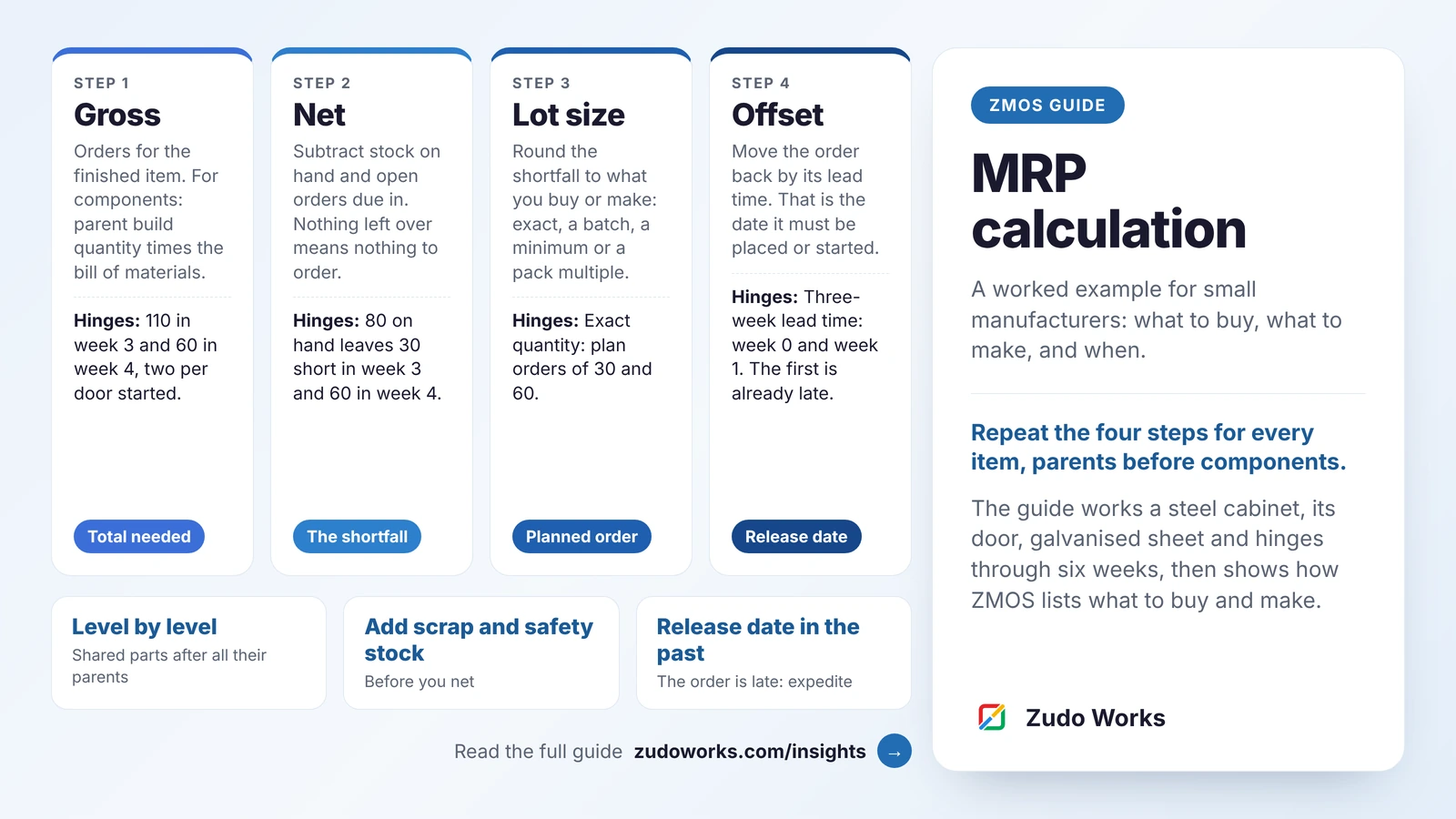
- Gross requirement: what an item is needed for in each period: customer orders or forecast for finished products, and parent build quantities times the bill of materials for components.
- Net requirement: the gross requirement less stock on hand and open orders due in. If the result is zero or less, nothing needs ordering.
- Lot sizing: round each net requirement to the quantity you actually buy or make: exact, a fixed batch, a supplier minimum or a pack multiple.
- Lead time offset: place the order one lead time before the date it is needed. That date is the planned order release.
- Level by level: finish every parent before its components, because the parent’s planned releases become the component’s gross requirements.
- A release date in the past is the most useful thing MRP tells you: that order is already late, so expedite it or move the job that needs it.
What MRP does, in plain words
MRP starts from a simple idea. Stock of a finished product is driven by customers, so you forecast it or take it from orders. Stock of a component is driven by your own production plan, so you can calculate it instead of guessing. The first is called independent demand; the second, dependent demand. Joseph Orlicky, an engineer at IBM, set out the first principles of MRP in 1964 and published the first book on the method in 1975, according to his biography. The arithmetic has not changed since.
Every MRP calculation needs three inputs:
- What is due: confirmed sales orders and any forecast or master production schedule, each with a date and quantity.
- What goes into what: a released bill of materials for every made item, with the quantity per unit and any scrap allowance. If the bill is wrong, every number below it is wrong; our guide to BOM revision control covers keeping it right.
- What you have and what is coming: stock on hand, open purchase orders and open jobs with their due dates, plus each item’s lead time and order rules.
The terms and formulas
An MRP grid has one row per quantity and one column per period, usually a week. The row names below are the standard ones; the University of Texas MRP formulas page uses the same set.
| Row | What it means | How to work it out |
|---|---|---|
| Gross requirements | Total quantity needed in the period, before looking at stock | Orders and forecast (finished items); parent planned releases × quantity per × (1 + scrap %) (components) |
| Scheduled receipts | Orders already placed: open purchase orders and released jobs, by due date | Taken from your open orders; MRP does not create them |
| Projected on hand | Stock expected at the end of the period | Last period’s projected on hand + scheduled receipts + planned receipts − gross requirements |
| Net requirements | The shortfall that existing stock and orders cannot cover | Gross requirements + safety stock − (last period’s projected on hand + scheduled receipts), if above zero |
| Planned order receipts | New orders MRP proposes, arriving in the period they are needed | Net requirement rounded up by the lot-sizing rule |
| Planned order releases | When each proposed order must be placed or started | Planned order receipt moved back by the lead time |
Two more rules make the grid work across a whole product. First, process items in order of their low-level code: the lowest level at which they appear in any bill. An item used both in a finished product and inside a sub-assembly is calculated only after both parents, so all its demand is counted once. MYOB’s Greentree MRP documentation describes exactly this sequence. Second, a component is needed when its parent starts, not when the parent is due, so components follow the parent’s planned releases, not its receipts.
A worked example: six weeks for a steel cabinet
A sheet metal shop makes a wall-mounted steel cabinet, CB-600. Each cabinet uses one door (made in-house), two galvanised sheets for the body and eight bolts. Each door uses one galvanised sheet and two hinges. The galvanised sheet therefore appears at two levels: in the cabinet and inside the door. The numbers are invented for the example; the method is the standard one.
| Item | Make or buy | Used in | On hand | Open orders | Lead time | Order rule |
|---|---|---|---|---|---|---|
| CB-600 cabinet | Make | Sold | 15 | Job for 10, due week 2 | 1 week | Exact quantity |
| DR-600 door | Make | 1 per cabinet | 20 | None | 1 week | Exact quantity |
| Galvanised sheet | Buy | 2 per cabinet, 1 per door | 120 | PO for 100, due week 3 | 2 weeks | Multiples of 50 |
| Hinge | Buy | 2 per door | 80 | None | 3 weeks | Exact quantity |
| M6 bolt | Buy | 8 per cabinet | 2,000 | None | 1 week | Reorder point |
Confirmed orders for the cabinet are 40 in week 3, 60 in week 5 and 30 in week 6. Week 1 is this week. To keep the arithmetic readable there is no scrap and no safety stock; the sections after the example add them.
Level 0: the cabinet
| CB-600 (on hand 15) | Wk 1 | Wk 2 | Wk 3 | Wk 4 | Wk 5 | Wk 6 |
|---|---|---|---|---|---|---|
| Gross requirements | 0 | 0 | 40 | 0 | 60 | 30 |
| Scheduled receipts | 0 | 10 | 0 | 0 | 0 | 0 |
| Projected on hand | 15 | 25 | 0 | 0 | 0 | 0 |
| Net requirements | 0 | 0 | 15 | 0 | 60 | 30 |
| Planned order receipts | 0 | 0 | 15 | 0 | 60 | 30 |
| Planned order releases | 0 | 15 | 0 | 60 | 30 | 0 |
In week 3, the 25 cabinets expected (15 on hand plus the job of 10) cover 25 of the 40 ordered, so the net requirement is 15. With a one-week lead time, jobs must start in weeks 2, 4 and 5.
Level 1: the door
The door’s gross requirements are the cabinet’s planned releases times one: 15 in week 2, 60 in week 4 and 30 in week 5.
| DR-600 (on hand 20) | Wk 1 | Wk 2 | Wk 3 | Wk 4 | Wk 5 | Wk 6 |
|---|---|---|---|---|---|---|
| Gross requirements | 0 | 15 | 0 | 60 | 30 | 0 |
| Projected on hand | 20 | 5 | 5 | 0 | 0 | 0 |
| Net requirements | 0 | 0 | 0 | 55 | 30 | 0 |
| Planned order releases | 0 | 0 | 55 | 30 | 0 | 0 |
Level 2: sheet and hinges
The galvanised sheet has two parents. Its gross requirement each week is two per cabinet started plus one per door started: 30 in week 2, 55 in week 3, 150 in week 4 (120 for cabinets and 30 for doors) and 60 in week 5. Orders go in multiples of 50.
| Galvanised sheet (on hand 120) | Wk 1 | Wk 2 | Wk 3 | Wk 4 | Wk 5 | Wk 6 |
|---|---|---|---|---|---|---|
| Gross requirements | 0 | 30 | 55 | 150 | 60 | 0 |
| Scheduled receipts | 0 | 0 | 100 | 0 | 0 | 0 |
| Projected on hand | 120 | 90 | 135 | 35 | 25 | 25 |
| Net requirements | 0 | 0 | 0 | 15 | 25 | 0 |
| Planned order receipts | 0 | 0 | 0 | 50 | 50 | 0 |
| Planned order releases | 0 | 50 | 50 | 0 | 0 | 0 |
The hinge has one parent, the door: 110 in week 3 and 60 in week 4. With 80 on hand, the net requirement is 30 in week 3 and 60 in week 4. With a three-week lead time, the week 4 order must be placed now, in week 1, and the week 3 order should have been placed last week. The bolts need 840 over the six weeks against 2,000 on hand, so MRP proposes nothing; a reorder point is the better control for a cheap, common part like that.
What the planner does with the result
- Hinges, 30, already late. Ask the supplier for part delivery, find another source, or start the week 3 door job with the 80 hinges in stock and move 15 doors later. This is the message that matters.
- Hinges, 60, order this week.
- Galvanised sheet, 50, order next week, and another 50 the week after. The open order of 100 must arrive in week 3 as promised; if the supplier slips, week 4 runs short.
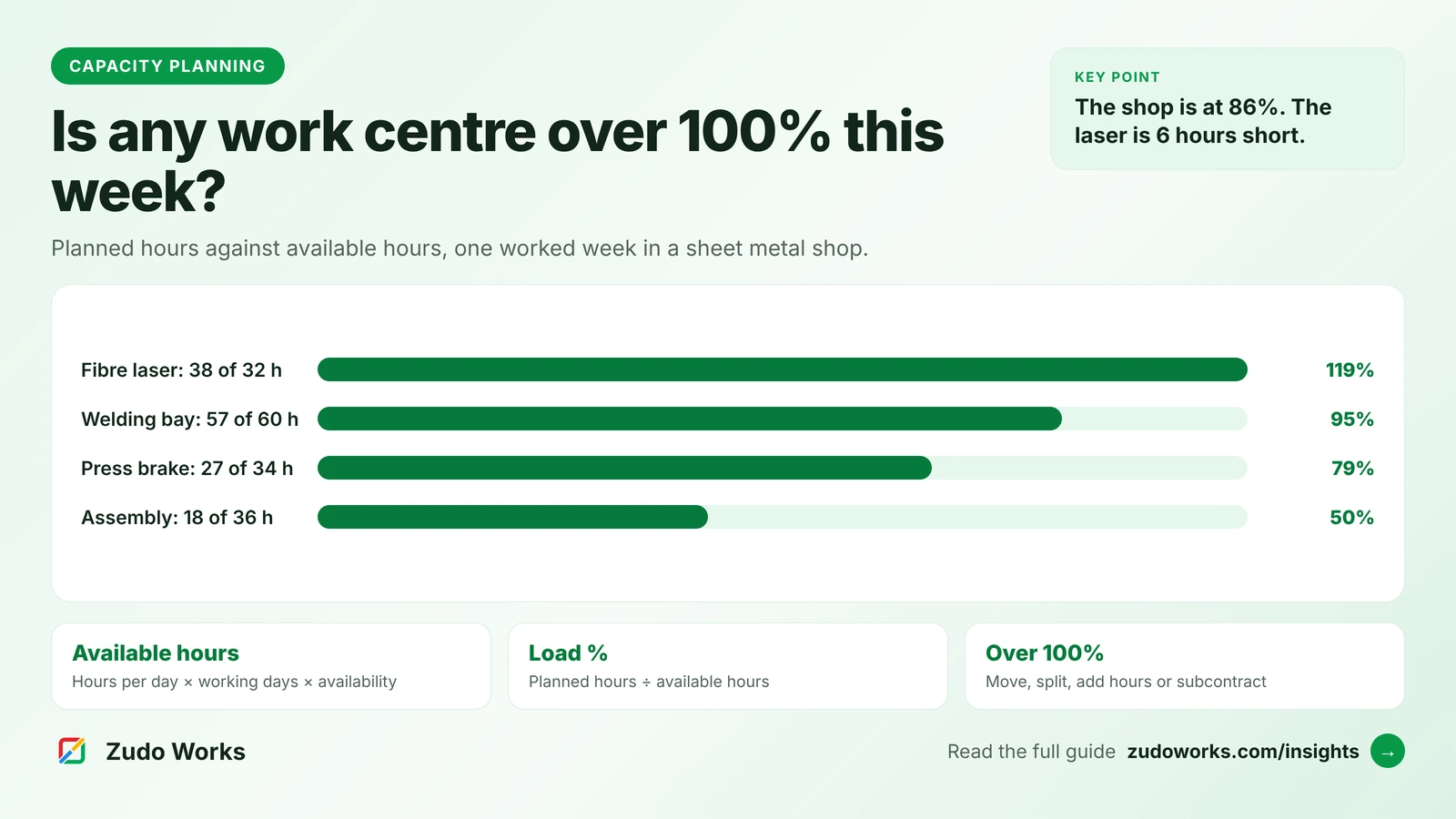
- Cabinet jobs of 15, 60 and 30 start in weeks 2, 4 and 5; door jobs of 55 and 30 start in weeks 3 and 4. Check those hours against each work centre with our capacity planning guide before you promise the dates.
Notice what a simple total would have missed. Over six weeks you need 295 sheets and have 220 on hand or on order, so a total says “order 75”. The time-phased grid says the shortage starts in week 4 and needs an order next week. For the hinges, a total says “order 90”; the grid says 30 of them are already late.
Lot sizing: how much to order each time
The net requirement is what you need; the planned order is what you will actually buy or make. SAP’s net requirements documentation describes the same split: the shortage creates a proposal, and the lot-sizing procedure, scrap and rounding set its quantity.
| Rule | How it works | Fits |
|---|---|---|
| Exact quantity (lot-for-lot) | Order exactly the net requirement for each period | Expensive or custom parts, made-to-order assemblies |
| Fixed order quantity | Always order the same quantity, more than once if needed | Parts made in a set batch, such as a full sheet nest or furnace load |
| Minimum and multiple | Round up to the supplier’s minimum, then to the pack or pallet size | Bought materials, fasteners, packaging |
| Period cover | Order enough for a set number of periods at once, such as two weeks | Steady items where fewer, larger orders save handling |
| Economic order quantity | Balance ordering cost against holding cost with the EOQ formula | Steady, predictable demand; less useful when orders are lumpy |
Rounding up leaves stock behind, as the sheet shows: 25 left at the end of week 6. That stock is not waste; the next period’s calculation uses it first.
Scrap, safety stock and lead times: where plans go wrong
Most bad MRP output comes from the inputs, not the arithmetic.
- Scrap. If 4 per cent of sheets are lost to setup and rejects, the bill should carry a 4 per cent scrap allowance, so each cabinet asks for 2.08 sheets, not 2. Without it you run short on every large order.
- Safety stock. Add it to the gross requirement in the net calculation so the plan never deliberately runs an item to zero. Keep it for items with unreliable supply or demand; on everything else it just ties up cash.
- Lead times. Use the lead time you actually get, door to door, including internal receiving and inspection, not the one in the supplier’s catalogue. For imported material, review it every quarter.
- Stock accuracy. MRP subtracts on-hand stock from every requirement. If the system says 120 sheets and the rack holds 80, the plan is wrong before it starts. Regular cycle counts on planned items are the fix.
- Open orders. A purchase order that will never arrive, or a job that was abandoned but not closed, counts as supply. Close them.
MRP or reorder points?
A reorder point watches the balance of one item and triggers an order when it falls below a level set from usage and lead time. It knows nothing about next month’s orders. MRP looks forward from the orders and the bill of materials. Most small manufacturers need both:
- Use MRP for material specific to your products, anything expensive, anything with a long lead time, and anything whose use jumps with large orders.
- Use reorder points for cheap, common, steadily used items: fasteners, consumables, packaging. Our guide to reorder points and safety stock shows how to set them.
If you are weighing up systems, the difference between MRP and ERP is explained in ERP vs MRP.
Doing MRP in a spreadsheet
The example above is a spreadsheet: one block of six rows per item, one column per week, items in low-level code order, with each component’s gross requirement row pointing at its parents’ planned release rows. It works well for a handful of products and a few dozen components, and it is the best way to learn the method.
It stops working when:
- the bill of materials changes and someone forgets to change the formulas;
- stock and open orders have to be typed in from another system every week;
- more than one person plans, or the file is rebuilt from a copy that was already out of date;
- you have more items than one person can check by eye before ordering.
At that point the calculation belongs in the same system that holds the bills, the stock and the orders, so it reads live data. If you already run on Zoho, our guide to Zoho manufacturing software explains which Zoho app can hold that data. The production planning guide covers the step from spreadsheets to a connected system.
How MRP software does the calculation
The arithmetic is the same everywhere. What differs is how much of the grid the software shows and how far it plans:
- Full time-phased MRP, as described for SAP and for MYOB Greentree above, nets requirements date by date, processes items by low-level code, creates planned orders and tells you which existing orders to bring forward, push back or cancel.
- Lighter MRP tools for small manufacturers show the result rather than the grid. MRPeasy’s Requirements report, for example, lists each purchased item needed for a specific order with the date it is required and an action date worked out from the lead time, and creates purchase orders from those lines. Our comparisons of MRPeasy and Katana cover two such tools.
- Shortage lists net total demand against total supply without dates. They are quick to read and catch most shortages, but they cannot tell you when to order.
How ZMOS works out what to buy and make
ZMOS, the manufacturing operating system we build, has a Procurement page under Purchasing. It is a shortage list of the third kind, calculated live from the workspace each time it opens or you press Recompute. We checked the calculation in the ZMOS code for this guide:
- Demand is the open quantity on confirmed sales orders, exploded one level through each manufactured part’s released bill of materials (including the scrap percentage on each line), plus material still to be issued to released and in-progress jobs.
- Supply is stock on hand across all warehouses plus the quantity still to arrive on purchase orders that have been sent.
- Shortage is demand minus supply, if above zero. The page splits it into What to buy (raw material, purchased parts and consumables) and What to make (manufactured parts short against confirmed orders).
- Generate purchase order drafts one purchase order for a chosen vendor with every shortage, or only the items you pick, priced at the item’s standard cost, or its moving average cost if it has none. A buyer reviews it before it is sent.
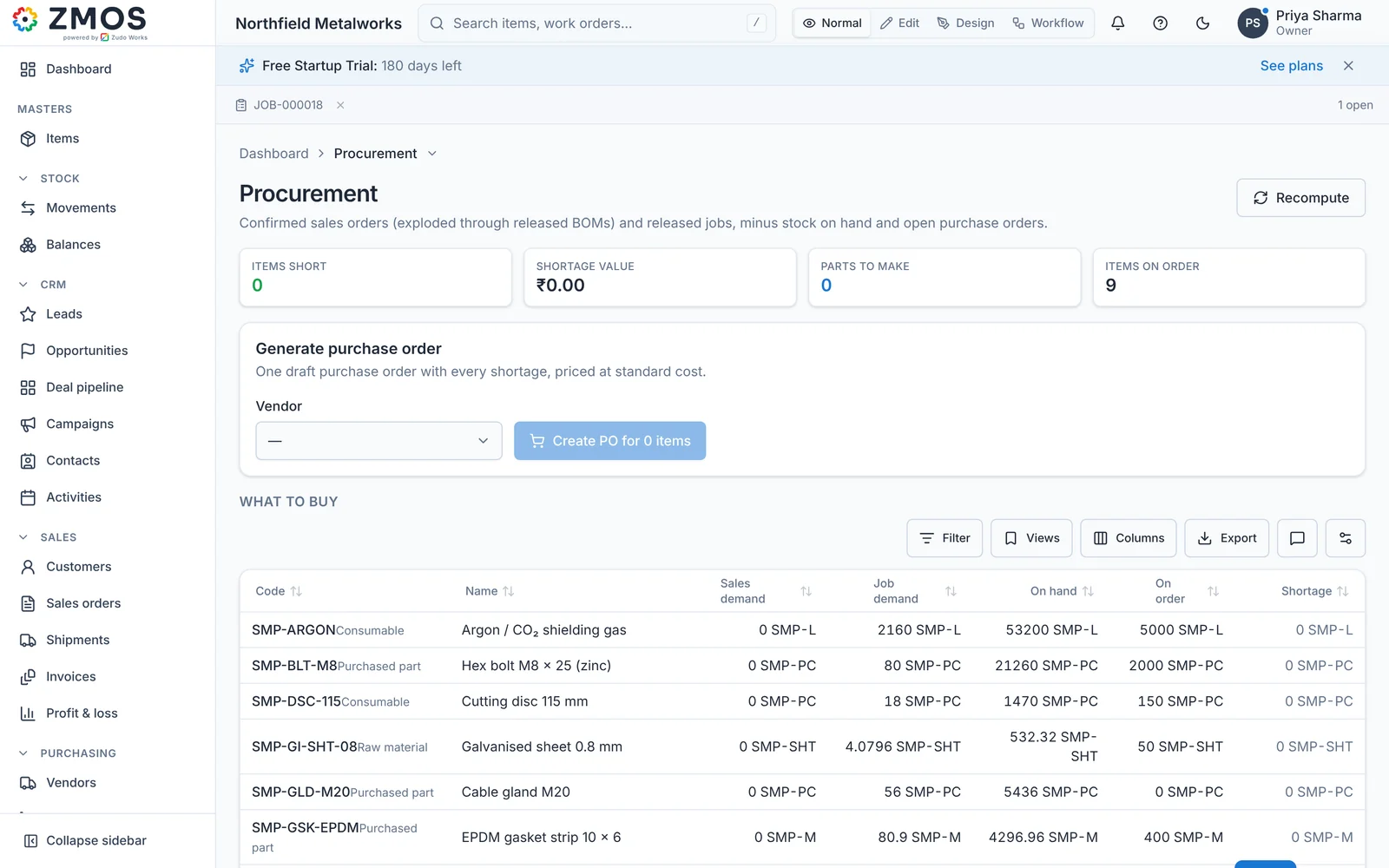
To be clear about what it does not do: ZMOS does not time-phase requirements by week, offset by lead time, apply lot-sizing rules or safety stock, or explode more than one level at a time (a sub-assembly’s own components appear once its job is released). Two practical points follow. Read the Job demand and Sales demand columns before ordering, because a sales order whose job is already released counts its material in both. And for items with long lead times, use the grid method above, or reorder points set from lead time on the purchasing side, so the order goes out in time. If your products have deep bills of materials and lead times of many weeks, a full time-phased MRP system is the better fit.
Bills of materials, jobs, stock and purchasing all live in the same ZMOS workspace, so the list needs no typing in. You can see it with sample data in the free trial.
A checklist before you trust the plan
- Every made item has one released bill of materials, with quantities per unit and realistic scrap allowances.
- Stock balances for planned items were counted or checked in the last month.
- Open purchase orders and jobs have real due dates; dead ones are closed.
- Each bought item has a current, door-to-door lead time and an order rule (exact, minimum and multiple, or fixed).
- Safety stock is set only where supply or demand is unreliable.
- Items are processed parents first; shared components are calculated once, after all their parents.
- Any planned release dated before today is treated as an expedite, not ignored.
- The planned jobs have been checked against work centre capacity before dates are promised.
If you want an MRP calculation built around your own products and data, in Zoho Creator or as a custom system, our custom software team can help.
Frequently asked questions
Frequently asked questions
How do you calculate MRP?
For each item and period, start with the gross requirement: orders for finished items, or parent planned releases times the bill of materials quantity for components. Subtract projected stock on hand and open orders due in. A positive result is the net requirement. Round it by the order rule, then move the order back by the lead time to get its release date.
What is the difference between gross and net requirements in MRP?
The gross requirement is the total quantity needed in a period before looking at stock. The net requirement is what is left after subtracting stock on hand and open orders due in, plus any safety stock. Only net requirements create new planned orders.
What is lead time offsetting in MRP?
Lead time offsetting moves each planned order back from the date the material is needed by the item’s lead time. If hinges are needed in week 4 and take three weeks to arrive, the order must be placed in week 1. A release date in the past means the order is already late.
Can you do MRP in Excel?
Yes, for a small number of products and components. Use one block of rows per item and one column per week, process items parents first, and link each component’s gross requirements to its parents’ planned releases. It becomes hard to keep right when bills change often, several people plan, or stock must be retyped from another system.
What is the difference between MRP and a reorder point?
A reorder point triggers an order when one item’s balance falls below a set level, without looking at future orders. MRP calculates future requirements from orders and bills of materials. Most manufacturers use MRP for product-specific and long lead time material, and reorder points for cheap, common items such as fasteners and consumables.
Does ZMOS have MRP?
ZMOS has a Procurement page that nets confirmed sales orders, exploded one level through released bills of materials, and open job material against stock on hand and open purchase orders. It lists what to buy and what to make and can draft a purchase order. It does not plan by date, lead time or lot size.