
A bill of materials is read by four groups at once. Purchasing buys from it, the store issues from it, the shop floor builds from it and costing prices from it. If someone opens the released list and swaps a hinge, a job released last week no longer matches its own paperwork, and last month’s cost figures change after the fact. Revision control exists to stop that.
This guide is written for shops of roughly 10 to 50 people that keep BOMs in a spreadsheet or a small system and have no engineering change department. The method is general. The section on ZMOS, our own manufacturing system, describes only what is built, and was checked in the product’s code and documentation on 18 November 2026. If the term itself is new, start with what a bill of materials is.
The short answer
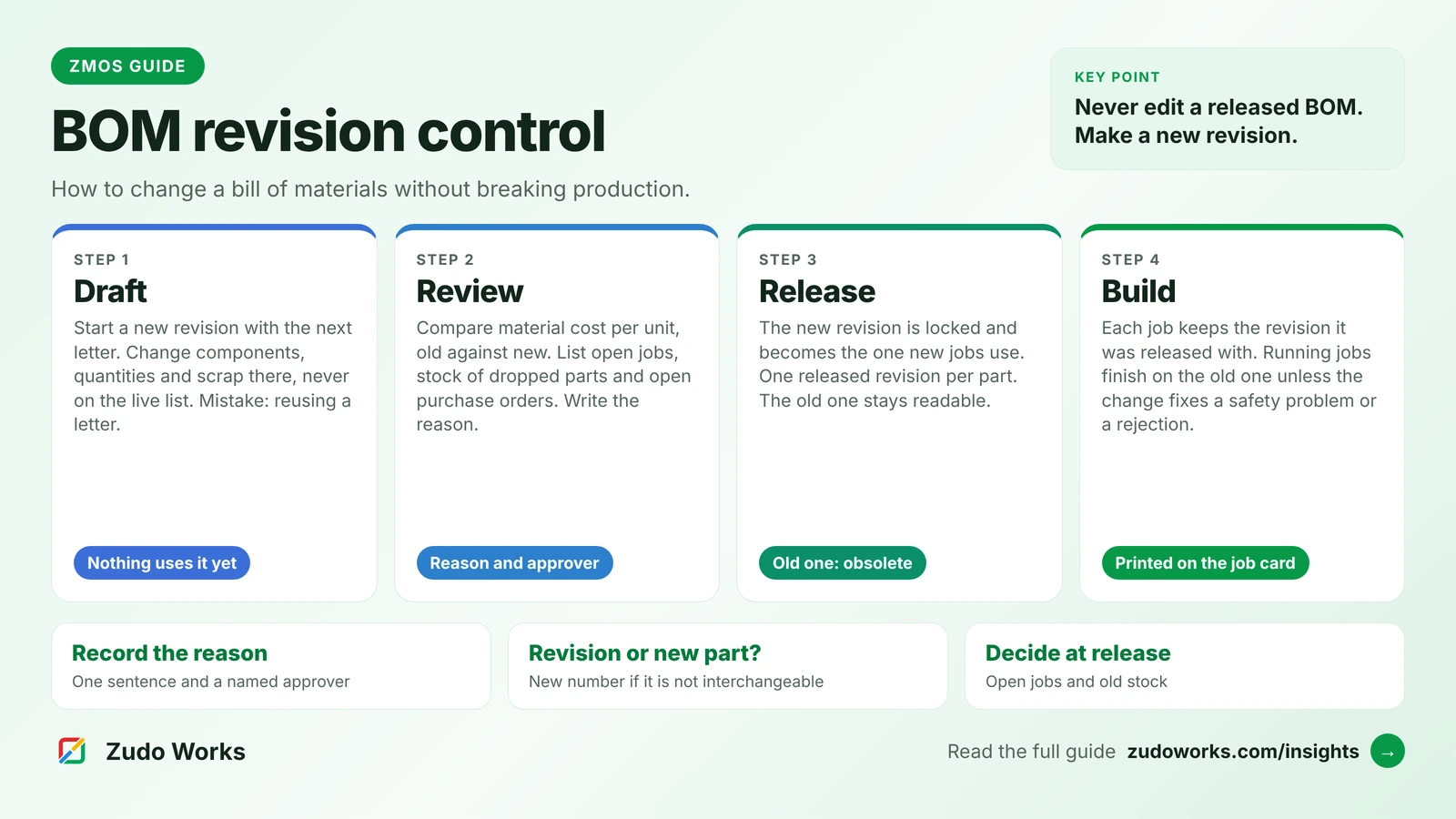
- Never edit a released BOM. Make the change on a new draft revision and leave the old one exactly as it was.
- Give every revision a header. An identifier, a reason in one sentence, who asked, who approved and the date it was released.
- Keep one released revision per part. Releasing a new one makes the previous one obsolete, not deleted.
- Pin the revision to the job. A job keeps the revision it was released with, and the revision is printed on the job card. Our guide to the job traveler covers what else that card should carry.
- Decide open jobs and old stock at release. Finish, stop or reissue; use up, rework, return or scrap. Write the decision down.
- Use a new part number when the part is no longer interchangeable. A revision is for changes that leave form, fit and function intact.
What BOM revision control actually controls
Three things, and a shop needs all three.
The content. Which components, how many per unit and what scrap allowance. A revision freezes these at the moment of release.
The status. Whether a list is still being worked on, is the one production should use, or has been replaced. Without a status, two versions of the same list look equally valid.
The link to work. Which revision each job, purchase and cost figure came from. This is the part a spreadsheet cannot do. A file can hold ten tabs named Rev A to Rev J, but it cannot stop a planner from building against the wrong tab, and it cannot tell you which tab job 418 used.
The same idea sits behind a stock ledger that is never overwritten: history is added to, not rewritten. It is also what makes batch and lot traceability useful. A lot number tells you which material went into a product. The BOM revision tells you what the product was supposed to contain.
Revision or new part number?
The usual test is form, fit and function. Arena, a product lifecycle management vendor, defines the three terms this way: form is the shape, size, dimensions, mass and other visual parameters of a part; fit is its ability to physically connect to or become part of another part; function is the action it is designed to perform. Its guidance is that these rules set how far a revision may differ from the original before a new part number is needed.
In plain terms: if the new part can replace the old one in stock, in a job and in the customer’s product without anyone needing to know which they have, it is a revision. If mixing the two would cause a problem, it is a new part.
| The change | Usually | Why |
|---|---|---|
| Second approved supplier for the same fastener | Revision, or no BOM change at all | Form, fit and function are unchanged |
| Scrap allowance raised from 3 to 5 per cent | Revision | The product is the same; the plan and the cost change |
| Gasket material changed, same dimensions and rating | Revision | Old and new can be mixed |
| Mounting holes moved | New part number | Fit changed; the old part will not go where the new one does |
| Thicker sheet to carry a higher load | New part number | Function changed; a customer could receive the wrong strength |
| Customer issues a new drawing revision | Follow the customer | Their revision letter is the one on the purchase order and the inspection report |
Write your rule down in two lines and apply it the same way every time. The rule matters less than its consistency.
What every revision must record
The lines of the BOM are the easy part. The header is what answers questions a year later, and it is the part most shops leave blank.
| Field | What to write |
|---|---|
| Revision identifier | A, B, C or 01, 02, 03. Pick one scheme and never reuse an identifier. |
| Status | Draft, released or obsolete |
| Reason | One plain sentence: “Hinge supplier discontinued the 120 mm part.” |
| Requested by, approved by | Two names. In a small shop they may be the same person; record both anyway. |
| Released on | The date production may start using it |
| Drawing or specification | The customer or internal drawing number and its own revision |
| Open jobs | Finish on the old revision, or stop and reissue |
| Old stock | Use up, rework, return or scrap, for each dropped component |
If you hold or are working towards ISO 9001, this record is also your evidence. Clause 8.5.6 of ISO 9001:2015, control of changes, asks you to keep documented information on the results of the review of a change, the people who authorised it and any actions that followed. ISO lists a new edition, ISO 9001:2026, as published on 16 September 2026, so check the clause wording in the edition you are certified to.
The three statuses and the one-way rule
A revision moves in one direction only.
- Draft. Anyone with the right to edit BOMs can change it. Nothing in production uses it.
- Released. Locked. This is the list new jobs are planned from. There is one released revision per part at any time.
- Obsolete. Replaced by a newer release. Still readable, because jobs were built to it, but no new job uses it.
Two rules keep this honest. A released revision never goes back to draft: if it is wrong, the fix is the next revision. And an obsolete revision is never deleted, because a job, an invoice or a complaint may still point at it.
Open jobs, stock and purchase orders
Releasing the revision is the easy moment. The work is in everything already in motion. Check each of these before you release, and write the decision on the revision.
| What is open | Default | When to do otherwise |
|---|---|---|
| Jobs planned but not released | Build to the new revision | Rarely; only if the customer ordered the old one by name |
| Jobs released, no material issued | Cancel and raise again on the new revision | Finish on the old one if the change is cosmetic and stock is already kitted |
| Jobs in progress | Finish on the old revision | Stop them if the change fixes a safety problem or a customer rejection |
| Stock of a dropped component | Use up on the last old-revision jobs | Rework, return or scrap if it cannot be used |
| Purchase orders for a dropped component | Ask the supplier to cancel or reduce | Accept delivery if the old revision still has jobs to finish |
| Quotes not yet accepted | Re-cost on the new revision | Hold the price if the cost moved very little |
Tell purchasing and the store on the day of release, not at the next meeting. Most of the waste from a BOM change is material ordered in the week after everyone thought the change was done.
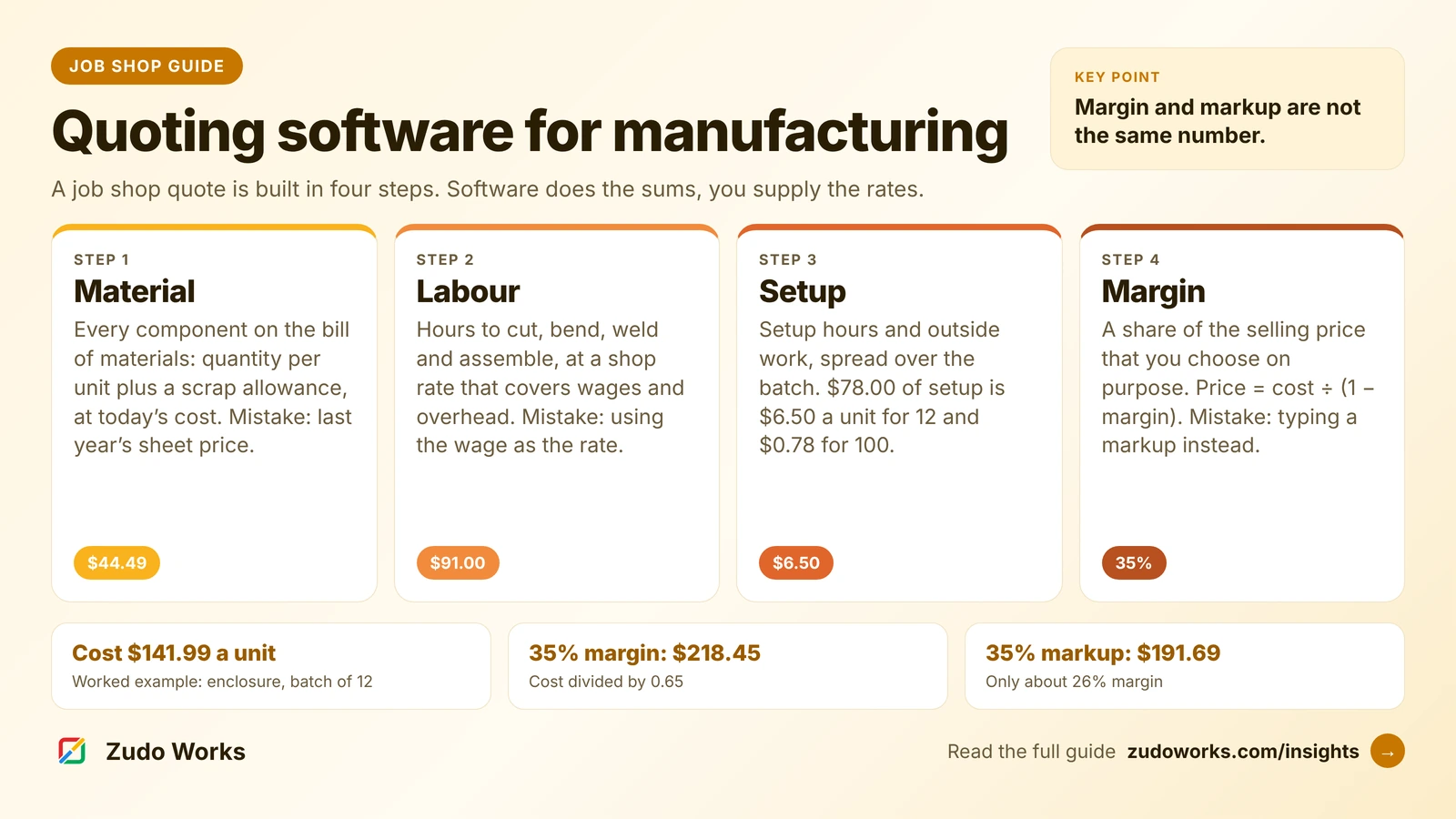
Cost is the other half. A revision usually moves the material cost per unit, so compare old and new before release and tell whoever quotes. Our guide to quoting software for manufacturing covers how the BOM cost reaches a quote.
When a component changes, does the parent change too?
If your products have sub-assemblies, a change low in the structure raises a question at every level above it. Arena’s two rules for rolling a revision are a sound starting point. If the change to the component is minor, do not release a new revision of the parent. If it is major, decide whether it is also a major change to the parent, and revise the parent only as far as that is true. Apply the same test at each level up.
The practical effect is that most changes stop one or two levels up. Revising every parent for every change buries the revisions that matter under ones that do not.
How BOM revisions work in ZMOS
ZMOS is our system for sheet-metal, machining and fabrication shops of 10 to 50 people. Its bills of materials are single-level, one per manufactured part, and each BOM record is one revision. Here is the process as built.
- Create the new revision as a draft. Under Production, open Bills of materials and start a new BOM. Choose the manufactured part and type the revision, for example C. ZMOS refuses a revision label that already exists for that part.
- Enter the lines. Each line has a component, a quantity per finished unit, a scrap percentage and a note. A component cannot be the part itself and cannot appear twice.
- Write the reason in Notes. The header has one Notes field. Use it for the reason, who asked and the decision on open jobs and old stock.
- Check the cost. The editor shows the cost of each line and the material cost per unit at current item costs. Compare it with the released revision before going further.
- Save draft, or release. A draft can be edited as often as needed. Release asks you to confirm, with the reminder that a released BOM cannot be edited and changes need a new revision. A BOM with no lines cannot be released.
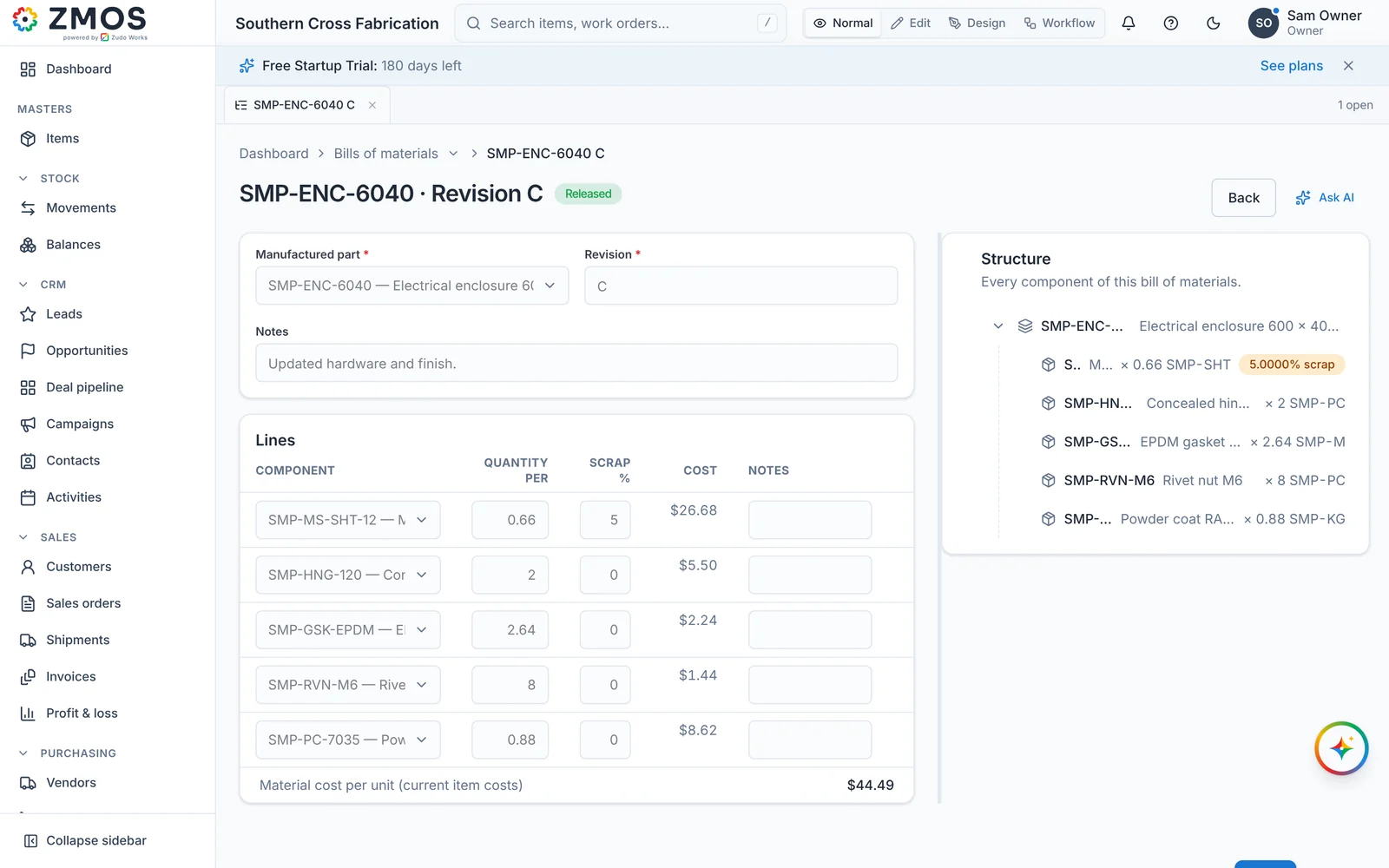
What release does. The draft becomes Released, and the revision that was released before it becomes Obsolete in the same step, so a part never has two released revisions. The release is written to the audit log with the part, the revision and the person who released it. The BOM list shows counts of released, draft and obsolete BOMs, and each row carries its status.
What a job keeps. When a job is released, ZMOS takes the revision that is released at that moment, records it on the job and copies the material requirement onto the job. Releasing revision D next week does not touch a job released on C. The revision appears on the job page and in the jobs list, and it is printed on the job card, so an operator can check it against the drawing. A job for a part with no released BOM cannot be released at all.
Moving an open job to the new revision. A job that is still a draft picks up the new revision when you release it. A released job with no material issued can be cancelled and raised again, and the new job takes the new revision. Once material has been issued the job cannot be cancelled, so it finishes on the revision it started with. That matches the default in the table above.
Who can do it. Reading BOMs and writing them are separate permissions, so you can let the whole shop see the lists while two or three people can draft and release.
What ZMOS does not do
ZMOS keeps revisions simple on purpose, and some shops need more.
- No effective dates. A release takes effect at once. You cannot release today for use from the first of next month.
- No approval chain. There is no engineering change order record and no multi-step sign-off. The control is the write permission, the Notes field and the audit log entry.
- No copy button. A new revision is entered as a new BOM, so a long list is typed again or created through the API.
- No multi-level BOMs in this release, so there is no rolling of revisions up a structure.
- No CAD or PLM link. Drawings are not managed in ZMOS.
- No automatic change to open jobs. You decide, job by job.
If your products are engineered to order with deep structures and customer-approved changes, a PLM system or a larger ERP is the right tool, and our machine shop ERP comparison lists some. If you run Zoho and want revision control built around your own approval steps, that is custom work we do in Zoho Creator; we build on Zoho, so read that with our interest in mind.
Spreadsheet, shop system or PLM
| Need | Spreadsheet | Shop system with revisions | PLM |
|---|---|---|---|
| Keep old revisions | By hand, as tabs or files | Yes | Yes |
| Stop edits after release | No | Yes | Yes |
| Job tied to its revision | No | Yes | Through the ERP it feeds |
| Approval routing | Varies; often simple | Yes | |
| Drawings and CAD | Separate folders | Usually attachments only | Yes |
| Suits | A handful of stable products | Small and mid-sized shops | Engineered, regulated or complex products |
The step that pays back first is the middle column: the moment a job is tied to a locked revision, the common errors stop. Where a system like this sits beside ERP and MES is covered in our guide to the manufacturing operating system.
Checklist: before you release a revision
- Revision or new part? Old and new can be mixed in stock without harm.
- Reason written. One sentence that will make sense in two years.
- Drawing matched. The BOM revision and the drawing revision agree.
- Cost compared. Material cost per unit, old against new, and sales told if it moved.
- Open jobs listed. Each one marked finish, stop or reissue.
- Old stock decided. Use up, rework, return or scrap, with a quantity.
- Purchasing told. Open orders for dropped components cancelled or reduced.
- Approved by a named person. Not “engineering”.
- Job cards reprinted for any job moved to the new revision.
Common mistakes
- Editing the live list “just this once”. It is always the edit nobody remembers.
- A revision with no reason. A new letter tells you something changed, not what or why.
- Reusing identifiers. A second “Rev B” destroys the point of the first.
- Revising for everything. A second supplier for the same bolt does not need a new product revision.
- Forgetting the shop floor. A released revision with an old job card on the bench is still the old revision.
- Deleting obsolete revisions to tidy up. They are the record of what you shipped.
What to take from this
Revision control is a small discipline with a large effect: lock what is released, make every change a new revision with a reason, and tie each job to the revision it was built to. A spreadsheet can hold the lists, but only a system can hold the lock and the link.
The shorter version of this method is in our answer on how to manage BOM revisions. To try the process on your own parts, ZMOS has a free trial for startups and registered partners on the pricing page.
Frequently asked questions
Frequently asked questions
What is BOM revision control?
It is the practice of never editing a released bill of materials. Every change is made on a new revision with its own identifier, reason and approver. The old revision is kept, marked obsolete, and each job records the revision it was built to.
What is the difference between a BOM revision and a BOM version?
Many shops use the two words for the same thing, and where they are separated the meaning differs from one company and one software product to the next. What matters is the control: a released state that is locked and a record of each change. Choose one meaning, write it down and use it consistently.
When should a change get a new part number instead of a new revision?
When the changed part is no longer interchangeable with the old one. The usual test is form, fit and function: if old and new stock can be mixed without affecting the job or the customer, use a revision. If mixing them would cause a problem, issue a new part number.
What happens to open work orders when a BOM revision changes?
By default, jobs already in progress finish on the revision they started with, and jobs not yet released use the new one. Stop and reissue a running job only when the change fixes a safety problem or a customer rejection. Record the decision on the revision.
Can I manage BOM revisions in Excel?
You can keep the lists in Excel, one tab or file per revision, with a change log. What Excel cannot do is stop someone editing a released list, or record which revision a job used. Those two controls are the reason to move to a system.
Does ZMOS have BOM revision control?
Yes, in a simple form. Each BOM is a revision with a status of draft, released or obsolete. A released BOM cannot be edited, releasing a new revision makes the previous one obsolete, and each job keeps the revision it was released with. ZMOS has no effective dates, approval chains or multi-level BOMs.