In short
Production planning in a small factory means deciding, in order, what must be made and by when, what material must arrive first, whether each work centre has the hours, and which jobs to release today. Build it on clean items, accurate bills of materials, routings with real times and stock posted as it moves, then add a release check and a short daily planning rhythm.
Every small factory has a production plan. In some it lives in a spreadsheet, in some on a whiteboard by the press brake, and in many it lives in one person’s head. The plan is rarely the problem. The problem is that it is made from numbers nobody trusts, released before anyone checks the material, and rewritten every morning because the week did not go the way it was planned.
This guide is for owners, works managers and operations leads in factories of roughly 10 to 250 people who want a plan that survives contact with Monday morning. It covers what production planning actually involves, the data it depends on, how to check load against capacity, how to stop jobs starting without material, a weekly rhythm a small team can keep, and how to choose software when the time comes. There is a calculator you can use as you read, and an eight-week rollout at the end.
What production planning really means in a small factory
In a large plant, planning is a department with its own systems and its own meetings. In a small one it is usually a part of somebody’s job: the owner on a Sunday evening, the works manager before the first shift, or the office manager who “owns the spreadsheet”. That is not a weakness. A small team can plan faster and change course more quickly than any large planning office, as long as the plan is built in the right order.
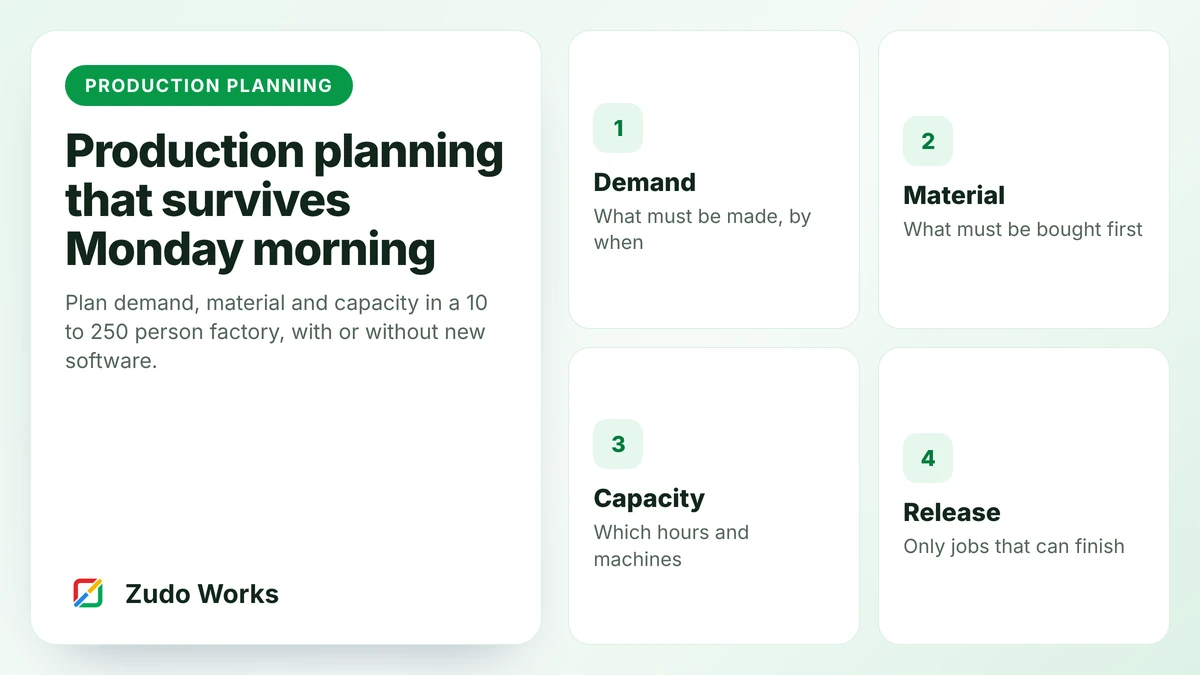
There are four decisions in every production plan, and they have to be made in sequence:
- Demand: what has to be made, how many and by when, from confirmed sales orders, forecasts and the stock you want to hold.
- Material: what has to be bought or made first, worked out from the bill of materials, current stock and what is already on order.
- Capacity: whether the people and machines have the hours, worked out from the routing and the real hours available at each work centre.
- Release: which jobs actually go to the floor today, in what order, and which wait.
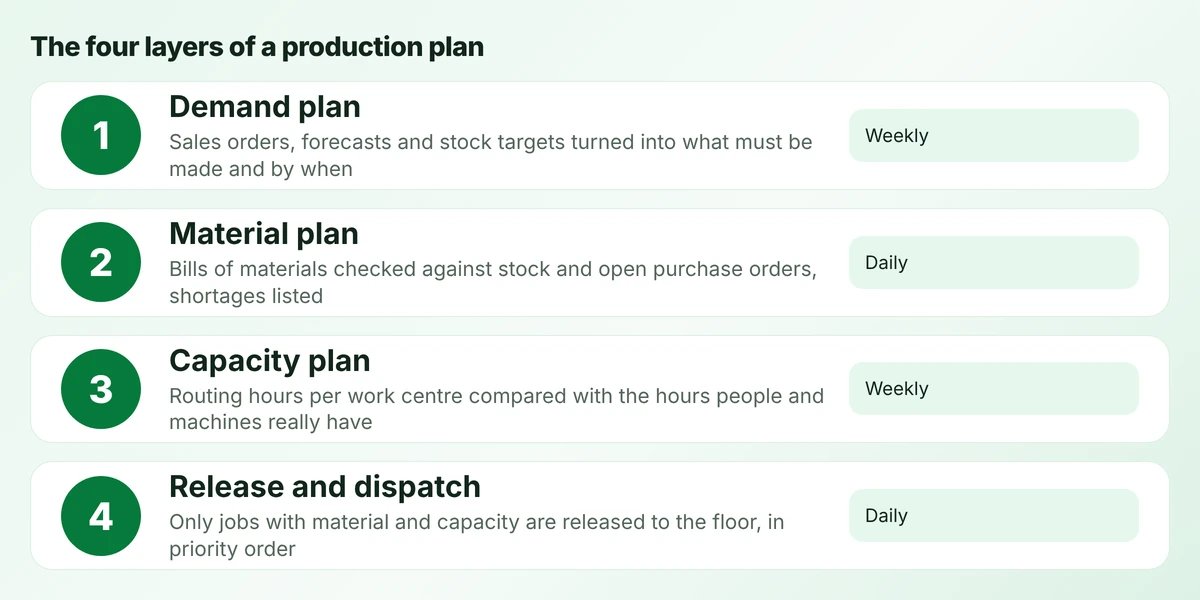
Most small factories plan the first layer carefully, guess the third, skip the second, and leave the fourth to whoever is standing nearest the job cards. The result is familiar: jobs start, stop for a missing part, and block a machine that another job needed. The rest of this guide takes each layer in turn.
The data a plan depends on
A plan is a calculation, and a calculation is only as good as its inputs. Before you think about scheduling screens, check the foundations. In our experience of setting up planning in small manufacturers, the plan almost always fails on one of the first five items below, not on the software.
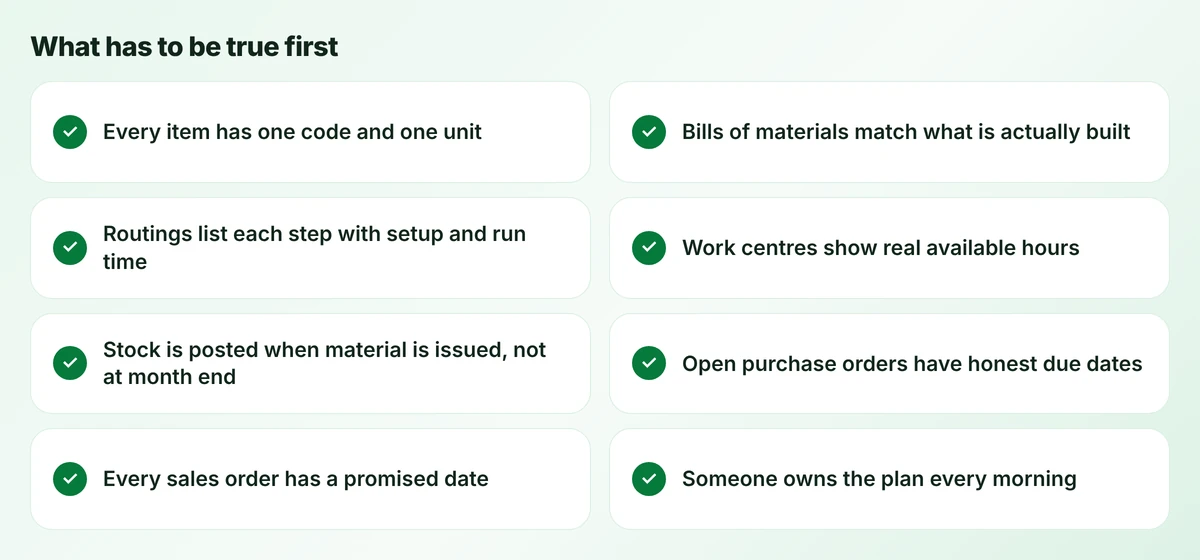
Items and units. Every material and part needs one code and one unit of measure, with a clear conversion where you buy in one unit and use in another. Sheet bought by the sheet and used by the kilogram, or cable bought by the drum and used by the metre, is where many stock errors start. If two people call the same part by different names, the plan will count it twice or not at all.
Bills of materials. A bill of materials (BOM) lists what goes into one unit of a product. It has to match what the floor actually builds, including the fasteners, consumables and packaging people tend to forget. When the drawing changes, the BOM must change with it, which is why revisions matter. If the BOM is wrong, the material plan is wrong before it starts.
Routings. A routing lists the steps a product goes through: cut, bend, weld, coat, assemble, inspect, pack. For planning, each step needs a work centre, a setup time and a run time per unit. These do not need to be perfect. An honest estimate that is checked against reality every few weeks is far more useful than a precise number nobody believes.
Work centres and hours. A work centre is any place work queues: a machine, a group of similar machines, a bench or a team. Each one needs its real available hours, not the hours on the shift pattern. Breaks, changeovers, maintenance, absence and the time the operator spends looking for material all come out of the week.
Stock posted at the moment it moves. If material is issued to jobs without being recorded, or recorded at the end of the week, the stock figure the plan reads is fiction. This single habit decides whether a material check before release is worth doing.
The last three foundations are about behaviour rather than data: purchase orders with honest due dates, a promised date on every sales order, and one named person who owns the plan each morning. None of them needs software. All of them need agreement.
Layer one: turning orders into a demand plan
The demand plan answers one question: what must be finished, and by when? For a make-to-order shop, that is mainly confirmed sales orders and their promised dates. For a make-to-stock business, it is forecasts and stock targets for each finished item. Most small manufacturers are a mix of the two, with a few repeat products held in stock and a long tail of one-off or customer-specific work.
Three practical rules keep the demand plan honest. First, plan from the promised date, not the date the customer asked for, and record both so you can see the gap. Second, work backwards from that date through the routing so each job has a planned start date, not just an end date. Third, keep a short, visible list of orders that are not yet confirmed but likely, so purchasing can see what may be coming without buying for it yet.
A demand plan does not need to look far ahead in a small shop. For most make-to-order businesses, two to four weeks of firm orders plus a rough view of the month after is enough to plan material and capacity. Looking further ahead mainly helps with long-lead materials and with hiring decisions.
Layer two: material planning and the release check
Material planning works out what has to be bought or made before each job can start. In formal terms this is material requirements planning (MRP): take the demand, explode it through the bills of materials, subtract stock on hand and open purchase orders, and the remainder is what you need to order, with dates.
A full MRP run is useful once you have reliable BOMs and stock. Long before that point, there is a simpler habit that removes most of the pain: a release check. Before any job goes to the floor, someone checks that every material on its bill is either in stock or due in before the step that needs it. If not, the job waits, is split, uses an approved substitute, or the purchase is expedited. What it does not do is start and then stop.
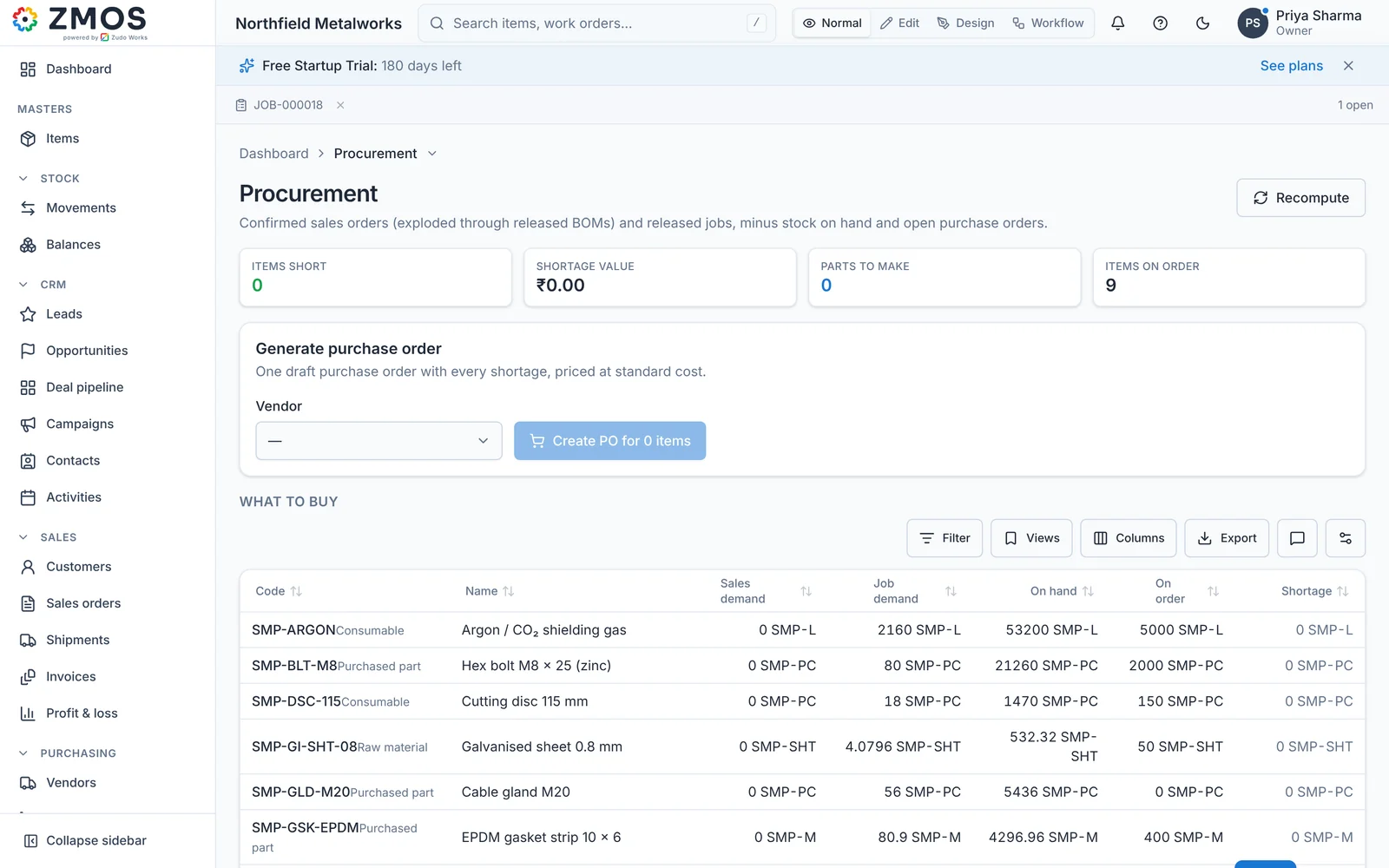
The release check matters because a job that starts without its material does more damage than a job that waits. It takes up a machine, it creates work in progress that has to be stored and tracked, and it hides the real shortage until the moment it is most expensive to fix. Shops that introduce a strict release check often find their output rises before anything else changes, simply because machines stop being blocked by half-finished work.
A rule that works
No job goes to the floor until its material is in the building or confirmed before the step that needs it. A job that waits costs less than a job that starts and stops.
Once the release check is in place, reorder points cover the materials you use every week. Reorder point = average daily usage × supplier lead time in days + safety stock. Our guide to purchasing and reorder points covers how to set and review them.
Layer three: load versus capacity
Capacity planning asks whether the work you have released, and plan to release, fits into the hours you really have. The useful measure is load: the hours of work planned at a work centre divided by the hours it is actually available, as a percentage.
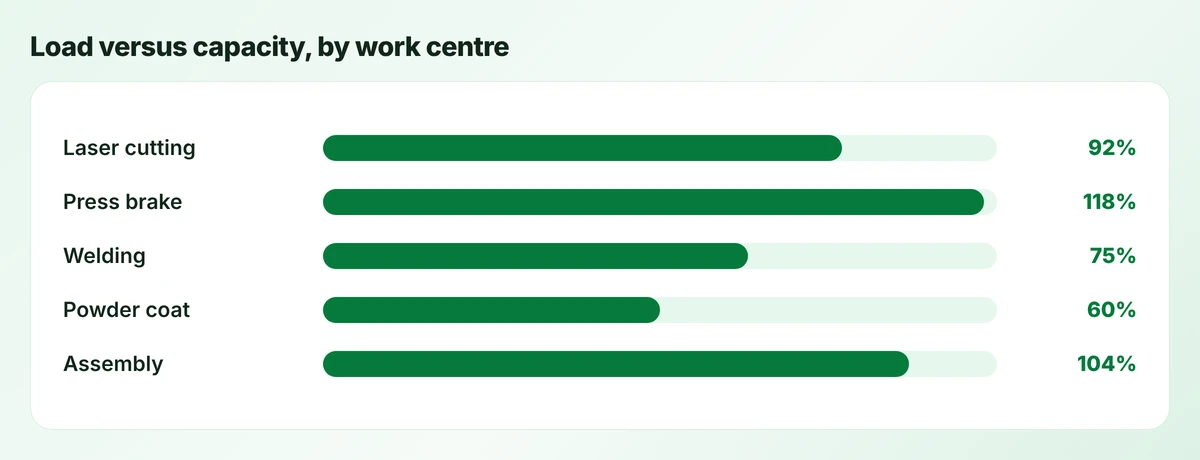
The chart above uses example figures for a fabrication shop. The total week looks fine, but two work centres are over 100% while the coating line has spare hours. This is the normal pattern in small factories: the bottleneck moves with the product mix. Planning the whole factory as one block of hours hides it. Planning by work centre shows exactly where the week will break.
When a work centre is overloaded you have five honest options: move work to an alternative machine, add hours with overtime or an extra shift, subcontract a step, split a job so the urgent part goes first, or move a promise date and tell the customer early. The wrong option is to release everything and let the floor sort it out, because the floor will sort it out by whoever shouts loudest.
Use the calculator below for one work centre. Enter a typical week, then change the availability figure. Many owners are surprised by how much of the shift is lost to setups, breaks and searching, and how quickly a work centre tips over 100% when it is not counted.
Work centre load calculator
Enter one work centre's numbers for the coming week. Everything is calculated in your browser.
Formula: load = jobs × (setup + units × run time) ÷ 60, divided by shift hours × days × availability. Above 100% the week will not fit; below about 70% the work centre is waiting for work.
As a rule of thumb, a work centre that runs consistently above 90% has no room for a rush order or a breakdown, and lead times will grow. One that sits below about 70% is usually waiting for work from somewhere else, which tells you where the real constraint is.
Layer four: releasing and sequencing jobs
Release is the moment a job becomes real on the shop floor. A good release rule is short enough to remember: only release a job that has its material and fits into the coming week’s capacity, in order of promised date, with exceptions agreed out loud.
Within a released set of jobs, sequencing decides the order at each machine. For most small shops, simple rules beat clever ones. Earliest promised date first is the default. Grouping jobs that share a setup, such as the same sheet thickness on the laser or the same colour on the coating line, saves hours but must not push an urgent job past its date. Write the rule down so the operator is not left to choose.
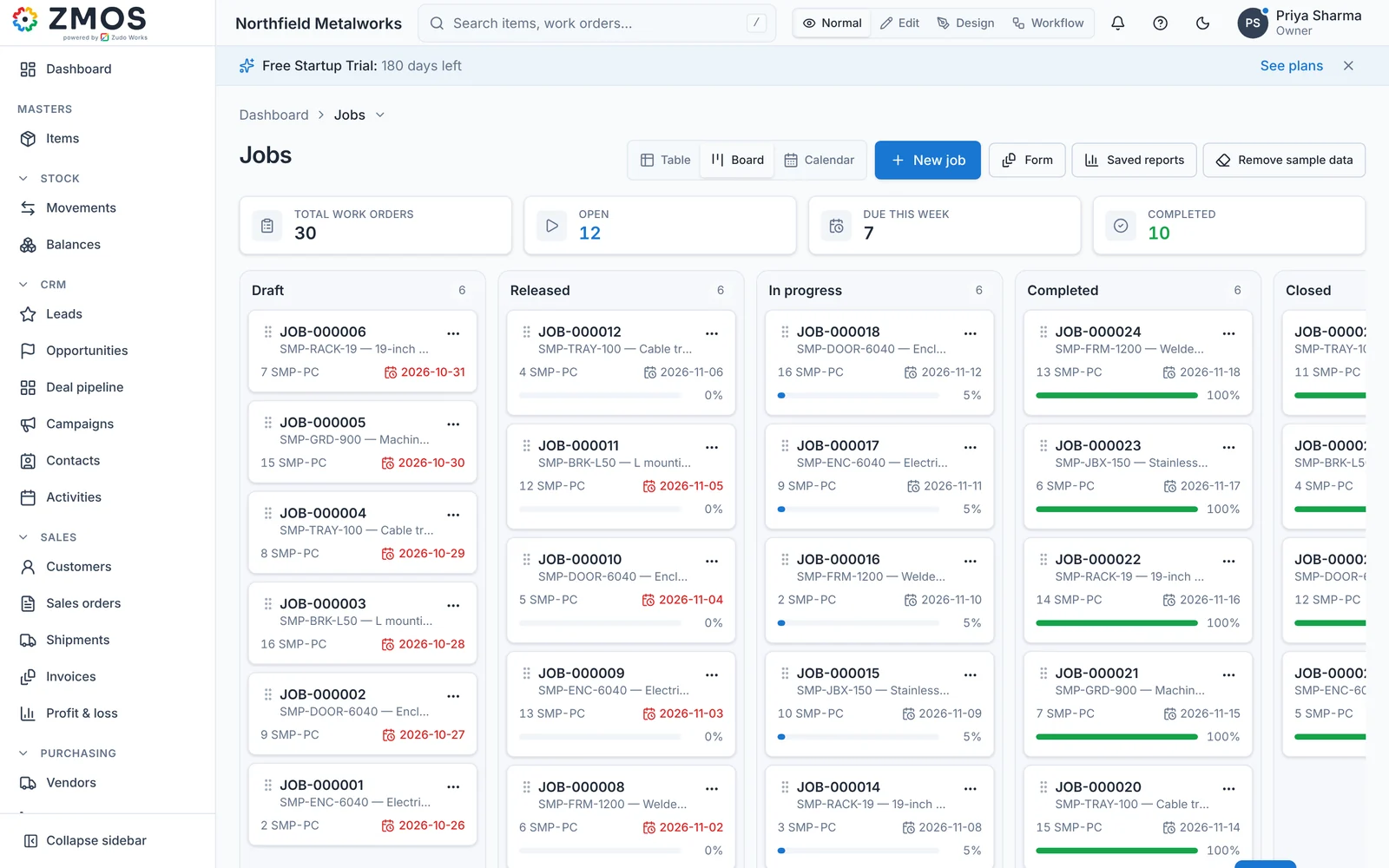
The visual tool that makes release work is a board with jobs in columns by status, from draft to released, in progress and done, with late jobs marked. It can be a whiteboard with magnets or a screen. What matters is that the jobs waiting for material and the jobs at risk of missing their date are reviewed every morning.
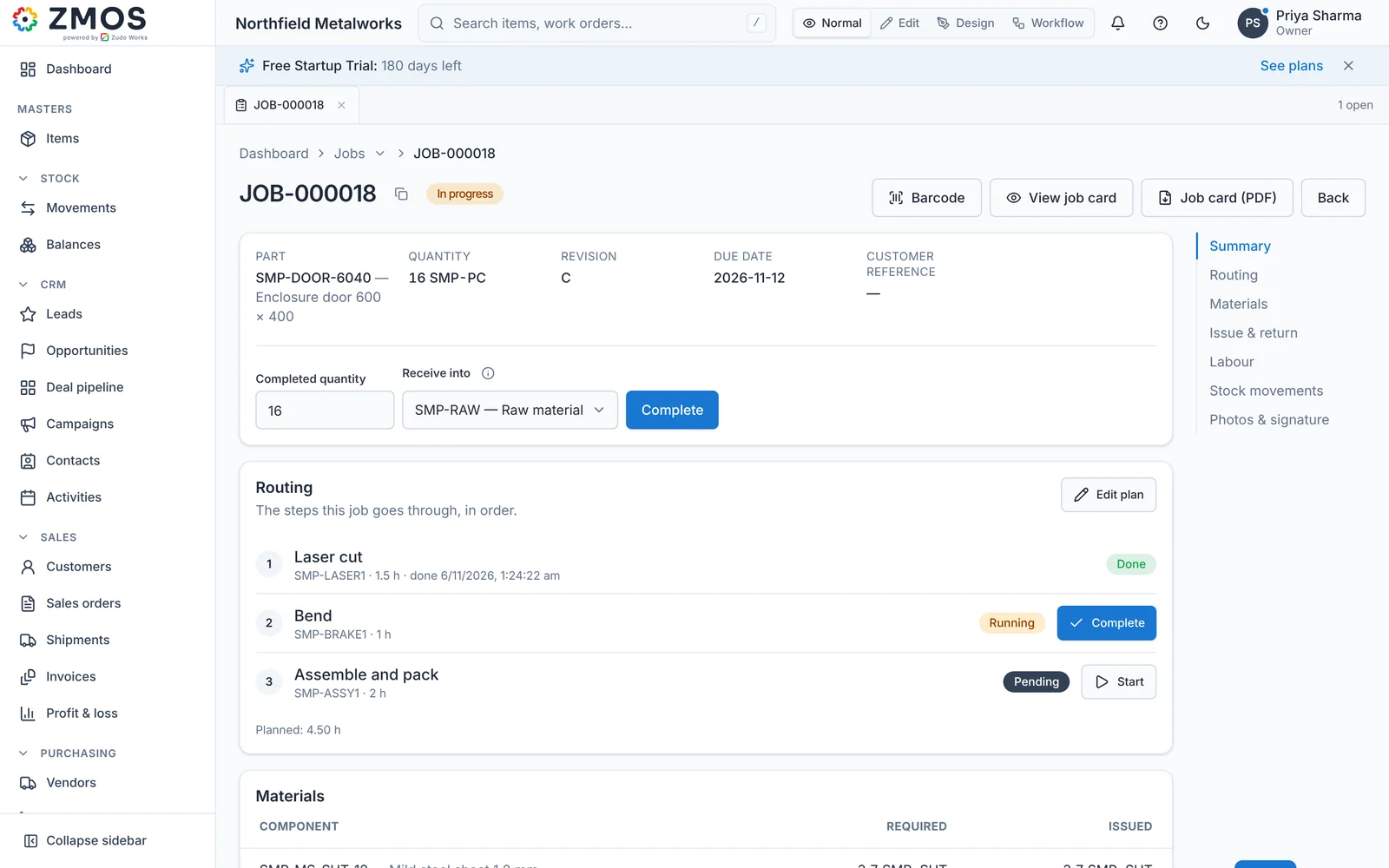
Once a job is released, each routing step should be started and completed where the work happens, by tablet or barcode job card. That turns the plan into a live record: the supervisor sees which step every job is on, and the planned hours can be checked against what really happened.
A planning rhythm a small team can keep
Planning is a habit, not a document. The most effective small factories we work with run a short, fixed rhythm that everyone knows:
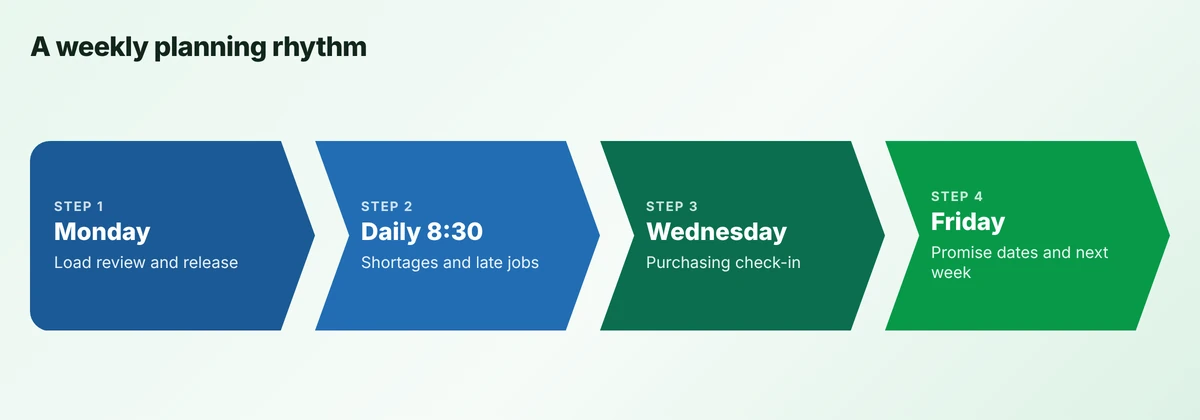
- Monday, 30 minutes: review the load per work centre for the week, agree which jobs to release, and decide what to do about any overloaded work centre.
- Every morning, 15 minutes, standing: shortages, late jobs and anything on hold. Who is doing what about each, by when.
- Wednesday: purchasing check-in on everything due in the next ten days, so shortages are seen before they stop a job.
- Friday: promise dates for new orders, based on the load for the next two weeks, and the first draft of next week’s release list.
The rhythm only works if the information is ready before the meeting. That is where a system earns its keep: not by producing a plan on its own, but by having the shortage list, the load and the late jobs ready at 8:30 every morning without anyone building them by hand.
When a spreadsheet is enough, and when it is not
A spreadsheet plan is a perfectly good tool while one person holds the whole picture, jobs are few and often repeated, and stock can be seen on the shelf. Many shops of under ten people run well this way for years.
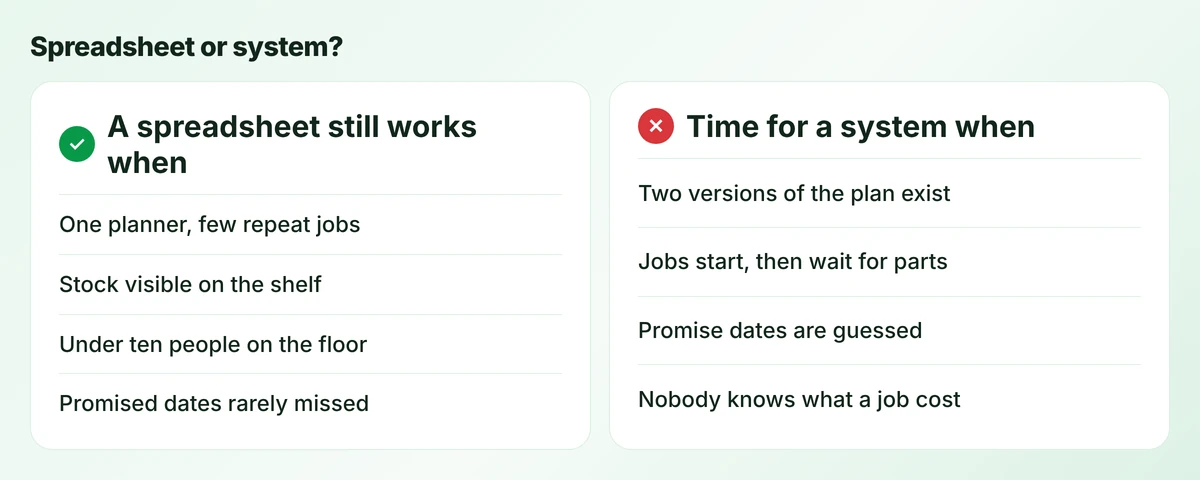
The signs it has stopped working are practical. Two people keep different versions of the plan. Jobs start and then wait for parts. Promise dates are guessed rather than checked against the load. Nobody can say what a finished job really cost. When two or more of these happen every week, the hours spent keeping the spreadsheet right are already costing more than a planning system would.
There is also a quieter sign: the plan only works when one particular person is in the building. If the business cannot plan when that person is on holiday, the plan is in their head, not in a system, and that is a risk worth fixing whatever the cost.
How to choose production planning software
Buy for the problem you have now, not for every problem a large plant might have. For most small factories, the features that pay back first are the plain ones:
- Work orders created from sales orders, with the bill of materials and routing attached.
- A material check against live stock and open purchase orders before a job is released.
- Load per work centre for the next one to two weeks.
- Progress recorded on the floor by tablet or barcode job card, so status is not chased by walking around.
- A list of jobs late against their promised date, every morning.
Drag-and-drop finite capacity scheduling and automatic optimisation across every job are real tools, but they suit plants with many machines, long routings and a planner whose full-time job is the schedule. For a 20-person job shop they usually add work rather than remove it.
Before you buy
If items, bills of materials and stock are not right yet, new planning software will plan the wrong numbers faster. Fix the data first; it is the part no system does for you.
In every demo, ask the vendor to plan one of your real jobs with your bill of materials and routing, not their sample data. Then ask how the plan changes when a machine is down for a day, how a rush order is inserted, how the floor records progress without a desk login, and what happens to stock when material is issued. Check the data underneath as hard as the planning screen. Systems you will meet include MRPeasy, Katana, Odoo Manufacturing, ERPNext, Zoho-based builds and ZMOS, each with a different balance of planning depth, price and ease of setup. Compare them on your own job, not on a feature list.
Where AI helps in production planning, and where it does not
AI assistants are now built into many business systems, and planning is an obvious place to try them. They help most with the questions planners already ask every day: which jobs are at risk this week, what is short for tomorrow’s releases, which work centre is overloaded, what a job is likely to cost at current material prices. Answering those in plain language from your own data saves time and makes the morning meeting faster.
They help least where the underlying data is wrong. An assistant that reads an inaccurate stock figure will give a confident, wrong answer. The safe pattern is the one we use in Zudo AI inside ZMOS: the assistant reads only the data the person is allowed to see, calculates and forecasts, and proposes changes, but every change is a proposal a person approves. Planning decisions stay with people; the AI removes the hunting for numbers.
Where ZMOS fits
ZMOS, our manufacturing operating system for small factories, covers the foundation a production plan depends on: work orders with routing steps and work centres, bills of materials with revisions, a live stock ledger with reorder points, purchase orders and receipts that post stock, barcode job cards so the floor records each step, and job costing when a job closes. Zudo AI answers planning questions from your workspace data and proposes changes for a person to approve. That gives a small shop accurate material and job status to plan from, every morning, without building it by hand.
ZMOS is not a finite capacity scheduler with automatic optimisation. A plant that needs minute-by-minute sequencing across dozens of machines should pair a dedicated scheduling tool with its ERP. For most shops of 10 to 50 people, getting the release check, the load view and the daily rhythm right delivers more than any optimiser. Startups and registered partners get six months free; see ZMOS pricing.
An eight-week rollout
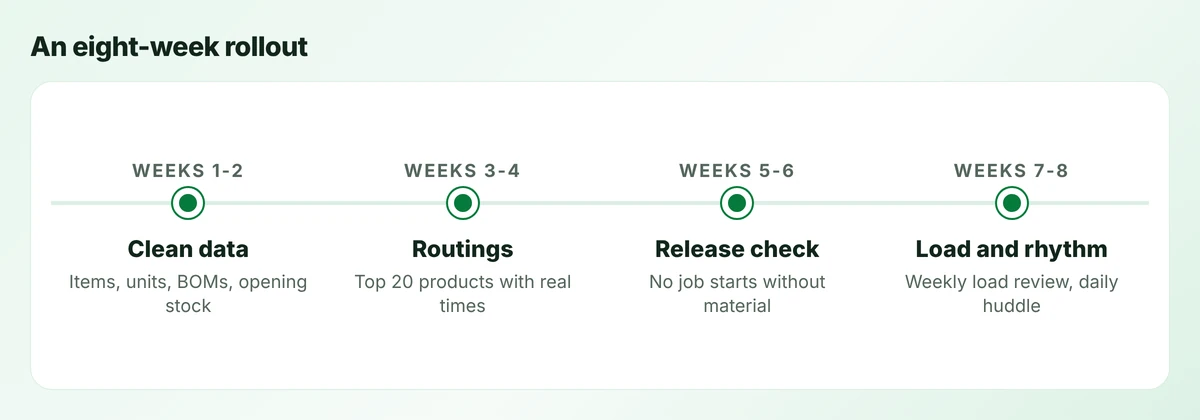
- Weeks 1 and 2, clean the data: one item list with units and conversions, bills of materials for your main products, and an opening stock count you trust.
- Weeks 3 and 4, write routings: start with the 20 products that make up most of your hours. Setup and run times can be estimates; check them against two weeks of real jobs.
- Weeks 5 and 6, introduce the release check: no job goes to the floor without its material confirmed. Expect some friction, then fewer stopped jobs.
- Weeks 7 and 8, add the load view and rhythm: weekly load per work centre, the Monday release meeting and the 15-minute morning huddle.
The date that matters
Agree at the start the date on which the old planning spreadsheet becomes read-only. Without that date, both run side by side for months and the new method gets the blame for the extra work.
After eight weeks, measure three things against the month before you started: the share of jobs finished by their promised date, the number of jobs that stopped for material, and how long the morning planning takes. Those three numbers tell you whether the plan is working far better than any report.
Frequently asked questions
Planning decides what to make, how many and by when, and what material and capacity that needs. Scheduling decides the exact order and timing of jobs on each machine. Small shops need solid planning first; detailed scheduling becomes worthwhile as machines and jobs multiply.
Not always. Planning needs live stock, bills of materials, routings and orders in one place. Some shops get that from an ERP, others from a manufacturing system plus accounting software. What matters is that material issues and job progress are recorded when they happen.
Add up the planned hours for the week: for each job, setup time plus units multiplied by run time per unit. Divide that by the hours the work centre is really available after breaks, maintenance and losses. Above 100 percent, the week will not fit.
A check, before a job goes to the floor, that every material on its bill of materials is in stock or due before the step that needs it. Jobs that fail the check wait, are split or have their purchase expedited, instead of starting and stopping.
For a 10 to 50 person shop, plan about eight weeks. Most of the time goes into cleaning items, writing routings with real times and getting stock right, not into configuring software.
AI assistants help by answering planning questions from your own data, such as which jobs are at risk or what is short tomorrow, and by proposing changes. They depend on accurate stock and routings, and decisions should stay with a person who approves each change.
Sources
Product capabilities change. We checked these pages in October 2026; confirm anything you plan around.
Related services: BOM and production in ZMOS · Barcode job cards · Zoho implementation for manufacturers