Comparisons
Zoho CRM vs Salesforce for Small and Mid-Size Businesses: Cost, Fit and the 2026 Changes
Salesforce is the CRM most companies measure against, and Zoho CRM is the one many of them end up choosing on cost. Both are capable. The real differences sit in how each is sold, what the lower editions leave out, and how much administration each one needs. Salesforce also changed its editions in September 2026, which most comparisons have not caught up with.

Quick answer
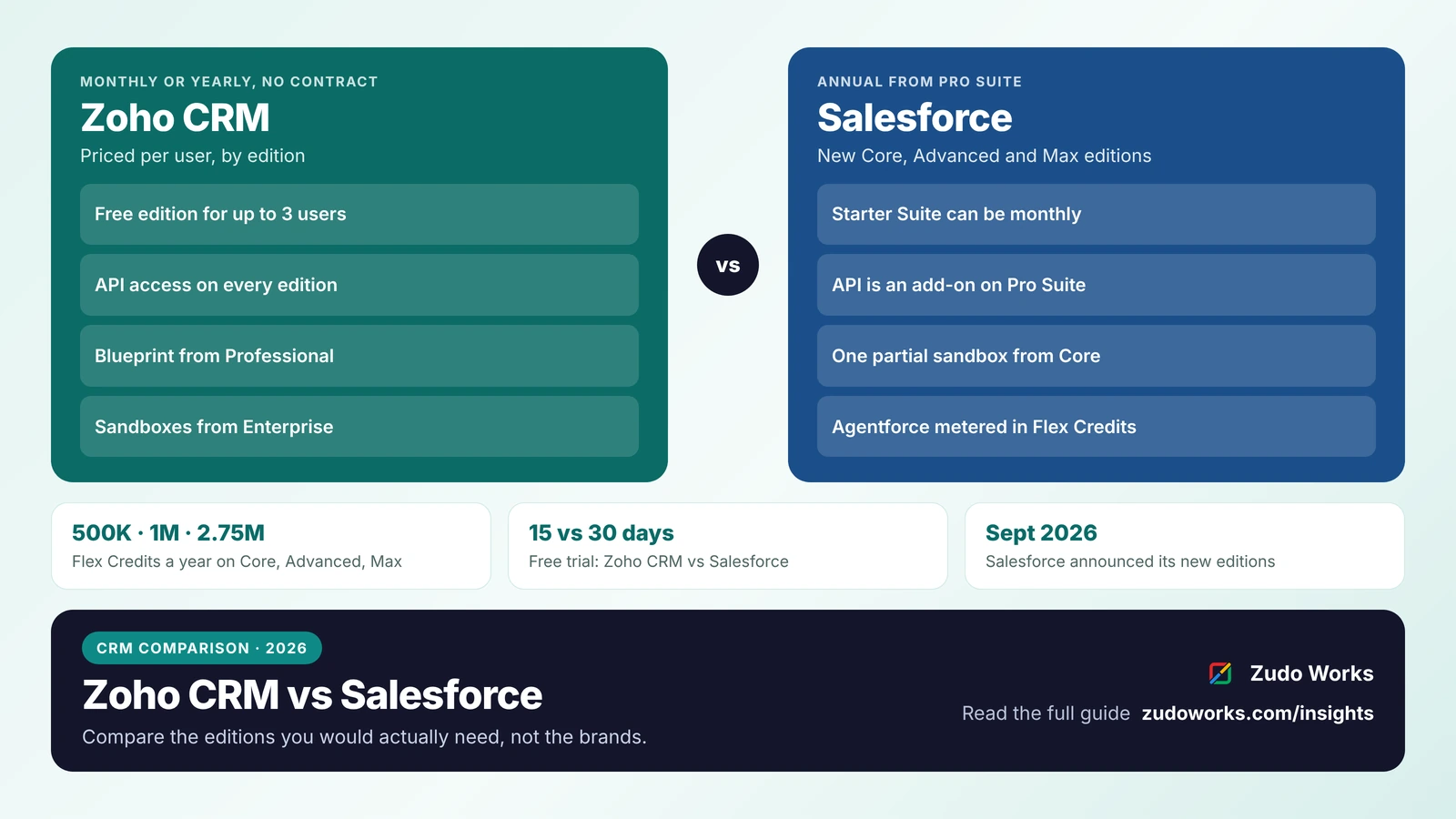
Choose Zoho CRM if you want monthly or yearly billing without a contract, processes, custom modules and API access at mid-level editions, and links to other Zoho apps. Choose Salesforce if you need its large app marketplace and admin talent pool, or your group has standardised on it. Compare the editions you would actually need: Salesforce adds API access from Core, and sandboxes start at Zoho CRM Enterprise.
Most “Zoho CRM vs Salesforce” articles compare feature lists, and on a feature list the two look close. What decides the choice for a small or mid-size business is different: which edition you actually need, how you are billed for it, which tools cost extra, and who will look after the system once it is live.
Every plan and feature below was checked on Zoho’s and Salesforce’s own pages on 16 October 2026. We do not quote prices, because both vendors change them and show different figures by country. Use the official Zoho CRM pricing and Salesforce Sales Cloud pricing pages for current figures.
The short answer
- Choose Zoho CRM if you want to pay monthly or yearly without a contract, need workflows, Blueprint processes and custom modules at a mid-level edition, and want the CRM to sit next to Zoho Books, Zoho Inventory or other Zoho apps.
- Choose Salesforce if you need its very large app marketplace and partner ecosystem, plan to hire administrators who already know it, or your group company has standardised on it.
- Look hard at the edition, not the brand. On Salesforce, API access and sandboxes depend on the edition. On Zoho CRM, Blueprint starts at Professional and sandboxes at Enterprise.
Zoho CRM and Salesforce at a glance
| Area | Zoho CRM | Salesforce Sales Cloud |
|---|---|---|
| Editions | Free, Standard, Professional, Enterprise, Ultimate | Free Suite, Starter Suite, Pro Suite, Core, Advanced, Max |
| Free option | Free edition for up to 3 users | Free Suite for very small teams |
| Billing | Monthly or yearly; Zoho states there are no contracts | Starter monthly or annual; Pro Suite and above annual |
| Free trial | 15 days | 30 days |
| API access | All editions, with a daily credit allowance | Paid add-on on Pro Suite; included from Core |
| Sandboxes | From Enterprise (5) and Ultimate (10) | Bought separately on Pro Suite; one partial sandbox included from Core |
| Process enforcement | Blueprint from Professional | Flow, Salesforce’s automation tool |
| AI | AI agents from Professional; Zia insights from Enterprise | Agentforce, with Flex Credits included from Core |
Salesforce’s new editions in 2026
In September 2026 Salesforce announced three new editions for Agentforce Sales, Service and Industry: Core, Advanced and Max. Salesforce positions them against its older Enterprise, Unlimited and Agentforce 1 editions, and says every tier includes Agentforce AI features, Slack, embedded analytics and a Premier Success plan.
The detail that matters for budgeting is the AI allowance. Each edition includes Flex Credits, the units Salesforce uses to meter AI usage: 500,000 a year on Core, 1 million on Advanced and 2.75 million on Max, per org. On Salesforce’s pricing page, Agentforce for Sales can be bought on Core and Advanced and is included in Max.
Two points for existing customers: Salesforce says pricing on legacy editions is unchanged for current customers, and Agentforce 1 customers can move to Max at no extra cost. The Starter and Pro Suites, aimed at small businesses, still appear on the pricing page alongside the new editions.
Most comparisons ranking today still describe Essentials, Professional, Enterprise and Unlimited. If a quote or article uses those names, check it against the current pricing page.
How you pay: contracts, add-ons and what is included
The licence price per user is only part of the cost. Three things change the total more than most buyers expect.
Contract length
Zoho CRM is billed monthly or yearly, and Zoho’s pricing page says customers are not bound by contracts or commitments. Salesforce’s FAQ says most of its products use annual contracts; on its Sales Cloud pricing page, the Starter Suite can be billed monthly or annually, while Pro Suite, Core, Advanced and Max are annual.
For a company that is still growing or still testing its sales process, being able to reduce licences without waiting for a renewal date has real value.
API access
Integrations with your website, accounting or ERP need API access. Zoho CRM includes it in every edition: the Free edition gets 5,000 API calls a day, and paid editions get a daily credit pool of 50,000 plus an amount per user that rises with the edition. On Salesforce’s pricing page, the Web Services API is a paid add-on on Pro Suite and is included from Core.
Sandboxes
A sandbox lets you test changes without touching live data. Zoho CRM includes sandboxes from Enterprise, with five on Enterprise and ten on Ultimate. Salesforce includes one partial sandbox per org on Core, Advanced and Max, and offers a sandbox as a purchase on Pro Suite.
If your project needs integrations and a test environment, compare Zoho CRM Enterprise with Salesforce Core, not the lowest editions of each. Our Zoho CRM implementation cost guide shows how setup hours add to the licence cost.
Customization and day-to-day administration
Both products let you add fields, modules or objects, page layouts, automation and code. The difference is how much of that a business owner or operations manager can do without a specialist.
- Zoho CRM gives custom modules from Standard (10, rising to 25 on Professional and 200 on Enterprise), Canvas for redesigning record pages without code, and Blueprint to enforce a sales or approval process from Professional. Deeper logic is written in Deluge, Zoho’s scripting language, which runs inside the CRM.
- Salesforce uses Flow for automation and Apex for code, with the AppExchange marketplace for add-ons. Its platform is very deep, and there is a large market of certified Salesforce administrators and developers.
In practice, a Salesforce org of any size usually has a named administrator, in-house or outsourced. A Zoho CRM account for a small business is often run by someone in operations, with a developer for scripts and integrations. Budget for whichever model fits your team, because an unmaintained CRM of either brand slowly fills with stale automations and duplicate data.
AI agents and how they are paid for
Both vendors now sell AI that can act, not just suggest, and both meter it differently from user licences.
- Zoho: Zoho CRM’s pricing page lists building and deploying AI agents from Professional, and Zia’s insights, predictions and recommendations from Enterprise. Zia Agents itself is free to build and deploy; you pay for model usage, either with your own key for OpenAI, Gemini or Claude or through a prepaid wallet. In late September 2026 Zoho added Zoho Key Service to Zoho CRM, which lets Professional, Enterprise and Ultimate customers in supported data centres switch on OpenAI models, with Anthropic rolling out in phases, using credits included with the edition instead of their own API keys.
- Salesforce: Agentforce usage is metered in Flex Credits. Core, Advanced and Max include an annual allowance, and more can be bought.
Whichever you choose, AI agents work on the same records and permissions as your team, so clean data matters more than the model. Our guide to AI agents in Zoho CRM covers what to let AI do and what to keep under rules. Zoho CRM also publishes ready-made MCP servers, so assistants such as Claude can work with CRM data directly.
Connecting the rest of the business
A CRM rarely stands alone. Quotes become orders, orders become invoices, and in a manufacturing business they become production jobs.
Zoho’s strength is that the other systems are in the same family. Zoho CRM connects to Zoho Books, Zoho Inventory, Zoho Desk and Zoho Creator with built-in integrations, and all of them are in the Zoho One bundle. For Indian manufacturers, Zoho ERP adds bills of materials, manufacturing orders and job cards, sold separately from Zoho One; our guide to Zoho for manufacturing explains the options.
Salesforce’s strength is reach. Its marketplace and integration partners cover almost any system you might already run, including large ERPs. If your accounting and operations are already on a non-Zoho ERP, that ecosystem can outweigh the convenience of a single vendor.
Data residency for Indian businesses
Zoho runs an India data centre, with Mumbai as primary and Chennai as secondary, and an account’s data centre is set by the country chosen at sign-up. Salesforce lists India among its Hyperforce public cloud regions, and notes that data stays in-country only for services offered in that region. If residency is a requirement for you, ask Salesforce to confirm in writing which of the products you are buying run in its India region.
Moving from Salesforce to Zoho CRM
Zoho CRM has a built-in Salesforce migration tool under Setup > Data Administration > Import. It takes your Salesforce export files, maps standard objects such as leads, accounts, contacts and opportunities, and can map custom objects to new Zoho modules. Formula and auto-number fields are not created during migration, and a migration can be undone from the import history. Zoho also offers free migration assistance on request.
Automations, reports and integrations do not move across; they have to be rebuilt. Our migration plan for HubSpot and Salesforce covers the order of work, and our Zoho CRM vs HubSpot comparison is useful if HubSpot is also on your list.
How to choose
- List your must-haves: integrations, a test environment, approval processes, AI features. Find the lowest edition of each product that has all of them.
- Price that edition for three years, including add-ons such as API access, sandboxes and AI credits, and the contract terms.
- Decide who will run it: an in-house administrator, a partner, or someone in operations with developer support.
- Check where your other systems live. If finance, inventory or production are on Zoho, Zoho CRM saves integration work. If they are on another platform, compare the effort of connecting each CRM to it.
- Run a trial on real work. Load a sample of your own data and run one sales process end to end in both.
If you decide on Zoho CRM, our Zoho CRM implementation page explains how we scope and deliver a setup.
Frequently asked questions
Usually, edition for edition, but compare the editions you would actually need. On Salesforce, API access is an add-on on Pro Suite and sandboxes are included from Core; on Zoho CRM, sandboxes start at Enterprise. Price the full set of features, add-ons and contract terms for each, using the official pricing pages.
They are editions Salesforce announced in September 2026 for Agentforce Sales, Service and Industry. Each includes Agentforce AI features, Slack and a Premier Success plan, with 500,000, 1 million or 2.75 million Flex Credits a year for AI usage. Salesforce says existing customers keep their current pricing on legacy editions.
No. Zoho CRM can be billed monthly or yearly, and Zoho's pricing page says customers are not bound by contracts or commitments. Most Salesforce products use annual contracts; on Sales Cloud, only the Starter Suite can be billed monthly.
Yes. Zoho CRM has a Salesforce import tool under Setup, Data Administration, Import, which maps standard objects and can map custom objects to new modules. Automations, reports and integrations must be rebuilt, and Zoho offers free migration assistance on request.
It depends on where operations run. If finance, inventory or production are on Zoho, including Zoho ERP in India, Zoho CRM connects to them natively. If you already run a large non-Zoho ERP, Salesforce's integration ecosystem may matter more. Map the quote-to-order-to-invoice flow before choosing.
Related services: Zoho CRM implementation · Zoho integrations · Pricing · Zoho development